


 Video Converter Ultimate
 Grabador de pantalla
 Reparación de vídeo
 Descarga segura
Grandes maneras de usar las herramientas definitivas para convertir XviD a 3GP
¿No puedes reproducir tu archivo .xvid en tu teléfono móvil? Entonces, quizá no sea compatible con tu dispositivo. Para reproducir tu vídeo en el teléfono, debes convertir tu archivo XviD a 3GP. Cuando se trata de teléfonos móviles, el formato más popular que puedes usar para reproducir vídeos es el formato 3GP. Esta publicación te dará información sobre las mejores maneras de convertir XviD a 3GP de forma rápida y sencilla utilizando las herramientas definitivas que puedes usar en Windows, Mac y en línea. Vamos a leer y aprender todo lo que podamos.

Parte 1: la mejor manera de convertir XviD a 3GP
La mejor manera de convertir XviD a 3GP es usando Video Converter Ultimate. Es uno de los excelentes conversores que puedes descargar en tus ordenadores Windows y Mac. Si tienes esta aplicación, ya no tendrás que preocuparte por convertir muchos archivos, porque Video Converter Ultimate puede convertir más de 1000 formatos, incluidos FLV, MKV, DIVX, XviD, 3GP, M4V, MTS, SWF, MP4 y muchos más. Además, tiene una velocidad de conversión 30 veces más rápida que otros conversores, lo cual es muy útil para los usuarios. También puedes convertir varios archivos de una sola vez porque ofrece un proceso de conversión por lotes, así que no necesitas convertir cada archivo manualmente. Asimismo, si quieres girar tu vídeo XviD, puedes usar esta herramienta porque ofrece una función de Rotador de vídeo. Con la ayuda de este rotador, puedes girar tu vídeo fácilmente. Además, también puedes recortar tu vídeo a la duración perfecta usando la herramienta Recortador de vídeo. Con estas funciones, se puede decir que Video Converter Ultimate es la herramienta definitiva para convertir y editar tus vídeos.
Funciones
◆ Convierta formatos de video como XviD, 3GP, MP4, M4V, DIVX, FLV, AVI, SWF y más de 100.
◆ Tiene la capacidad de crear un video musical.
◆ Puede ayudar a crear un collage.
◆ Tiene excelentes herramientas de edición como mejoradores de video, corrección de color, recortador y más.
◆ Ajuste el controlador de velocidad de video.
◆ Puede cambiar el tamaño de archivo del archivo usando el compresor.
Pros
- Puede convertir archivos de video 30 veces más rápido que otros convertidores.
- Apto para usuarios no profesionales y tiene una interfaz sencilla.
- Puede convertir el formato de imagen entre JPG, PNG, WEBP, BMP y TIFF.
- Puede convertir varios archivos a la vez.
Contras
- Obtenga la versión paga para disfrutar de las excelentes funciones.
Convirtamos su archivo XviD a 3GP utilizando los métodos útiles a continuación.
Paso 1: Debes descargar Video Converter Ultimate en tu Windows o Mac haciendo clic en el botón Descargar de abajo. Instala la aplicación y ejecútala.
Descarga gratuitaPara Windows 7 o posteriorDescarga segura
Descarga gratuitaPara macOS 10.7 o posteriorDescarga segura
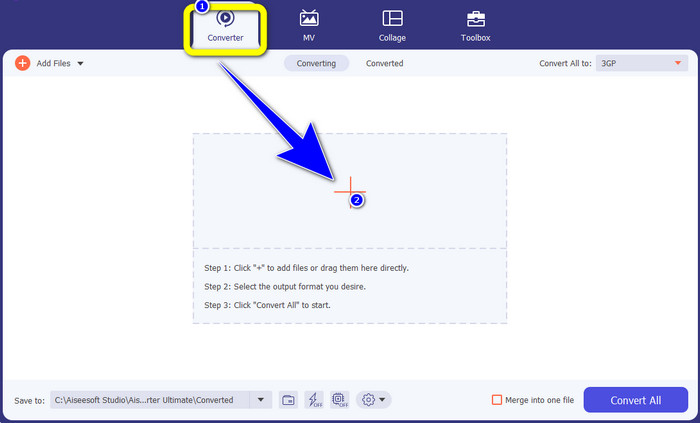
Paso 2: Hay cuatro opciones en la parte superior de la interfaz: Converter, MV, Collage y Toolbox. Selecciona el panel Converter y haz clic en el icono Más para añadir el archivo XviD que quieres convertir.
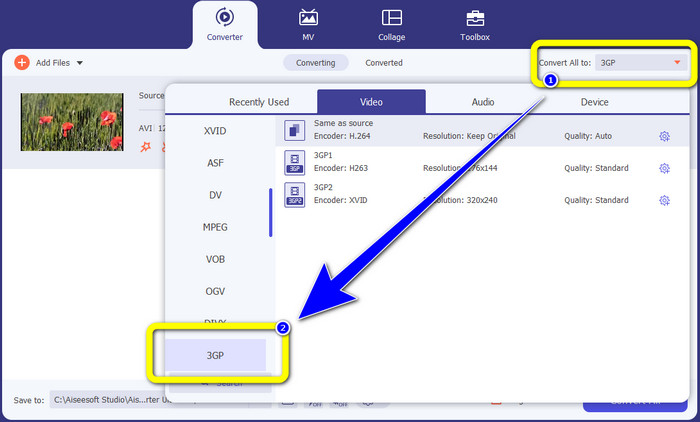
Paso 3: Después de añadir tu archivo XviD, mira en la parte derecha de la interfaz y haz clic en el botón Convertir todo a. Aparecerán las opciones de formato y selecciona el formato de archivo 3GP.
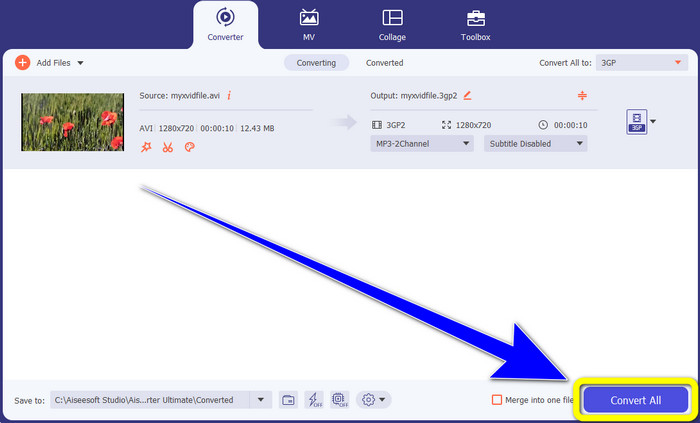
Paso 4: Para el cuarto y último paso, haz clic en el botón Convertir todo para convertir tu archivo XviD a 3GP. Espera a que finalice el proceso de conversión y guarda tu vídeo.
Parte 2: Convertir XviD a 3GP en línea
Uso de FVC Free Video Converter en línea
Además del mejor conversor que has descubierto en la primera parte, también hay conversores en línea que puedes utilizar gratis. La mejor herramienta en línea es FVC Free Video Converter Online. Este útil software te permite convertir XviD a 3GP fácilmente. Admite formatos de archivo de audio y vídeo, como MP4, M4V, WMV, AVI, MOV, VOB, WEBM, MP3, AAC, AC3, WMA, FLAC, etc. Además, este conversor es fácil de usar porque solo tiene tres sencillos pasos que seguir para convertir varios archivos. De este modo, ningún usuario tendrá dificultades para utilizar este conversor en línea. Si deseas saber cómo convertir XviD a 3GP fácilmente usando FVC Free Video Converter Online, utiliza estos tres sencillos pasos que se indican a continuación.
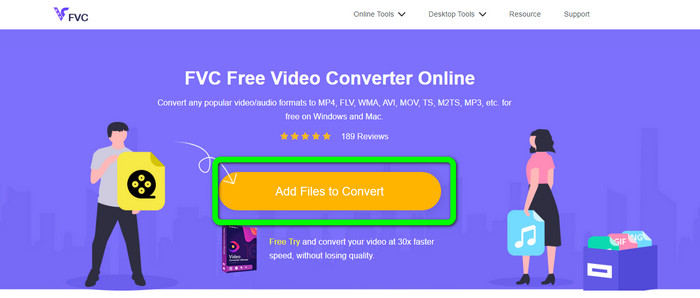
Paso 1: Visita la página web de FVC Free Video Converter Online. Haz clic en el botón Añadir archivos para convertir y sube el archivo XviD que quieres convertir a formato 3GP.
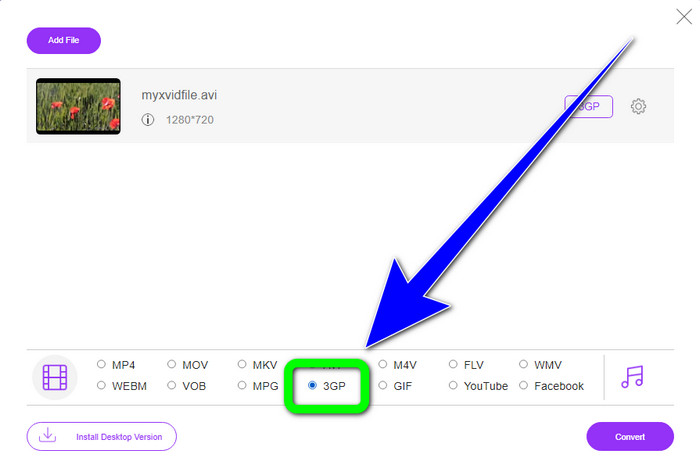
Paso 2: Cuando subas tu archivo, verás las opciones de formato en la parte inferior de la interfaz. Elige el formato de archivo 3GP.
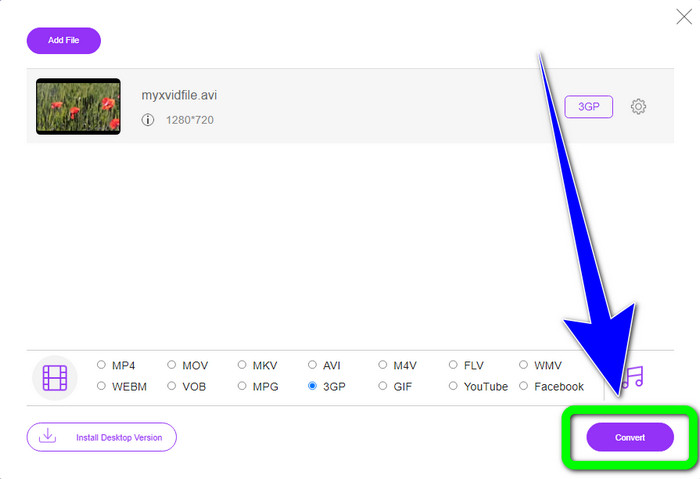
Paso 3: Debes hacer clic en el botón Convertir para convertir el archivo XviD a 3GP. Espera al proceso de conversión del archivo y guarda el archivo final en tu Windows o Mac.
Uso de OnlineConvertFree.com
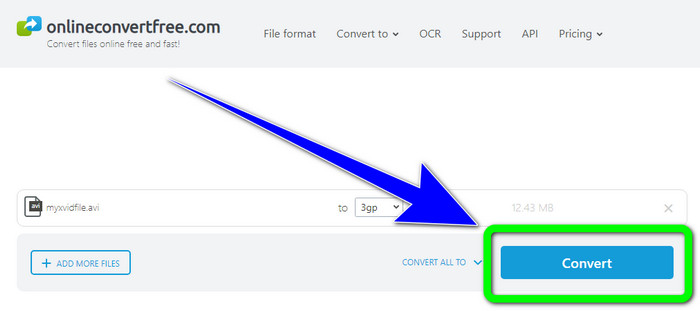
Onlineconvertfree.com es otra herramienta en línea que puedes usar para convertir XviD a 3GP. Esta aplicación también es buena para convertir archivos de audio, imágenes, documentos y vídeos, lo que la hace práctica para cualquiera. Además, admite varios formatos, como AVCHD, MT2S, MPEG, MKV, M4V, MP4, FLV, DIVX, XviD, 3GP y muchos más. Tampoco tienes que preocuparte por tu archivo, ya que está protegido en este software. Tu archivo de vídeo se eliminará automáticamente después de 24 horas. También puedes usar esta herramienta para convertir XviD a FLV.
Sin embargo, debe considerar que Onlineconverterfree.com es una herramienta basada en la web, en la que debe tener una conexión rápida a Internet para operarla. Además, el límite de almacenamiento de este software es de solo 100 Mb, por lo que debe comprar una suscripción para aumentar el límite de almacenamiento. Siga los pasos a continuación para convertir XviD a 3GP utilizando Onlineconverter.com.
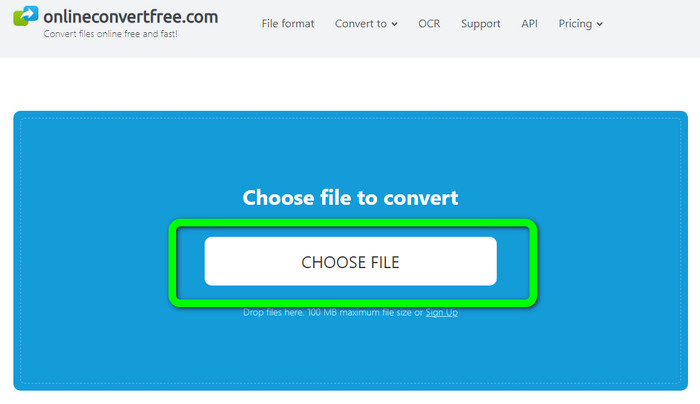
Paso 1: Ve al sitio web de Onlinecovnerter.com. Haz clic en el botón Elegir archivo para insertar el archivo XviD.
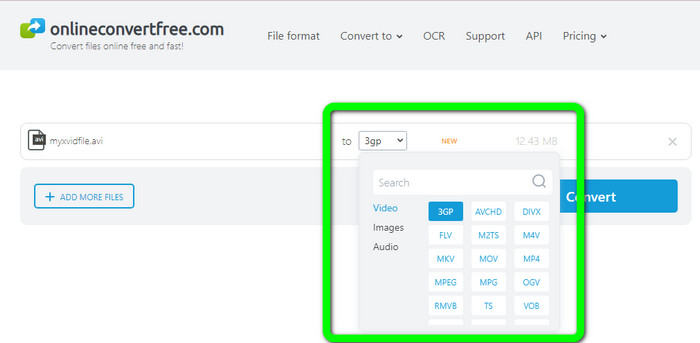
Paso 2: Haz clic en el archivo 3GP de entre las opciones de formato.
Paso 3: Para el paso final, haz clic en el botón Convertir. Espera el proceso de conversión y guarda tu resultado final en tu dispositivo. Haz clic aquí para aprender a convertir M4V a 3GP.
Parte 3: Conocimiento extendido sobre XviD
¿Qué es XviD?
Este códec, XviD, se basa en el estándar MPEG-4. Aunque deforma los colores, tiene una gran definición en escenas dinámicas. Por tratarse de un códec de código abierto, los interesados pueden contribuir a su desarrollo, fomentando actualizaciones continuas. Una película en DVD se puede comprimir lo suficiente como para caber en un CD y al mismo tiempo mantener la calidad de DVD gracias a la compresión habilitada en Xvid. El programa Xvid comprime y descomprime datos de video a MPEG-4 ASP. La extensión .xvid se usa para almacenar videos comprimidos. Cuando se trata de archivos de video, Xvid es comparable a ZIP. Xvid comprime video en una proporción de 200:1 o superior. Esto permite una transmisión de red más rápida y un almacenamiento en disco más efectivo.
Parte 4: Preguntas frecuentes sobre la conversión de XviD a 3GP
1. ¿Cuánto tiempo debo esperar para convertir XviD a 3GP?
El proceso de conversión dependerá del convertidor que esté utilizando y del tamaño del archivo de video. Descarga Video Converter Ultimate en tu Windows o Mac si quieres un convertidor más rápido. Esta aplicación tiene una velocidad de conversión 30 veces más rápida que otros convertidores.
2. ¿Hay algún convertidor gratuito que pueda usar con almacenamiento de archivos ilimitado?
¡Por supuesto que sí! El mejor conversor gratuito que puedes usar es FVC Free Video Converter Online. Esta herramienta en línea te permite convertir archivos ilimitados, por lo que no tienes que preocuparte por el tamaño máximo de archivo.
3. ¿Qué es mejor, Xvid o 3GP?
Ambos son mejores. Si desea reproducir un video en un dispositivo 3G, es más adecuado reproducir un video con un archivo de video 3GP. Y si desea reproducir sus videos en reproductores de video, un video con un archivo XviD es perfecto.
Conclusión
Este artículo te ha proporcionado las mejores técnicas para convertir XviD a 3GP. Para convertir más archivos en tu Windows y Mac, puedes descargar Video Converter Ultimate. Además, si quieres un conversor en línea gratuito, puedes usar FVC Free Video Converter Online.
-
 Encuentre los mejores y más simples métodos para convertir TS a 3GP
 Este artículo ofrecerá una increíble descarga gratuita de convertidor de TS a 3GP que puede probar en su dispositivo. Lea este artículo para descubrir más detalles esenciales que necesita
-
 Convierte MTS a 3GP usando estos Ultimate Converters
 ¿Quiere un proceso sencillo para convertir MTS a 3GP? ¡No te preocupes más! Este artículo ofrecerá convertidores de MTS a 3GP que puede usar en línea y fuera de línea
-
 WebM a 3GP: formas más efectivas de usar estas herramientas
 ¿Está buscando un excelente convertidor de WebM a 3GP? Este artículo le asegurará que obtenga los mejores métodos efectivos para convertir su WebM a 3GP
