


 Video Converter Ultimate
 Grabador de pantalla
 Reparación de vídeo
 Descarga segura
M4A vs. MP3 Revisión detallada y comparación de dos formatos de audio
Debido a la proliferación de la música digital, seleccionar un formato de audio apropiado es ahora más crucial que nunca. Si bien M4A y MP3 se usan ampliamente, existen distinciones importantes entre los dos. Si bien MP3 es el estándar de facto para archivos de música, M4A se usa con frecuencia para obtener una calidad de audio superior.
In M4A vs. MP3 comparison, we'll examine the finer points between the M4A and MP3 file formats so you can make an informed decision. We'll also present a comprehensive analysis of the differences and similarities between the two file types regarding audio quality, compatibility, file size, and more. If you're a music lover or a working musician, you'll want to read on to find out which format is ideal for you.

Parte 1. M4A frente a MP3
Aquí hay una tabla simple que compara estos formatos en diferentes aspectos importantes para una decisión informada. Consulte la tabla a continuación.
| M4A | MP3 | |
| Calidad de sonido | Alto | Bueno |
| Tamaño del archivo | Grande | Pequeño |
| Compatibilidad | Limitado | Ampliamente compatible |
| metadatos | Soportado | Limitado |
| Protección DRM | si | No |
| Usos populares | Música, audiolibros, podcasts | Música, podcasts, tonos de llamada |
Parte 2. Introducción a M4A y MP3
Basta de batallas entre MP3 y M4A. Detengámonos un momento y aprendamos más sobre estos formatos a través de una breve introducción de cada uno de ellos.
M4A Introduction
El formato de audio digital propiedad de Apple es MPEG-4 Audio (o M4A para abreviar). Es un excelente formato de audio para música, audiolibros y podcasts porque admite muchas tasas de bits y frecuencias de muestreo. Los archivos M4A se pueden abrir en iTunes, QuickTime y otros reproductores multimedia, lo que los hace ideales para dispositivos Apple.
MP3 Introduction
MP3, que significa 'MPEG-1 Audio Layer 3', es un formato de audio digital que se ha convertido en el estándar para audio comprimido debido a su adopción generalizada y compresión de baja tasa de bits. Los archivos MP3 son ideales para música, podcasts y tonos de llamada debido a su tamaño compacto en comparación con otros formatos de audio. Se pueden jugar en muchos dispositivos diferentes y descargarse rápida y fácilmente de Internet. Los archivos MP3, por otro lado, a menudo tienen una calidad de audio más pobre que los formatos alternativos como M4A.
Parte 3. ¿Es M4A mejor que MP3?
M4A y MP3 tienen diferentes fortalezas y debilidades. M4A es conocido por su calidad de sonido superior y es el preferido de los entusiastas de la música y los profesionales. MP3, por otro lado, tiene un tamaño de archivo más pequeño y es ampliamente compatible con varios dispositivos y reproductores multimedia.
Elegir entre M4A y MP3 depende de lo que sea más importante para usted: alta calidad de sonido o menor tamaño de archivo y compatibilidad.
Parte 4. La diferencia entre MP3 y M4A
Los formatos populares de música digital MP3 y M4A tienen características distintas. La siguiente es una explicación detallada de las distinciones entre MP3 y M4A:
Sound Quality: M4A is known for its superior sound quality compared to MP3. M4A uses a better compression algorithm and supports a broader range of bitrates and sample rates. M4A also supports lossless compression, which preserves the original audio quality, while MP3 uses lossy compression, which reduces the file size but also reduces the audio quality.
File Size: MP3 files are smaller in size compared to M4A files. This is because MP3 uses a more efficient compression algorithm that reduces the file size without significantly affecting the audio quality. M4A, on the other hand, uses a less efficient compression algorithm that results in larger file sizes but better audio quality.
Compatibility: MP3 is widely recognized as the industry standard for digital audio and is compatible with a wide range of devices and media players, including smartphones, tablets, and computers. M4A, on the other hand, is less widely compatible and is primarily used on Apple devices and software, such as iTunes and QuickTime.
Metadata: M4A supports a wider range of metadata compared to MP3. This means that M4A files can store more information about the audio, such as album art, lyrics, and track information.
DRM Protection: M4A supports Digital Rights Management (DRM) protection, which allows copyright holders to control the use and distribution of their audio files. MP3, on the other hand, does not support DRM protection.
Parte 5. Cómo convertir M4A a MP3 o MP3 a M4A
Más que comparar y revisar estos dos formatos de audio, también es importante aprender a convertir de M4A a MP3 o viceversa. Estos son algunos de los programas que puede utilizar:
Whether you are online or offline, Video Converter Ultimate is a great tool you can use to convert between M4A and MP3. This utility comes with a lot of features you can take advantage of. The tool offers the capability to convert multiple files into batches, which means you can transform a collection of music files. What is intriguing is that it grants you access to the output settings of your audio files. Find out how this tool works by looking at the steps below.
Step 1. Initiate the download by clicking one of the Free Download buttons and then following the on-screen instructions. The next step is launching the app and getting used to its simple interface.
Descarga gratuitaPara Windows 7 o posteriorDescarga segura
Descarga gratuitaPara macOS 10.7 o posteriorDescarga segura
Step 2. Click the add button on the main screen, then find the audio file you want to convert. A preview of an uploaded file will be displayed on the UI shortly after the upload. You can convert multiple M4As at once to MP3 by uploading a folder.
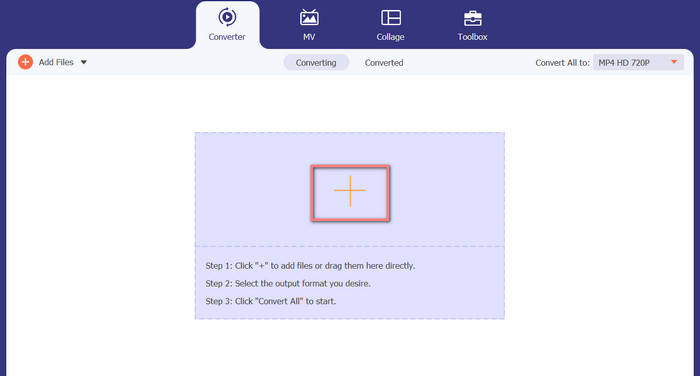
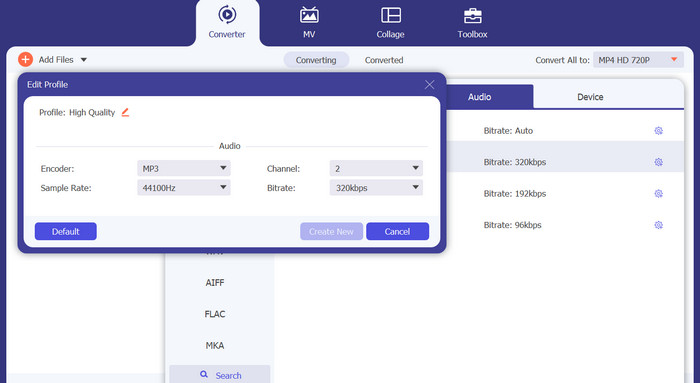
Step 3. To change the tool's output format, go to the Profile menu's Audio tab (found in the tool's upper right). You can change an M4a file into an MP3 file and vice versa.
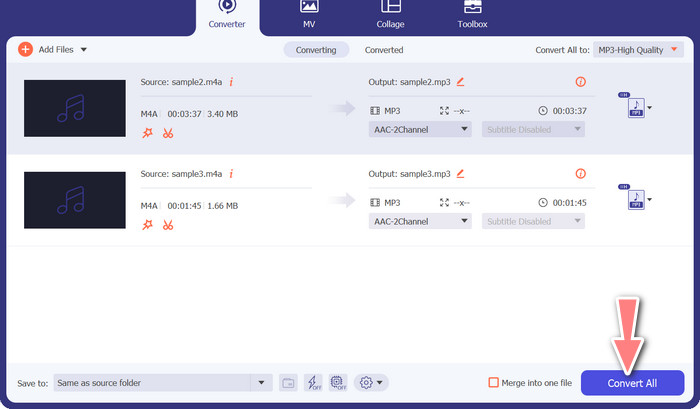
Step 4. Select the desired location at the very bottom of the screen. To get started with the conversion, select Convert All.
Convertidor de video gratuito en línea (en línea)
No room for another show to air? The good news is that using a web-based converter can prevent downloading software altogether. The Free Video Converter Online web tool allows for in-browser conversion. It also supports a wide variety of music and video file types. In addition, this web tool supports batch conversions. In addition, the user can alter the final audio file's settings. Learn how to convert MP3 to M4A online.
Step 1. First, fire up your preferred web browser and navigate the Free Video Converter Online website.
Step 2. Click the Add Files to Convert option, then navigate to the M4A file you want to convert and select it.
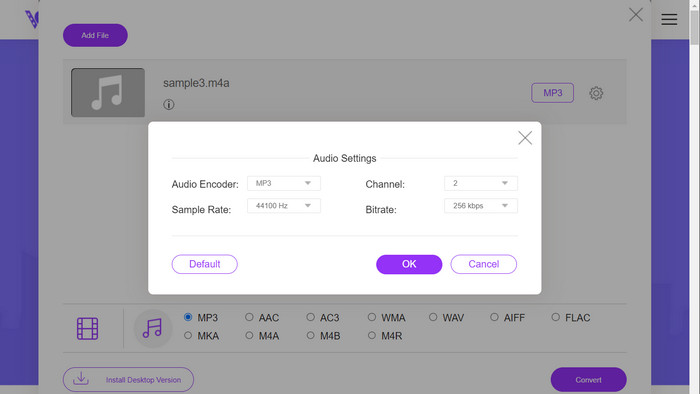
Step 3. Select MP3 as the output file type from the Audio format menu. It is also possible to adjust the bitrate, or output quality, of the MP3 file.
Step 4. To start the conversion process, click the Convert button. That's the procedure for changing M4A to MP3 on the web.
Lecturas recomendadas:
Guidelines on How to Convert M4A to WAV [PC and Mac]
Best Tools that You Can Use to Batch Convert MP3 to M4R Files
Parte 6. Preguntas frecuentes sobre M4A y MP3
¿Qué es MP3 frente a M4A en términos de metadatos?
M4A admite una gama más amplia de metadatos que MP3, lo que significa que los archivos M4A pueden almacenar más información sobre el audio.
¿Puedo editar archivos MP3 o M4A?
Puede editar archivos MP3 y M4A utilizando varios programas de edición de audio.
¿Cuál es mejor para podcasts, MP3 o M4A?
MP3 es mejor para podcasts debido a su menor tamaño de archivo y mayor compatibilidad.
Conclusión
Understanding the MP3 vs. M4A comparison can help you choose the best digital audio format. Whether you're streaming music or producing it, selecting the right format is crucial for ensuring the best possible audio quality and compatibility.
-
 MP3 VS MP4: ¿Cuál es la diferencia entre MP3 y MP4?
 MP3 o MP4, ¿cuál es mejor? ¿Cuál es la diferencia entre MP3 y MP4? Este artículo comparará MP3 con MP4 desde todos los aspectos que pueda imaginar.
-
 Reproductor M4A: los 5 mejores reproductores M4A para Android y computadora
 ¿Cómo reproducir archivos M4A en un teléfono Android? ¿Qué jugador puede jugar M4A? Esta publicación comparte los 5 mejores reproductores M4A gratuitos para Android, Mac y PC.
-
 Los 4 mejores métodos para arreglar y editar metadatos MP3 en Windows y Mac
 ¿Quieres conocer los secretos de editar metadatos MP3 a gusto? Este blog te enseñará diferentes técnicas con las diferentes herramientas a las que accedes fácilmente.
