


 Video Converter Ultimate
 Grabador de pantalla
 Reparación de vídeo
 Descarga segura
Mejora tu juego de música: convierte MP3 a MIDI y remezcla melodías
If you're a musician or music producer, you are aware that the right tools can make all the difference in your creative process. One tool that can take your music to the next level is the ability to convert MP3 files to MIDI. While MP3s are great for listening to music, MIDI files offer unparalleled flexibility and customization options. By converting your MP3s to MIDI, you can manipulate individual notes, change the tempo and key of a song, and even add new instruments or sounds to an existing track.
Con la herramienta de conversión adecuada, las posibilidades son infinitas. Ya sea que esté buscando crear remezclas únicas de sus canciones favoritas, transcribir una pieza musical para una partitura o experimentar con nuevos sonidos y arreglos, la conversión de MP3 a MIDI puede revolucionar su música y llevar su creatividad a nuevas alturas.

Parte 1. Comparación de MP3 vs. MIDI
Si desea inspeccionar una comparación específica de estos dos formatos en diferentes aspectos, puede consultar la tabla a continuación.
| Caracteristicas | MP3 | midi |
| Tamaño del archivo | Relativamente grande | Muy pequeña |
| Calidad de sonido | Compresión con pérdida, alta calidad | Baja calidad, pero personalizable |
| Editabilidad | No es fácilmente editable | Altamente editable |
| Instrumentación | Instrumentación fija | Instrumentación personalizable |
| Uso | Escuchando música | Edición y producción de música. |
| Compresión | Compresión con pérdida | Sin compresión |
Parte 2. Formas de convertir MP3 a MIDI o MIDI a MP3 en Windows y Mac
FVC Video Converter Ultimate is a multifaceted tool for video conversion, facilitating the effortless conversion of videos to a diverse range of formats. This software tool has the capability to accommodate a diverse array of file formats, such as MP4, AVI, MOV, WMV, and others. This feature renders it a highly desirable option for individuals seeking to transform their video files to suit various devices or platforms.
Además de sus robustas funcionalidades de conversión de video, FVC Free Video Converter Ultimate incorpora atributos sofisticados como edición de video, conversión por lotes y otras funciones avanzadas. FVC ofrece un diseño fácil de usar y una interfaz intuitiva que facilita las tareas de edición de video, como recortar, recortar, agregar marcas de agua y ajustar los efectos de video. Este software permite a los usuarios crear videos personalizados adaptados a sus necesidades específicas. Además, puede funcionar como conversor de MIDI a MP3. Aprenda cómo usarlo a través del procedimiento paso a paso.
Key Features:
◆ Velocidad de conversión rápida: FVC utiliza tecnología de conversión avanzada, lo que resulta en tiempos de conversión más rápidos en comparación con otras herramientas similares.
◆ Opciones de personalización: FVC le permite personalizar su configuración de conversión, como el códec de video y audio, la tasa de bits, la tasa de fotogramas y la resolución.
◆ Interfaz fácil de usar: FVC tiene una interfaz intuitiva y fácil de usar.
Step 1. Obtain and install the application
Initially, it is imperative to procure and install FVC Video Converter Ultimate software on your personal computer. Tick on the Free Download button below and subsequently initiate the software.
Descarga gratuitaPara Windows 7 o posteriorDescarga segura
Descarga gratuitaPara macOS 10.7 o posteriorDescarga segura
Step 2. Include MIDI or MP3 files in the program
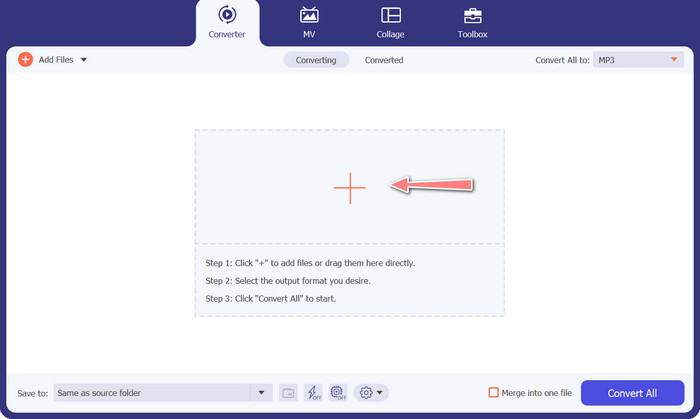
Subsequently, include the MIDI or MP3 audio file that you intend to transform. Hit the Add Files button to import your audio files. Upon successful addition of the audio to the program, the thumbnail associated with the audio should become visible.
Step 3. Select an output format
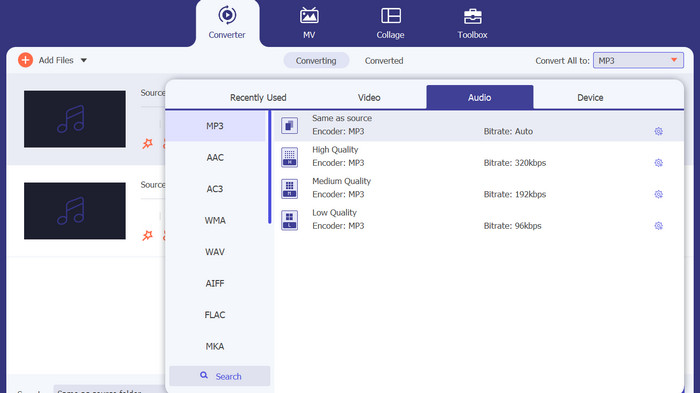
Following the aforementioned procedure, it is advisable to select an appropriate output format. Choose the MP3 format as the designated output option from the dropdown menu located adjacent to the Convert All to section. In the event of a preference for customization, the output video settings can be tailored by selecting the Custom Profile button.
Step 4. Initiate the conversion procedure
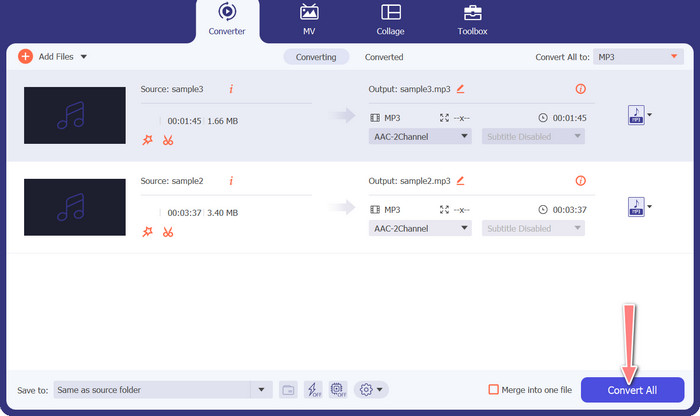
Ultimately, select the Convert All option to initiate the process of conversion. Upon completion of the conversion process, the MP3 files will be stored in the designated output directory.
2. Convertidor de audio gratuito en línea
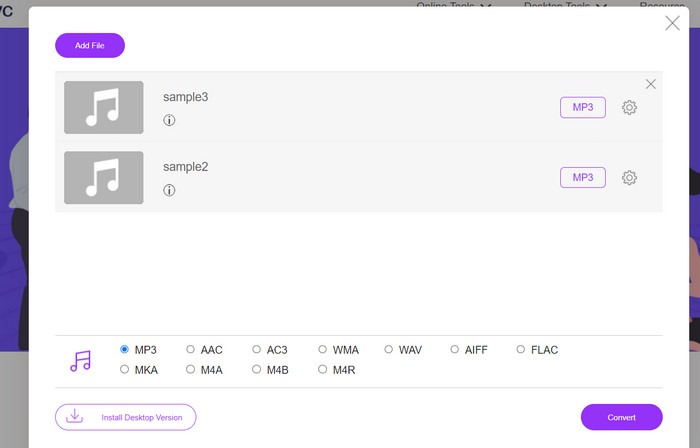
Another way you can use is the Free Audio Converter Online. As its name implies, this is an online program that runs on the web directly. Thus, you need not to have an MP3 to MIDI converter app. All is accessible and can be done using just your browser. It does not lack behind in terms of the features. You can also upload many files or batch convert and customize the profile of a video or audio file. Learn about this best MP3 to MIDI converter online by following the steps below.
Funciones clave
◆ Accesibilidad en línea: como herramienta en línea, se puede acceder a un convertidor de audio gratuito en línea desde cualquier lugar.
◆ Conversión por lotes: esta herramienta gratuita de conversión de MIDI a MP3 en línea permite a los usuarios convertir varios archivos de audio simultáneamente, ahorrando tiempo y esfuerzo.
◆ Velocidad de conversión rápida: es un servidor basado en la nube que puede manejar el proceso de conversión, lo que permite velocidades de conversión rápidas.
Step 1. In order to begin using Free Audio Converter Online, you should first open your favorite web browser and go to the website directly.
Step 2. Click the Add Files to Convert option, and the tool will prompt you to download and install its bit-sized launcher. When the installation is finished, you may now upload your MIDI or M3 files.
Step 3. From the Audio format menu, select MP3 as the format to use for the final output. The quality of the resulting MP3 file can be adjusted by choosing a different bitrate.
Step 4. Lastly, tick the Convert button to initialize the conversion process.
Parte 3. Convierta MP3 a MIDI o MIDI a MP3 en el móvil
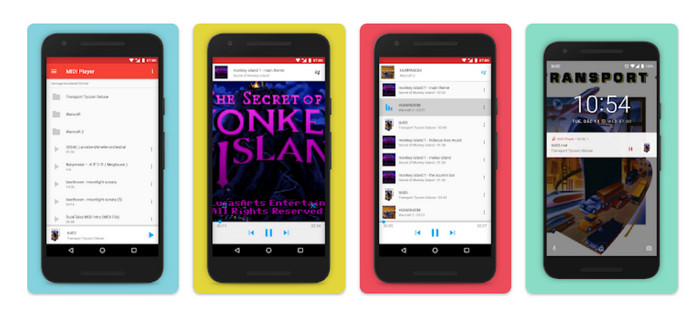
MIDI Player & Converter es una aplicación móvil diseñada para dispositivos Android y se utiliza principalmente para reproducir y convertir archivos MIDI a otros formatos de audio. El programa se puede descargar gratis y proporciona una interfaz fácil de usar. Una de las características clave de MIDI Player & Converter es su reproductor MIDI incorporado, que permite a los usuarios escuchar archivos MIDI con sonido de alta calidad. Además de sus capacidades de reproducción MIDI, MIDI Player & Converter también incluye herramientas para convertir archivos MIDI a otros formatos de audio, incluidos MP3, WAV y AAC.
Funciones clave
◆ Conversión de audio: la aplicación permite a los usuarios convertir archivos MIDI a otros formatos de audio, incluidos MP3, WAV y AAC.
◆ Configuración de salida personalizable: los usuarios pueden ajustar la calidad del audio de salida, la frecuencia de muestreo y la tasa de bits según sus preferencias.
◆ Ajuste de tempo y tono: la aplicación también incluye herramientas para ajustar el tempo y el tono del archivo de audio durante el proceso de conversión.
◆ Conversión por lotes: MIDI Player & Converter permite a los usuarios convertir varios archivos MIDI a formatos de audio simultáneamente.
Step 1. To change a MIDI file to MP3, one may procure and deploy the MIDI Player & Converter through the Google Play Store.
Step 2. Launch the application and opt for the Convert feature from the primary menu.
Step 3. Navigate to the Source category and opt for the MIDI option. Proceed to select the desired MIDI file for conversion. Within the Target category, opt for the MP3 format as the designated output.
Step 4. Tailor the output parameters, including but not limited to the audio quality, sample rate, and bitrate, in accordance with your personal preferences. Utilize the integrated tools to modify the tempo and pitch of the audio. Initialize the conversion process by selecting the Convert option.
Lecturas recomendadas:
Convert MP3 to OGG and Enjoy Superior Sound Quality
FLAC vs. MP3: ¿Qué formato de archivo de audio es el rey absoluto?
Parte 4. Preguntas frecuentes sobre la conversión de MP3 a MIDI
¿Es legal convertir archivos MIDI a MP3?
La legalidad de convertir archivos MIDI a MP3 puede variar según las leyes de derechos de autor de su país. Si posee los derechos del archivo MIDI o tiene permiso del titular de los derechos de autor, entonces convertirlo a un MP3 debería ser legal. Por otro lado, siempre es una buena idea revisar las leyes de su región para asegurarse de que no está violando ninguna regulación de derechos de autor.
¿Puedo personalizar la configuración de salida al convertir un archivo MIDI a MP3?
Sí, la mayoría de las herramientas de conversión de MIDI a MP3 le permiten personalizar la configuración de salida, como la calidad de audio, la frecuencia de muestreo y la tasa de bits. Esto puede ayudarlo a lograr la calidad de sonido y el tamaño de archivo deseados para su MP3.
¿Puedo convertir MP3 a MIDI en Audacity?
R: Audacity no puede convertir directamente archivos MP3 a archivos MIDI. Si bien Audacity es un poderoso software de edición y grabación de audio, no tiene la capacidad de reconocer y extraer notas individuales de un archivo MP3, lo cual es necesario para crear un archivo MIDI.
Conclusión
The process of converting MIDI to MP3 format, or vice versa, can serve as a practical means of facilitating the sharing and playback of musical compositions across various platforms and devices. Various tools are at the disposal for this objective, such as software installed on desktop computers, converters accessible online, and applications designed for mobile devices.
-
 M4A vs MP3: ¿Qué formato de archivo de audio es el adecuado para usted?
 ¿Estás dividido entre los formatos de audio M4A y MP3? Nuestra revisión y comparación exhaustivas de M4A frente a MP3 lo ayudarán a elegir el mejor tipo de archivo para sus necesidades
-
 Cómo convertir MP3 a M4A para una calidad de sonido mejorada
 Mejore la calidad de sus archivos de música convirtiendo MP3 a M4A con los consejos y trucos de nuestros expertos. Nuestra guía ofrece instrucciones paso a paso y software recomendado
-
 Conversores excepcionales de MP3 a AIFF para Windows y Mac
 Este tutorial lo guiará a través de cada etapa de la conversión de MP3 a AIFF utilizando herramientas confiables. Visítalos para saber más
