


 Video Converter Ultimate
 Grabador de pantalla
 Reparación de vídeo
 Descarga segura
Conversión perfecta de Caf a MP3 para preservar la calidad de audio y la accesibilidad
La conversión de Caf a MP3 es esencial para mejorar la compatibilidad y la accesibilidad. La conversión de sus archivos Caf a MP3 garantiza una reproducción perfecta en varias plataformas, lo que elimina los problemas de compatibilidad. Además, los archivos MP3 son más pequeños, lo que los hace más fáciles de almacenar, transferir y compartir. Ya sea que desee disfrutar de su colección de audio en teléfonos inteligentes, computadoras o sistemas en el automóvil, la conversión de Caf a MP3 le brinda una mayor flexibilidad y comodidad para acceder a su música, podcasts o grabaciones favoritas.
Al utilizar un conversor de Caf a MP3, puedes transformar fácilmente tus archivos Caf al popular formato MP3, lo que garantiza una mayor accesibilidad, tamaños de archivo más pequeños y un intercambio fluido de tu colección de audio. Dicho esto, descubre las herramientas que puedes usar para ayudarte a cambiar tus archivos de Caf a MP3.

Parte 1. ¿Qué es CAF y por qué convertir CAF a MP3?
Caf o Core Audio Format es un formato de archivo de audio presentado por Apple Inc. Se usa comúnmente en las plataformas macOS e iOS. Los archivos Caf a menudo se crean y utilizan en aplicaciones de audio profesionales, como edición, mezcla y grabación de sonido. Convertir Caf a MP3 ofrece varias razones y ventajas convincentes. Estas son algunas de las pocas razones clave por las que podría considerar convertir sus archivos Caf al formato MP3:
Compatibilidad mejorada: MP3 es uno de los formatos de audio más ampliamente compatibles en todo tipo de dispositivos, reproductores multimedia y sistemas operativos. Al convertir tus archivos Caf a MP3, garantizas la compatibilidad y eliminas cualquier problema o limitación de reproducción que puedas encontrar con archivos Caf.
Accesibilidad: Convertir Caf a MP3 permite un acceso mucho mayor a tu contenido de audio. Los archivos MP3 se pueden reproducir en múltiples dispositivos, incluidos teléfonos móviles, tabletas, ordenadores portátiles, ordenadores de sobremesa, reproductores de música portátiles e incluso sistemas de audio para coches. Esta versatilidad te permite disfrutar de tu música favorita, pódcasts o grabaciones en cualquier momento y lugar.
Tamaño de archivo menor: Los archivos MP3 suelen estar comprimidos, lo que da como resultado un tamaño de archivo significativamente menor en comparación con los archivos Caf. Esta compresión ayuda a ahorrar espacio de almacenamiento en tus dispositivos sin afectar de forma apreciable a la calidad del audio. También facilita la transferencia o el intercambio de tus archivos de audio con otras personas por correo electrónico, aplicaciones de mensajería o plataformas en línea.
Parte 2. Convertir CAF a MP3 sin conexión
Video Converter Ultimate es un software muy eficiente que permite convertir diversos formatos de archivo a múltiples formatos de audio como Caf y MP3. El programa ofrece una función de conversión por lotes que permite al usuario convertir varios archivos de audio de manera simultánea.
Además, los usuarios tienen la capacidad de optimizar la calidad de cualquier canción deseada a través de la función del programa que permite la personalización de los aspectos técnicos de salida, incluida la frecuencia de muestreo y la tasa de bits. Para las personas que buscan realizar una conversión por lotes de archivos de audio de Caf a MP3 o viceversa, a continuación proporcionamos una guía concisa para su lectura. Puede consultar las instrucciones a continuación para aprender cómo cambiar Caf a MP3.
Paso 1. Selecciona el icono de Descarga gratuita apropiado que aparece a continuación para instalar el programa en tu dispositivo. Asegúrate de seguir las instrucciones en pantalla para activar el programa en el siguiente paso. Una vez instalado, su interfaz se domina con facilidad. Esta herramienta funciona como conversor de Caf a MP3 tanto para Mac como para Windows.
Descarga gratuitaPara Windows 7 o posteriorDescarga segura
Descarga gratuitaPara macOS 10.7 o posteriorDescarga segura
Paso 2. Haz clic en el botón Añadir en la interfaz principal para importar el archivo de audio que deseas editar. A continuación, se mostrará una miniatura del archivo importado. También puedes añadir una carpeta para convertir varios archivos a la vez. Elige la ubicación dentro de tu directorio que contenga todos los archivos de audio necesarios.
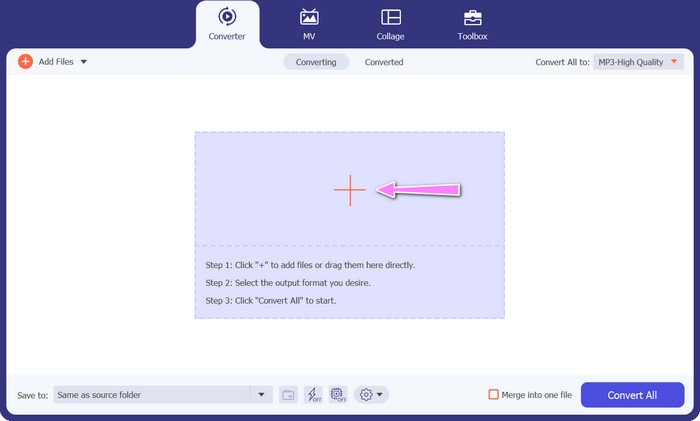
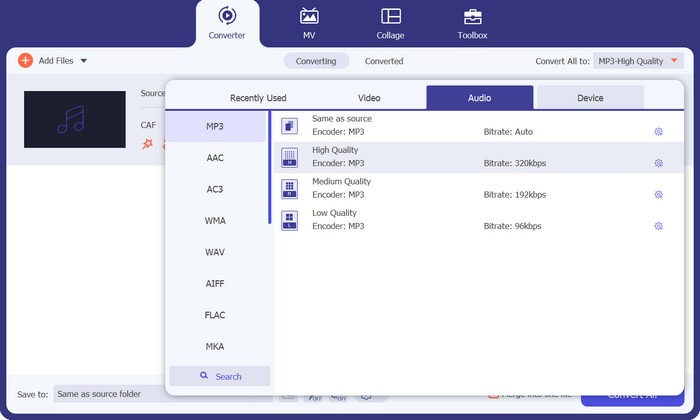
Paso 3. Ahora puedes modificar el formato de salida haciendo clic en el botón Convertir todo a situado en la parte superior de la ventana del programa. Elige MP3 en el panel denominado Audio. Mientras tanto, puedes cambiar la frecuencia de muestreo y la tasa de bits del archivo de salida para obtener la calidad deseada.
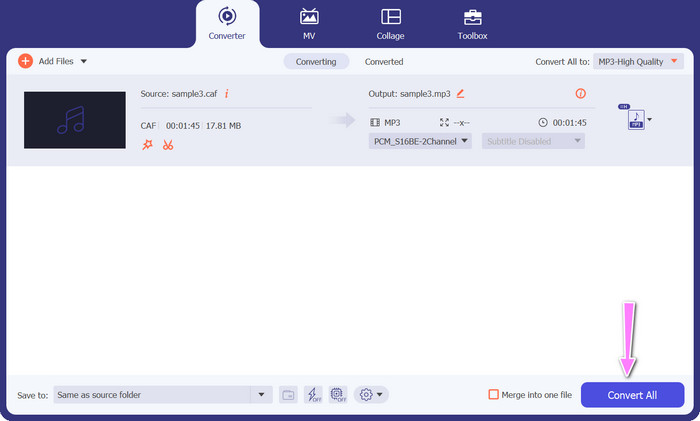
Paso 4. Haz clic en el botón Convertir todo que aparece abajo para iniciar el proceso de conversión como paso final. El programa abrirá automáticamente la carpeta de salida para que puedas comprobar el nuevo formato de archivo.
Pros
- Puede convertir por lotes Caf a formato de archivo de audio MP3.
- El programa funciona bien con Windows y Mac OS.
Contras
- Requiere una tarifa de suscripción paga después de la prueba gratuita.
Parte 3. Convertir CAF a MP3 en línea
También puedes utilizar el Convertidor de MP3 gratuito en línea, que es otra opción. Se trata de una aplicación web que funciona a través de Internet, como su nombre indica. En consecuencia, no necesitas tener una aplicación instalada para convertir Caf a MP3. Todo es accesible y solo necesitas tu navegador para hacerlo. En cuanto a funciones, este conversor gratuito de Caf a MP3 no se queda corto en absoluto. Además, puedes subir una gran cantidad de archivos, convertirlos por lotes o ajustar el perfil de un vídeo o clip de audio. Siguiendo los pasos que se indican aquí, conocerás el mejor conversor de Caf a MP3 en línea.
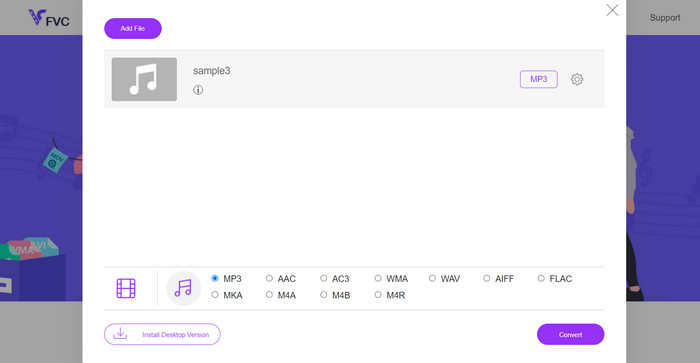
Paso 1. Ve directamente a la página principal del Convertidor de MP3 gratuito en línea haciendo clic en el enlace situado arriba. Puedes subir tu archivo de audio yendo a la pantalla principal y seleccionando la opción Añadir archivos para convertir.
Paso 2. En la pantalla aparecerá una vista previa del archivo original que has seleccionado. Puedes elegir el formato de salida que desees debajo del panel donde te encontrabas inicialmente.
Paso 3. Para cambiar el formato del archivo de Caf a MP3, haz clic en el botón Convertir. Si quieres convertir otro archivo, tendrás que repetir el mismo procedimiento desde el principio.
Pros
- Los usuarios pueden disfrutar de conversiones ilimitadas por día.
- Este convertidor de Caf a MP3 en línea funciona en casi todos los navegadores web.
Contras
- La velocidad de conversión es proporcional al ancho de banda de Internet disponible.
Lecturas recomendadas:
Conversión de MP3 a AAC: cómo mejorar la calidad de tu audio
Descargar reproductor MP3 – Los 10 mejores reproductores de música MP3 gratuitos de 2023
Parte 4. Preguntas frecuentes sobre la conversión de CAF a MP3
¿Puedo conservar los metadatos de mis archivos Caf después de convertirlos a MP3?
La preservación de los metadatos durante la conversión de Caf a MP3 depende del convertidor o software específico que esté utilizando. Algunas herramientas de conversión tienen la capacidad de retener metadatos como el nombre del artista, el título del álbum, el número de pista y más. Sin embargo, es importante tener en cuenta que no todos los convertidores admiten la retención de metadatos.
¿Hay otros formatos de audio a los que pueda convertir archivos Caf?
Sí, además de MP3, hay varios otros formatos de audio a los que puede convertir archivos Caf, según sus necesidades específicas. Los formatos alternativos comunes incluyen WAV, FLAC (Free Lossless Audio Codec), AAC y OGG (Ogg Vorbis).
¿Tengo que pagar por un conversor de Caf a MP3?
Hay opciones de conversión de Caf a MP3 gratuitas y de pago disponibles. Muchos convertidores en línea ofrecen servicios gratuitos, lo que le permite convertir archivos Caf a MP3 sin costo alguno. Sin embargo, algunos software avanzados o servicios en línea premium pueden requerir una compra o suscripción para funciones adicionales o velocidades de conversión más altas.
Conclusión
Con la conversión de Caf a MP3, puedes desbloquear todo el potencial de tu colección de audio y disfrutar de una reproducción fluida en cualquier momento y lugar. Te permite disfrutar de tu música favorita, pódcasts o grabaciones en una amplia variedad de dispositivos y plataformas.
-
 Las 4 mejores formas de convertir AIFF a MP3 en Mac y PC
 ¿Tiene dificultades porque los archivos AIFF son demasiado grandes para guardarlos? Por lo tanto, debe continuar leyendo mientras explicamos cómo solucionarlo convirtiendo AIFF a formato MP3.
-
 Descubra cómo convertir AMR a MP3 [en línea y fuera de línea]
 ¿Tiene dificultades porque los archivos .amr no se pueden reproducir en su escritorio? Luego, lea este artículo para aprender cómo convertir AMR a formato MP3.
-
 Guía sobre cómo agregar la carátula del álbum a MP3 sin esfuerzo en Breze
 ¿Quieres saber cómo agregar la carátula del álbum a MP3? Si es así, lea los detalles completos y un tutorial sobre cómo editar la carátula del álbum en su archivo.
