


 Video Converter Ultimate
 Grabador de pantalla
 Reparación de vídeo
 Descarga segura
Cómo convertir AIFC a MP3 usando los mejores convertidores de audio
AIFC, abreviatura de Audio Interchange File Format, es un formato de audio desarrollado inicialmente por Apple Inc. Es un estándar para almacenar datos de audio y comúnmente puede encontrar archivos AIFF en sistemas Mac. AIFC es una extensión de AIFF, donde las variantes comprimidas se identifican con una extensión de archivo .aifc.
El problema de los archivos AIFC radica en su compatibilidad limitada con diversos dispositivos y reproductores multimedia. Además, a la hora de editar archivos AIFC, los problemas de compatibilidad pueden resultar significativos si el editor no admite este formato. Para solucionarlo, hemos recopilado algunos métodos eficaces que te ayudarán a convertir archivos AIFC al formato MP3, ampliamente compatible. Convertir tus archivos AIFC a MP3 garantiza una mejor compatibilidad entre dispositivos y unas posibilidades de edición sin complicaciones. Veamos estos métodos de conversión para superar los obstáculos de compatibilidad de tus archivos de audio.

Parte 1. 5 formas de convertir AIFC a MP3
1. Video Converter Ultimate
Video Converter Ultimate es una herramienta profesional y fiable para convertir AIFC a MP3, diseñada para transformar el formato AIFC a MP3 y a muchos otros formatos sin dificultades. Este software te permite convertir tus archivos de vídeo y audio de forma sencilla y segura, mejorando tu experiencia de entretenimiento sin conexión y garantizando una compatibilidad óptima. Aprovecha sus impresionantes funciones descargando hoy mismo la versión de prueba gratuita.
Descarga gratuitaPara Windows 7 o posteriorDescarga segura
Descarga gratuitaPara macOS 10.7 o posteriorDescarga segura
Siga estos sencillos pasos para convertir sus archivos AIFC a MP3 usando Video Converter Ultimate:
Paso 1. Importar archivos AIFC
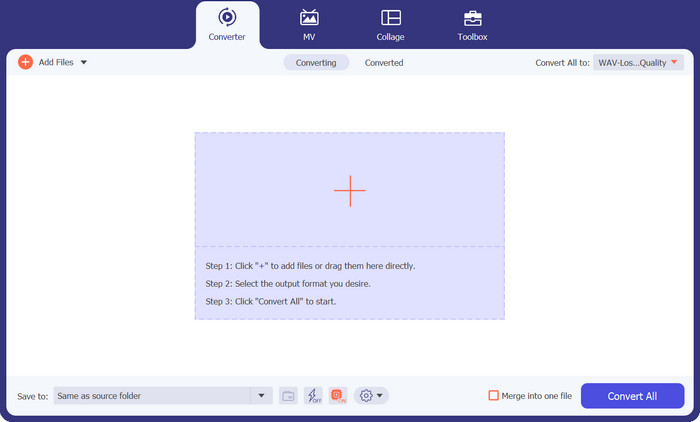
Inicia el programa después de instalar Video Converter Ultimate en tu ordenador Windows o Mac. Haz clic en el botón Añadir archivos situado en la cinta superior e importa los archivos AIFC que desees convertir.
Paso 2. Seleccionar MP3 como formato de salida
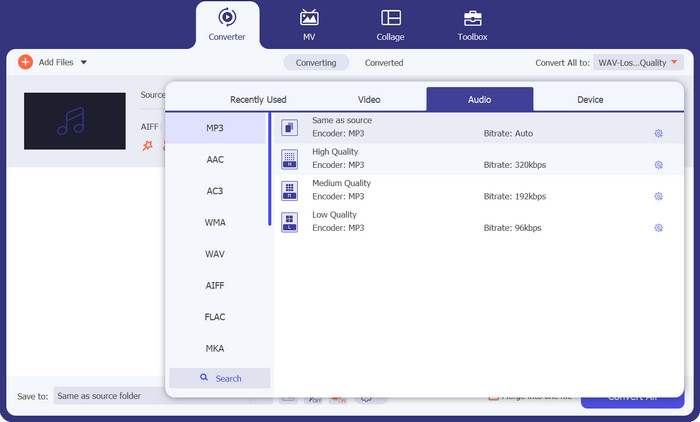
Localiza el archivo de audio AIFC en la biblioteca y haz clic en el desplegable Convertir todo a situado en la parte derecha. Elige la pestaña Audio y selecciona MP3 como formato de salida deseado. A continuación, haz clic en el desplegable de la parte inferior para buscar y especificar una carpeta en la que guardar los archivos MP3 convertidos.
Paso 3. Convertir AIFC a MP3
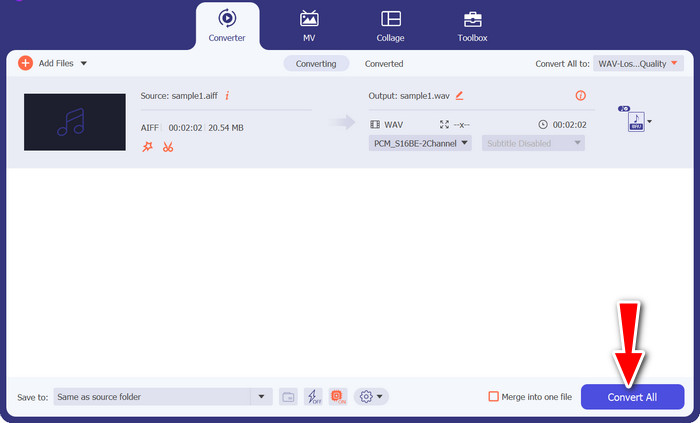
Una vez configurados los ajustes de salida, selecciona en la zona de biblioteca todos los archivos AIFC que quieras convertir. Haz clic en el botón Convertir todo situado en la esquina inferior derecha para iniciar el proceso de conversión y transformar tus archivos AIFC a formato MP3. Tras la conversión, podrás transferir y disfrutar fácilmente de tus archivos MP3 en cualquier dispositivo compatible.
2. iTunes
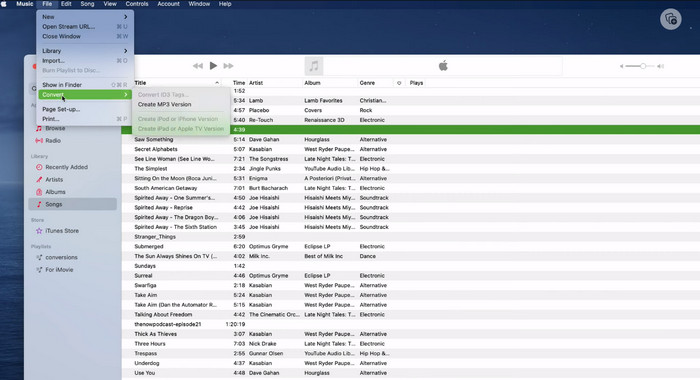
iTunes es una plataforma versátil para reproducir, administrar y descargar música y vídeos en Mac OS X y Windows OS. Además, cuenta con una capacidad incorporada para convertir archivos de audio AIFC. A continuación, encontrará guías completas paso a paso sobre cómo convertir AIFC a MP3 de manera eficiente en Mac usando iTunes.
Paso 1. Abre iTunes en tu ordenador. En un Mac, accede a iTunes seleccionando iTunes > Preferencias en la barra de menús de la parte superior de la pantalla.
Paso 2. En la ventana de preferencias de iTunes, ve a General y haz clic en Ajustes de importación en la parte inferior. En el cuadro de diálogo Ajustes de importación, haz clic en el menú desplegable junto a Importar usando y selecciona Codificador MP3. Haz clic en OK para confirmar la selección. Si utilizas un Mac, mantén pulsada la tecla Opción, haz clic en Archivo > Convertir > Crear versión MP3 y elige la carpeta que contiene las canciones AIFC que quieres convertir.
Paso 3. Una vez completado el proceso, las canciones se habrán convertido a formato MP3 y aparecerán en tu biblioteca de iTunes, listas para reproducirse o transferirse a tus dispositivos. Después de esto, ya deberías saber cómo convertir AIFC a MP3 en Mac.
3. Convertidor de MP3 gratuito en línea
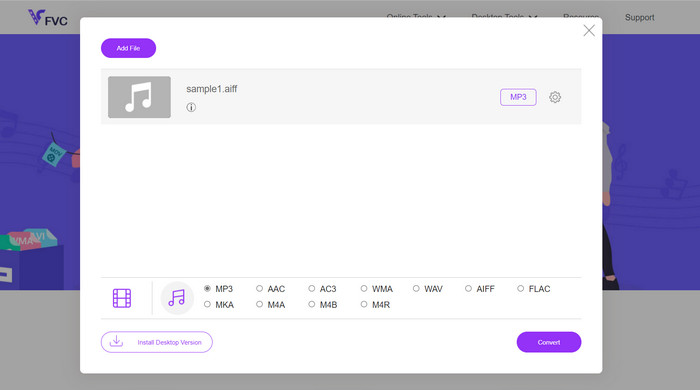
La solución más fácil y cómoda es utilizar un conversor AIFC a MP3 online de confianza, y mi favorito personal es Free MP3 Converter Online. Este servicio web no requiere registro ni dirección de correo electrónico, lo que permite a los usuarios añadir archivos para su conversión directa sin complicaciones. Una característica destacable es su amplio soporte para diversos formatos.
Paso 1. Comienza visitando la página oficial del programa. Haz clic en el botón Añadir archivos para convertir y selecciona el archivo AIFC deseado desde el disco duro de tu ordenador.
Paso 2. Una vez añadido el archivo, accede al menú de formato y elige el formato de salida MP3 como formato deseado.
Paso 3. Por último, haz clic en el botón Convertir para iniciar el proceso de conversión. En pocos segundos, el archivo se convertirá correctamente a formato MP3 y se guardará directamente en tu ordenador para que puedas acceder a él fácilmente.
4. Zamzar
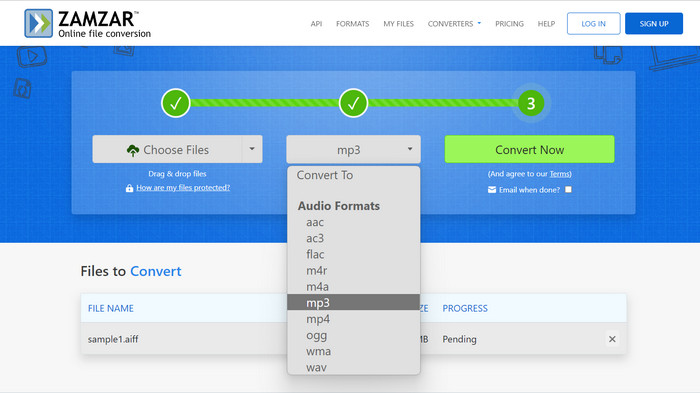
Optar por aplicaciones de conversión de audio basadas en web presenta una alternativa atractiva para convertir AIFC a MP3. Sin necesidad de instalación, estas aplicaciones manejan eficientemente la tarea de conversión de audio. Para ilustrar el proceso, usaremos Zamzar como ejemplo.
Paso 1. Accede a la página de conversión de AIFC a MP3 en tu navegador web. Sube tus archivos AIFC desde el disco duro de tu ordenador, una URL o directamente desde tu cuenta de almacenamiento en la nube.
Paso 2. Para modificar el formato de salida, haz clic en el menú desplegable de formato y selecciona MP3 como formato deseado.
Paso 3. Una vez que hayas configurado los ajustes, haz clic en el botón Convertir ahora para iniciar el proceso de conversión. Espera a que finalice la conversión y, a continuación, descarga los archivos MP3 convertidos a tu ordenador para usarlos de inmediato.
5. Convertio
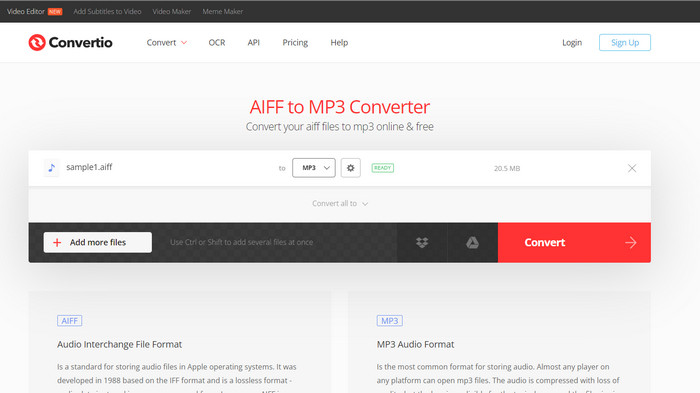
Convertio no se limita únicamente a la conversión de AIFC a MP3. De hecho, ofrece una amplia gama de posibilidades para convertir archivos AIFC a otros formatos populares, incluidos WAV, WMA, AAC, AC3, FLAC, OGG, RA y más. Con Convertio, puedes transformar fácilmente tus archivos AIFC a tu formato de audio preferido, lo que la convierte en una herramienta versátil y valiosa para conversiones de audio.
Paso 1. Visita el sitio web de Convertio (https://convertio.co/aifc-mp3/) en tu navegador web.
Paso 2. Haz clic en el botón Elegir archivos para subir tus archivos AIFC desde tu ordenador. Como alternativa, también puedes arrastrar y soltar los archivos directamente en la página web.
Paso 3. Después de subir los archivos AIFC, haz clic en el menú desplegable del formato de salida. Selecciona MP3 de la lista de formatos de audio disponibles.
Paso 4. Haz clic en el botón Convertir para iniciar el proceso de conversión de AIFC a MP3. Espera a que termine la conversión.
Lecturas recomendadas:
Reseña de los mejores programas para convertir AIF a WAV [2023]
FLAC vs. MP3: ¿Qué formato de archivo de audio es el rey absoluto?
Parte 2. Preguntas frecuentes sobre la conversión de AIFC a MP3
¿QuickTime convierte AIFC a MP3?
Si bien QuickTime puede leer archivos AIFC, no tiene la capacidad de convertir AIFC a MP3.
¿Es AIFC mejor que AIFF?
AIFC es una variante popular de AIFF que emplea compresión, lo que da como resultado archivos de menor tamaño en comparación con AIFF. Sin embargo, esta compresión también conduce a una calidad de audio inferior a la del formato AIFF original.
¿Qué es mejor, MP3 o AIFC?
AIFC es un formato con pérdida y su calidad está determinada por la tasa de bits seleccionada. La modificación de la tasa de bits puede afectar si AIFC supera o queda atrás del MP3 en calidad de audio. A pesar de esto, MP3 goza de una amplia compatibilidad con dispositivos. La mejor opción entre MP3 y AIFC depende de sus requisitos y preferencias específicas.
¿Puedo convertir archivos AIFC a MP3 en mi dispositivo móvil?
Sí, algunas aplicaciones móviles o convertidores en línea ofrecen conversión de AIFC a MP3 directamente en su dispositivo móvil para mayor comodidad.
¿Cómo puedo garantizar la mejor calidad de audio durante el proceso de conversión?
Para lograr la mejor calidad de audio, utilice una tasa de bits más alta durante la conversión. Sin embargo, tenga en cuenta que los archivos de mayor tamaño se traducirán en tasas de bits más altas.
Conclusión
Convertir AIFC a MP3 ofrece flexibilidad y una mayor compatibilidad con dispositivos, lo que lo convierte en una opción popular para la conversión de audio. Aunque AIFC puede ofrecer mejor calidad a tasas de bits más altas, MP3 sigue siendo una opción práctica y ampliamente aceptada para el uso cotidiano.
-
 Las 4 mejores formas de convertir AIFF a MP3 en Mac y PC
 ¿Tiene dificultades porque los archivos AIFF son demasiado grandes para guardarlos? Por lo tanto, debe continuar leyendo mientras explicamos cómo solucionarlo convirtiendo AIFF a formato MP3.
-
 Descarga del reproductor de MP3: los 10 mejores reproductores de música MP3 gratuitos de 2023
 ¿Cuál es el mejor reproductor de música MP3? ¿Cómo pongo música en un reproductor MP3? ¿Cómo descargar el reproductor de música MP3? Esta publicación le brinda una revisión detallada de los 10 mejores reproductores de MP3 gratuitos para PC con Windows y Mac.
-
 5 cortadores de MP3 para cortar cualquier audio fácilmente [2023 actualizado]
 ¿Necesita un cortador de MP3 para recortar el audio? En ese caso, lea este artículo porque proporcionamos las herramientas en las que puede confiar para facilitar el corte del audio.
