


 Video Converter Ultimate
 Grabador de pantalla
 Reparación de vídeo
 Descarga segura
3 formas gratuitas de convertir FLV a WAV
¿Quieres extraer el audio de los vídeos que has descargado pero no sabes cómo? ¿Buscas una forma sencilla de convertir FLV a WAV o MP3?
En algunos casos, solo necesita la pista de audio o la música de fondo de un video. Entonces necesitas convertir video a audio. Esta publicación hablará principalmente sobre cómo convertir FLV a WAV.

Aquí te recomendamos 3 excelentes conversores de FLV a WAV para que conviertas tus archivos FLV. Puedes elegir el método que prefieras para pasar FLV a audio WAV.
Parte 1. Convertir FLV a WAV en línea
Cuando buscas en Internet un método para convertir FLV a WAV, verás que muchos de los resultados son conversores online gratuitos. Por si no sabes cuál usar, aquí te presentamos sinceramente el popular Free Online Video Converter. Está diseñado específicamente para convertir FLV a cualquier formato de vídeo y audio de uso frecuente, como MP4, MOV, AVI, MP3, AAC, M4A y WAV.
En comparación con otros convertidores de FLV a WAV en línea, admite más formatos de entrada y salida y ofrece una velocidad de conversión más rápida. Además, no requiere registrarse en una cuenta o iniciar sesión. Le permite convertir cualquier archivo FLV sin límite de tamaño de archivo.
Paso 1: Ve a este sitio de conversor FLV a WAV online y gratuito en tu navegador. Es compatible con la mayoría de navegadores web, incluidos Safari, IE, Chrome, Firefox y Yahoo.
Paso 2: Haz clic en Add Files to Convert y luego en el botón Download para instalar un lanzador para la conversión de FLV. Tras la instalación, aparecerá una ventana emergente para que cargues tu archivo FLV.

Paso 3: Cuando accedas a la ventana principal del conversor, verás que aparecen algunos formatos de vídeo populares como MP4, MOV, AVI, FLV, MKV, VOB, MPG, WMV y otros. En este paso, debes hacer clic en el icono Audio para mostrar los formatos de audio. Selecciona WAV como formato de salida.
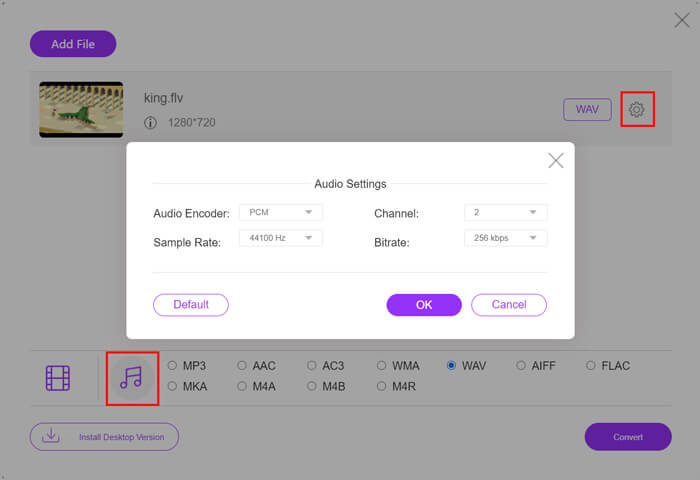
Paso 4: Antes de la conversión de FLV a WAV, puedes hacer clic en el icono Settings junto al formato de salida para personalizar más ajustes de audio. Aquí puedes modificar el códec de audio, el canal, la frecuencia de muestreo y la tasa de bits. Después puedes hacer clic en el botón Convert para convertir tu archivo FLV a audio WAV.
Si quieres convertir FLV a audio como MP3, WMA, WAV, etc., debes hacer clic en la pestaña de audio para marcarla.
Parte 2. Conversión gratuita de FLV a WAV
Además de conversores FLV online, también hay algunos conversores de vídeo gratuitos que pueden ayudarte a convertir FLV a WAV fácilmente. Para ello, puedes recurrir a Free FLV Converter.

Convertidor FLV a WAV gratuito
155321+ Descargas- Convierta FLV a WAV, AAC, MP3, M4A, MP4, MOV, AVI y más.
- Admite todos los formatos de audio y video de uso frecuente.
- Admite las últimas aceleraciones de CPU y GPU multinúcleo.
- Convierta uno o más archivos FLV sin pérdida de calidad.
Descarga gratuitaPara Windows 7 o posteriorDescarga segura
Descarga gratuitaPara macOS 10.7 o posteriorDescarga segura
Lleva todas las funciones de conversión que necesita. La siguiente guía le mostrará cómo convertir FLV en WAV con él.
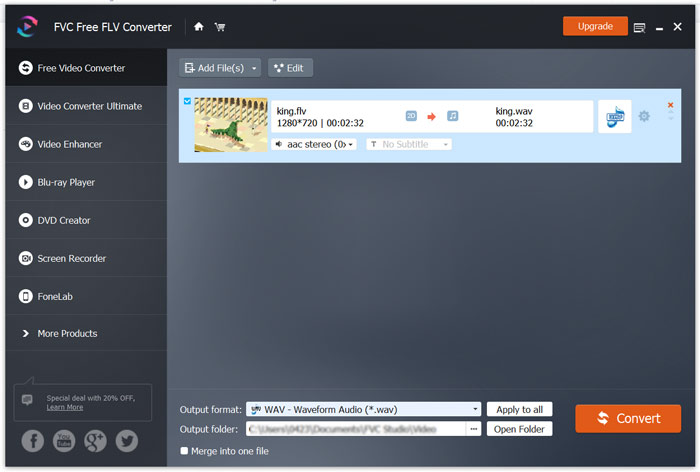
Paso 1: Descarga gratis, instala y ejecuta este conversor gratuito de FLV a WAV en tu ordenador. Haz clic en Add Files para importar tu(s) archivo(s) FLV.

Paso 2: Haz clic en Output format y selecciona WAV como formato de destino. Luego elige una carpeta de destino adecuada.
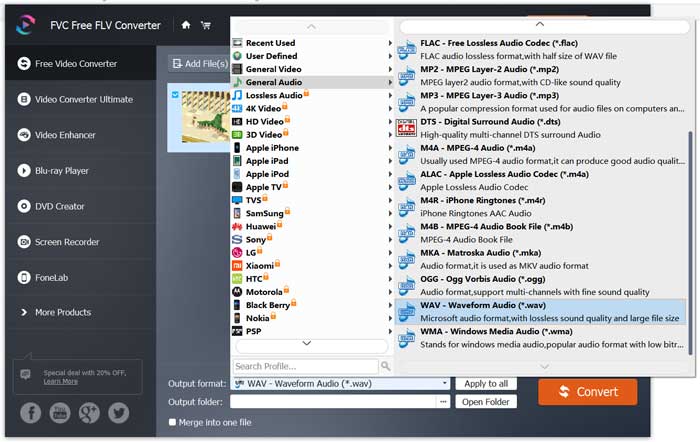
Paso 3: Haz clic en el botón Convert para iniciar la conversión de FLV a WAV.
Parte 3. Convierta FLV a WAV con VLC
Si tienes VLC Media Player instalado en tu ordenador, también puedes recurrir a VLC para convertir FLV a WAV. Debes saber que VLC es un reproductor multimedia muy popular que también incluye algunas funciones básicas de conversión y edición.
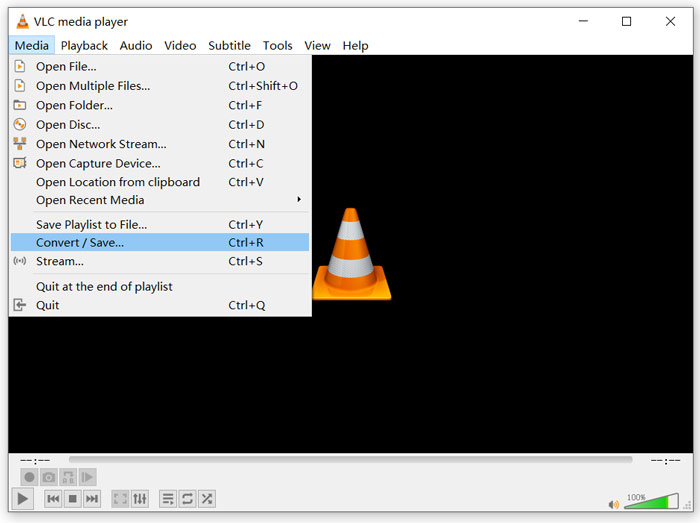
Paso 1: Abre VLC Media Player en tu ordenador. Puedes instalarlo gratis desde el sitio de VideoLAN. Haz clic en Media y luego selecciona la opción Convert/Save en el menú desplegable.
Paso 2: Ahora se abrirá la ventana de Open Media. Haz clic en el botón Add para añadir el archivo FLV que quieres convertir. Luego haz clic en el botón Convert/Save para que aparezca la ventana de Convert.
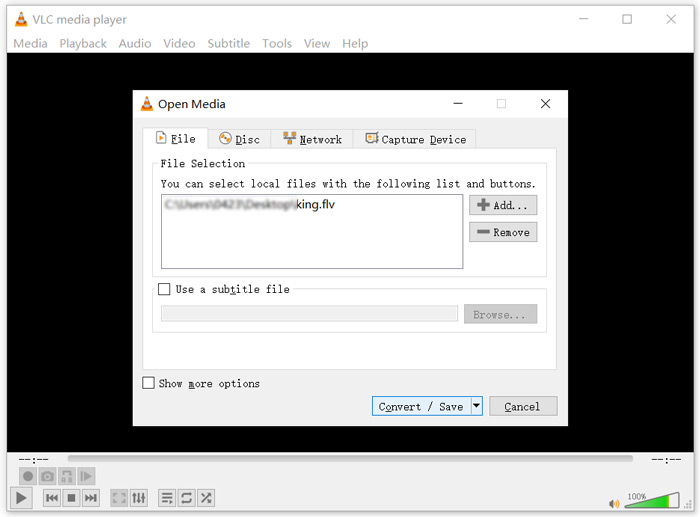
Paso 3: Marca la opción Display the output en la pestaña Convert. Después, selecciona un formato de salida adecuado en la lista desplegable de Profile. Haz clic en el botón Browse para elegir una carpeta de destino adecuada. En este paso puedes renombrar el archivo de salida.
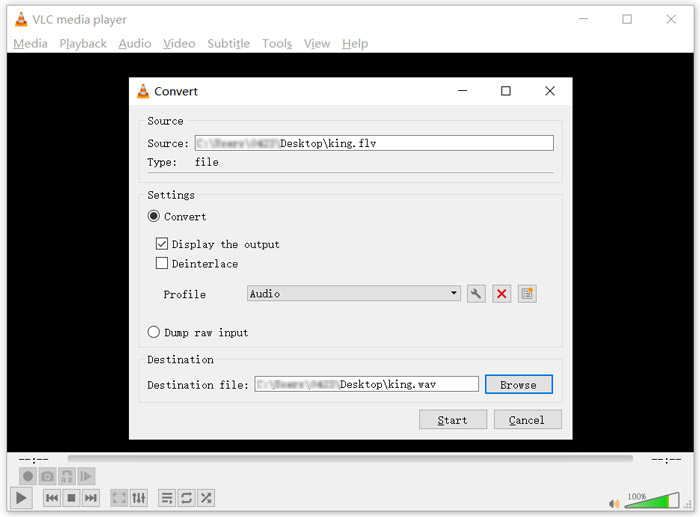
Paso 4: Haz clic en el botón Start para empezar a convertir tu FLV a WAV. Después, VLC reproducirá automáticamente el archivo WAV convertido. Verás el mensaje Converting file mientras dure la conversión. No cierres por completo VLC Media Player hasta que finalice la conversión.
Parte 4. Preguntas frecuentes sobre la conversión de FLV a WAV
FLV vs WAV, ¿cuál es la diferencia entre FLV y WAV?
FLV, Flash Video File, es un archivo de vídeo compatible con Flash que fue desarrollado por Adobe Systems. Contiene una cabecera corta y paquetes entrelazados de vídeo, audio y metadatos. FLV fue diseñado originalmente para incrustar secuencias de vídeo en aplicaciones de Adobe. Un archivo FLV incluye una secuencia de vídeo de 640x360 y una secuencia de audio con 44,1 KHz, 2 canales, AAC.
Un archivo con la extensión WAV es un formato de archivo de audio Waveform y es un contenedor que almacena los datos en segmentos. Fue desarrollado originalmente por Microsoft e IBM y almacena audio sin comprimir y sin pérdida, lo que da lugar a tamaños de archivo muy grandes. El formato utiliza contenedores para guardar los datos de audio, números de pista, frecuencia de muestreo y tasa de bits.
¿Cómo convertir FLV a WAV sin software?
Si desea convertir FLV a WAV sin ningún software de conversión, puede elegir cambiar la extensión del archivo de .flv a .wav.
¿Cómo descargar FLV a WAV?
Hay una gran cantidad de grabadores de pantalla en el mercado que pueden ayudarlo a guardar videos como archivos de audio en su computadora local.
Conclusión
Después de leer esta publicación, puedes conocer 3 formas gratuitas de extraer audio WAV de archivos FLV. Cuando necesites convertir FLV a WAV, puedes elegir el conversor FLV que prefieras para hacerlo.
-
 Los 5 mejores reproductores WAV gratuitos para Android, iOS y computadora
 ¿Cómo reproducir archivos WAV en un teléfono Android? ¿Qué jugador puede reproducir WAV? Esta publicación comparte los 5 mejores reproductores WAV gratuitos para Android, iPhone, Mac y PC.
-
 10 mejores reproductores de video FLV para Windows 10/8/7, Mac, iOS y Android que debe probar
 El reproductor FLV le ayuda a acceder fácilmente a sus archivos FLV en su dispositivo Windows, Mac, Android, iOS. Echa un vistazo a los mejores reproductores de archivos FLV que puedes descargar ahora mismo.
-
 Cómo convertir WAV a MP3 con los 5 mejores convertidores gratuitos
 Esta página es una larga lista de convertidores WAV a MP3 gratuitos (iTunes, Audacity, VLC, Windows Media Player y Free Audio Converter) para cambiar WAV a MP3 en la computadora.
