


 Video Converter Ultimate
 Grabador de pantalla
 Reparación de vídeo
 Descarga segura
2 formas eficientes de combinar videos para Instagram
“¿Cómo puedo combinar videos para Instagram? Tuve una fiesta de cumpleaños inolvidable y tomé muchos videos durante ella. Ahora quiero combinar los videoclips en uno completo y publicarlo en Instagram. Por favor, enséñeme cómo hacerlo… ”Hay muchas ocasiones en las que muchos videoclips están esperando ser fusionados en uno solo. Para satisfacer tal necesidad, este artículo hablará sobre 2 métodos eficientes para unir videos para Instagram.

Parte 1: Combina videos para Instagram sin dañar la calidad
Para empezar, necesitas una aplicación para combinar los vídeos para Instagram. No quieres un programa de edición de vídeo complicado como Adobe Premiere Pro o Final Cut Pro para una tarea tan sencilla. Video Converter Ultimate es más que suficiente para ti.
Puede ayudarlo a fusionar múltiples videos para Instagram fácilmente. La velocidad de procesamiento y la calidad de la imagen son perfectas. Independientemente del formato, puede usar esta aplicación para unirse a los videos de Instagram sin ninguna limitación.
Funciones principales:
- • Combina videos para Instagram independientemente del formato y la resolución
- • La tecnología de aceleración de hardware asegura una velocidad de proceso 70 veces más rápida
- • Edite y únase videos para Instagram sin dejar ninguna marca de agua
- • Recortar y fusionar videos con diferentes resoluciones para que sean perfectos
- • Unir videos con la función de recorte para eliminar los segmentos no deseados
- • Interfaz de usuario fluida e intuitiva tanto para principiantes como para profesionales
Descarga gratuitaPara Windows 7 o posteriorDescarga segura
Descarga gratuitaPara macOS 10.7 o posteriorDescarga segura
Pasos para combinar vídeos para Instagram sin pérdida de calidad
Paso 1. Descarga gratis, instala y ejecuta Video Converter Ultimate. Haz clic en el botón Añadir archivos para añadir los vídeos que quieres unir para Instagram.

Paso 2. En la interfaz principal, puedes arrastrar los vídeos importados para cambiar su orden libremente. Marca la casilla Unir en un solo archivo para que los vídeos no se conviertan por separado.
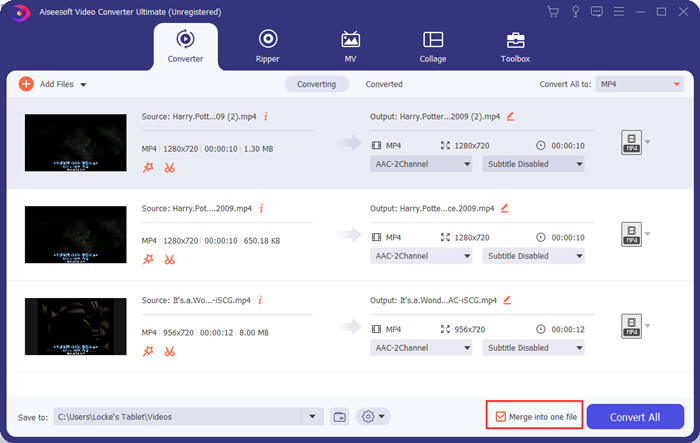
Paso 3. Haz clic en el cuadro Convertir todo a para abrir el menú de perfiles. Entonces podrás seleccionar el formato, la resolución y el códec que desees. Para unir vídeos para Instagram, el formato MP4 es una buena opción. También puedes hacer clic en uno de los botones de Perfil personalizado para ajustar la configuración.
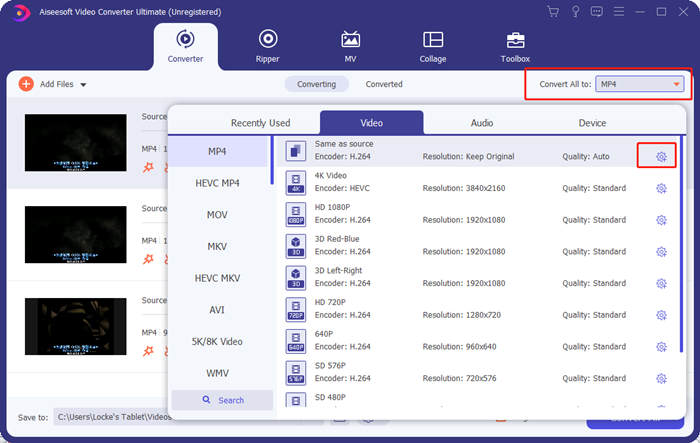
En la ventana Editar perfil, puedes personalizar el códec, la resolución, la frecuencia de fotogramas, la tasa de bits y algunos parámetros de audio.

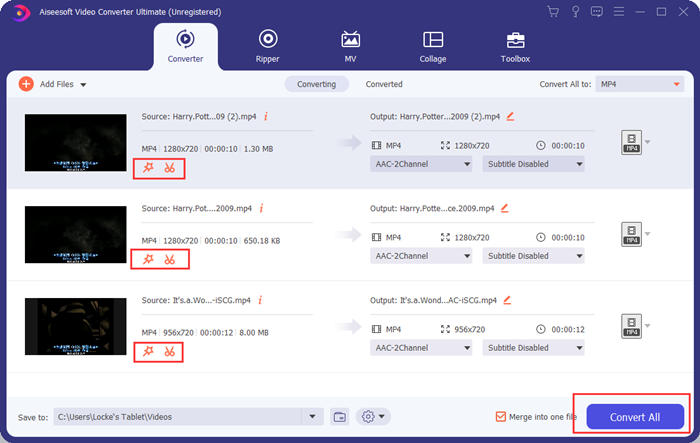
Paso 4. De vuelta en la interfaz principal, puedes hacer clic en el botón Convertir todo para empezar a unir los vídeos para Instagram. Antes de eso, también puedes usar los botones Cortar y Editar para recortar, encuadrar, girar y aplicar otras funciones que pueden hacer que tu vídeo se vea mejor.
Video Converter Ultimate es conveniente y poderoso, pero a nadie le gusta esperar a descargar un programa enorme. Nosotros tampoco. Entonces, ¿es posible fusionar videos para Instagram sin descargar un programa? Sí, ¡sigue leyendo!
Parte 2: Combinar videos para Instagram en línea y gratis
Aquí tienes otra herramienta práctica, FVC Free Online Video Merger, una increíble herramienta web para unir vídeos para Instagram. Puedes cargar esta herramienta en un segundo y luego subir tus vídeos en otro segundo. Simplemente ajusta la configuración y deja que el programa haga el resto. Lo más importante es que esta herramienta es totalmente gratuita .
Pasos para unir vídeos para Instagram online y gratis
Paso 1. Haz clic en FVC Free Online Video Merger para abrirla. En el centro de la página web de la herramienta, haz clic en el botón Subir vídeos para unir. Entonces debería aparecer la ventana del explorador de archivos, en la que tendrás que seleccionar los vídeos y subirlos.

Paso 2. Cuando los vídeos se hayan importado, puedes ajustar su orden. Para ello, puedes eliminar un vídeo importado que esté en un lugar equivocado y volver a insertarlo en el hueco correcto.

Paso 3. Este fusor de vídeos online te permite decidir la Resolución y el Formato del vídeo unido para Instagram. Puedes seleccionar Auto para mantener la resolución original o elegir cualquiera de las otras cinco opciones de resolución.
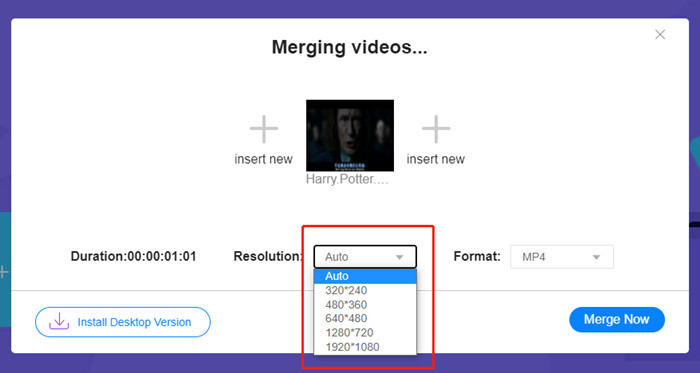
La fusión de video en línea ofrece actualmente nueve formatos de salida para que elijas. MP4 podría ser mejor para tu publicación en Instagram.
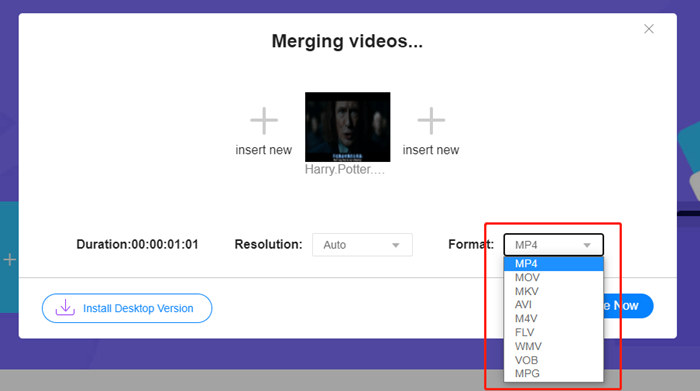
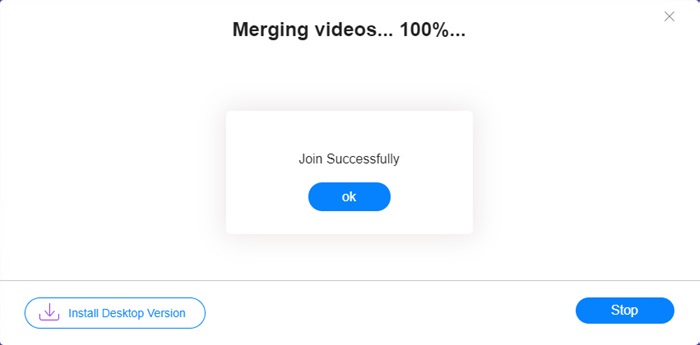
Paso 4. Haz clic en el botón Unir ahora y espera a que aparezca el aviso Unión completada con éxito.
Aunque es conveniente, esta herramienta en línea no es tan perfecta como Video Converter Ultimate. En la herramienta en línea, no puede ajustar el orden de los videos convenientemente, cambiar el codificador o la velocidad de fotogramas, o editar los videos. Además, Video Converter Ultimate le ofrece más opciones de resolución y formatos, y procesa los videos mucho más rápido.
Parte 3: Preguntas frecuentes sobre la combinación de videos para Instagram
¿Qué especificaciones son buenas para los videos de Instagram?
La relación de aspecto de 9:16 sería perfecta. Más exactamente, use 1080 * 1920 si es posible. El mejor formato de video es MP4, aunque también se aceptan otros formatos populares.
¿Qué hacer si mi video combinado es demasiado grande para Instagram?
En la parte superior de la interfaz principal de Video Converter Ultimate hay una Caja de herramientas en la que puedes encontrar un Compresor de vídeo. Puedes usarlo para comprimir tu vídeo hasta el tamaño deseado. En el caso de Instagram, asegúrate de que no sea mayor de 4 GB.
¿Cuánto tiempo puede durar mi video combinado para Instagram?
Depende de dónde publiques el video. El límite para los videos de noticias en tiempo real es de 3 segundos a 1 minuto y para las historias es inferior a 15 segundos. Los videos de IGTV pueden durar 60 minutos, lo que probablemente cubra sus necesidades.
Conclusión
Este artículo ha presentado dos formas eficaces de combinar vídeos para Instagram. Puedes usar Video Converter Ultimate para combinar vídeos para Instagram sin perder calidad de imagen y realizar algunos ajustes y ediciones en los vídeos. La otra herramienta, FVC Free Online Video Merger, es la solución más rápida, pero ofrece menos opciones en cuanto a resoluciones y formatos. Además, no puede cambiar el códec ni la frecuencia de fotogramas. Por último, si tienes cualquier dificultad a la hora de unir vídeos para Instagram, déjanos un comentario para hacérnoslo saber.
-
 Cómo combinar videos en iPhone con o sin iMovie
 Lea y obtenga 4 formas sencillas de fusionar videos en iPhone. Todos los modelos de iPhone y versiones de iOS son compatibles. Puede combinar 2 o más videos en iPhone en un nuevo video rápidamente.
-
 2 mejores formas de unir archivos MKV para ver películas sin cesar
 Cuando descarga su película favorita con archivos MKV separados y desea unir archivos MKV para verla incesantemente, puede aprender 2 formas eficientes de unir archivos MKV de este artículo.
-
 Los 6 mejores ensambladores de videos MP4 para combinar videos MP4 gratis
 Hay muchos ensambladores MP4 disponibles para conectar diferentes clips MP4. En este artículo, hemos elegido algunos ensambladores MP4 gratuitos para Windows 10/8/7 y Mac.
