


 Video Converter Ultimate
 Grabador de pantalla
 Reparación de vídeo
 Descarga segura
Cómo convertir sus archivos de video FLV a formato 3GP de forma gratuita
Este artículo te mostrará las mejores formas de convertir FLV a 3GP. Según las encuestas, hay montones de formatos de archivo de vídeo en el mercado. Los desarrolladores los lanzaron para diferentes propósitos. FLV, por ejemplo, que significa Flash Video, se utiliza para almacenar contenido visual para reproducirlo en Adobe Flash Player a través de internet.
3GP, por otro lado, es el formato multimedia creado por Third Generation Partnership Project para ahorrar ancho de banda y uso de datos en dispositivos móviles. En otras palabras, será mejor que convierta FLV a 3GP y vea videos en el teléfono.

Parte 1: la mejor manera de convertir FLV a 3GP en el escritorio
FVC Free FLV Converter es un potente conversor de vídeo. Como indica su nombre, te permite convertir FLV a 3GP sin gastar ni un céntimo. Además, te ofrece muchas funciones útiles, como edición de vídeo y audio. Más importante aún, su interfaz fácil de usar te permite encontrar rápidamente lo que necesitas.
Características clave del mejor convertidor FLV gratuito
- 1. Convierta videos FLV a cualquier formato multimedia, como 3GP.
- 2. Maneja por lotes varios archivos de video al mismo tiempo.
- 3. Transcodifique archivos FLV para reproducirlos en dispositivos móviles.
Descarga gratuitaPara Windows 7 o posteriorDescarga segura
Descarga gratuitaPara macOS 10.7 o posteriorDescarga segura
Cómo convertir FLV a 3GP gratis
Inicia el mejor conversor FLV gratuito después de instalarlo en tu equipo. Es compatible con Windows 10/8/7 y Mac OS X. Haz clic en el botón Add File(s) para abrir el cuadro de diálogo de archivos. Selecciona los archivos FLV que quieras convertir y haz clic en Open. Entonces los vídeos aparecerán en el área de la biblioteca.

Paso 2: Configurar el formato de salida
Haz clic y despliega el menú desplegable Profile format en la parte inferior y se mostrará el cuadro de perfiles. Escribe 3GP en el cuadro Search Profile y pulsa la tecla Enter en tu teclado. Después selecciona el formato de salida. Si quieres reproducir los vídeos en tu dispositivo móvil, selecciona el fabricante y elige directamente el modelo correcto.

Paso 3: Convertir FLV a 3GP
Configura un directorio específico para almacenar el archivo de salida haciendo clic en el botón Open Folder en la parte inferior. Por último, haz clic en el botón Convert para iniciar la conversión de FLV a 3GP. Unos minutos después, encontrarás los archivos 3GP en tu disco duro.

Parte 2: Cómo convertir FLV a 3GP en línea
Las aplicaciones web de conversión de vídeo son otra forma popular de convertir FLV a 3GP gratis. Sin embargo, la mayoría tienen varios inconvenientes, como límite de tamaño de archivo, marca de agua, problemas de seguridad y más. Afortunadamente, FVC Free Online Video Converter puede ayudarte a resolver el problema. Es totalmente gratuito y no tiene ninguna restricción. La calidad de salida es excelente.
Paso 1: Visita https://www.free-videoconverter.net/free-online-video-converter/ en un navegador web y haz clic en el botón Add Files to Convert para obtener el lanzador. No ocupará espacio local en tu ordenador.
Descarga la versión de escritorio para convertir archivos por lotes.
Paso 2: Haz clic en el menú Add File y sube los archivos FLV que desees convertir. La aplicación web te permite convertir varios vídeos por lotes a la vez.
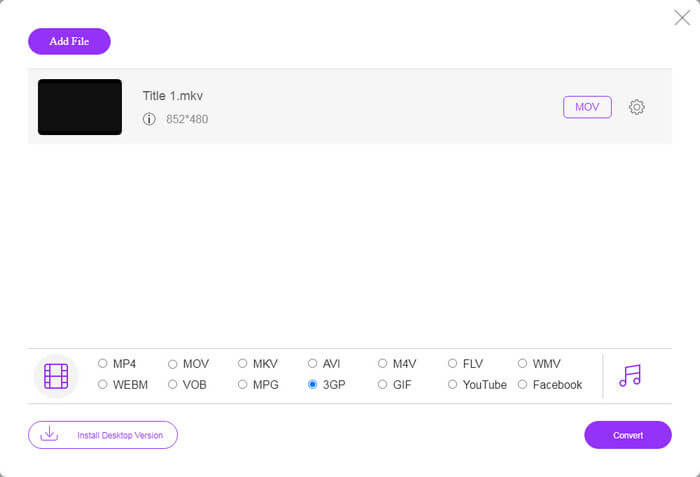
Paso 3: Ve a la parte inferior y selecciona 3GP en la sección de perfiles. Haz clic en el botón Convert para iniciar la conversión de FLV a 3GP en línea. Si tu conexión a internet es rápida, terminará en unos segundos. Después descarga los archivos 3GP a tu disco duro.
No te pierdas:
Parte 3: Cómo convertir FLV a 3GP con VLC
A veces, el software gratuito es tan poderoso como el software profesional. VLC, por ejemplo, es un popular reproductor multimedia de código abierto. Puede convertir FLV a 3GP en Windows, Mac y Linux de forma gratuita. Por supuesto, el gasto es obvio, como difícil de usar. Por lo tanto, compartimos los pasos a continuación:
Paso 1: Ejecuta el conversor gratuito de FLV a 3GP en tu ordenador. Primero tienes que instalarlo. La página web oficial ofrece un instalador seguro.
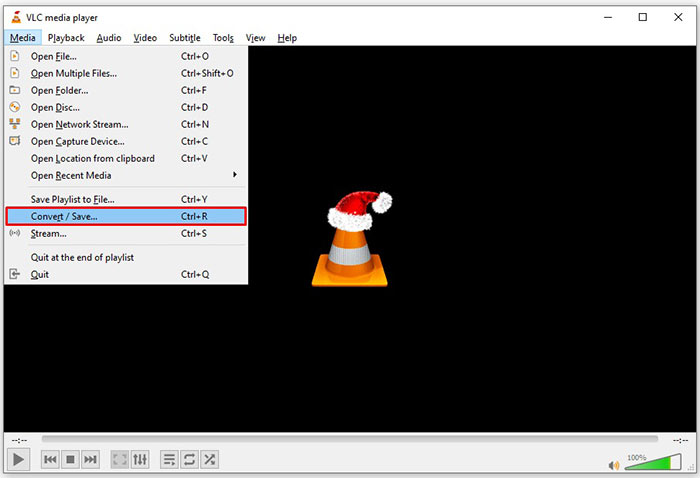
Paso 2: Ve al menú Media en la cinta superior y elige Convert/Save. Entonces aparecerá el cuadro de diálogo de medios abiertos.
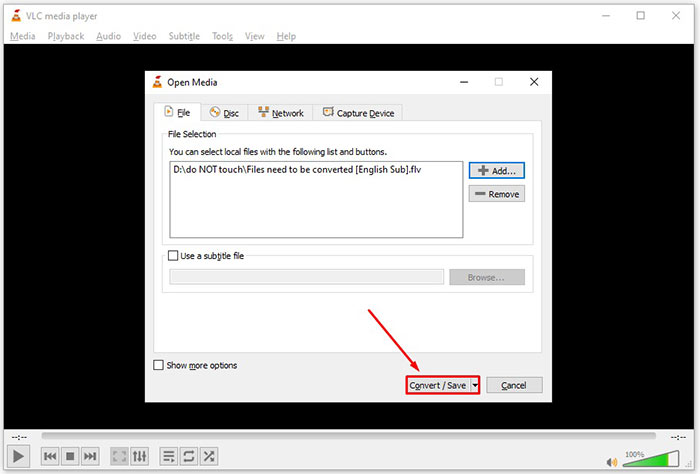
Paso 3: Haz clic en el botón Add, busca el archivo FLV que necesitas convertir y selecciónalo, y haz clic en Open. Pulsa el botón Convert/Save para pasar a la siguiente ventana.
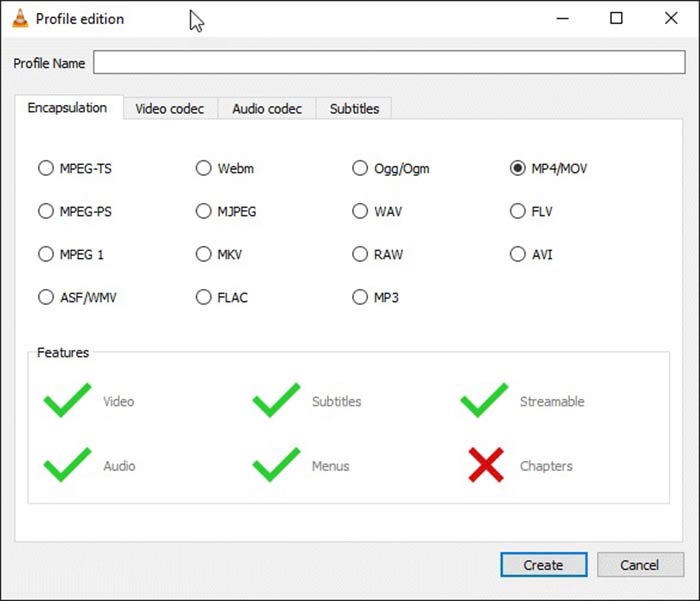
Paso 4: Despliega la lista desplegable junto a Profile y elige 3GP u otro formato de vídeo relacionado. Si quieres cambiar el códec de vídeo u otros parámetros, haz clic en el botón Profile Edit junto a la lista desplegable y añade 3GP.
Paso 5: Haz clic en el botón Browse y elige una carpeta específica para guardar el archivo 3GP de salida en la sección Destination.
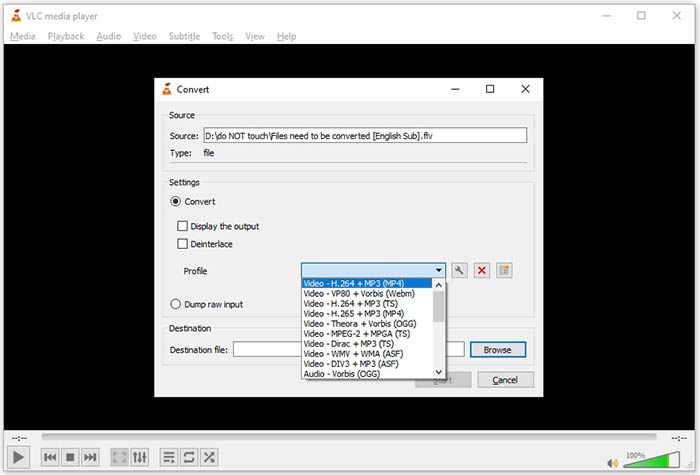
Paso 6: En cuanto hagas clic en el botón Start, VLC empezará a convertir FLV a 3GP.
Se necesita un momento para completar la conversión, ya que VLC hace el trabajo grabando el video original. Significa que el proceso dura tanto como la duración de su video FLV.
FLV frente a 3GP
Adobe Flash Player usó FLV para entregar contenido de video como películas y programas de televisión. En la actualidad, Adobe ya no desarrolla el reproductor y recomienda a los usuarios que lo desinstalen por motivos de seguridad. Sin embargo, aún puede usar el formato FLV en muchos programas que no son de Adobe/Macromedia.
El Proyecto de Asociación de Tercera Generación (3GPP) produjo el formato 3GP/3GPP como un formato de contenedor multimedia. En realidad, se basa en el formato de archivo multimedia ISO. A menudo lo usamos para guardar secuencias de video/audio que se transmiten entre teléfonos móviles 3G y en línea.
Parte 4: Preguntas frecuentes sobre la conversión de FLV a 3GP
¿La conversión de FLV a 3GP dañará la calidad del video?
En términos generales, la conversión de video perderá calidad. Sin embargo, un poderoso programa de conversión de video puede solucionar este problema y optimizar la calidad del video utilizando tecnología avanzada.
¿Cuánto tiempo se tarda en convertir un video FLV?
Está determinado por varios factores, como la duración del video, el software de conversión de video que utiliza, el rendimiento de su hardware y más. Si está utilizando un conversor de video web, su conexión a Internet es un elemento esencial.
¿Por qué FLV no se reproduce en mi iPhone?
iPhone es compatible con MOV, una parte de MP4, ASF y AVI. Por lo tanto, no puede abrir FLV en iPhone directamente. Sin embargo, hay formas de ver FLV en dispositivos móviles. Si su archivo FLV está alojado en servicios de Internet, como Google Drive, el reproductor multimedia integrado está disponible. Además, puede usar otro reproductor multimedia, como VLC.
Conclusión
Esta guía le ha explicado tres formas gratuitas de convertir archivos de video FLV al formato 3GP en la computadora o en línea. Si se prepara para ver videos FLV en dispositivos móviles, será mejor que los convierta a 3GP u otros formatos de video compatibles con dispositivos móviles con FVC Free FLV Converter. No solo es fácil de usar, sino que también puede proteger la calidad de su video. ¿Más preguntas? Deje un mensaje a continuación.
-
 Cómo convertir sus archivos de video FLV a MP4 sin pagar un centavo
 Esta guía comparte cuatro métodos gratuitos para convertir sus archivos de video FLV a formato MP4 en Windows 10/8/7 / XP y Mac OS X, para que pueda disfrutar de los videos en cualquier dispositivo.
-
 Cómo convertir sus videos FLV a archivos de audio MP3 en el escritorio y en línea
 ¿Cómo convertir un archivo FLV a MP3? Todo lo que necesita hacer es leer este artículo detenidamente, encontrar su método favorito y seguir nuestra guía paso a paso para obtener lo que desea.
-
 Las 3 formas principales de convertir FLV a MOV
 ¿Cómo convertir FLV a MOV? ¿Cómo convierto FLV a MOV en Mac? ¿Hay alguna forma gratuita de convertir FLV a MOV en línea? Esta publicación comparte 3 convertidores de FLV a MOV para cambiar archivos FLV a MOV.

