


 Video Converter Ultimate
 Grabador de pantalla
 Reparación de vídeo
Cómo agrandar emojis en iPhone, Android y en línea
¿Es realmente posible agrandar los emojis? Probablemente alguno de ustedes se lo haya planteado, y la respuesta es sí. Los emojis pueden parecer más grandes porque se tratan como imágenes o caracteres que se pueden escalar según su uso.
Los emojis son una forma divertida de expresar emociones, pero a veces pueden verse demasiado pequeños, especialmente en chats o publicaciones en las que quieres que destaquen. Por suerte, hay varias formas de hacer los emojis más grandes, ya sea que estés enviando mensajes desde tu iPhone o Android, o incluso creando uno en línea. Aprender esto será sin duda fácil y entretenido, así que empecemos explorando cómo puedes agrandar los emojis directamente desde tu dispositivo.

Parte 1. Cómo agrandar emojis en línea
Ya que es posible agrandar emojis, este es el primer método que puedes usar para hacerlos fácilmente. Existen varias herramientas en línea que permiten ampliar imágenes. Los emojis se consideran imágenes, así que con esta herramienta, los usuarios pueden agrandarlos con solo unos clics.
FVC Free Image Upscaler, como indica su nombre, es una herramienta online para ampliar imágenes que permite a los usuarios agrandar sus fotos. Esto incluye hacer que los emojis sean más grandes que sus tamaños habituales.
Principales características:
• Tecnología de resolución IA avanzada para ampliar la imagen.
• Reconocimiento automático y mejora de secciones de imágenes borrosas.
• Restauración precisa de píxeles perdidos, colores, texturas y detalles más finos.
• Excelente reconocimiento y restauración natural de los rasgos del retrato.
• Versatilidad en opciones de ampliación de imagen: 2×, 4× u 8× con alta calidad.
• Interfaz en línea fácil de usar para mejorar y ampliar imágenes sin inconvenientes.
Pasos para agrandar emojis con FVC Free Image Upscaler:
Paso 1. Empieza entrando en la web oficial de FVC Free Image Upscaler.
Paso 2. Ahora, haz clic en el botón Upload Photo para seleccionar la imagen que quieres mejorar.
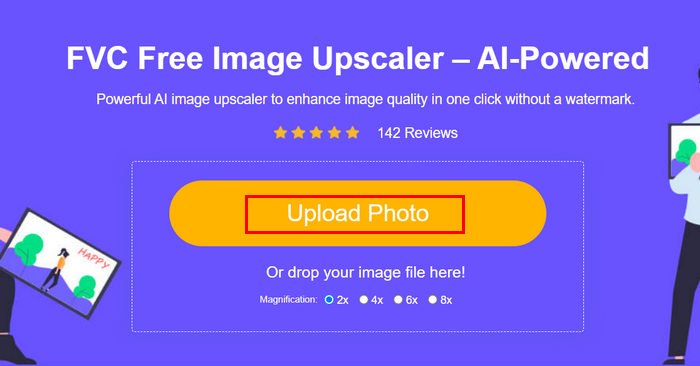
Paso 3. Tras la subida, la herramienta mostrará una vista previa de tu imagen. Para examinar los detalles más de cerca, utiliza la opción Magnifier.
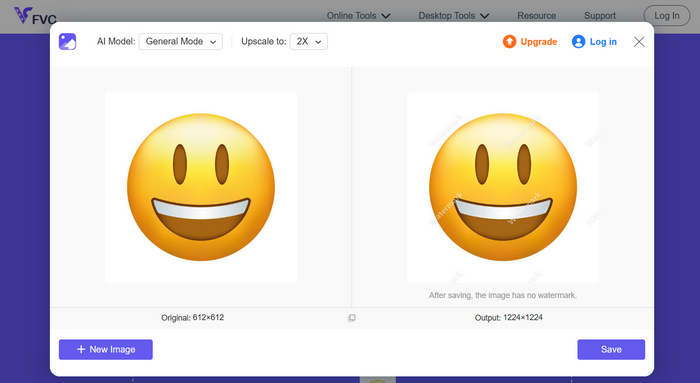
Paso 4. Cuando estés satisfecho con la vista previa, haz clic en el botón Save para descargar tu imagen mejorada.
Con FVC Image Upscaler, puedes ampliar fácilmente tus emojis con solo unos clics. Además, su simplicidad e interfaz intuitiva lo convierten en una herramienta ideal para cualquier usuario.
Haz clic aquí para aprender cómo eliminar emojis de una imagen si te interesa.
Parte 2. Cómo agrandar emojis en el iPhone
Si prefieres no usar aplicaciones de terceros, puedes agrandar tus emojis directamente desde la configuración de tu iPhone. Este método aumenta ligeramente el tamaño general de la pantalla, lo que también amplía el texto y los emojis en tus mensajes y aplicaciones.
Cómo hacer emojis más grandes en iPhone:
Paso 1. Abre la app de Ajustes en tu iPhone. Aquí es donde puedes personalizar todas las opciones de pantalla y accesibilidad.
Paso 2. Desplázate hacia abajo y toca Pantalla y brillo para acceder a los ajustes visuales de tu teléfono.
Paso 3. En esta sección, busca Zoom de pantalla y tócala. Esta función te permite cambiar cómo aparece el contenido en tu pantalla.
Paso 4. Selecciona la opción Texto más grande o vista ampliada. Al hacerlo, todo lo que aparezca en tu pantalla, incluidos los emojis, se verá más grande.
Paso 5. Toca OK o Listo para aplicar los cambios. Una vez hecho esto, tu iPhone se reiniciará brevemente y notarás que tus emojis, textos e iconos ahora se ven más grandes y fáciles de ver.
Si bien este método agranda los emojis, también agranda todo lo demás en la pantalla, incluyendo los íconos de las aplicaciones y el texto. Por lo tanto, si solo quieres agrandar los emojis sin cambiar la visualización general, esta opción podría no ser la ideal.
Parte 3. Cómo agrandar los emojis en Android
Si usas un dispositivo Android y quieres agrandar tus emojis, puedes usar el editor de fotos con IA de PicWish. Esta aplicación te permite agrandar emojis fácilmente sin perder calidad. Puedes subir cualquier emoji o incluso una captura de pantalla y usar la herramienta de redimensionar o ampliar para agrandarlo, manteniendo la nitidez y los detalles.
Pasos para agrandar los emojis en Android:
Paso 1. En tu teléfono Android, busca PicWish AI Photo Editor en la tienda de aplicaciones y descárgalo.
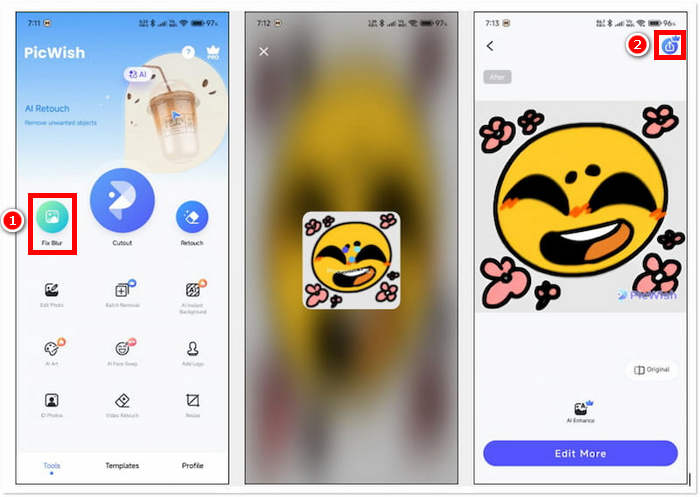
Paso 2. A continuación, abre la app y, en la pantalla principal, busca la opción Fix Blur y tócala para continuar.
Paso 3. Después, selecciona el emoji que quieres agrandar eligiéndolo desde la galería de tu dispositivo.
Paso 4. Tras el proceso de ampliación, pulsa el botón Save para guardar el emoji agrandado en la galería de tu dispositivo.
Después de que la app analice el emoji, verás que no hay opciones para ajustar la escala. Por ello, no te queda otra opción que guardar directamente el emoji ampliado. Esto hace que el proceso sea rápido y sencillo, pero también puede ser una desventaja si quieres tener más control sobre el tamaño final o la calidad. Aun así, PicWish sigue siendo una opción práctica para agrandar emojis al instante en tu iPhone sin necesidad de tener conocimientos avanzados de edición.
Parte 4. Preguntas frecuentes sobre cómo agrandar emojis
¿Por qué los emojis aparecen más grandes cuando se envían solos en los mensajes?
Al enviar un emoji solo en apps de mensajería como iMessage, WhatsApp o Messenger, la aplicación lo amplía automáticamente para que sea más visible y destacado. Esta función está integrada para que el emoji sea más expresivo y visible, pero solo funciona cuando no está acompañado de texto u otros emojis.
¿Puedo hacer que los emojis sean más grandes sin cambiar toda la pantalla?
Sí. Puedes usar herramientas o aplicaciones en línea como FVC Free Image Upscaler y PicWish solo para agrandar los emojis, en lugar de ajustar la configuración de pantalla de tu teléfono.
¿Puedo copiar y pegar emojis más grandes en mis chats?
Sí. Después de ampliar un emoji con una herramienta o aplicación en línea, puedes guardarlo como imagen y luego copiarlo o insertarlo en tus mensajes o publicaciones en redes sociales.
¿Por qué algunos emojis se ven pequeños incluso en pantallas grandes?
El tamaño de los emojis depende de la aplicación y el estilo de fuente de tu dispositivo. Algunas plataformas ajustan automáticamente el tamaño de los emojis para que coincidan con el texto, por lo que incluso en pantallas más grandes, podrían verse pequeños a menos que ajustes la pantalla o uses una herramienta de ampliación de imagen.
Conclusión
Como ves, es posible y fácil hacer los emojis más grandes. Y ahora que ya sabes cómo hacerlo, lo que puedes hacer es probar el método con el que te sientas más cómodo. Ya sea a través de los ajustes de tu teléfono, una app o una herramienta online, cada opción te permite expresarte de una forma más divertida y creativa. Solo recuerda que algunos métodos pueden tener ligeras limitaciones, pero en general, aprender cómo hacer los emojis más grandes es un truco sencillo que puede hacer que tus conversaciones destaquen aún más.
-
 3 formas de comprimir imágenes para emojis de Discord [Guía]
 Si estás buscando un método para comprimir imágenes para emojis de Discord debido a su estricta restricción de tamaño de archivo, lee este artículo y déjate guiar por 3 formas sencillas.
-
 Guías paso a paso sobre cómo eliminar emojis de un video
 ¿Te sientes molesto con los emojis en tus videos? Esta publicación le brindará los mejores procedimientos para eliminar instantáneamente emojis de sus videos utilizando excelentes herramientas.
-
 Cómo quitar marcas de agua de videos en After Effects fácilmente
 Este artículo ayudará a eliminar las marcas de agua del video usando After Effects. Además, brindará las mejores alternativas para eliminar objetos molestos.
