


 Video Converter Ultimate
 Grabador de pantalla
 Reparación de vídeo
 Descarga segura
Cómo combinar archivos de video MXF de la videocámara Sony con la calidad 4K original
P: “He pedido una Sony X70 en este momento para reemplazar mi cámara Canon XF100. Con Canon XF100, puedo usar Canon XF Utility para fusionar todos los archivos MXF a alta velocidad. ¿Existe un software similar para fusionar archivos MXF creados por Sony X70?
Cuando usa el modo 4K para tomar videos con cámaras profesionales como Sony XDCAM (incluida Sony X70), Canon XF305 y Panasonic AG-HPX500M, los archivos de video se guardarán en formato MXF con alta calidad. Pero la mayoría de los usuarios de video no admiten archivos MXF. Estos son los combinadores MXF más utilizados que debe conocer.

Parte 1: Cómo fusionar archivos MXF gratis en línea
Si solo quieres unir varios archivos MXF grandes sin límite de tamaño, FVC Free Online Merger es una opción versátil que puedes tener en cuenta. Te permite subir vídeos en múltiples formatos. Además, puedes generar un vídeo impresionante sin que se añada ninguna marca de agua.
- 1. Coloque los archivos de video MXF uno al lado del otro en línea sin ninguna limitación de tamaño.
- 2. Combine varios archivos de video MXF en formato MP4 con una resolución de 1080p.
- 3. Configure y ajuste la configuración de resolución con varios ajustes preestablecidos.
- 4. Proteja la privacidad para eliminar el MXF cargado dentro de las 24 horas.
Paso 1: Ve a FVC Free Online Merger y haz clic en el botón Upload Videos to Merge para instalar el complemento del navegador y elige los archivos MXF que quieras unir.

Paso 2: Haz clic en el icono Más para insertar otros archivos MXF en el orden deseado. Después elige el formato MP4 para asegurarte de que los vídeos puedan subirse y reproducirse sin problemas en YouTube. Para mantener una alta calidad de vídeo, puedes elegir la resolución 1920*1080P.

Paso 3: Después de eso, puedes establecer la ruta para guardar tus vídeos combinados en el ordenador y hacer clic en el botón Merge Now en la esquina inferior derecha para empezar a unir automáticamente los archivos MXF.

Parte 2: Cómo unir archivos MXF sin calidad original
Cuando necesites conservar la calidad original 4K de los vídeos MXF para crear películas o series de televisión, FVC Video Converter Ultimate es una forma versátil de combinar archivos de vídeo, incluidos MXF, MKV, MP4 y muchos más. Te permite recortar la parte deseada, comprimir el archivo y convertirlo a otro formato de vídeo. Además, te permite unir archivos MXF con resolución 1080P o 4K.
- 1. Combine diferentes formatos de video, incluidos MXF, MKV, MP4 y más.
- 2. Proporcione 4 métodos para mejorar la resolución, eliminar el ruido de video, etc.
- 3. Modifique la resolución de video, la velocidad de bits, la velocidad de fotogramas y otros parámetros.
- 4. Convierta el video combinado a otro formato de video para sitios de redes sociales.
Descarga gratuitaPara Windows 7 o posteriorDescarga segura
Descarga gratuitaPara macOS 10.7 o posteriorDescarga segura
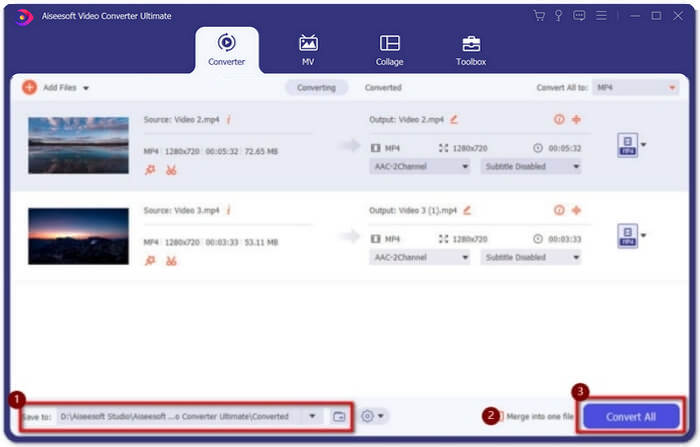
Paso 1: Descarga e inicia Video Converter Ultimate. Haz clic en el botón Add Files para seleccionar todos los archivos MXF que quieras unir. También puedes arrastrar los archivos al programa. Si quieres ajustar el orden, simplemente arrastra los vídeos y suéltalos en el orden correcto.

Paso 2: Después de eso, puedes hacer clic en el botón Convert All to y buscar el formato MXF en la línea de vídeo. Elige el botón 4K o Same as Source para mantener la calidad original alta. Además, también puedes mejorar la resolución del vídeo según tus necesidades.

Paso 3: Después de elegir la ruta de almacenamiento deseada, marca la casilla Merge into one file y luego haz clic en el botón Convert All para combinar los archivos MXF. Una vez que hayas unido los vídeos, podrás guardar los archivos en tu ordenador o compartirlos en redes sociales.
Parte 3: Preguntas frecuentes sobre la combinación de archivos de video MXF
1. ¿Qué es MXF?
MXF es la abreviatura de Material Exchange Format, que es un formato de medios de audio y video profesional. Los videos tomados por cámaras profesionales en modo 4K siempre están en formato MXF, por lo que a menudo se usa para producir y editar videos en la industria del cine y la televisión.
2. Si quiero fusionar videos MXF para YouTube, ¿qué formato debo elegir?
MXF es demasiado grande para YouTube, es mejor que elijas fusionar archivos MXF en MP4 para mantener una calidad relativamente alta con un tamaño pequeño. Además, la mayoría de los dispositivos y reproductores admiten la reproducción de videos MP4.
3. ¿Puedo reproducir archivos de video MXF con QuickTime Player?
Sí, puedes. Aunque es un formato poco común, algunos reproductores de vídeo pueden reproducir archivos MXF, como QuickTime en Mac y Zoom Player en Windows. Si no puedes reproducir vídeos MXF, puedes intentar convertir los archivos MXF a algunos formatos más comunes como MP4 y AVI.
Conclusión
Para combinar archivos de video MXF tomados por cámaras profesionales, puede encontrar los ensambladores MXF más utilizados en el artículo. Si solo desea cargar estos videos combinados en YouTube, usar el ensamblador en línea gratuito es la mejor opción porque puede ayudarlo a combinar archivos MXF en MP4 con tamaños más pequeños. Sin embargo, si desea crear una película o un televisor profesional, debe elegir el Video Converter ultimate para mantener la calidad 4K original.
-
 Las 6 mejores fusiones de AVI: cómo unir archivos de video AVI en Windows y Mac
 Cuando desee unir videos AVI para un DVD, puede conocer las características de los 6 mejores ensambladores de AVI, incluidas las herramientas en línea gratuitas, así como los programas de escritorio del artículo.
-
 Cómo comprimir MXF con Premiere Pro y Free Online
 ¿Cómo comprimir MXF con un tamaño de archivo más pequeño? ¿Cómo comprimir archivos MXF en Adobe Premiere Pro? Esta publicación comparte 2 formas de comprimir archivos MXF.
-
 Cómo unir archivos M2TS de forma gratuita
 ¿Quiere fusionar libremente archivos M2TS / MTS capturados por videocámaras? Esta publicación comparte formas eficientes de unir 2 archivos M2TS en uno sin volver a codificar.
