


 Video Converter Ultimate
 Grabador de pantalla
 Reparación de vídeo
 Descarga segura
Cómo convertir sus archivos de video FLV a formato 3G2 en el escritorio y en línea
Se dice que la tecnología cambia la vida y hace que nuestro trabajo y nuestra vida diaria sean más fáciles. Sin embargo, toda moneda tiene dos caras, y la tecnología no es una excepción. El vídeo digital, por ejemplo, nos da la oportunidad de acceder al entretenimiento y a la información en cualquier momento y lugar. El problema es el formato de vídeo. Según una encuesta reciente, hay más de cien formatos de vídeo. Esta guía se centra en cómo ayudarte a convertir FLV a 3G2 o 3GP en el ordenador y online de forma gratuita.

Parte 1: Cómo convertir FLV a 3G2 en PC / Mac
Método 1: Convierta FLV a 3G2 con Free FLV Converter
Solo hay unos pocos conversores de vídeo que admiten el formato 3G2. FVC Free FLV Converter es uno de ellos. Además, puede satisfacer tus necesidades sin pagar ni un céntimo. Si tienes muchos archivos FLV, puede procesarlos todos a la vez rápidamente.
Funciones principales del mejor conversor de FLV a 3G2
- 1. Convierta FLV a 3G2 sin pérdida de calidad.
- 2. Maneje por lotes múltiples archivos FLV usando tecnología multi-hilo.
- 3. Ofrezca una amplia gama de herramientas adicionales, como la edición de videos.
Descarga gratuitaPara Windows 7 o posteriorDescarga segura
Descarga gratuitaPara macOS 10.7 o posteriorDescarga segura
Cómo convertir FLV a 3G2 por lotes gratis
Paso 1: agregue archivos FLV
Cuando necesites convertir FLV a 3G2, instala el mejor conversor de vídeo gratuito en tu ordenador y ejecútalo. Haz clic en el botón Add File(s), busca todos los archivos FLV que quieras convertir y ábrelos.

Paso 2: seleccione el formato de salida
Ve a la parte inferior tras cargar los vídeos. Haz clic para desplegar la opción Output format, busca 3G2 con la barra de búsqueda y selecciónalo en el lado derecho. Haz clic en el botón Open Folder y elige una carpeta específica para guardar la salida.

Paso 3: convierta FLV a 3G2
Por último, haz clic en el botón Convert para comenzar de inmediato a convertir FLV a 3G2. Unos minutos después, encontrarás los archivos 3G2 en la carpeta que has elegido.

Método 2: Cómo convertir FLV a 3G2 con VLC
VLC no es solo un reproductor multimedia de código abierto, sino también un conversor gratuito de FLV a 3G2. Te permite hacer un conversor de video de forma gratuita tanto en Windows como en Mac. Estos son los pasos:
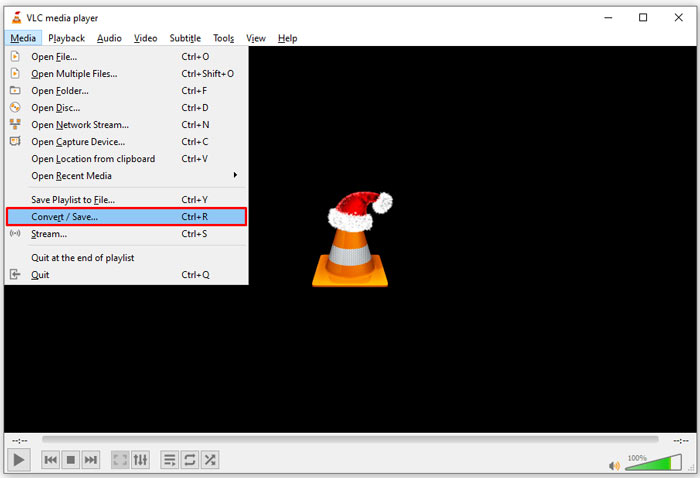
Paso 1: Abre VLC, ve al menú Media en la parte superior y elige Convert/Save.
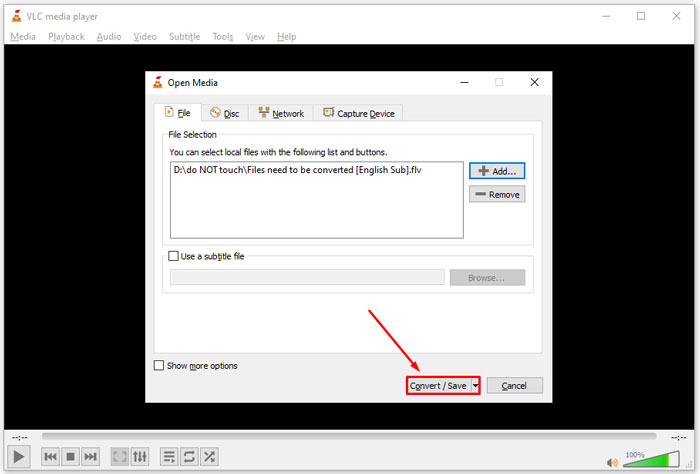
Paso 2: Haz clic en el botón Add y abre el archivo FLV que pretendes convertir a otro formato. Pulsa el botón Convert/Save para continuar.
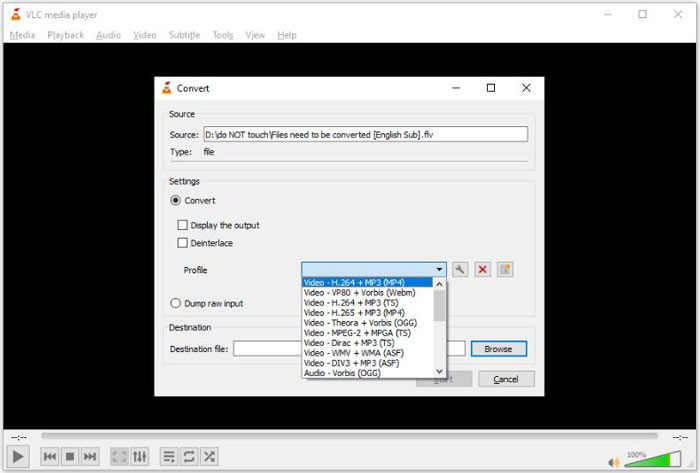
Paso 3: Despliega la opción Profile y selecciona 3G2 u otro formato relacionado. Después, configura la carpeta de salida pulsando el botón Browse.
Paso 4: Cuando hagas clic en el botón Start, VLC convertirá FLV a 3G2. Tardará un rato y tendrás que ser paciente.
Parte 2: Cómo convertir FLV a 3G2 en línea
A veces solo necesitas convertir FLV a 3G2 de forma ocasional. En esos casos, una aplicación web es una opción muy práctica, como FVC Free Online Video Converter. Es gratuita, no requiere registro ni tiene límite de tamaño de archivo.
Paso 1: Visita https://www.free-videoconverter.net/free-online-video-converter/ en cualquier navegador. Haz clic en el botón Add Files to Convert y descarga el iniciador.

Paso 2: Cuando termine la descarga, el iniciador se abrirá automáticamente. Haz clic en el botón Add File y carga los archivos FLV. Esta aplicación web de conversión de vídeo admite la conversión por lotes.
Si quieres ajustar parámetros como la resolución, la tasa de fotogramas y más, haz clic en el icono de Gear y abre el cuadro de diálogo Settings.

Paso 3: Ve a la parte inferior y selecciona un formato de salida adecuado en el área de formato. Cuando estés listo, haz clic en el botón Convert. Después, descarga el resultado a tu disco duro.
Quizás también te interese:
Parte 3: Preguntas frecuentes sobre FLV a 3G2
¿Qué son los archivos 3G2?
3G2, siglas de 3rd Generation Partnership Project Group 2, es una extensión para archivos multimedia basada en MPEG-4. Fue creado por un grupo de siete organizaciones de desarrollo estándar para teléfonos móviles en redes CDMA. Es muy similar a 3GP.
¿Puede Windows Media Player abrir 3G2?
No, WMP no puede abrir ni reproducir archivos de video 3G2 porque carece de los códecs correspondientes. Tiene tres opciones para abrir archivos 3G2: convertirlos a formato de video estándar, descargar un reproductor de video 3G2 o instalar un paquete de códec adicional para WMP.
¿FLV es mejor que 3G2?
La respuesta depende de tu propósito. Si ve el video en un teléfono móvil con red CDMA, 3G2 es una mejor opción. Para compartir videos, FLV es mejor que 3G2.
Conclusión
Ahora, debe comprender qué significa 3G2 y cómo convertir FLV a 3G2 sin pérdida de calidad. VLC es un conversor de video gratuito que tiene la capacidad de cambiar formatos de video. Sin embargo, FVC Free FLV Converter funciona mejor. Es más fácil de usar que VLC y completamente gratis. Si tiene más problemas, deje un mensaje debajo de esta publicación y le responderemos rápidamente.
-
 FLV a WAV - Convierta FLV a WAV en línea gratis y en Mac / PC
 ¿Cómo convierto un archivo FLV? ¿Puede VLC convertir FLV a WAV? Esta publicación cuenta 3 formas gratuitas de convertir FLV a WAV sin pérdida de calidad.
-
 FLV a MPG - Cómo convertir FLV a MPG en Mac, PC y en línea gratis
 ¿Cómo convertir FLV a MPEG? ¿Puedo convertir FLV a MPG gratis? Esta publicación comparte 3 convertidores de video gratuitos para ayudarlo a convertir FLV a MPG sin pérdida de calidad.
-
 FLV a Xbox - Cómo convertir y reproducir FLV en Xbox
 ¿No puede reproducir archivos FLV en Xbox One o Xbox 360? ¿Necesita convertir FLV a formato compatible con Xbox como MP4, AVI, MOV o WMV? Esta publicación enumera 3 convertidores FLV a Xbox gratuitos para que juegues FLV en Xbox.
