


 Video Converter Ultimate
 Grabador de pantalla
 Reparación de vídeo
 Descarga segura
3 mejores grabadoras de llamadas de Facebook: cómo grabar videollamadas de Facebook
¿Cómo grabar videollamadas de Facebook para conservar los momentos tan valiosos que compartes con tus amigos y familiares? Desde que Facebook incorporó la función de videollamadas, cada vez más usuarios prefieren contactar con los demás a través de llamadas de Facebook en lugar de llamadas telefónicas. Pero, al tratarse de una función de comunicación añadida dentro de una red social, no dispone de la opción de grabar como sí ocurre con las llamadas de teléfono. Además, la app independiente derivada —Facebook Messenger— tampoco incluye un grabador integrado. En este caso, puedes conocer 3 grabadores de llamadas de Facebook fáciles de usar para ordenador, dispositivos iOS y móviles Android, con instrucciones detalladas en este artículo.

Parte 1: La mejor grabadora de llamadas de Facebook en línea para Windows / Mac
Sin descargar ningún software de terceros, puedes utilizar FVC Free Screen Recorder para grabar videollamadas de Facebook online y de forma gratuita. Es un grabador de llamadas de Facebook fácil de usar, con una interfaz sencilla y varias funciones que puedes necesitar.
- 1. Grabe llamadas y videos de Facebook en línea de forma gratuita con pasos simples.
- 2. Grabación sin pérdidas de audios y videos para mantener videos de alta calidad.
- 3. Sin marca de agua para proteger su propiedad.
- 4. Las grabaciones se guardarán automáticamente en la biblioteca de medios y puede elegir eliminar, descargar y compartir en SNS libremente.
Paso 1: Ve a la página web de FVC Free Screen Recorder desde cualquier navegador. Haz clic en el botón Start Recording para instalar el lanzador en unos segundos y, a continuación, vuelve a hacer clic en el botón Start Recording para iniciar el grabador.

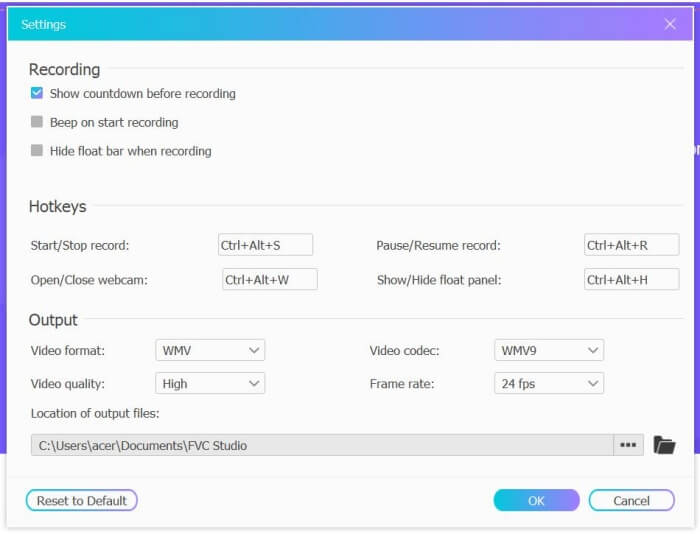
Paso 2: Haz clic en el menú Recording Area para elegir la pantalla completa o seleccionar libremente una región. Después, activa el Microphone y el Speaker. Para ajustar la configuración de vídeo, puedes hacer clic en el icono de Setting. Y puedes elegir el formato MP4, calidad High y 24 fps para mantener una alta calidad en las grabaciones. Luego haz clic en el botón REC para empezar a grabar las llamadas de Facebook.
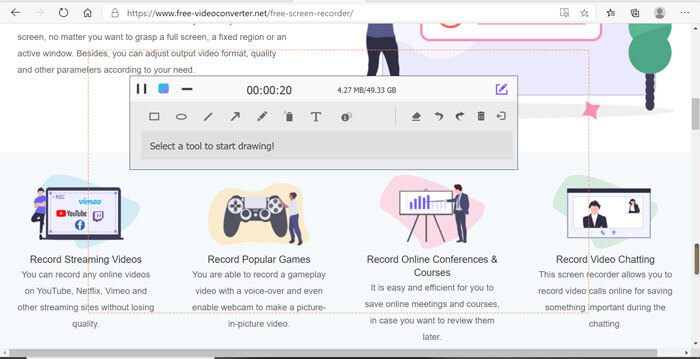
Paso 3: Aparecerá una caja de herramientas con múltiples herramientas de edición. Puedes añadir formas, texto y líneas según tus necesidades. Después, haz clic en el icono Stop para guardar tu grabación en la nube. Con el botón derecho del ratón puedes elegir descargarla en tu ordenador.
El uso de esta grabadora de videollamadas de Facebook en línea es la mejor manera para que los usuarios de computadoras graben las videollamadas de Facebook en línea. Al ajustar la configuración de grabación de antemano, puede guardar las llamadas de Facebook en formato MP4 con tamaño pequeño y alta calidad. Si está acostumbrado a recibir llamadas de Facebook en el móvil, siga leyendo este artículo.
Parte 2: Cómo grabar una llamada de Facebook para iOS a través de la grabadora predeterminada
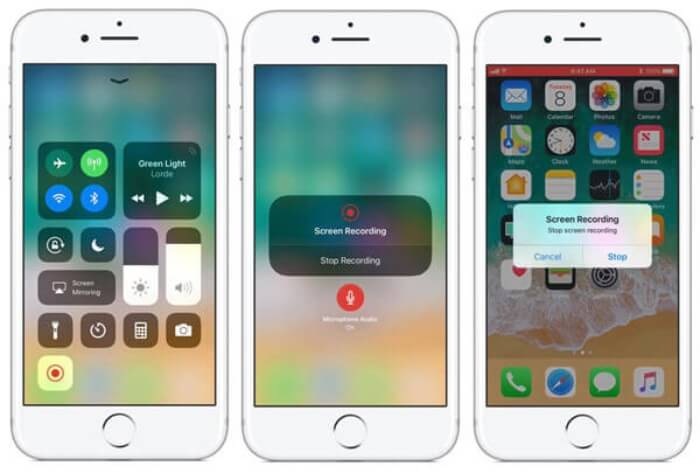
La versión actualizada de iOS 11 o superior tiene una nueva grabadora predeterminada en su iPhone y iPad que es la mejor opción para capturar videollamadas de Facebook sin descargar ninguna aplicación. Aquí puede aprender cómo agregar la grabadora de llamadas de Facebook a los accesos directos en el centro de control y la forma de usarla.
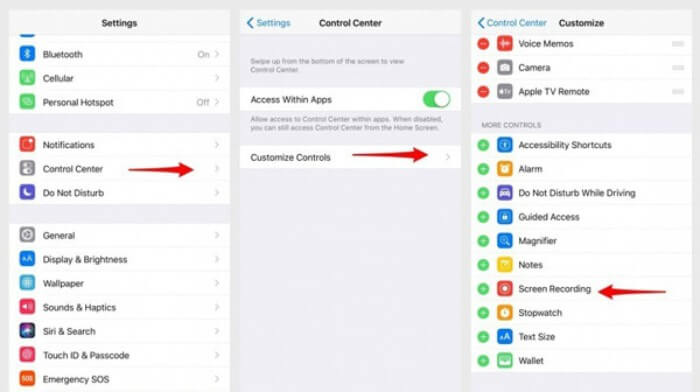
Paso 1: Toca la app Settings en tu iPhone/iPad y desplázate hacia abajo para elegir la opción Control Center. Luego pulsa en la pestaña Customize Controls y busca la función Screen Recording. Toca el icono con el signo Plus para añadir esta función al Centro de control.
Paso 2: Desliza hacia abajo desde la parte superior de la pantalla del teléfono para abrir el Centro de control y encontrarás la app de grabación en la parte inferior. Toca el icono Screen Recording para iniciar la grabación, y puedes elegir si quieres capturar el vídeo o grabar solo la pista de audio. Si quieres finalizarla, toca la Status Bar roja de la parte superior y selecciona la opción Stop en la ventana emergente.
Parte 3: una sencilla grabadora de Facebook Messenger para Android
Algunos teléfonos Android no tienen grabadoras integradas y hay demasiadas grabadoras de videollamadas de Facebook para que Android pueda elegir. Así, puedes aprender uno de los mejores grabadores para móviles Android con los pasos detallados en la siguiente parte.
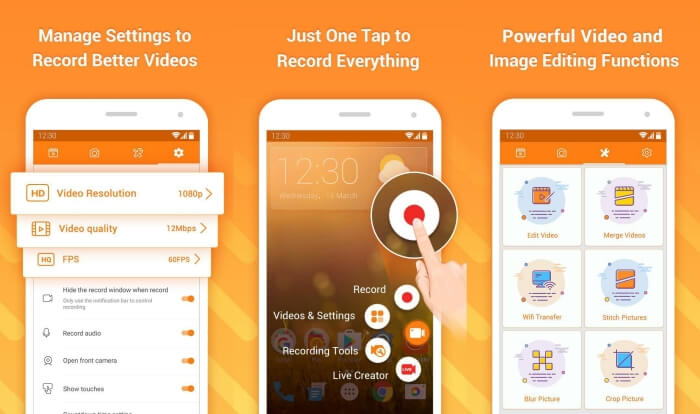
DU Recorder es un grabador de llamadas de Facebook para Android fácil de usar, conocido por su grabación fluida. Sin necesidad de root, cualquiera puede utilizarlo para grabar llamadas de Facebook Messenger con un solo toque.
Paso 1: Inicia el grabador y verás cuatro menús: grabaciones, capturas de pantalla, herramientas de edición y ajustes. Primero, toca el menú Settings para ajustar los parámetros de vídeo. Para mantener una alta calidad, puedes elegir resolución 1080p y una tasa de fotogramas de 30 fps.
Paso 2: No cierres el grabador y simplemente abre Facebook Messenger. Entonces verás el icono del grabador. Toca el icono y elige el icono Recording para empezar a capturar la pantalla y el sonido. Puedes tocarlo de nuevo para detener la grabación. Después puedes pulsar el icono Editing para recortar la grabación y añadirle música.
Quizás también te interese:
Reseña de Action Screen Recorder
Parte 4: Preguntas frecuentes de la grabadora de llamadas de Facebook
1. ¿Tiene Facebook la grabadora predeterminada para grabar videollamadas en la PC?
No, no es así. Por lo tanto, debe confiar en otros grabadores de llamadas profesionales de Facebook. Si no desea descargar otro software que ocupe el espacio de almacenamiento en su computadora, FVC Free Screen Recorder es su mejor opción.
2. ¿Cómo iniciar un chat con un amigo en la aplicación Facebook Messager?
En primer lugar, abra Facebook Messenger en su móvil, luego elija el chatbox del amigo al que desea tener una llamada de Facebook. Y ahora puede ver el ícono de Video, por lo que puede hacer clic en él para iniciar una videollamada.
3. ¿Qué formato debo elegir para guardar las grabaciones cuando utilizo grabadoras de Facebook Messenger?
Ya sea que esté utilizando una grabadora de llamadas de Facebook en una computadora o un dispositivo móvil, el mejor formato para guardar las videollamadas de Facebook es MP4. Puede ahorrar más espacio de almacenamiento y es compatible con todos los dispositivos.
Conclusión
En el artículo anterior se han presentado 3 grabadores de videollamadas de Facebook. En iPhone, iPad y algunos móviles Android puedes usar fácilmente el grabador integrado del propio teléfono. En caso contrario, puedes elegir cualquier grabador, incluido DU Recorder disponible en Google Play. Para PC, FVC Free Screen Recorder es tu mejor opción para capturar llamadas de Facebook. Si te encuentras con otros problemas al usar grabadores de llamadas de Facebook, deja tu comentario más abajo.
-
 Revisión de Snagit 2021: pros, contras y la mejor alternativa
 ¿Cuál es la mejor alternativa a Snagit? ¿Existe una herramienta de captura de pantalla como Snagit? Esta publicación revisará Snagit y compartirá la mejor alternativa a Snagit para capturar la pantalla.
-
 Las 6 mejores grabadoras WAV que no debe perderse en el escritorio y en línea
 El mejor software de grabación WAV que compartimos en este artículo tiene una variedad de funciones útiles, que lo ayudan a capturar audio y voz como profesionales.
-
 Los 4 mejores grabadores de sonido AIFF gratuitos que producen audio de alta calidad
 Este artículo habla sobre AIFF y algunas de las herramientas más populares que puede usar para producir un formato AIFF de alta calidad.
