


 Video Converter Ultimate
 Grabador de pantalla
 Reparación de vídeo
 Descarga segura
Cómo convertir MTS a FLV con 3 MTS to FLV Converter
¿Quieres convertir archivos MTS a FLV? Los vídeos grabados con videocámaras AVCHD suelen guardarse en formato MTS o M2TS. Algunos reproductores multimedia no son compatibles con archivos MTS, ni tampoco se pueden subir directamente a YouTube o Facebook. Si tienes una videocámara AVCHD como Sony, Panasonic o Canon, quizá quieras convertir los vídeos MTS grabados al formato de vídeo Flash. Así podrán reproducirse en la mayoría de reproductores multimedia. Por eso deberías seguir leyendo nuestro artículo, ya que te ofrecemos 3 métodos para convertir archivos MTS a FLV en Windows y Mac.

Parte 1. Manera profesional de convertir MTS a FLV de forma gratuita
Para convertir tu archivo MTS a vídeo Flash y poder subirlo, necesitas una herramienta profesional como FVC Free MTS Converter. Es un convertidor de MTS a FLV que puede convertir por lotes archivos MTS a FLV, MP4, WMV, MOV y otros formatos de vídeo y audio. Con las herramientas de edición de vídeo integradas, puedes editar los archivos MTS antes de convertirlos.

Convertidor MTS gratuito de FVC
1,286,400+ Descargas- Convierta MTS a FLV en Windows 10/8/7 / Vista / XP y Mac OS X.
- Comprima, combine y agregue otros efectos de video a archivos MTS.
- Agregue temas especiales a sus archivos MTS, como vacaciones, familia, cumpleaños.
- Convierta por lotes MTS a FLV, MP4, MKV, etc. a una velocidad 50 veces más rápida.
Descarga gratuitaPara Windows 7 o posteriorDescarga segura
Descarga gratuitaPara macOS 10.7 o posteriorDescarga segura
Paso 1. Añadir archivo MTS
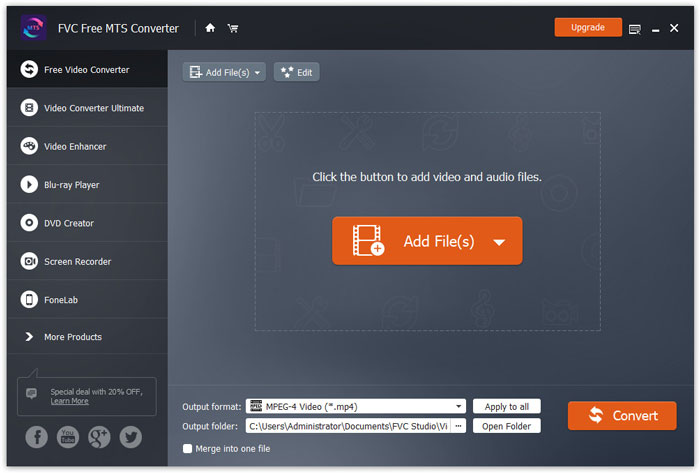
Descarga gratis, instala y ejecuta FVC Free MTS Converter. Haz clic en el botón Add File(s) para importar tu archivo MTS. También puedes arrastrar más de un archivo MTS al programa de forma gratuita.
Paso 2. Editar archivo MTS
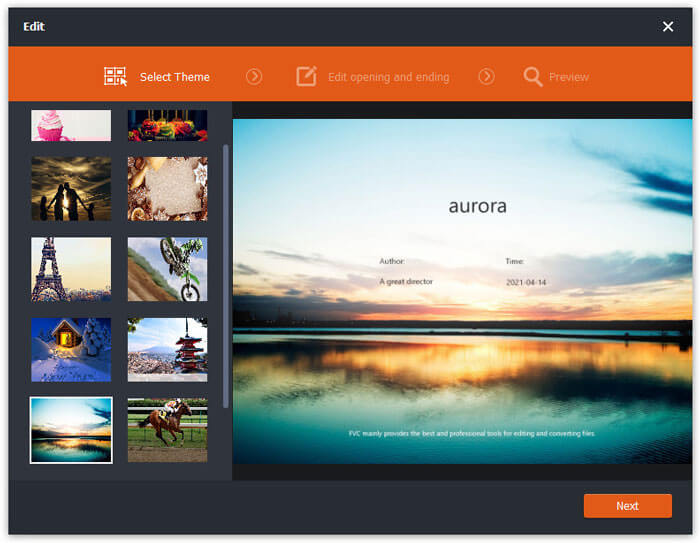
Haz clic en el botón Edit para empezar a editar tu archivo MTS. Puedes seleccionar un tema, editar el título, autor y la hora en la apertura y el cierre.
Paso 3. Establecer FLV como salida
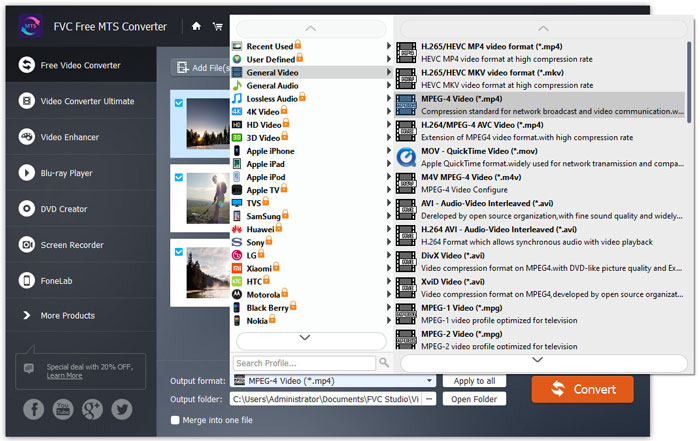
A continuación, ve al área Output format y elige la categoría General Video. Busca FLV - Flash Video Format (.flv) y establécelo como formato de salida. Este formato es un formato de transmisión de vídeo en red muy utilizado.
Paso 4. Convertir MTS a FLV
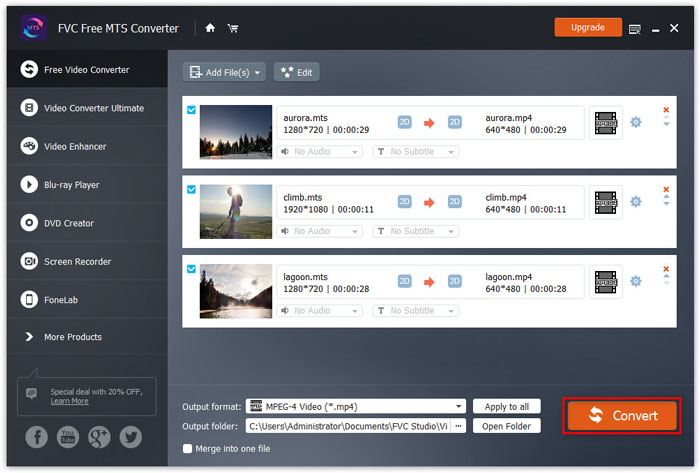
Por último, ve al área Output folder y elige la carpeta de destino donde se guardará el archivo FLV convertido. Puedes hacer clic en el botón Convert para empezar a convertir gratis el archivo MTS a FLV.
Después de eso, puede cargar el archivo FLV convertido en YouTube, Vimeo, Facebook, videos de Google u otras plataformas multimedia.
Parte 2. Cómo cambiar MTS a FLV gratis en línea
Si quieres usar una herramienta online sin descargar ningún software, puedes ir a FVC Free Online Video Converter. Es un sencillo y gratuito conversor online de MTS a FLV que ayuda a convertir cualquier formato popular de vídeo/audio, como MTS a FLV, MP4, WMV, AVI, MOV, MP3, etc., totalmente gratis en Windows y Mac. Puedes consultar los pasos detallados para cambiar MTS a FLV con esta herramienta online gratuita.
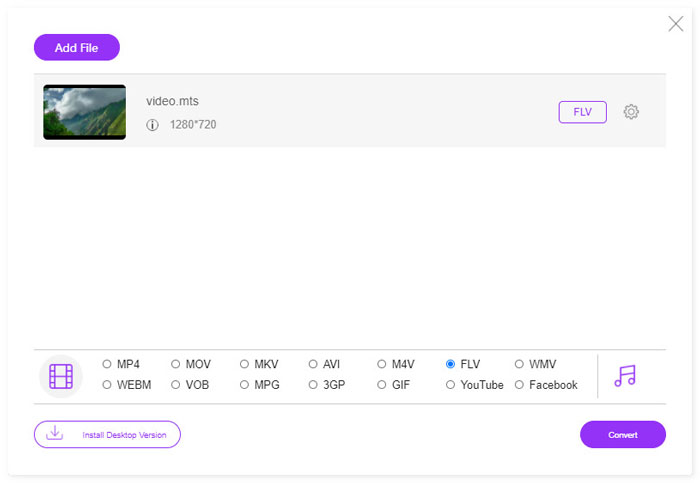
Paso 1. Visita la página oficial de FVC Free Online Video Converter (https://www.free-videoconverter.net/free-online-video-converter/). Haz clic en el botón Add Files to Convert para descargar e instalar el iniciador.

Paso 2. Selecciona desde tu ordenador los archivos MTS que quieras convertir.
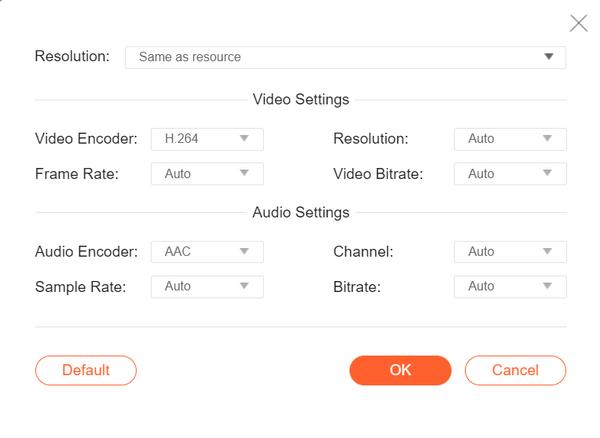
Paso 3. Establece FLV como formato de salida en la parte inferior. Si quieres ajustar más parámetros, puedes hacer clic en el icono de engranaje para modificar el códec de vídeo, la resolución, la frecuencia de fotogramas, la tasa de bits y otros ajustes de audio como el códec de audio, el canal, la frecuencia de muestreo y la tasa de bits.
Paso 4. Haz clic en el botón Covert para comenzar a convertir tu archivo MTS a FLV.
Parte 3. Exportación gratuita de video Flash desde un archivo MTS con VLC
VLC Media Player no es solo un sencillo reproductor de vídeo/audio, sino también un conversor de vídeo con funciones muy útiles. Funciona como un buen conversor de MTS a FLV que maneja una amplia gama de archivos compatibles para la conversión. Es totalmente gratuito y sin limitaciones. Con VLC, puedes exportar vídeos Flash a partir de un archivo MTS en Windows o Mac gratis. Para convertir un archivo MTS a FLV, debes descargar e instalar VLC en tu ordenador.
Paso 1. Inicia VLC Media Player, ve a Media y haz clic en el botón Convert / Save.
Paso 2. Haz clic en el botón Add para añadir el archivo MTS y, a continuación, haz clic en el botón Convert / Save para continuar.
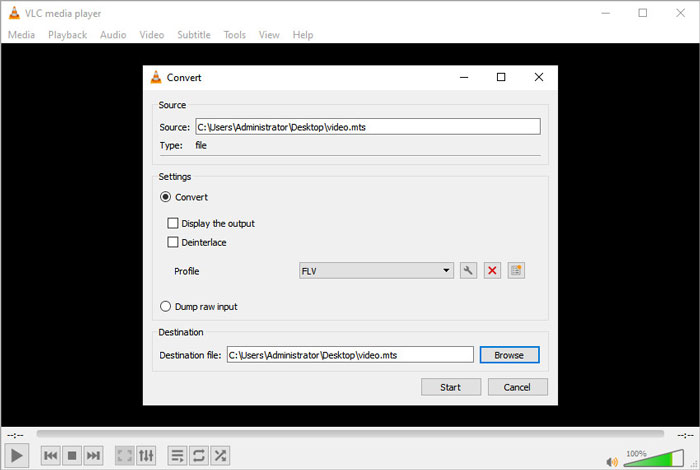
Paso 3. Marca la opción Convert en el área Settings y haz clic en la flecha desplegable para seleccionar FLV como formato de salida. Si no aparece FLV como salida, puedes hacer clic en el icono Create a new profile y crear un nuevo perfil FLV.
Paso 4. Luego ve al área Destination y haz clic en el botón Browse para establecer la carpeta de salida.
Paso 5. Asegúrate de haber terminado todos los ajustes y haz clic en el botón Start para empezar a convertir MTS a FLV en VLC.
Parte 4. Preguntas frecuentes sobre la conversión de MTS a FLV
¿Qué es el formato de video MTS?
Un archivo MTS es un vídeo guardado en el formato Advanced Video Coding Definition (AVCHD). El archivo MTS es el formato de vídeo estándar utilizado por muchas videocámaras HD de Sony y Panasonic. También se utiliza para almacenar vídeo de alta definición en discos Blu-ray.
¿Cómo convierto archivos MTS a MP4?
Con FVC Free MTS Converter, también puedes convertir archivos MTS a MP4. Haz clic en el botón Add File(s) para importar los archivos MTS. Después ve a Output format y elige MP4 como formato de salida. A continuación, haz clic en el botón Convert para empezar a convertir MTS a MP4 gratis.
¿Puede Windows 10 reproducir archivos MTS?
Si. Puede utilizar Windows Media Player para reproducir sus archivos MTS. Si el archivo MTS no se pudo reproducir, puede probar otros reproductores MTS como VLC Media Player, 5K Player, FVC Free Video Player y más.
Conclusión
En este artículo, hablamos principalmente de 3 métodos para convertir archivos MTS a FLV de forma gratuita. Puede probar todos los convertidores de MTS a FLV anteriores para exportar archivos de video flash para cargarlos. Este convertidor MTS gratuito puede cambiar fácilmente sus archivos MTS a FLV, MP4, WMV, VOB, MP3 y más a alta velocidad.
-
 Los 10 mejores reproductores FLV para Windows, Mac, iOS y Android en 2021
 El reproductor FLV le ayuda a acceder fácilmente a sus archivos FLV en su dispositivo Windows, Mac, Android, iOS. Echa un vistazo a los mejores reproductores de archivos FLV que puedes descargar ahora mismo.
-
 Mejores formas de convertir VOB a FLV
 ¿Quiere convertir un archivo VOB en un archivo FLV? Puede completar fácilmente la tarea con convertidores de escritorio o en línea. Lea esta guía y aprenda cómo transformar VOB a FLV de forma fácil y rápida.
-
 MTS VS M2TS - Diferencia entre MTS y M2TS
 ¿Cuál es el archivo MTS o M2TS? ¿Cuál es la diferencia entre M2TS y MTS? ¿Cómo puedo ver la videocámara grabada en un archivo MTS o M2TS? Encuentra todas las respuestas en esta publicación.
