


 Video Converter Ultimate
 Grabador de pantalla
 Reparación de vídeo
Aprenda a convertir MTS a WMV de diferentes maneras

Parte 1. La mejor herramienta que convierte MTS a WMV en línea
La mayoría de nosotros preferimos no lidiar con inconvenientes, por eso no queremos instalar un conversor de software. Buscan un conversor en línea que pueda convertir sus tipos de archivo. FVC Free Video Converter Online es un conversor de vídeo en línea totalmente gratuito. Aunque este programa es gratis, no tienes que preocuparte por la calidad, porque FVC Free Video Converter no la compromete durante la conversión.
Paso 1: Para empezar, haz clic en este enlace y se te redirigirá a la página web. Desde allí, haz clic en el botón Add Files to Convert para descargar el lanzador; tendrás que subir los archivos que deseas convertir.
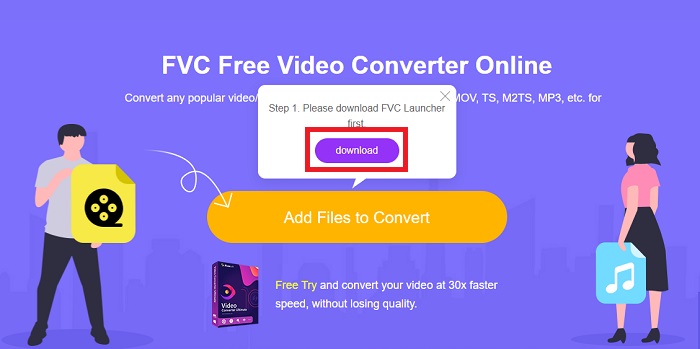
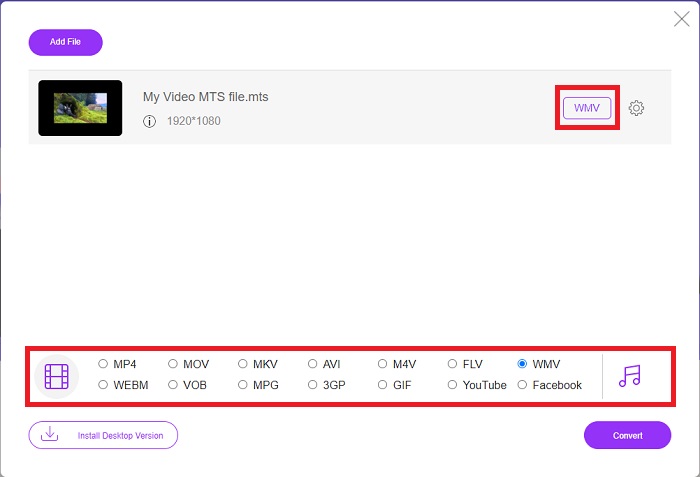
Paso 2: Después de eso, ya puedes hacer clic de nuevo en el botón para subir el archivo de vídeo. Verás todos los formatos disponibles en la parte inferior y selecciona WMV entre ellos.
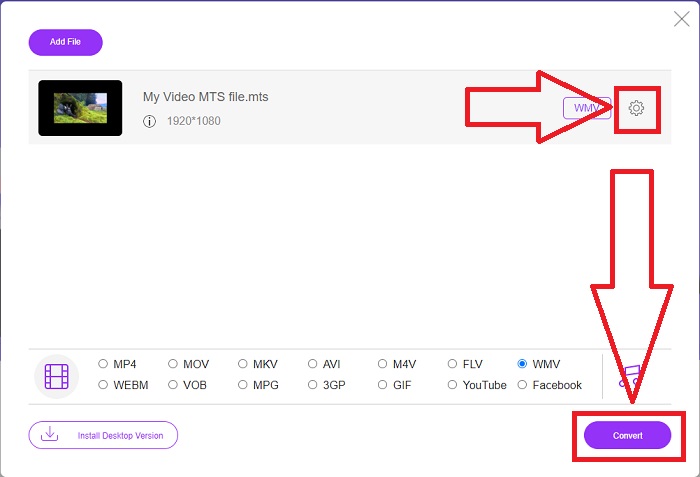
Paso 3: Las opciones adicionales siguen ahí. Haz clic en el icono de engranaje y aparecerán todos los ajustes que puedes realizar en tu vídeo. Simplemente haz clic en OK cuando ya hayas elegido un formato para guardar los cambios y haz clic en Convert para iniciar por fin la conversión.
Parte 2. Cómo convertir MTS a WMV con Best Converter Offline
Al elegir un conversor, debemos tener en cuenta la sencillez, ya que no queremos un conversor caro y difícil de usar. Nos complace presentarte Video Converter Ultimate y su interfaz de usuario. Este conversor tiene la interfaz más sencilla y, precisamente por eso, también es el más fácil de usar. Además, puedes añadir tus archivos rápidamente y ver los tipos de archivo compatibles. Aquí encontrarás más funciones en las que puedes confiar y que harán que tu experiencia de edición sea más cómoda. Si quieres usarlo de primera mano, sigue estos sencillos pasos:
Paso 1: Primero, tienes que instalar el propio software. Para ello, descarga el archivo .exe haciendo clic en el botón Free Download de abajo para Windows o Mac. Espera a que termine y ábrelo para iniciar el proceso de instalación. Haz clic en Start Now y, por último, inicia el programa.
Descarga gratuitaPara Windows 7 o posteriorDescarga segura
Descarga gratuitaPara macOS 10.7 o posteriorDescarga segura
Paso 2: Una vez abierto, aparecerá una interfaz con un botón + en el centro. Haz clic en él para subir el archivo de vídeo MTS que quieras convertir, o simplemente arrástralo y suéltalo para un uso rápido.
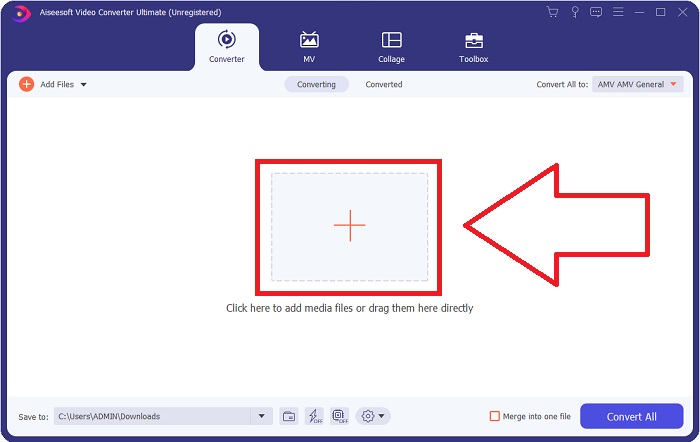
Paso 3: Si el proceso tiene éxito y una vez que aparezca en la interfaz, a la derecha podrás ver el formato actual de tu vídeo en su ficha. Haz clic en la flecha desplegable y se mostrarán todos los formatos disponibles. Desplázate hacia abajo y selecciona WMV o escríbelo directamente en la barra de búsqueda. Además de esto, puedes elegir la calidad que quieras en el panel derecho de la pestaña.
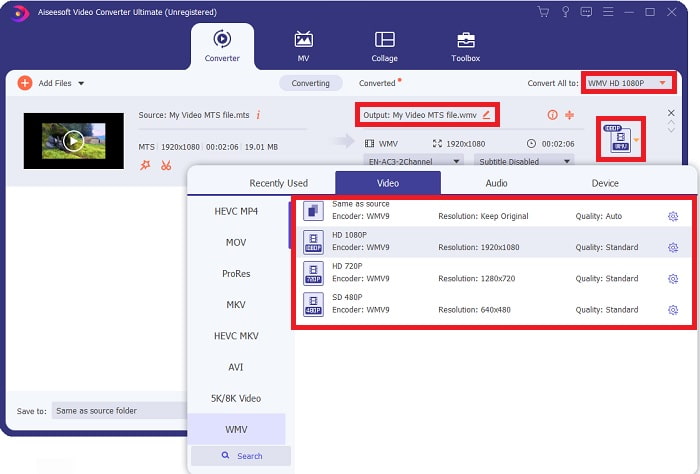
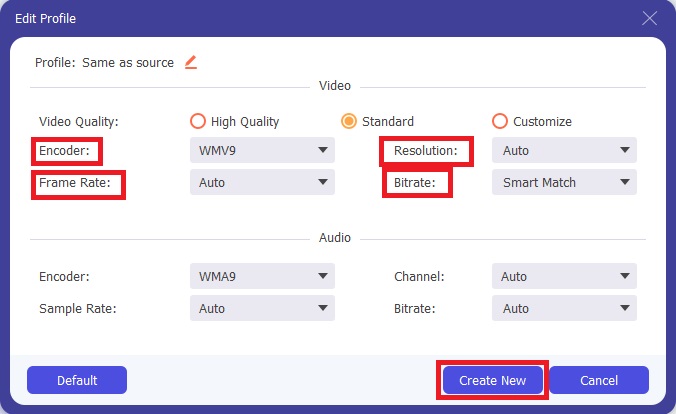
Paso 4: Para más opciones, haz clic en el icono de engranaje que se encuentra a la derecha de la calidad de vídeo que has seleccionado. Desde ahí puedes seguir editando tu vídeo, como la resolución, la tasa de fotogramas, la tasa de bits y mucho más. Simplemente haz clic en el botón Create New cuando termines de ajustar.
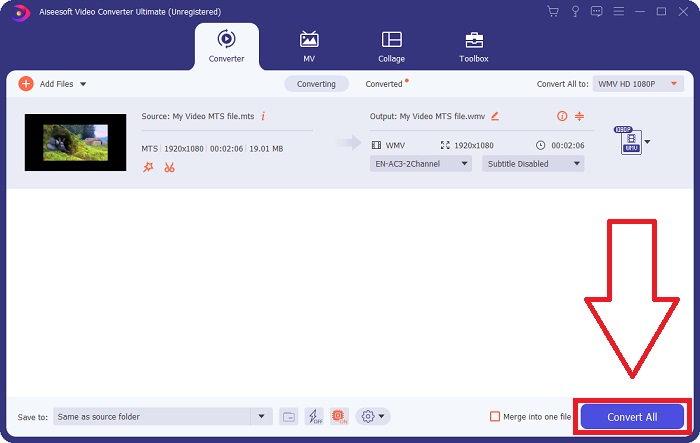
Paso 5: Si ya has realizado todos los ajustes necesarios, haz clic en el botón Convert All situado en la esquina inferior derecha para iniciar correctamente la conversión y espera a que termine.
Parte 3. Conocimiento Extendido sobre MTS VS. WMV
| Extensión de archivo | .mts | .wmv |
| Descripción | Codificación de video avanzada de alta definición (AVCHD) es un formato de video que usa la extensión de nombre de archivo MTS como su nombre de archivo. Algunas marcas de videocámaras, como JVC, Sony, Canon y Sanyo, usan el formato de video HD MPEG y guardan sus archivos con la extensión de nombre de archivo .mts. | Como parte del marco de Windows Media de Microsoft, WMV (Windows Media Video) incluye varios códecs de video y formatos de codificación. Al principio, su propósito es competir con el formato RM en las aplicaciones de transmisión en línea. Con la tecnología WMV, los videos se pueden almacenar, comprimir y entregar en Blu-ray/DVD. |
| Programas Asociados | ◆ Roxio Creator NXT Pro 7 ◆ licuadora ◆ VLC Media Player ◆ Final Cut Pro X de Apple | ◆ VLC Media Player ◆ MPplayer ◆ Reproductor multimedia clásico ◆ Reproductor de Windows Media |
| Desarrollado por | sony/panasonic | Microsoft |
| Tipo de archivo | Vídeo/mp2t | Vídeo/x-ms-asf |
Parte 4. Preguntas frecuentes sobre la conversión de MTS a WMV
¿Qué reproductor puede reproducir el archivo MTS?
Si tienes un vídeo MTS, puedes editarlo con el software que viene incluido con las videocámaras HD de Sony y Panasonic, o puedes usar uno de los programas que se indican a continuación: En Blender, combina dos o más elementos (multiplataforma). MAGIX Vegas es un paquete de software que te permite crear distintos tipos de efectos visuales (Windows). CyberLink PowerDirector es un programa de edición de vídeo (Windows, Mac, Android).
¿Los archivos MTS tienen audio?
Varios factores pueden causar una pérdida de audio en los archivos MTS. El más común es que no se permitió que se completara el proceso de conformidad, lo que dio como resultado que no hubiera audio o que se cortara el audio y que no se copiara toda la estructura de carpetas (a diferencia de solo los archivos multimedia) de la tarjeta de memoria.
¿Cuál es el uso de WMV?
Microsoft introdujo el formato de archivo WMV como una serie de códecs de vídeo en el Reproductor de Windows Media. WMV es la abreviatura de 'Windows Media Video', un formato de contenedor de vídeo comprimido desarrollado para su uso con la infraestructura Windows Media. Para vender contenidos de vídeo en línea o a través de discos HD DVD y Blu-ray, los archivos de vídeo WMV son el formato más adecuado. Para reproducir archivos WMV, haz clic aquí para conocer algunos reproductores WMV útiles.
Conclusión
Todos los convertidores mencionados anteriormente son herramientas confiables y recomendadas para convertir MTS a WMV. Video Converter Ultimate y Free Video Converter Ultimate son los dos mejores convertidores que son incomparables con otras herramientas y software en línea. Tiene diferentes tipos de herramientas destacadas que ofrece y los numerosos formatos de video que admite.
-
 [Gratis y en línea] 5 métodos para convertir M2TS a MP4
 ¿Quiere convertir el video de una videocámara HD a un MP4 común? Aquí hay 5 formas simples y gratuitas de cambiar el archivo M2TS a MP4 en Windows y Mac.
-
 Cómo convertir M2TS a MKV gratis y en línea
 ¿Quiere convertir M2TS a MKV manteniendo la calidad original? Esta publicación le muestra métodos gratuitos y en línea para cambiar M2TS a MKV sin pérdidas.
-
 [2021] Las 6 mejores formas gratuitas y en línea de convertir M2TS a MP3
 ¿Se puede convertir un archivo M2TS a MP3? En esta publicación, hemos enumerado las 6 mejores formas gratuitas y en línea para ayudarlo a convertir M2TS a MP3, AAC, AIFF y más formatos de audio.
