


 Video Converter Ultimate
 Grabador de pantalla
 Reparación de vídeo
 Descarga segura
¿Qué es un archivo MTS y cómo convertir / reproducir un archivo MTS?
Obtendrás un vídeo grabado en formato MTS si utilizas una videocámara Sony o Panasonic. En realidad no te darás cuenta de ello hasta que no puedas reproducir el archivo MTS con tu reproductor multimedia o dispositivo. Aquí surge la pregunta, ¿qué es un archivo MTS?

Ahora, en muchos campos y productos electrónicos, existe un requisito cada vez más alto de calidad de imagen para la procesión de video. MTS es un formato de video de flujo de transporte de alta definición que puede ofrecer una experiencia visual de alta calidad.
Sin embargo, MTS no es un formato de archivo popular. Muchos reproductores multimedia muy utilizados y dispositivos portátiles iOS/Android no pueden reproducir directamente el archivo MTS. Teniendo esto en cuenta, en este artículo queremos ofrecerte una introducción detallada al formato MTS. Además, te mostraremos 3 formas sencillas de convertir y reproducir archivos MTS.
Parte 1. ¿Qué es un archivo MTS? MTS vs MP4
MTS es la extensión de archivo de AVCHD (Advanced Video Coding High Definition), que se utiliza principalmente en videocámaras HD de Sony y Panasonic. Fue desarrollado conjuntamente por Sony y Panasonic y está especialmente diseñado para vídeos digitales de alta definición. MTS es un formato de vídeo de flujo de transporte MPEG y H.264 de alta definición y ofrece una gran compatibilidad con HD 720p y 1080i. Por lo tanto, en comparación con otros formatos, el archivo MTS puede ofrecer una calidad de vídeo superior.
MTS es la extensión de archivo de video AVCHD en videocámara digital. Cuando importa un archivo MTS a su computadora, la extensión del archivo se convertirá automáticamente en M2TS. MTS también se usa ampliamente para Blu-ray Disc Audio-Video (BDAV). Tiene la capacidad de transportar varios videos, audio y otros flujos.
El archivo MTS puede proporcionar un vídeo de alta calidad con un tamaño de archivo relativamente pequeño. Pero, como se ha mencionado antes, MTS no es compatible con muchos reproductores multimedia, editores de vídeo, ordenadores y dispositivos móviles. Es fácil que aparezca un error al reproducir un MTS debido a problemas de compatibilidad. Por este motivo, mucha gente busca en Internet reproductor MTS, cómo reproducir un archivo MTS y cómo convertir MTS a MP4, entre otras cosas.
MTS frente a MP4
En comparación con MTS, MP4 se puede reproducir fácilmente en casi todos los reproductores multimedia, herramientas y dispositivos de edición de video. MP4 es el formato de contenedor multimedia digital más popular para almacenar videos. MP4 también puede transportar audio y texto.
MP4 es compatible con Windows 10/8/7 / XP / Vista PC, Mac, software de edición, reproductores multimedia, dispositivos iOS / Android como iPhone, iPad, iPod touch, teléfono Android, teléfono Windows y más. MP4 puede ofrecer una alta calidad de video manteniendo un tamaño de archivo adecuado. Entonces, cuando obtiene un formato no compatible como MTS, puede elegir convertirlo a MP4 para una mejor reproducción.
Parte 2. Cómo convertir gratis MTS a MP4 en línea
Cuando desee compartir el video MTS grabado en YouTube, Facebook u otras plataformas, o si desea editarlo y verlo en su dispositivo, es posible que deba convertir MTS a MP4. Afortunadamente, hay muchos convertidores de video MTS, incluidos algunos gratuitos en línea que pueden ayudarlo a realizar la conversión de archivos MTS. Aquí, en esta parte, le presentaremos un popular conversor de video en línea gratuito, FVC Free Online Video Converter para convertir su archivo MTS.
Paso 1. Primero, abre tu navegador y ve al sitio oficial de FVC Free Online Video Converter. Aquí puedes ir directamente a https://www.free-videoconverter.net/free-online-video-converter/. Después, haz clic en el botón Add Files to Convert para descargar e instalar el lanzador.
Paso 2. Cuando el lanzador se active, sube el archivo MTS que quieras convertir a MP4. Luego haz clic en el botón Convert para empezar la conversión de vídeo de MTS a MP4.

Parte 3. Forma gratuita de convertir MTS a MP4 sin pérdida de calidad (recomendado)
Con el conversor de vídeo online gratuito anterior, puedes realizar fácilmente la conversión de vídeo de MTS a MP4. Si prestas más atención a la calidad del MP4 de salida, deberías probar el Free MTS Converter. Te permite convertir MTS a MP4 sin ninguna pérdida de calidad de imagen o sonido.
Descarga gratisPara Windows 7 o posteriorDescarga segura
Descarga gratisPara macOS 10.7 o posteriorDescarga segura
Paso 1. Haz doble clic en el botón de descarga de arriba y luego sigue las instrucciones que aparezcan en pantalla para instalar y ejecutar rápidamente este conversor gratuito de MTS a MP4 en tu ordenador.
Paso 2. Cuando entres en la primera ventana de este conversor de vídeo MTS, haz clic en Add File(s) para cargar el archivo MTS que quieras convertir. En este paso, puedes añadir uno o varios archivos según tus necesidades.
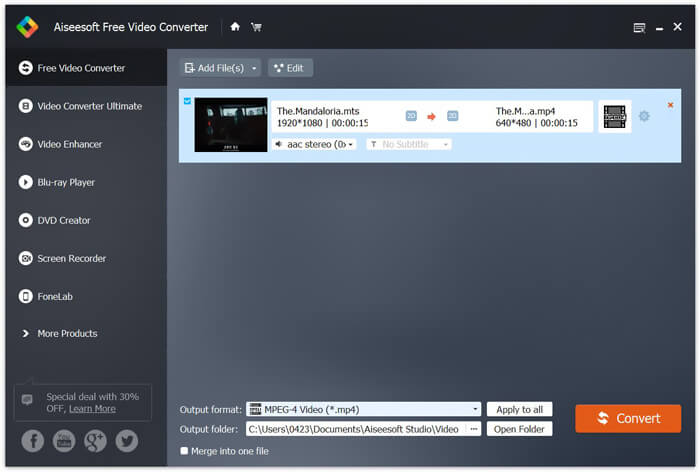
Paso 3. Haz clic en Output format y luego elige MP4 como formato de destino. Aquí también puedes seleccionar una carpeta de destino adecuada para el vídeo convertido haciendo clic en la opción Output folder. Después de eso, haz clic en el botón Convert para iniciar la conversión gratuita de vídeo de MTS a MP4.

Free Video Converter está diseñado con la última tecnología de aceleración que le garantiza una velocidad de conversión de MTS / M2TS a MP4 realmente rápida. Además, también ofrece algunas funciones básicas de edición para personalizar videos antes de la conversión final. Deberías descargarlo gratis y probarlo.
Parte 4. Cómo convertir y reproducir gratis un archivo MTS con VLC Player
Si tiene el VLC Media Player instalado en su computadora, puede confiar en él para convertir gratis un archivo MTS a MP4, MOV, FLV y más para una mejor carga o reproducción. De hecho, como reproductor multimedia de código abierto, VLC Player le permite disfrutar directamente del archivo MTS con una gran experiencia visual. Aquí, en esta parte, nos gusta mostrarle cómo reproducir y convertir un archivo MTS en un reproductor VLC.
Reproducir un archivo MTS con VLC Player
Paso 1. Primero, debes asegurarte de tener un VLC Player en tu computadora. Luego abra este reproductor multimedia para reproducir el archivo MTS.
Paso 2. Haz clic en Media > Open File para cargar el archivo MTS que quieras reproducir. Una vez cargado, VLC Player reproducirá automáticamente el archivo MTS por ti.
Aquí debe saber que no todos los archivos MTS pueden verse con buenos efectos en VLC Player.
En algunos casos, es más probable que obtenga un error de reproducción de MTS. Debe agregar algunas extensiones para que VLC Player admita su archivo MTS. Por ejemplo, necesita una biblioteca de decodificación AACS para reproducir un archivo MTS.
Convierta un archivo MTS con VLC Player
De hecho, cuando recibe el error de reproducción del archivo MTS, puede elegir convertir su MTS a un formato de video popular como MP4, MOV, FLV y AVI, etc. Después de eso, puede ver fácilmente el archivo MTS en cualquier dispositivo con facilidad.
Paso 1. Abre VLC Player en tu ordenador. Haz clic en Media > Convert/Save para que aparezca la ventana emergente de Open Media. Aquí puedes hacer clic en Add para importar el archivo MTS que quieras convertir.
Paso 2. Después de importar, haz clic en Convert Save para abrir la ventana Convert. Haz clic en Profile y luego elige MP4 como formato de destino. En este paso, puedes seleccionar una carpeta de destino adecuada para el vídeo de salida haciendo clic en la opción Browse.
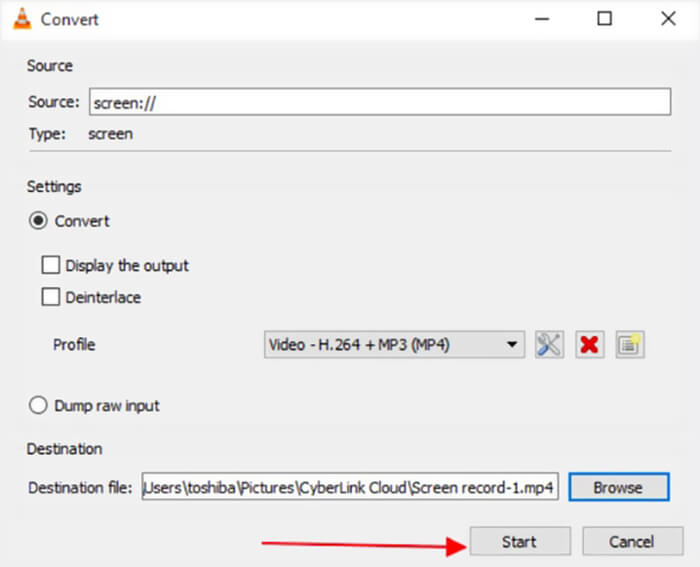
Paso 3. VLC Player te ofrece algunas funciones básicas de edición. Antes de la conversión final del archivo MTS, puedes personalizar los efectos de vídeo según tus necesidades. Después podrás hacer clic en Start para comenzar la conversión gratuita del archivo MTS.
Tras leer esta página, podrás tener una comprensión clara del archivo MTS. Además, puedes aprender cómo convertir y reproducir un archivo MTS. Déjanos un mensaje si sigues teniendo cualquier duda sobre el formato MTS.
-
 2 formas sencillas de convertir gratis MTS a MP3
 ¿Necesita extraer audio MP3 de un archivo MTS pero no sabe cómo? ¿Cuál es el mejor conversor de MTS a MP3? Esta publicación comparte 2 maneras fáciles de ayudarlo a convertir MTS / M2TS a MP3 con alta calidad de audio.
-
 Las 4 mejores formas gratuitas de convertir MTS a MOV
 ¿No puede reproducir el archivo MTS en su computadora o teléfono iPhone / Android? ¿Qué es un archivo MTS y cómo reproducirlo? ¿Cuál es el mejor convertidor de video MTS? Esta publicación comparte 4 formas simples y gratuitas de ayudarlo a convertir MTS a MOV para una mejor reproducción.
-
 ¿Cuál es la diferencia entre MTS y M2TS?
 ¿Cuál es el archivo MTS o M2TS? ¿Cuál es la diferencia entre M2TS y MTS? ¿Cómo puedo ver la videocámara grabada en un archivo MTS o M2TS? Encuentra todas las respuestas en esta publicación.
