


 Video Converter Ultimate
 Grabador de pantalla
 Reparación de vídeo
 Descarga segura
Cómo convertir sus archivos de video DAT a formato FLV de forma gratuita
Dado que existen tantos formatos de vídeo, es posible que necesites convertir un formato a otro. Este artículo se centra en cómo convertir DAT a FLV en el escritorio y en línea de forma gratuita. Un archivo con la extensión DAT no es un archivo estándar, sino un archivo de datos que almacena información. Por lo tanto, ningún programa específico se encarga de abrir archivos DAT. Si un archivo de vídeo se guarda de esta manera, un conversor adecuado de DAT a FLV puede ayudarte a abrirlo.

Parte 1: Las mejores formas gratuitas de convertir DAT a FLV
Forma 1: Convierta DAT a FLV con Free FLV Converter
FVC Free FLV Converter es un potente conversor de vídeo aunque sea un programa gratuito. Esto significa que puedes obtener funciones similares a las de un software profesional sin pagar ni un céntimo.
Características principales del mejor conversor gratuito de DAT a FLV
- 1. Convierta por lotes archivos DAT a formato FLV rápidamente.
- 2. Produzca resultados de alta calidad utilizando tecnología avanzada.
- 3. Incluya una amplia gama de herramientas adicionales, como la edición de videos.
Descarga gratuitaPara Windows 7 o posteriorDescarga segura
Descarga gratuitaPara macOS 10.7 o posteriorDescarga segura
Cómo convertir DAT a FLV gratis
Paso 1: Abra archivos DAT
Ejecuta el mejor conversor gratuito de DAT a FLV una vez que lo hayas instalado en tu ordenador. Para mantener tus datos seguros, es mejor que lo descargues desde el sitio web oficial. Haz clic en el gran botón Add File(s) en la interfaz principal, localiza y selecciona los archivos de vídeo DAT y ábrelos. Después aparecerán en el área de la biblioteca.

Paso 2: establece FLV como formato de salida
Dirígete a la parte inferior, haz clic y despliega la opción Output format. Ve a la pestaña General Video de la lista, desplázate hacia abajo y selecciona FLV o un formato relacionado. También puedes reajustar la frecuencia de imagen, la resolución y otros parámetros pulsando en el icono de Gear en cada título.

Paso 3: Convierta DAT a FLV
A continuación, haz clic en el botón Open Folder y cambia el directorio de destino según tus preferencias. De forma predeterminada, el conversor de DAT a FLV guardará el resultado en tu biblioteca de vídeos. Por último, haz clic en el botón Convert para comenzar de inmediato a convertir DAT a FLV en tu ordenador. Solo se necesitan unos minutos para completar la conversión.

Forma 2: Cómo convertir DAT a FLV por VLC
VLC es otra forma de convertir DAT a FLV de forma gratuita. El reproductor multimedia de código abierto puede abrir un archivo de video con extensión DAT y convertirlo en archivos de video estándar. Teniendo en cuenta el complicado procedimiento, compartimos los pasos básicos a continuación.
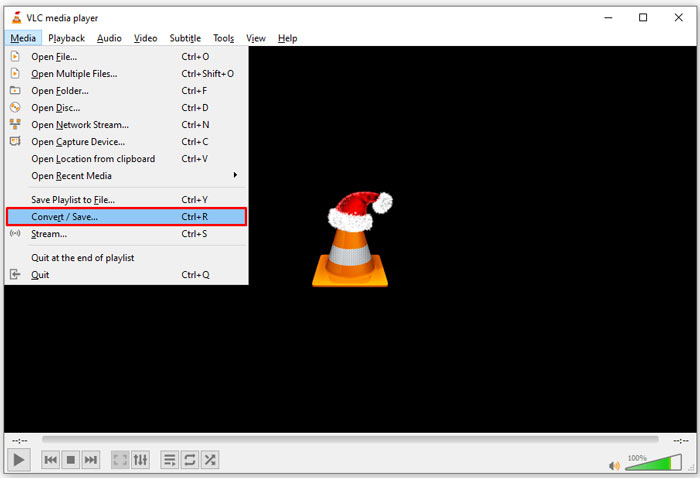
Paso 1: Abre VLC y haz clic en Convert/Save en el menú Media de la cinta superior. A continuación verás el cuadro de diálogo de apertura de medios.
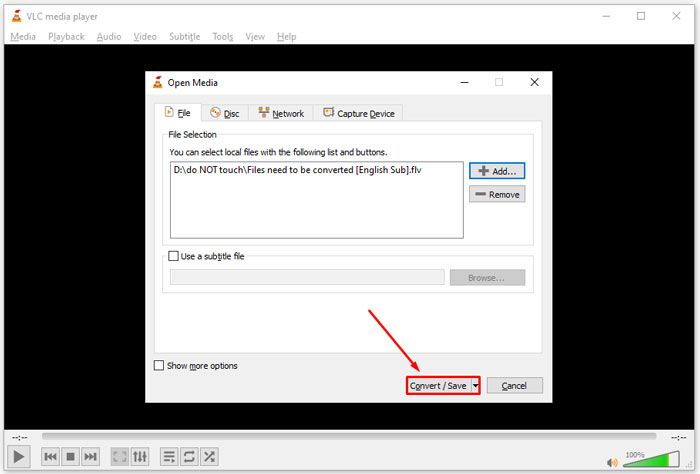
Paso 2: Haz clic en el botón Add y abre los archivos de vídeo DAT en VLC. Pulsa el botón Convert/Save para continuar.
Paso 3: Despliega la lista Profile y establece FLV como formato de salida. Haz clic en el botón Browse para seleccionar una carpeta de salida en la sección Destination.
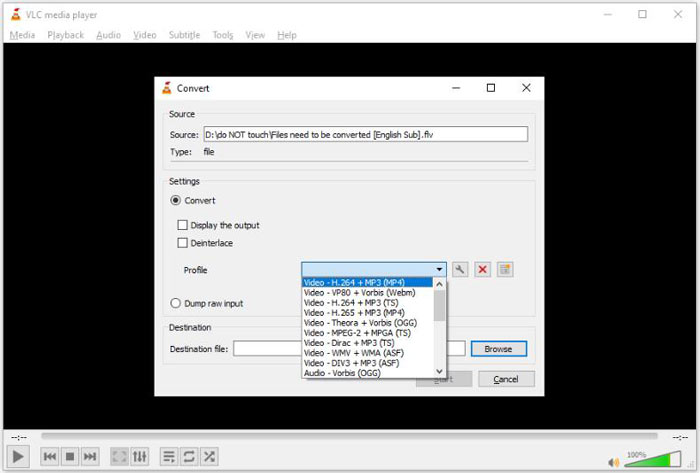
Paso 4: Haz clic en el botón Start para iniciar la conversión de DAT a FLV. Tardará tanto como la duración de tu archivo de vídeo en convertirlo en VLC.
Parte 2: Cómo convertir DAT a FLV en línea
FVC Free Online Video Converter es una forma sencilla de convertir DAT a FLV en línea de forma gratuita. En comparación con otros conversores de vídeo web, te permite hacer el trabajo sin ningún tipo de límite, como tamaño de archivo, registro, marca de agua, etc.
Paso 1: Abre un navegador y visita https://www.free-videoconverter.net/free-online-video-converter/. Haz clic en el botón Add Files to Convert para descargar el iniciador.

Paso 2: Haz clic en el botón Add File en el iniciador y sube los archivos de vídeo DAT desde tu ordenador. Luego ve a la sección de formato en la parte inferior y selecciona FLV.

Paso 3: Pulsa el botón Convert para iniciar la conversión de DAT a FLV en línea. Cuando termine, descarga los archivos de vídeo a tu disco duro.
Quizás también te interese:
Convierte tus archivos TS al formato FLV
Parte 3: Preguntas frecuentes sobre DAT a FLV
¿Puedo convertir archivos DAT a FLV desde Internet Explorer?
Si los archivos DAT de IE almacenan contenido de video, puede convertirlos en videos estándar. Sin embargo, DAT no solo almacena datos de video, sino también otra información. Para otros datos, no puede convertir a videos.
¿Cómo abrir archivos DAT?
Un archivo DAT es un archivo de datos que contiene información sobre el programa al que está asociado. Puede intentar abrir un archivo DAT haciendo doble clic en él. Su sistema puede distribuir el programa adecuado.
¿Puedo convertir DAT a QuickTime?
Eso depende de tu situacion. En primer lugar, los archivos DAT deben almacenar datos de video. Entonces también necesita un convertidor de video compatible con DAT y QuickTime.
Conclusión
Esta guía ha compartido tres formas de convertir su DAT a FLV en su escritorio o en línea. VLC es una forma gratuita de hacer el trabajo en Windows, Mac y Linux. Sin embargo, FVC Free FLV Converter ofrece más funciones de nivel profesional al solicitar cualquier pago. Si tiene otras preguntas, deje un mensaje debajo de esta publicación.
-
 MP4 a FLV | Top 3 Free Converter (en línea / Mac / Windows)
 Esta publicación es la guía detallada para la conversión de MP4 a FLV. Puede tomar los 3 principales convertidores gratuitos para cambiar MP4 a FLV en línea, en una computadora con Windows o Mac con facilidad.
-
 3 soluciones para convertir MTS a FLV gratis y en línea
 ¿Quiere convertir MTS a FLV? Aquí hay 3 programas de conversión de MTS a FLV gratuitos que puede probar para convertir MTS a FLV en Mac OS X y Windows 10/8/7.
-
 Las 4 mejores formas gratuitas de convertir videos FLV a MP4 en el escritorio y en línea
 Esta guía comparte cuatro métodos gratuitos para convertir sus archivos de video FLV a formato MP4 en Windows 10/8/7 / XP y Mac OS X, para que pueda disfrutar de los videos en cualquier dispositivo.
