


 Video Converter Ultimate
 Grabador de pantalla
 Reparación de vídeo
Descubra cuáles son los mejores 3 convertidores de FLV a MKV para convertir sus archivos FLV a MKV
¿Estás cansado de navegar por Internet buscando la mejor forma de convertir FLV a MKV gratis? Puede que sea una coincidencia, pero hoy hemos encontrado los mejores conversores FLV que puedes usar; por supuesto, solo elegimos los mejores. Para que tu búsqueda sea mucho más manejable, debes seguir adelante leyendo el artículo de abajo, porque aprenderás mucho sobre FLV y MKV y sobre los conversores que puedes utilizar.

Parte 1. 2 Maneras de Convertir FLV a MKV Gratis
1er Camino. Use el convertidor en línea para convertir FLV a MKV
Este conversor en línea es, sin duda, uno de los grandes transcodificadores para convertir FLV a MKV online. FVC Free Video Converter Online es un conversor sencillo y fácil de entender que puedes usar en línea. Pero esta herramienta depende de Internet, lo que significa que, si no tienes conexión, será tu último recurso para convertir. Aunque la herramienta es en línea, no muestra anuncios en la interfaz que puedan irritarte y está libre de malware. Así que ahora, si quieres tener una experiencia práctica con esta herramienta, debes seguir los pasos que se indican a continuación.
Paso 1. Haz clic en este enlace para abrir FVC Free Video Converter Online en una nueva pestaña.
Paso 2. Haz clic en el botón Add Files to Convert para abrir la carpeta en el ordenador que estás usando. Elige el archivo FLV que quieres convertir y pulsa Open para subir el archivo.
Descarga la versión de escritorio para convertir archivos por lotes.
Paso 3. Selecciona el formato MKV en la lista de formatos que se presenta abajo.
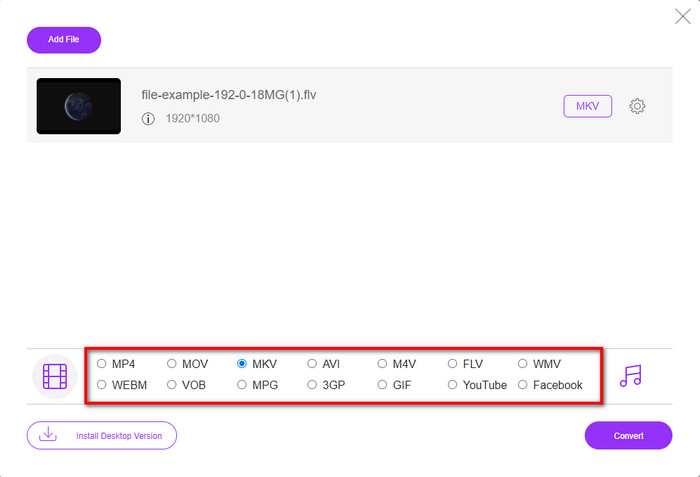
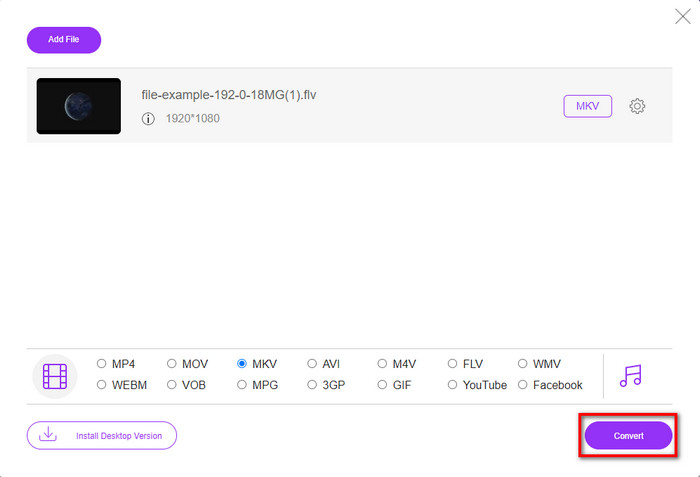
Paso 4. Inicia el proceso de conversión haciendo clic en el botón Convert, y el archivo convertido se guardará automáticamente en la unidad de tu ordenador al finalizar.
2do Camino. Use el convertidor gratuito disponible para descargar en Windows y Mac
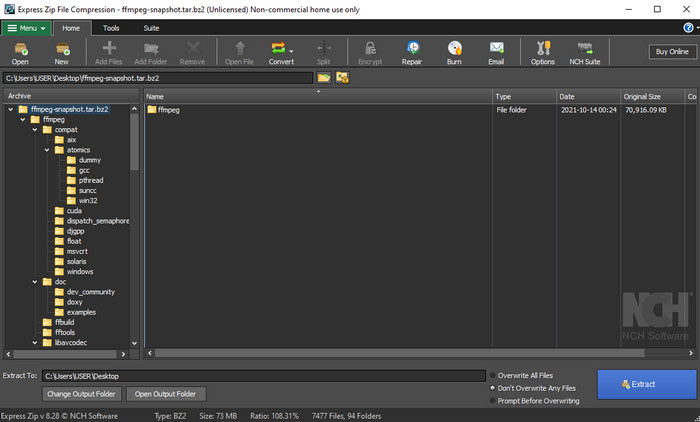
FFmpeg no es el conversor clásico que ya utilizas. Aunque no sea el conversor habitual, aún puede convertir tu archivo FLV. Entonces, ¿qué hace que esta herramienta sea diferente? Que utiliza una interfaz basada en CLI, lo que significa que, antes de realizar la conversión, tendrás que darle órdenes codificando o, dicho de forma sencilla, escribiendo comandos. Si encuentras interesante este conversor, lee los detalles a continuación para usar este FFmpeg de FLV a MKV siguiendo los pasos.
Paso 1. Descarga y abre FFmpeg.exe.
Paso 2. Abre el símbolo del sistema en tu ordenador.
Paso 3. Localiza el archivo FLV usando el CMD. Luego copia este código y pégalo en el símbolo del sistema: ffmpeg -i input.flv -vn -ar 44100 -ac 2 -b:a 192k output.mkv; después, pulsa Intro en tu teclado para que comience el proceso.
Parte 2. Convierta FLV a MKV con el mejor convertidor de FLV a MKV sin pérdidas
3er camino Use el convertidor profesional para convertir FLV a WMV
¿Sigues sin estar satisfecho con los dos primeros conversores presentados arriba? Si es así, debes probar FVC Video Converter Ultimate. ¿Por qué? Porque ofrece un resultado profesional incluso aunque no pongas demasiado esfuerzo en la conversión. Además, admite más formatos para convertir tu archivo FLV a MKV, AVI, MOV, AVI, MP4 y más de 200 formatos adicionales. ¿Aún no te impresiona? ¿Quizá quieres añadir algo de magia a tu vídeo? En ese caso, tienes suerte de contar con este conversor, porque ofrece funciones avanzadas de edición de vídeo que puedes usar. ¿Lo dudas porque la herramienta podría ser compleja de manejar para ti? Si es así, sigue los pasos que se indican a continuación para experimentar y aprender a usar este conversor de FLV a MKV.
Paso 1. Antes de usar este conversor, primero debes descargarlo haciendo clic en el botón de descarga de abajo. Sigue las indicaciones de instalación después de descargarlo y ejecútalo.
Descarga gratuitaPara Windows 7 o posteriorDescarga segura
Descarga gratuitaPara macOS 10.7 o posteriorDescarga segura
Paso 2. Para añadir el archivo FLV que quieras convertir, pulsa el botón +. Busca el archivo FLV en la carpeta que aparecerá en tu interfaz y pulsa Open para proceder al siguiente paso.
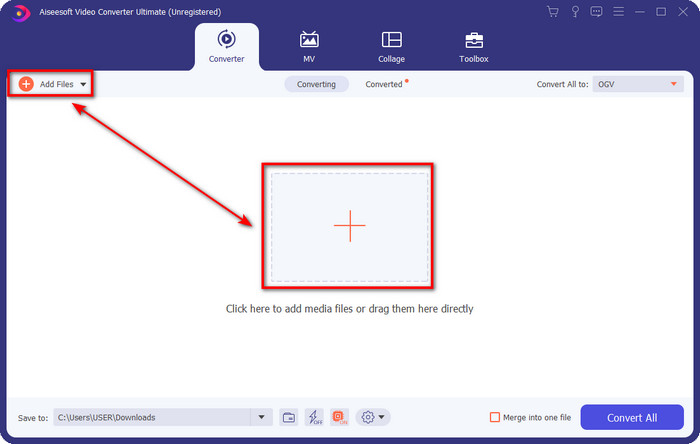
Paso 3. Después de eso, cambiemos el formato a MKV haciendo clic en el botón desplegable en la parte superior derecha de la interfaz de usuario.
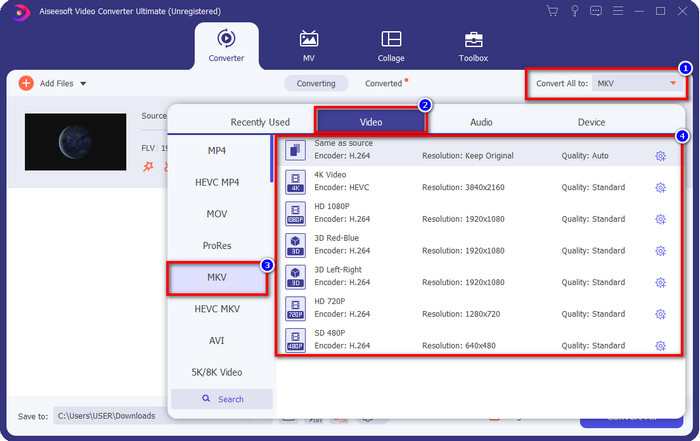
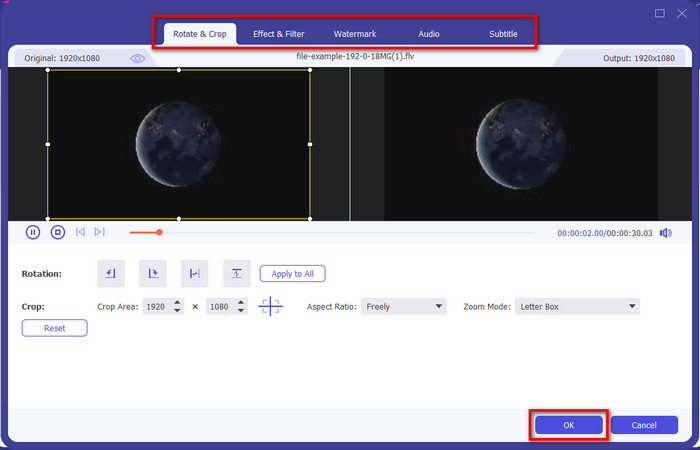
Opcional. Si necesitas editar el vídeo, puedes hacer clic en el botón de la varita si lo deseas. Aparecerá una nueva interfaz en la que podrás Girar, Recortar, aplicar Efectos, Filtro, Marca de agua, así como editar el Audio y los Subtítulos. No limites tu imaginación, haz todo lo que quieras y, para aplicar toda la magia que has creado, haz clic en OK.
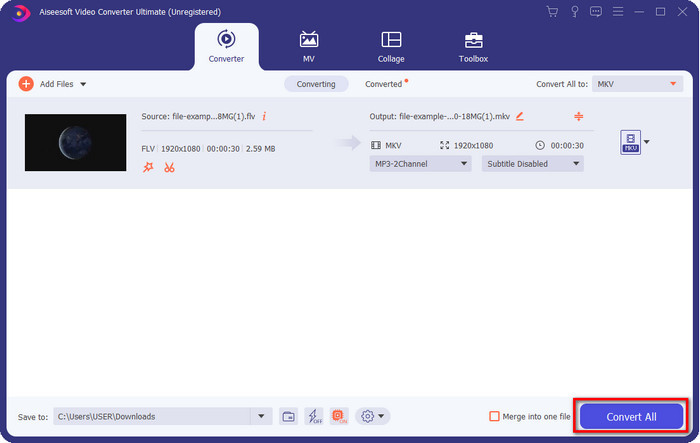
Paso 4. Por último, haz clic en Convert All para convertir el FLV al formato MKV. El proceso tardará menos de un minuto, así que no tendrás que esperar demasiado. Aparecerá una carpeta en tu pantalla con el FLV convertido.
Relacionado:
Parte 3. ¿Cuál es la diferencia entre FLV y MKV?
FLV y MKV son conocidos por estar entre los mejores contenedores que todos conocen. Pero antes que nada, comparemos y veamos información más detallada sobre los dos formatos.
FLV es conocido en todos los sitios web porque es popular en las páginas web, principalmente porque Adobe lo creó. Además, .flv reproduce transmisiones de video en línea porque son mucho más fáciles de cargar que el otro formato. Además, este formato necesita un plug-in-play antes de que pueda ver o ver el video en este formato, o puede descargar fácilmente Flash Player. Aunque el formato es excelente, los plug-in-plays que utiliza ya han despegado, lo que significa que el formato no es la mejor opción. Sin embargo, muchos reproductores multimedia aún admiten este formato y los usuarios que aún lo usan.
MKV es conocido por ser el formato más futuro disponible. Este formato no sería como cualquier otro formato en muchos sentidos si estuviéramos a punto de compararlo. Por ejemplo, la estructura construida en este formato no es la misma que la del MP4 o AVI, pero es diferente. El diseño y su exclusivo almacenamiento de archivos multimedia lo hacen más impresionante. Hoy en día, es difícil elegir qué formato está desactualizado, y uno es el MKV.
Si profundizamos más en los detalles, encontraremos muchas razones por las que necesita convertir FLV en MKV. Aunque los dos formatos contienen contenido multimedia, MKV es más potente que FLV. Entonces, si desea tener el poder único de MKV, debe convertir su archivo a este formato.
FLV frente a MKV
Adobe Flash Player usó FLV para entregar contenido de video como películas y programas de televisión. En la actualidad, Adobe ya no desarrolla el reproductor y recomienda a los usuarios que lo desinstalen por motivos de seguridad. Sin embargo, aún puede usar el formato FLV en muchos programas que no son de Adobe/Macromedia.
El formato de contenedor multimedia Matroska, lanzado en 2002, es un formato de código abierto que puede incluir varias pistas de video, audio, imágenes y subtítulos. Por lo tanto, puede usarlo para almacenar clips de video cortos, programas de TV y películas fácilmente. Es bastante popular para los fanáticos del anime.
Parte 4. Preguntas frecuentes sobre la conversión de FLV a MKV
¿Es seguro convertir FLV a MKV en línea?
Bueno, la conversión de formato debería ser segura si usa una herramienta web. Sin embargo, no todos los convertidores en línea son seguros para convertir su formato de archivo. Debido a que hay algunas tendencias, habrá muchos errores inesperados cuando utilice el convertidor incorrecto. Por ejemplo, la pérdida de calidad es un problema generalizado, los virus al descargar el archivo después de convertirlo, múltiples anuncios emergentes, malware infeccioso y muchos más. Por lo tanto, si desea tener un proceso de conversión seguro en línea, debe usar FVC Free Video Converter Online en su lugar.
¿La conversión de FLV llevará tiempo?
El proceso de conversión dependerá de muchos factores, y uno de ellos es la herramienta que está utilizando y el tamaño del archivo. Si tiene un archivo FLV grande, debe usar FVC Video Converter Ultimate, especialmente cuando tiene prisa. Debido a que esta herramienta proporciona un proceso ultrarrápido, no necesitará una conexión a Internet para usarla. Y ahora, si está buscando un convertidor que pueda procesar su formato más rápido, entonces la mejor herramienta es la elección.
¿Por qué no puedo abrir mi archivo FLV?
Hay varias razones por las que no puede abrir sus archivos FLV. Tomar nota; el siguiente detalle es una de las cien razones por las que no puede abrir el archivo FLV. En primer lugar, no puede abrir un archivo FLV si el archivo está descifrado o tiene un virus. En segundo lugar, el problema más común es que el archivo de video no es compatible con la aplicación que está utilizando. En tercer lugar, si descarga un archivo FLV de Internet, se dará el caso de que el archivo pierda información vital para reproducirlo. Aunque esto es un problema, aún podemos ayudarlo convirtiendo su FLV a otro formato. Pero recuerde, no puede restaurar el FLV cambiando el formato si está dañado o incompleto.
Conclusión
Hemos aprendido lo que necesitamos saber para convertir FLV a MKV de varias maneras. Las herramientas anteriores son excelentes para usar si convertimos el formato a una nueva versión. Ahora está en tus manos elegir qué formato crees que se adapta mejor a ti para transformar tu archivo. Cualquiera de las tres herramientas anteriores garantiza tu éxito, pero si quieres un resultado profesional y sacar lo mejor de tu archivo de vídeo, debes optar por FVC Video Converter Ultimate. No hace falta explicación, porque esta herramienta cubrirá todas tus necesidades.
-
 3 soluciones sobre cómo convertir FLV a PSP sin pérdidas
 ¿Cómo convertir FLV a PSP? Aquí obtendrá la guía paso a paso para convertir videos Flash a formatos compatibles con PSP (WMV, MP4, AVI, FLV, etc.) en Windows y Mac.
-
 2 métodos para convertir audio FLV a WMA [gratis y en línea]
 ¿Quiere extraer audio WMA de video FLV? Aquí hay 2 extractores de audio WMA gratuitos para convertir FLV (Flash Video) a WMA (Windows Media Audio) con una velocidad de conversión rápida en Mac OS X y Windows 10/8/7.
-
 [Resuelto] Cómo convertir videos FLV a archivos GIF animados de forma gratuita
 Si desea crear GIF a partir de los segmentos de video FLV para un mejor envío, puede obtener más información sobre cómo convertir videos FLV a archivos GIF fácilmente en este artículo.

