


 Video Converter Ultimate
 Grabador de pantalla
 Reparación de vídeo
 Descarga segura
3 formas gratuitas de convertir FLV a MPG
MPG, estandarizado por el Moving Picture Experts Group, es un formato de vídeo habitual que contiene formatos de vídeo MPEG-1 o MPEG-2, y formatos de audio. Es compatible con todas las plataformas informáticas, incluidas Windows y macOS. ¿Sabes cómo convertir FLV a MPG?

En el mercado se ofrecen muchos conversores de vídeo que pueden ayudarte a convertir FLV a MPG fácilmente. En este artículo te presentaremos 3 excelentes herramientas de entre ellas para cambiar gratis tus archivos FLV a MPG.
Parte 1. Cómo convertir gratis FLV a MPG
Un conversor gratuito será siempre tu primera opción cuando quieras convertir FLV a MPEG. En esta primera parte queremos presentarte un Free FLV Converter fácil de usar para realizar la conversión de vídeo de FLV a MPG. Es altamente compatible con cualquier formato de vídeo y audio de uso frecuente, incluidos FLV, MPG, MKV, MP4, MOV, WMV, WAV, AAC, MP3, M4A, FLAC y muchos más. Te permite convertir FLV a MPG sin perder calidad.

- Convierta cualquier FLV a MPG, MP4, MOV, AVI, MKV, MP3, AAC y más.
- Ofrece varios temas para editar y personalizar archivos FLV.
- CPUs multinúcleo avanzadas y aceleraciones de GPU para convertir FLV a MPG a alta velocidad.
- Compatible con iPhone 12/11 / XS / XR / X / 8/7, iPad Pro, Samsung Galaxy S21, HUAWEI, SONY, LG, etc.
- Convierta uno o más archivos FLV sin pérdida de calidad de imagen o sonido.
Descarga gratuitaPara Windows 7 o posteriorDescarga segura
Descarga gratuitaPara macOS 10.7 o posteriorDescarga segura
Paso 1. Este conversor FLV te permite convertir FLV a MPG tanto en un PC con Windows 10/8/7 como en un Mac. Puedes elegir la versión adecuada según tu sistema y después instalarla gratis en tu ordenador.
Paso 2. Abre este conversor de FLV a MPG y haz clic en Add Files para cargar tu(s) archivo(s) FLV.

Paso 3. Elige MPEG como formato de destino en la lista desplegable de Output format. Puedes hacer clic en el icono Settings que está al lado del formato de salida para personalizar más ajustes del perfil. En este paso, también puedes seleccionar una carpeta de salida adecuada para el archivo MPG convertido.
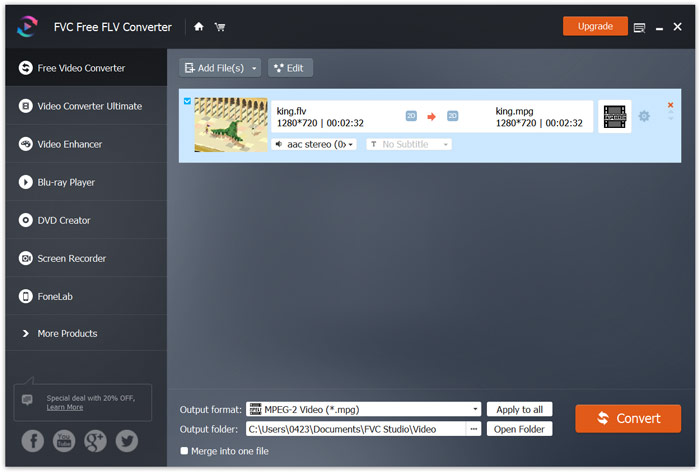
Paso 4. Como se mencionó antes, este conversor gratuito de FLV a MPG está equipado con una lista de funciones de edición. Así que, antes de la conversión, puedes usarlas para editar tu vídeo. Después, haz clic en el botón Convert para iniciar esta conversión gratuita de FLV a MPG.
Parte 2. Cómo cambiar FLV a MPG en línea
Cuando buscas en Google cómo convertir FLV a MPG, puedes ver muchos conversores online entre los primeros 20 resultados. Aquí te recomendamos encarecidamente el popular Free Online Video Converter. Es compatible con muchos formatos de vídeo y audio populares. No requiere registro ni tiene límite de tamaño de archivo. Puedes ir directamente a esta página del conversor online de FLV a MPG y empezar la conversión.
Paso 1. Abre tu navegador, como IE, Chrome, Firefox o Safari, y ve a esta página de conversor online de FLV a MPG.
Descarga la versión de escritorio para convertir archivos por lotes.
Paso 2. Haz clic en Add Files to Convert y luego en el botón Download para instalar rápidamente un lanzador para la conversión de FLV a MPEG. Cuando el lanzador esté listo, podrás buscar y cargar tu archivo FLV mediante la ventana emergente.

Paso 3. Ahora se te dirigirá a la ventana del conversor. Allí se muestran algunos formatos de vídeo populares como MP4, MPG, MOV, AVI, FLV, MKV, WMV y otros. Establece MPG como formato de destino.
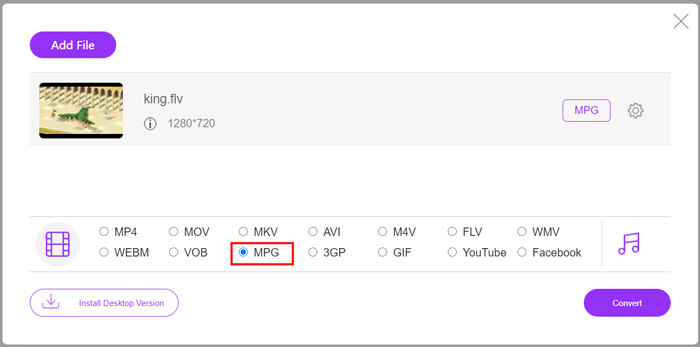
Paso 4. Para más ajustes de vídeo y audio, puedes hacer clic en el icono Settings junto al formato de salida. Luego haz clic en el botón Convert para iniciar la conversión de vídeo de FLV a MPG.
Parte 3. Cómo convertir gratis FLV a MPG con Aconvert
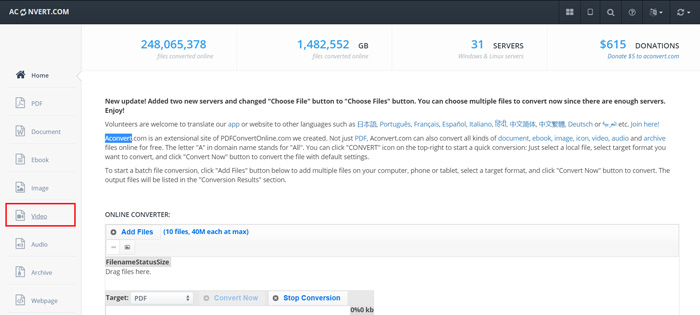
Aconvert es otro conversor online popular de vídeo, audio, documentos, imágenes y PDF. Como conversor de archivos con todas las funciones, te permite cambiar tus archivos FLV a MPG gratis en línea. La siguiente guía te mostrará cómo usarlo.
Paso 1. Busca y ve al sitio oficial de Aconvert. Una vez allí, haz clic en Video en el panel de la izquierda. Entonces se te llevará a la página de Convert video online.
Paso 2. Haz clic en el botón Select File para buscar y subir tu archivo FLV. Después elige MPG como formato de salida. Para más opciones, puedes hacer clic en Options y seleccionar Change size, bitrate o frame rate.
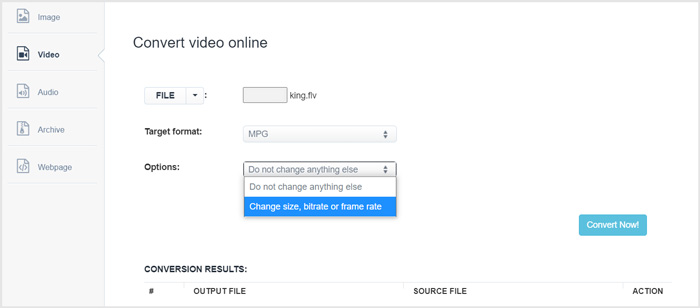
Paso 3. Haz clic en el botón Convert Now para iniciar la conversión online de FLV a MPG. Este conversor online de FLV a MPG empezará a subir y convertir tu archivo. En comparación con el conversor de vídeo online anterior, tardará más en completar todo el proceso, así que ten paciencia.
FLV frente a MPG
Adobe Flash Player usó FLV para entregar contenido de video como películas y programas de televisión. En la actualidad, Adobe ya no desarrolla el reproductor y recomienda a los usuarios que lo desinstalen por motivos de seguridad. Sin embargo, aún puede usar el formato FLV en muchos programas que no son de Adobe/Macromedia.
Creado por el Grupo de expertos en imágenes en movimiento (MPEG), MPG es un formato de video digital común para almacenar información de video, audio y metadatos. Es bastante útil a la hora de crear películas para compartir en Internet. Esos archivos en MPG generalmente contienen compresión de video/audio MPEG-1 o MPEG-2.
Parte 4. Preguntas frecuentes sobre la conversión de FLV a MPG
Pregunta 1. ¿Cuáles son las desventajas de FLV?
En primer lugar, la creación de contenido flash lleva mucho tiempo y es costosa. Los archivos FLV no pueden ser reconocidos por las arañas de los motores de búsqueda. Por lo tanto, no se agregarán a la optimización de un sitio. En ese caso, necesita tiempos de espera más largos para acceder a una página web con flash.
Pregunta 2. ¿Puedo reproducir archivos FLV en Windows Media Player?
Si. Windows Media Player puede abrir archivos FLV. Pero debe descargar e instalar el códec CCCP u otros códecs necesarios para reproducir archivos FLV.
Pregunta 3. ¿Cuál es el mejor reproductor FLV?
VLC Media Player puede ser el mejor reproductor para ti para reproducir archivos FLV tanto en un PC con Windows como en un Mac. Por supuesto, hay muchos otros reproductores de vídeo disponibles en internet que pueden ayudarte a ver archivos FLV. Obtén más reproductores FLV aquí.
Conclusión
En este artículo hemos hablado principalmente de cómo convertir FLV a MPG. Se recomiendan 3 conversores de vídeo gratuitos para que conviertas tus archivos FLV. Si tienes algún método mejor para convertir FLV, compártelo en los comentarios con otros lectores.
-
 MP4 a MPEG: las 4 mejores formas de convertir MP4 a MPEG (gratis)
 Esta publicación es la guía paso a paso para convertir MP4 a MPEG. Puede usar los 4 mejores convertidores de video gratuitos para cambiar MP4 a MPEG-1 o MPEG-2 como desee.
-
 Cómo comprimir archivos MPEG-4 en línea: sin descarga, sin marca de agua
 ¿No tiene suficiente almacenamiento de archivos para guardar todos sus archivos MPEG-4? Aquí hay algunas soluciones que podrían ayudarlo a reducir el tamaño de sus archivos de video.
-
 Las 4 mejores formas gratuitas de convertir videos FLV a MP4 en el escritorio y en línea
 Esta guía comparte cuatro métodos gratuitos para convertir sus archivos de video FLV a formato MP4 en Windows 10/8/7 / XP y Mac OS X, para que pueda disfrutar de los videos en cualquier dispositivo.

