


 Video Converter Ultimate
 Grabador de pantalla
 Reparación de vídeo
 Descarga segura
Cómo convertir archivos de video FLV a WMV sin perder calidad
Los archivos FLV no son compatibles con todos los reproductores multimedia ni con todos los dispositivos móviles. Por eso, quizá quieras convertir tus archivos FLV a WMV u otro formato compatible con tu reproductor de vídeo. El nuevo problema es que necesitas una herramienta adecuada para hacer el trabajo en tu ordenador o en línea. No pierdas el tiempo buscándola en Internet. Esta demostración te enseñará cómo convertir tus vídeos FLV a WMV para que puedas continuar tu proyecto sin complicaciones.

Parte 1: 2 métodos sencillos para convertir FLV a WMV gratis
Método 1: Convierta FLV a WMV con Free FLV Converter
FVC Free FLV Converter es una potente forma de convertir tus archivos FLV a WMV. Aunque no requiere ningún pago ni añade marcas de agua, ofrece abundantes funciones similares a las de un software profesional. Aún más importante, es muy fácil de usar y no requiere conocimientos técnicos.
Características clave del mejor convertidor FLV
- 1. Convierta videos FLV a otros formatos con un solo clic.
- 2. Maneje por lotes múltiples archivos de video FLV al mismo tiempo.
- 3. Admite una amplia variedad de formatos multimedia.
Descarga gratuitaPara Windows 7 o posteriorDescarga segura
Descarga gratuitaPara macOS 10.7 o posteriorDescarga segura
Cómo convertir FLV a WMV gratis
Paso 1: Importar FLV
Descarga e instala el mejor conversor de vídeo FLV gratuito y ejecútalo. El conversor de vídeo es compatible con Windows 10/8/7 y Mac OS X. Haz clic en el menú Add File(s) en la esquina superior izquierda y añade todos los archivos FLV que quieras convertir. El software utiliza multihilo para procesar los vídeos por lotes.

Paso 2: Establecer WMV como formato de salida
Ve a la parte inferior después de cargar los vídeos y haz clic para desplegar la lista Output format. En la pestaña General Video, selecciona WMV. Puedes encontrar rápidamente el formato de salida buscándolo en el cuadro Search Profile.
Si quieres editar tus vídeos, haz clic en el botón Edit en la cinta superior para abrir la ventana del editor de vídeo.

Paso 3: Convertir FLV a WMV
Haz clic en el botón Open Folder y establece la carpeta de destino en el campo Output folder. Por último, haz clic en el botón Convert para empezar a convertir FLV a AVI. Según nuestras pruebas, solo se necesitan unos minutos para convertir decenas de archivos FLV.

Método 2: Cómo convertir FLV a WMV con VLC
Mucha gente prefiere los convertidores de video de código abierto. VLC, por ejemplo, no solo es un reproductor de video, sino que también puede convertir FLV a WMV de forma gratuita. Sin embargo, muchos usuarios se quejaron de que VLC es difícil de usar. Por lo tanto, publicamos una guía básica a continuación.
Paso 1: Ejecuta el conversor gratuito de FLV a WMV. Puedes instalarlo desde la página web oficial sin pagar ni un céntimo.
Paso 2: Ve al menú Media y selecciona Convert/Save en PC. Si utilizas VLC en Mac, elige Convert/Stream en el menú File.
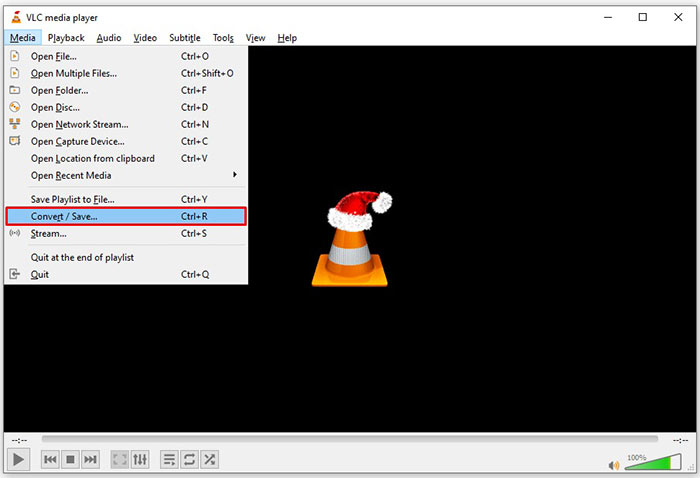
Paso 3: Haz clic en el botón Add para añadir un archivo FLV que quieras convertir. En el caso de Mac, haz clic en el botón Open media para importar el vídeo FLV.
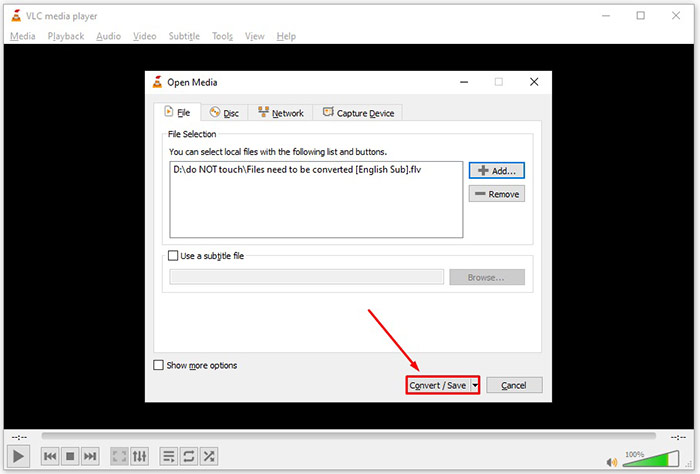
Paso 4: Pulsa el botón Convert/Save para pasar a la siguiente ventana. En Mac, desplázate hasta la sección Choose Profile.
Paso 5: De forma predeterminada, VLC no admite la exportación en WMV, pero puedes añadirla manualmente. Haz clic en el botón Profile edit en PC o en el botón Customize en Mac para abrir el cuadro de diálogo Profile edition.
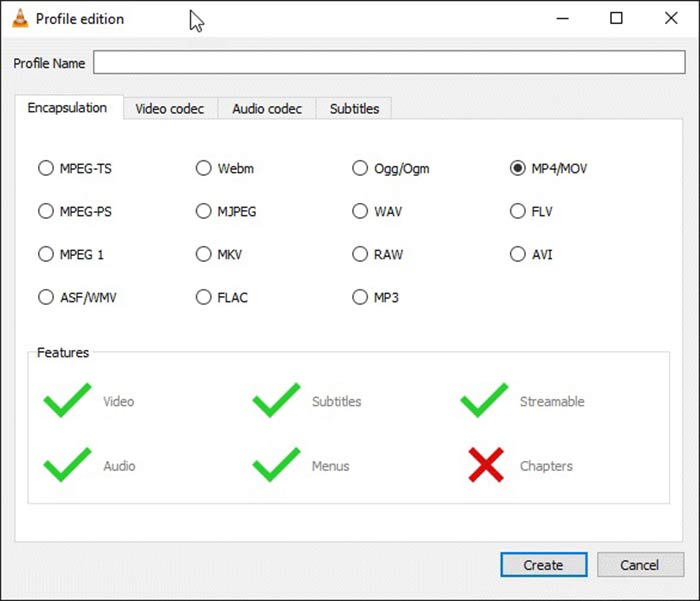
Paso 6: Escribe WMV en el cuadro Profile Name y selecciona ASF/WMV. Haz clic en el botón Create y cierra el cuadro de diálogo. Luego abre la lista desplegable Profile y selecciona WMV.
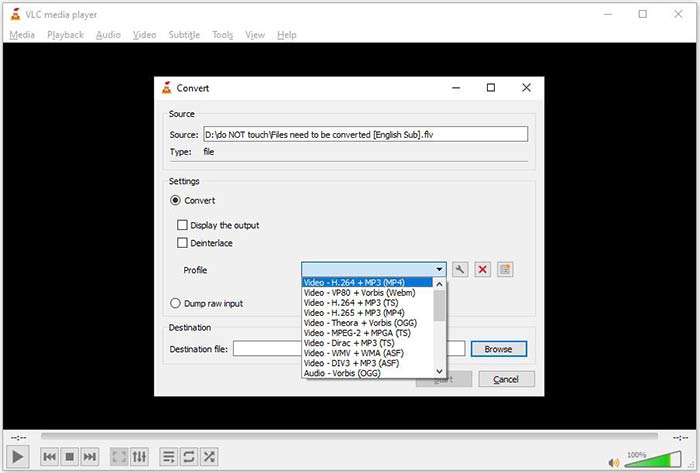
Paso 7: Haz clic en el botón Browse y elige un directorio específico para guardar el archivo WMV de salida. Finalmente, haz clic en el botón Start para iniciar de inmediato la conversión de FLV a WMV. Tarda tanto como dura el archivo de vídeo en convertirse, así que tendrás que tener paciencia.
Parte 2: Cómo convertir FLV a WMV en línea
Para quienes no desean instalar software, las aplicaciones web son la alternativa portátil para realizar diversas tareas. FVC Free Online Video Converter, por ejemplo, puede ayudarte a convertir archivos FLV a formato WMV en línea de forma gratuita. A diferencia de otras aplicaciones web, utiliza tecnología avanzada para convertir vídeos en línea sin límite de tamaño de archivo.
Paso 1: Abre https://www.free-videoconverter.net/free-online-video-converter/ en tu navegador cuando necesites convertir FLV a WMV. Haz clic en el botón Add Files to Convert para descargar e instalar el lanzador.
Descarga la versión de escritorio para convertir archivos por lotes.
Paso 2: Una vez terminada la instalación, aparecerá el lanzador. Haz clic en el botón Add File y sube los archivos FLV que quieres convertir.
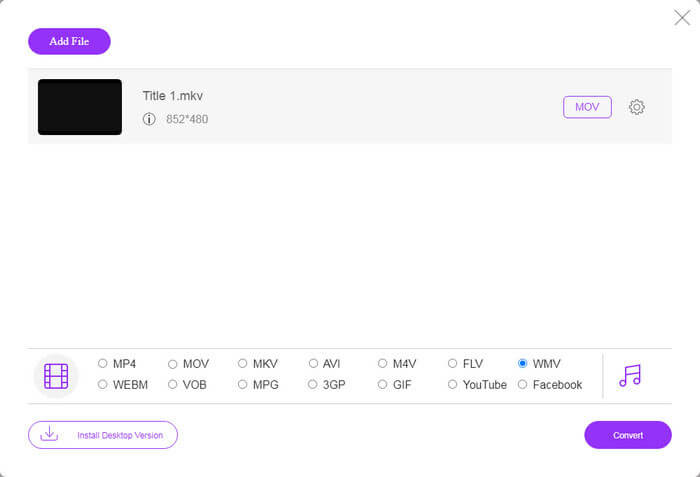
Paso 3: A continuación, selecciona la opción WMV en la parte inferior y haz clic en el botón Convert. Tardará un poco en completar la conversión. Después, descarga los archivos de salida a tu disco duro.
No te lo pierdas:
- • 3 formas gratuitas de convertir FLV a MPG
- • 3 formas gratuitas de convertir FLV para jugar en Xbox
FLV frente a WMV
Adobe Flash Player usó FLV para entregar contenido de video como películas y programas de televisión. En la actualidad, Adobe ya no desarrolla el reproductor y recomienda a los usuarios que lo desinstalen por motivos de seguridad. Sin embargo, aún puede usar el formato FLV en muchos programas que no son de Adobe/Macromedia.
Producido por Microsoft, WMV fue uno de los formatos de video más comunes en la década de 2000. Puede verse en la web y reproducirse en varios reproductores multimedia en Windows. Y también es el formato de archivo de video predeterminado de Windows Media Player. Pero recientemente ha sido absorbido por otros formatos.
Parte 3: Preguntas frecuentes sobre FLV a WMV
¿Puedo convertir FLV a WMV en Windows 10?
No hay una función incorporada en Windows 10 que pueda convertir archivos de video. Para hacer el trabajo, también necesita un programa de conversión de video o una aplicación instalada en su PC.
¿Por qué FLV no se reproduce en Windows Media Player?
Como sabemos, FLV es un formato que ha ganado popularidad en la entrega de videos a través de Internet. Sin embargo, FLV no es compatible con Windows Media Player. Aquí tiene dos opciones, usar otro reproductor multimedia o instalar el paquete de códec en WMP.
¿Es seguro convertir FLV a WMV en línea?
Es difícil responder a esta pregunta. Aunque la mayoría de los convertidores de video web prometen eliminar sus videos después de la conversión, algunos de ellos pueden poner sus archivos en otras manos. Por lo tanto, debe utilizar una herramienta confiable, como FVC Free Online Video Converter.
Conclusión
Esta guía ha compartido tres formas de convertir FLV a WMV en el escritorio y en línea. Cuando tenga tal necesidad, puede seguir nuestra guía concreta para terminar el trabajo fácilmente. FVC Free FLV Converter, por ejemplo, no solo es gratuito, sino que también convierte sus archivos de video sin dañar la calidad. Si encuentra otros problemas, bienvenido a contactarnos dejando un mensaje debajo de esta publicación.
-
 Cómo convertir sus archivos de video FLV a MP4 sin pagar un centavo
 Esta guía comparte cuatro métodos gratuitos para convertir sus archivos de video FLV a formato MP4 en Windows 10/8/7 / XP y Mac OS X, para que pueda disfrutar de los videos en cualquier dispositivo.
-
 Cómo convertir sus videos FLV a archivos de audio MP3 en el escritorio y en línea
 ¿Cómo convertir un archivo FLV a MP3? Todo lo que necesita hacer es leer este artículo detenidamente, encontrar su método favorito y seguir nuestra guía paso a paso para obtener lo que desea.
-
 Las 3 formas principales de convertir FLV a MOV
 ¿Cómo convertir FLV a MOV? ¿Cómo convierto FLV a MOV en Mac? ¿Existe alguna forma gratuita de convertir YouTube FLV a MOV en línea? Esta publicación comparte 3 convertidores FLV a MOV para cambiar archivos FLV a MOV.

