


 Video Converter Ultimate
 Grabador de pantalla
 Reparación de vídeo
Proceso de conversión fuera de línea y en línea: la mejor manera de convertir OGV a FLV
Cuando se utilizan vídeos OGV, este formato de compresión de vídeo con pérdida puede resultar molesto, ya que se ve borroso después de realizar ajustes. No obstante, la situación mejora si primero conviertes OGV a formato FLV antes de compartirlo en línea; el único desafío será encontrar un conversor de vídeo fácil de usar pero potente. Afortunadamente, contamos con el mejor tanto para uso sin conexión como en línea para convertir OGV a FLV sin complicaciones. Solo tienes que seguir los pasos que se indican en este artículo para tu comodidad.

Parte 1. Cómo convertir OGV a FLV con facilidad [sin conexión]
Siendo sinceros, hay muchos conversores de vídeo disponibles en línea, pero solo unos pocos pueden realizar una conversión de OGV. Puesto que este formato no es común para la mayoría de los usuarios de vídeo, a muchos conversores no les preocupa incluirlo entre los formatos que admiten. Por este motivo, es donde Video Converter Ultimate resulta especialmente útil. Es totalmente compatible con archivos OGV de entrada y te permite convertir vídeos OGV a formatos FLV rápidamente. También cabe destacar que puede transformar tus vídeos OGV y editarlos con herramientas prácticas. Todo lo que necesitas está en Video Converter Ultimate. Por ello, te proporcionamos los pasos más sencillos para que los sigas:
Paso 1: Antes de poder usar el software, primero debes instalarlo en tu ordenador. Puedes hacerlo haciendo clic en uno de los botones de Descarga gratuita que aparecen a continuación, según el sistema operativo que utilices. Espera a que el archivo .exe o .dmg termine de descargarse y, una vez completado, ábrelo para iniciar el proceso de instalación. Por último, podrás ejecutar el programa nada más finalizar haciendo clic en Iniciar ahora.
Descarga gratuitaPara Windows 7 o posteriorDescarga segura
Descarga gratuitaPara macOS 10.7 o posteriorDescarga segura
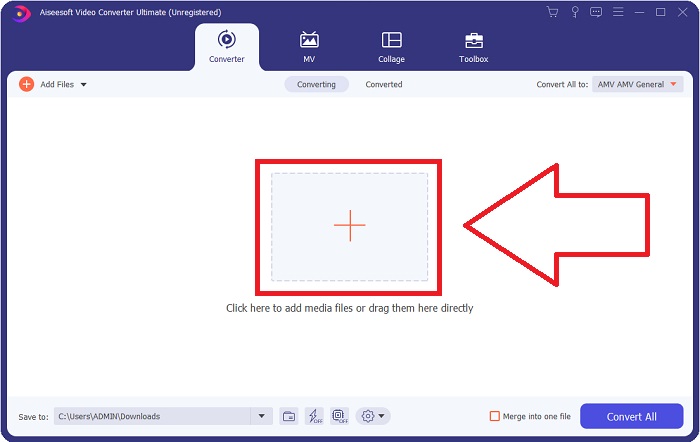
Paso 2: Cuando aparezca la ventana emergente, te encontrarás con una interfaz que tiene un botón con un signo + en el centro. Para importar el archivo de vídeo que quieres convertir, haz clic en él o arrastra y suelta el archivo directamente en el programa.
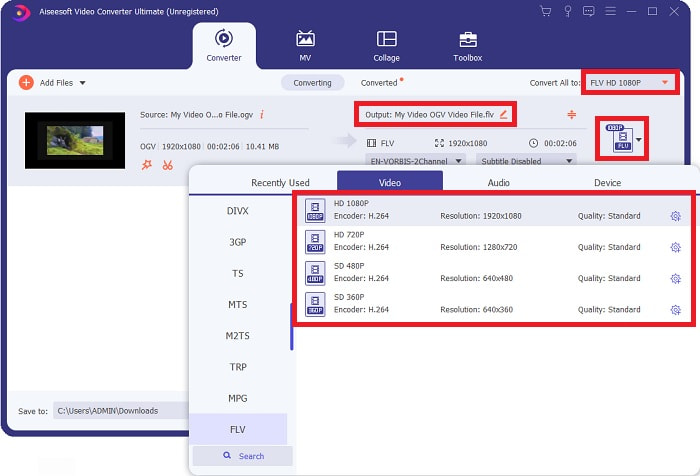
Paso 3: A la derecha se muestra el formato de archivo actual de tu vídeo. Haz clic ahí y se mostrarán todos los formatos disponibles. En este caso, desplázate hacia abajo y selecciona FLV, o simplemente búscalo en la barra de búsqueda situada debajo. Ahora, en el lado derecho de la pestaña, también puedes elegir la calidad de vídeo que quieres para tu archivo convertido.
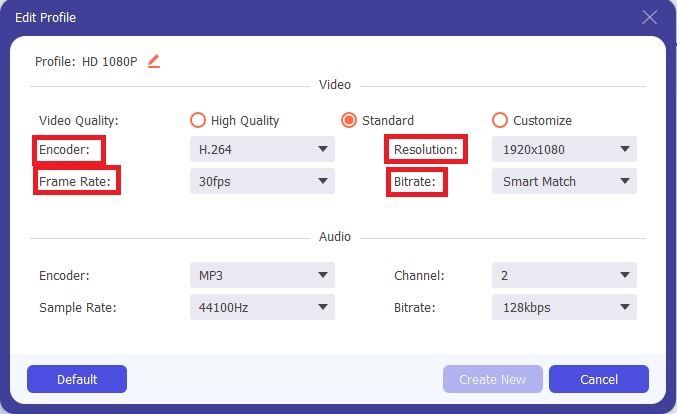
Paso 4: Si buscas más opciones, puedes encontrarlas haciendo clic en el icono de engranaje junto a la calidad de vídeo seleccionada. Con esto podrás editar aún más la resolución del vídeo y otros parámetros como la tasa de fotogramas, la frecuencia de muestreo, la tasa de bits y el códec. Una vez satisfecho, haz clic en el botón Crear nuevo en la esquina inferior derecha para guardar los cambios.
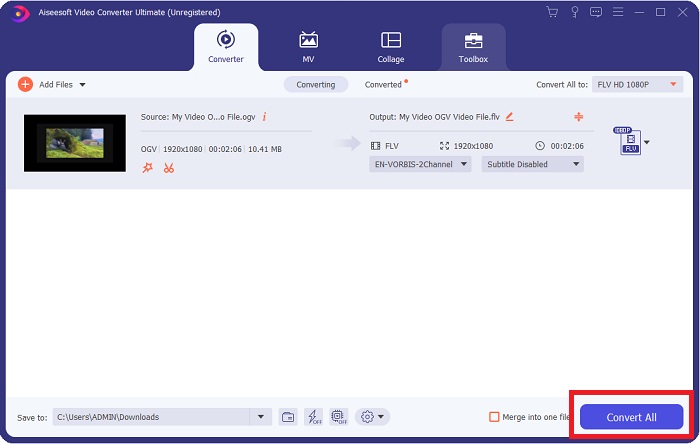
Paso 5: Cuando termines todos los ajustes, puedes iniciar la conversión propiamente dicha haciendo clic en el botón Convertir todo en la esquina inferior derecha y esperar a que finalice.
Parte 2. Otro método disponible para convertir OGV a FLV [en línea]
Si vas justo de tiempo y necesitas convertir tu archivo OGV a FLV lo más rápido posible, no tienes de qué preocuparte, porque también tenemos una solución para ello. Puedes usar la versión en línea de este software, que sigue ofreciéndote la máxima comodidad mediante un proceso de conversión fluido. FVC Free Video Converter Online es una herramienta web que puede convertir fácilmente archivos OGV a FLV y seguir ofreciendo las mismas opciones de resolución y calidad de audio. Para utilizarla, sigue estos pasos:
Paso 1: Haz clic en este enlace y se te redirigirá al conversor en línea. En el centro de la página hay un botón que dice Añadir archivos para convertir. Debes hacer clic en él para descargar el lanzador que necesitas para importar el archivo de vídeo que quieres convertir.
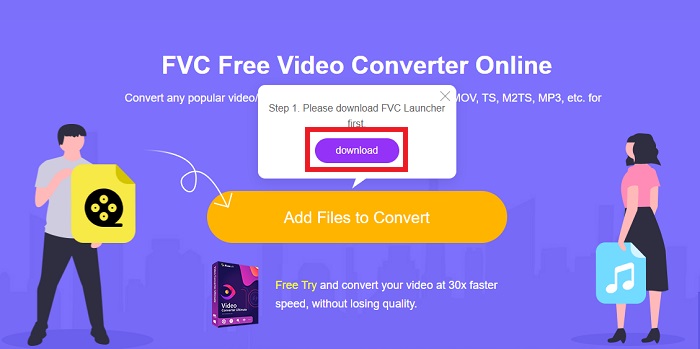
Paso 2: Una vez terminado, ya puedes subir tu archivo haciendo clic de nuevo en dicho botón. Aparecerá una interfaz si la carga se ha realizado correctamente. Desde ahí podrás seleccionar FLV entre los demás formatos que se muestran en la parte inferior de la ventana.
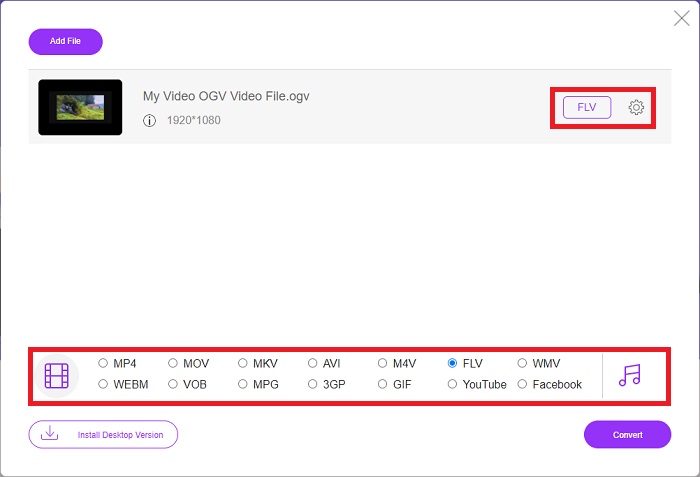
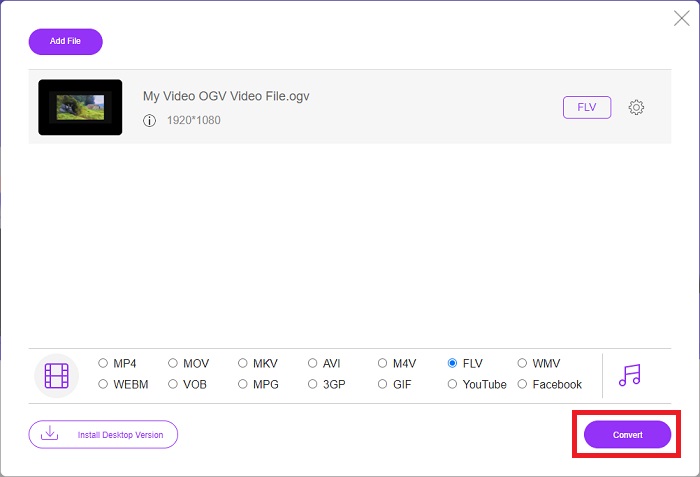
Paso 3: Del mismo modo, también encontrarás un icono de engranaje en el extremo derecho, donde podrás editar aún más tu vídeo. Al hacer clic, verás los ajustes de vídeo y audio para modificar los códecs, la resolución, la tasa de fotogramas y más. Haz clic en OK y luego en el botón Convertir en la esquina inferior derecha para iniciar el proceso de conversión.
Parte 3. Conocimiento ampliado sobre OGV y FLV
Si desea saber más sobre los dos archivos que se comparan, aquí le brindamos toda la información necesaria que quizás desee leer:
El método de codificación de video Ogg Vorbis generalmente puede vincularse con archivos que tienen la extensión de archivo .ogv. Ogg Vorbis es un formato de compresión de audio no patentado y de código abierto. El formato contenedor para archivos de audio, video e información se conoce como Ogg, mientras que la tecnología de compresión de audio Vorbis recibe su nombre. El formato de archivo OGV es un contenedor para archivos de video. Las secuencias de video vinculadas con uno o más códecs de video, como Theora y DivX, se pueden encontrar en archivos OGV. Los usuarios pueden reproducir el material grabado dentro del archivo de contenido en varios dispositivos multimedia utilizando estos archivos.
Por otro lado, un archivo de video almacenado en el formato contenedor Adobe Flash Video (FLV) es un archivo FLV. Adobe Flash Player lo usa principalmente para ofrecer contenido de video en línea, como películas y episodios de TV. Además, es esencial tener en cuenta que es un formato abierto compatible con una variedad de aplicaciones que no son de Adobe/Macromedia. Para una comparación más específica de los dos, hicimos una tabla solo para ti.
| Ogg Vorbis (OGV) | Vídeo Adobe Flash (FLV) | |
| Extensión de archivo | .ogv | .flv |
| Desarrollador | Fundación Xiph.Org | sistemas de Adobe incorporados |
| Programas de apoyo | MPlayer clásico, VLC Media Player, Jriver Media Center, MPUI | RealPlayer, Apple QuickTime Player, Mplayer, VLC Media Player |
| Ventajas | OGG tiene la ventaja de estar libre de patentes, generalmente reconocido y compatible de forma nativa con la mayoría de los navegadores. Por lo tanto, si desea cargar una película en su sitio web, este formato es una buena opción. | La belleza de Flash es que puede ayudar a los sitios web que desean incorporar movimiento y contenido interactivo. El procedimiento es sencillo y, al final, puede tener un impacto significativo. Todos también utilizaron Flash para juegos rudimentarios en su mejor momento. |
| Desventajas | A pesar de su uso generalizado, el formato de video OGG tiene algunos inconvenientes. Safari e Internet Explorer, por ejemplo, solo lo admiten parcialmente; por lo tanto, es posible que los usuarios no vean correctamente su video en estos navegadores. | La desventaja, por supuesto, es que el formato FLV se ha vuelto más impopular en los últimos años. La creación de contenido FLV puede llevar mucho tiempo y ser costosa. Otra desventaja es que el material Flash no se puede reproducir en dispositivos iOS, lo que limita severamente su capacidad para atraer nuevos seguidores. |
Parte 4. Preguntas frecuentes sobre la conversión de OGV y FLV
¿Son lo mismo OGG y OGV?
Es un subconjunto adecuado del tipo de medio de video Ogg video/Ogg con la extensión de archivo. ogv. Otras aplicaciones de Ogg utilizan la extensión de archivo. ogv con el tipo de medio application/ogg desde. ogx es un superconjunto de video/ogg.
¿Es la calidad de FLV mejor que MP4?
Se dice que MP4 contiene una codificación digital de vídeo y audio de alta calidad. La opinión del público sobre FLV es menos clara, aunque las ventajas y desventajas de FLV rara vez se centran en la calidad del formato en sí. Con mayores niveles de compresión, MP4 presenta menos pérdida de calidad. Aquí puedes consultar las formas de convertir archivos FLV a MP4.
¿FLV es sin pérdidas o con pérdidas como OGV?
El formato de archivo FLV para Flash Video admite dos versiones del códec de pantalla compartida (Video de pantalla), que es un método de codificación de screencast. Estos formatos se basan en mosaicos de mapa de bits y tienen pérdida cuando las profundidades de color se reducen y comprimen con Zlib.
Conclusión
Independientemente de cuánto tiempo tenga para convertir sus archivos de video, tanto el software como su contraparte de herramienta en línea le brindarán lo más conveniente para usted. Entonces, en pocas palabras, Video Convert Ultimate y Free Video Converter son los que deben ser lo primero en lo que piensas cuando se trata de conversión de video para que ahorres tiempo navegando por Internet y encontrando el mejor. Aquí te entregamos lo mejor.
-
 Mejores formas de convertir VOB a FLV [Gratis y en línea incluido]
 ¿Quiere convertir un archivo VOB en un archivo FLV? Puede completar fácilmente la tarea con convertidores de escritorio o en línea. Lea esta guía y aprenda cómo transformar VOB a FLV de forma fácil y rápida.
-
 Las 4 mejores aplicaciones gratuitas de conversión de RMVB a FLV en el escritorio o en línea
 Este artículo le dirá el mejor software de conversión de RMVB a FLV y aplicaciones web que pueden convertir archivos RMVB (RealMedia Variable Bitrate) a video FLV.
-
 Cómo comprimir un archivo OGV sin perder calidad
 ¿No puede enviar archivos OGV grandes a otros? Bueno, este artículo le presentará 2 formas fáciles de ayudarlo a comprimir archivos OGV fácilmente.
