


 Video Converter Ultimate
 Grabador de pantalla
 Reparación de vídeo
 Descarga segura
2 forma eficiente de convertir archivos WMV a GIF para compartirlos fácilmente
Cuando corte los fragmentos interesantes y maravillosos de los videos WMV y quiera compartirlos con sus amigos, no podrá enviarlos a través de muchas plataformas. La mejor solución es convertir segmentos WMV en archivos GIF animados con tamaños pequeños y alta compatibilidad con la web o dispositivos portátiles. De esta manera, puede compartir fácilmente sus momentos favoritos en los videos a través de cualquier aplicación.
This article will introduce the 2 best methods for you to convert WMV videos to GIFs with detailed steps. You can choose the professional way to solve all the problems or the easy way with simple steps but fewer functions. Please keep reading and learn more about them.

Parte 1: La mejor y más eficiente forma de convertir videos WMV a GIF de forma gratuita
To make interesting GIFs from WMV videos in an efficient way, you should rely on the professional GIF maker - FVC Free Video to GIF Maker. It is actually a versatile video converter that can transform 100+ formats to any format, including converting WMV format to GIF. Moreover, it supports adjusting the video resolution and frame rate to keep high quality and fluency.
- 1. Transfiera videos WMV a GIF con simples clics.
- 2. Recorte y recorte los videos WMV para que sigan siendo las partes deseadas.
- 3. Personalice libremente la resolución de vídeo, la velocidad de fotogramas y los efectos.
- 4. Recorta, marca de agua, marca de agua y gira el WMV antes de crear GIF.
Descarga gratuitaPara Windows 7 o posteriorDescarga segura
Descarga gratuitaPara macOS 10.7 o posteriorDescarga segura
Step 1: Free download FVC Free Video to GIF Maker on Windows/Mac and launch it. Click the Add Files button to choose the desired WMV videos to convert to GIFs.
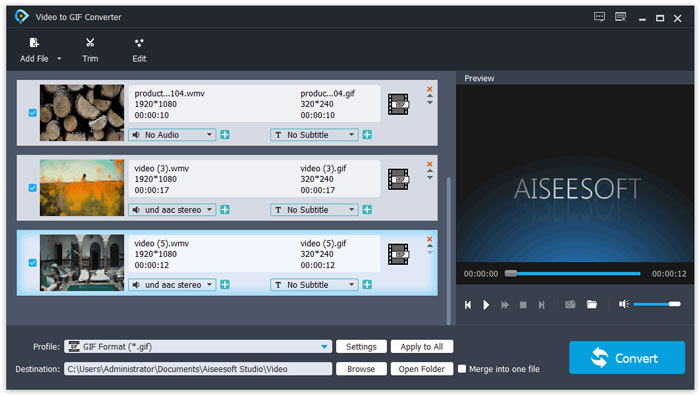
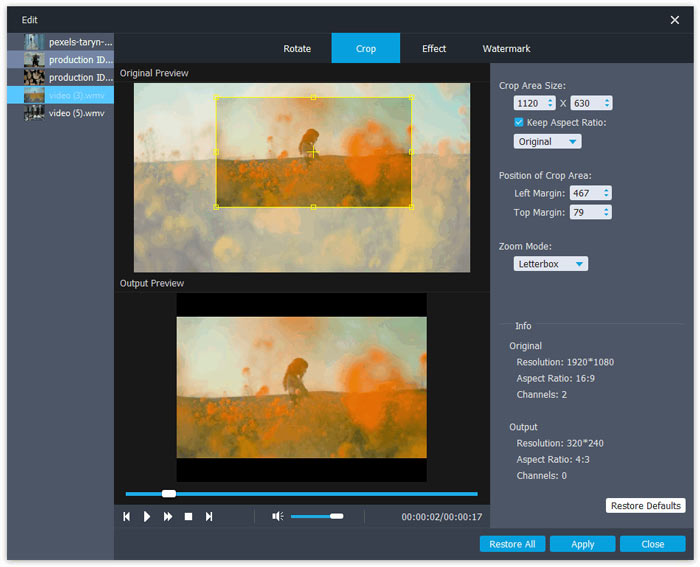
Step 2: Click the Edit button to clip the videos into short animations. You can also crop and rotate the videos freely. Then you can add the desired themes, effects, and subtitles freely.
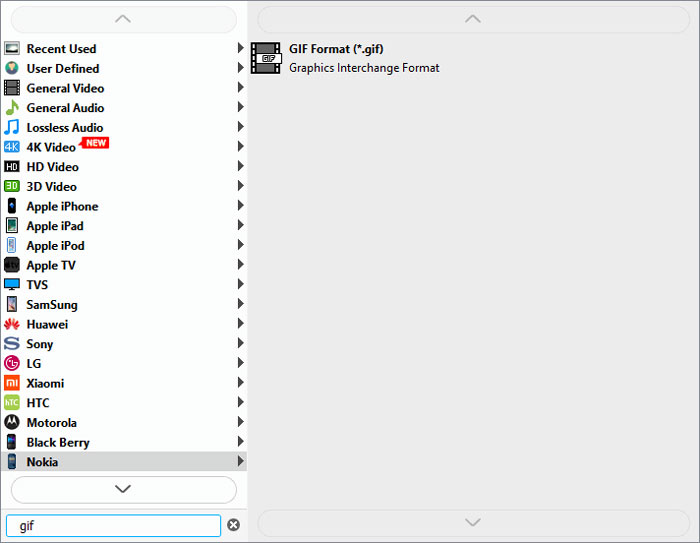
Step 3: Then you should click the Profile menu and choose the GIF format to export. To keep the quality and fluency of GIF files, click the Settings icon and change the resolution and frame rate to the highest one. Then go back to the main interface and click the Convert button to start transferring WMV to GIF.
Parte 2: Cómo transformar WMV al GIF animado en línea de forma gratuita y fácil
FVC Free Online Video Converter is very easy to use that can helps you convert WMV videos to animated GIFs online without downloading other software. It supports importing any format and exporting videos to more than 10 common formats. Regardless of the low resolution and frame rate of GIF settings, it’s the best choice for quick conversion. The detailed steps are introduced in the following:
Step 1: Open FVC Free Online Video Converter on any browser. Click the Add Files to Convert button to install the launcher. Then click the button again to add the edited WMV files and launch the converter.
Descarga la versión de escritorio para convertir archivos por lotes.
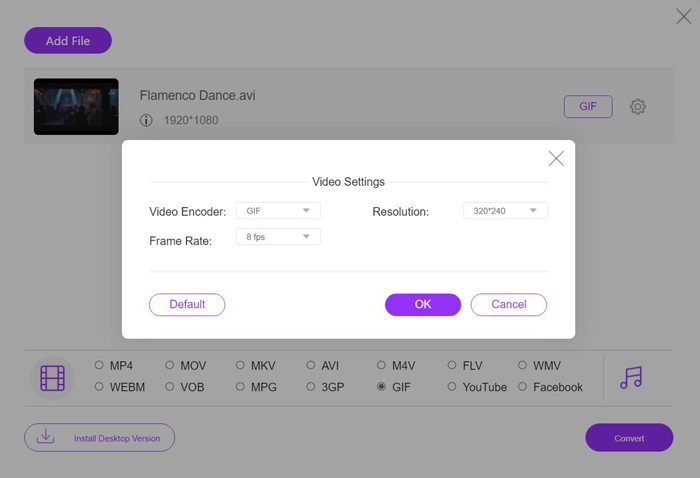
Step 2: Choose the GIF format in the video list, and then click the Settings icon to choose the 320X240p resolution and 8 fps frame rate. Then click the OK button to save the settings. After that, click the Convert button to choose the storage path and start transforming WMV videos to GIF files.
WMV frente a GIF
Producido por Microsoft, WMV fue uno de los formatos de video más comunes en la década de 2000. Puede verse en la web y reproducirse en varios reproductores multimedia en Windows. Y también es el formato de archivo de video predeterminado de Windows Media Player. Pero recientemente ha sido absorbido por otros formatos.
GIF es un formato de imagen común para gráficos web. Además de guardar imágenes pequeñas e imágenes que contienen texto, GIF también puede contener y mostrar animaciones básicas en sitios web. Es un formato sin pérdidas y la compresión GIF no degrada la claridad de la imagen.
Parte 3: Preguntas frecuentes sobre la conversión de videos WMV a GIF
1. ¿Cómo transformar WMV a GIF con la calidad original?
En realidad, no puede mantener la calidad original después de convertir WMV a GIF. GIF solo admite colores de 256 bits, por lo que la calidad de la imagen es relativamente baja y el tamaño del archivo es pequeño. Pero puede usar FVC Free Video to GIF Maker para ajustar la configuración y mantener una calidad relativamente alta.
2. ¿Por qué no puedo enviar fragmentos de WMV en Twitter?
Eso es porque Twitter solo admite formatos de video MP4 y MOV. Si desea compartir un fragmento de película en Twitter, será mejor que convierta videos WMV a archivos GIF compatibles con tamaños más pequeños.
3. ¿Debo eliminar la pista de audio al convertir WMV a GIF?
No, no necesitas hacer esto. Dado que GIF solo se combina con varias imágenes, no admite archivos de audio. Cuando desee transferir WMV a GIF, la pista de audio se borrará automáticamente.
Conclusión
GIF es muy popular ahora, y es posible que desee crear GIF interesantes o maravillosos a partir de videos WMV. Este artículo ha presentado 2 formas fáciles y eficientes de ayudarlo a convertir videos WMV a GIF. Puede transformar WMV a GIF en línea de forma gratuita con un ajuste básico. Para mantener una alta calidad y fluidez, descargue gratis FVC Free Video to GIF Maker para cambiar la resolución y la velocidad de fotogramas.
-
 Convertidor gratuito de FLV a Xvid - Convierta FLV a Xvid para reproductor de CD / DVD
 Esta publicación es una guía paso a paso para convertir gratis FLV a archivos codificados Xvid para que pueda reproducir los archivos de video FLV en un reproductor de CD y DVD sin esfuerzo.
-
 Cómo descargar el códec MKV en Windows Media Player para una reproducción fluida
 ¿No puede reproducir videos MKV en Windows Media Player? Puede descargar gratis el códec MKV para Windows Media Player. Por el contrario, convierta el MKV para que se pueda reproducir en Windows Media Player.
-
 Cómo convertir videos AVI a archivos GIF animados en Windows / Mac
 ¿Quiere seleccionar los segmentos AVI interesantes para crear memes GIF? Este artículo le dirá los 2 mejores métodos para recortar los videos AVI y convertir AVI a archivos GIF animados de forma gratuita.

