


 Video Converter Ultimate
 Grabador de pantalla
 Reparación de vídeo
 Descarga segura
Cómo convertir ICO a PNG al instante [Métodos completos]
ICO es un archivo de imagen para iconos de ordenador, especialmente en Microsoft Windows. Se utiliza para contener un archivo de icono. Sin embargo, el formato ICO no es popular en otros programas y dispositivos. Por lo tanto, si quieres ver tus imágenes con otros programas, necesitas convertirlas a otro formato. Si prefieres un archivo de imagen con un tamaño de archivo más pequeño, PNG es una de las mejores opciones. El formato PNG tiene un tamaño de archivo más reducido y puedes ver las imágenes en casi todos los programas. En ese caso, este artículo tiene la mejor solución para ti. Usando conversores de imágenes, aprenderás los mejores métodos para convertir de ICO a PNG.

Parte 1. ICO versus PNG
| Formato de archivo | OIC | PNG |
| Extensión de nombre de archivo | .ico | .png |
| Nombre completo | Icono | Gráfico de red portátil |
| Desarrollado por | Microsoft | Grupo de desarrollo PNG |
| Descripción | OIC es un tipo de archivo de imagen que puede almacenar iconos de imagen. Los sistemas operativos Microsoft Windows utilizan la extensión de archivo ICO para almacenar archivos de iconos. Incluye imágenes de mapa de bits. Además, los sitios web usan archivos ICO como sus favicons. Se admiten imágenes con colores de 24 bits. Además, Windows solo guarda iconos para archivos ejecutables en formato ICO. Las imágenes en los archivos ICO de Windows varían en tamaño desde 16 × 16 hasta 256 × 256 píxeles. Los archivos ICO más antiguos solo pueden almacenar imágenes de 48 × 48 píxeles. | Un tipo de archivo de imagen de trama es un gráfico de red portátil o PNG. El formato GIF ha evolucionado a este. Oliver Fromme desarrolló el formato PNG en 1995 para realizar tareas que los GIF no pueden. A diferencia de GIF, el formato PNG no tiene patente y proporciona una gama más amplia de colores. PNG es uno de los formatos de imagen más utilizados en este momento. Puede abrir PNG en cualquier programa de edición de imágenes sin licencia porque una patente no protege el archivo. Este formato también hace uso de la compresión sin pérdidas. |
Parte 2. Convierta ICO a PNG gratis en línea
FVC Free Image Converter es una de las mejores herramientas en línea para convertir ICO a PNG. Este conversor de imágenes basado en la web puede convertir cualquier formato de archivo de imagen a JPG. Los tipos de entrada que esta aplicación puede manejar incluyen JPG, PNG, JPEG, TIFF, BMP, WEBCO, ICO y más. También ofrece un diseño sencillo y opciones claras. De este modo, tanto expertos como principiantes pueden convertir fotografías con este programa. Además, es más fácil de usar porque solo requiere unos sencillos pasos para convertir imágenes. Todos los navegadores son compatibles con FVC Free Image Converter. Incluye Safari, Microsoft Edge, Internet Explorer, Google Chrome y Mozilla Firefox. Además, FVC Free Image Converter ofrece conversión de fotos completamente gratuita. Esta herramienta es web, por lo que no necesitas descargar ningún software ni complementos. Las imágenes se pueden convertir fácilmente para su uso en navegadores.
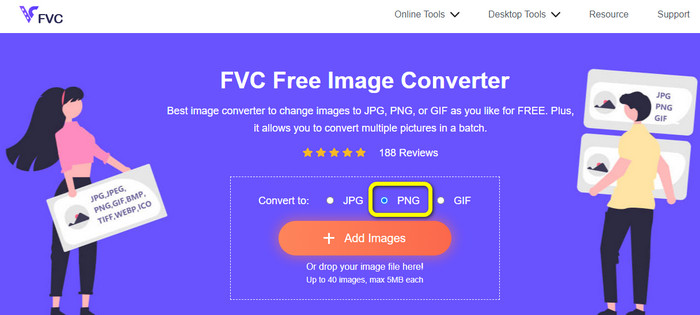
Paso 1: Accede al sitio web de FVC Free Image Converter. Luego, ve a la opción Convert to y selecciona el formato de archivo PNG.
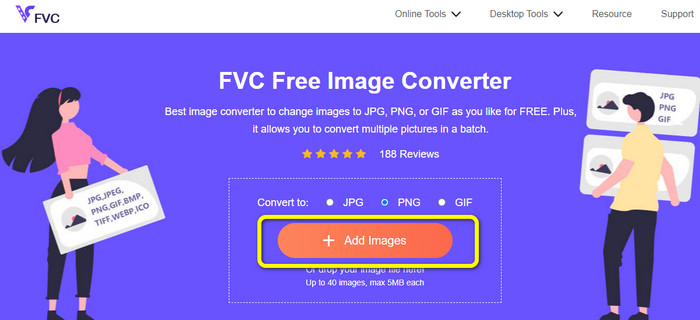
Paso 2: A continuación, haz clic en el botón Add Images. Los archivos de tu ordenador aparecerán en la pantalla. Elige el formato ICO que quieras convertir y haz clic en Open. Haz clic de nuevo en el botón Add Images para añadir más archivos y realizar un proceso de conversión por lotes.
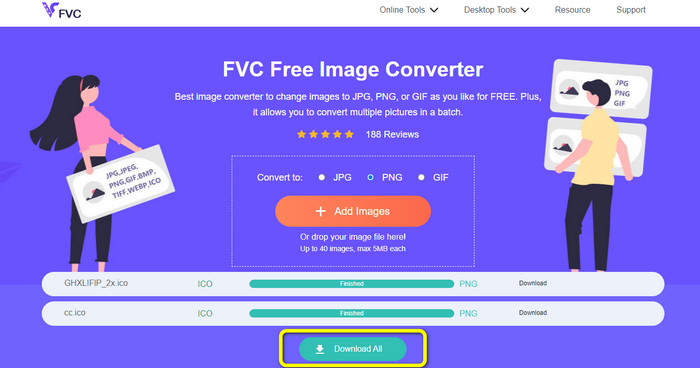
Paso 3: Tu imagen se convertirá automáticamente a PNG. Después del proceso de conversión, haz clic en el botón Download All para guardar las imágenes. Luego, tras el proceso, ya podrás abrir tu imagen convertida.
Parte 3. Cómo convertir ICO a PNG en Mac fácilmente
Preview es un programa preinstalado en Mac. Además de visualizar imágenes, también te permite convertir archivos de imagen. De este modo, puedes convertir un archivo ICO al formato PNG al instante. Además, el proceso de conversión es rápido. Puedes convertir imágenes en solo unos segundos, lo que resulta práctico para todos los usuarios. También ofrece un proceso de conversión por lotes. Así, puedes convertir varios archivos de imagen de una sola vez. Por otra parte, además de convertir, hay más funciones de las que puedes disfrutar. El programa es capaz de cambiar el tamaño y recortar fotos. Sin embargo, el proceso de conversión puede resultar complicado, especialmente para usuarios no profesionales. Las opciones son confusas de seguir. Si deseas convertir ICO a PNG usando este programa, es necesario pedir ayuda a profesionales. Sigue los pasos que aparecen a continuación para convertir ICO a PNG en Mac.
Paso 1: Ve a tu carpeta y haz clic en el archivo de imagen ICO. Haz clic con el botón derecho en la imagen y ve a Open with > Preview (default).
Paso 2: En Preview, ve a la opción File en la parte superior de la interfaz y selecciona Export.
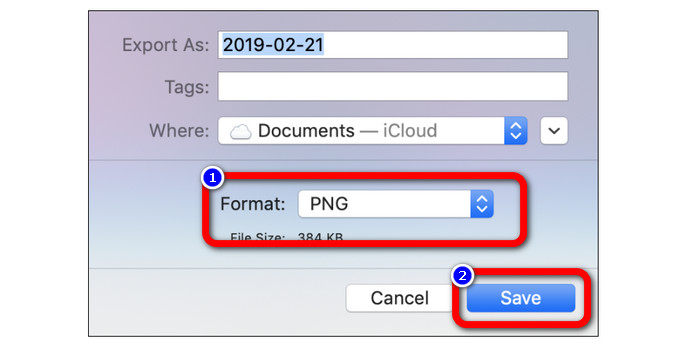
Paso 3: Después, en la opción de formato, selecciona tu formato de salida deseado, que es PNG. A continuación, haz clic en el botón Save. De este modo, tu imagen se convertirá del formato ICO al formato PNG.
Parte 4. Cómo convertir ICO a PNG en Windows
Uno de los mejores conversores de imágenes sin conexión es Video Converter Ultimate. Puedes convertir rápidamente de ICO a PNG con este excelente conversor. Además, puedes convertir muchos archivos gracias a su alta velocidad de conversión. También ofrece un método de conversión por lotes para convertir muchos archivos simultáneamente. Video Converter Ultimate también admite varios formatos de imagen. Además, incluye PNG, BMP, WEBP y TIF. Este conversor de imágenes sin conexión proporciona una interfaz fácil de usar y procedimientos de conversión sencillos. Los usuarios de todos los niveles pueden transformar imágenes fácilmente con este método. El proceso de conversión en este conversor también es rápido. En poco tiempo, puedes convertir gran cantidad de imágenes. Además, este conversor es accesible tanto en Mac como en PC con Windows.
Paso 1: Instala Video Converter Ultimate en tu Windows. Luego, tras el proceso de instalación, inicia el programa. Para acceder rápidamente al conversor, haz clic en el botón Download que aparece a continuación.
Descarga gratuitaPara Windows 7 o posteriorDescarga segura
Descarga gratuitaPara macOS 10.7 o posteriorDescarga segura
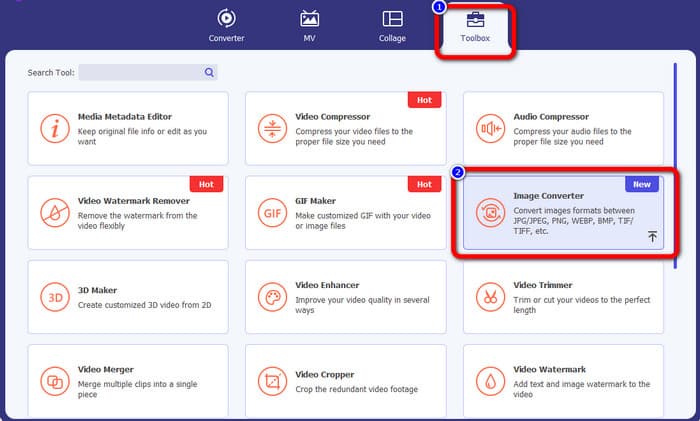
Paso 2: Después de iniciar el programa, ve a la parte superior de la interfaz y selecciona el panel Toolbox. Después, haz clic en la función Image Converter. Aparecerá otra interfaz en tu pantalla.
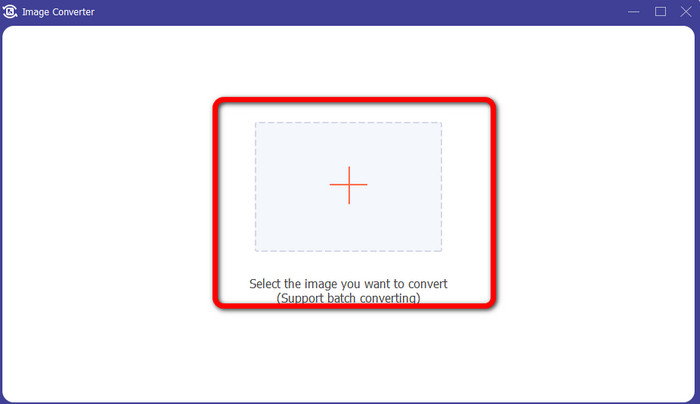
Paso 3: Cuando aparezca la nueva interfaz, haz clic en el icono Plus. Cuando se abra la carpeta, haz clic en la imagen ICO que quieras convertir y haz clic en Open.
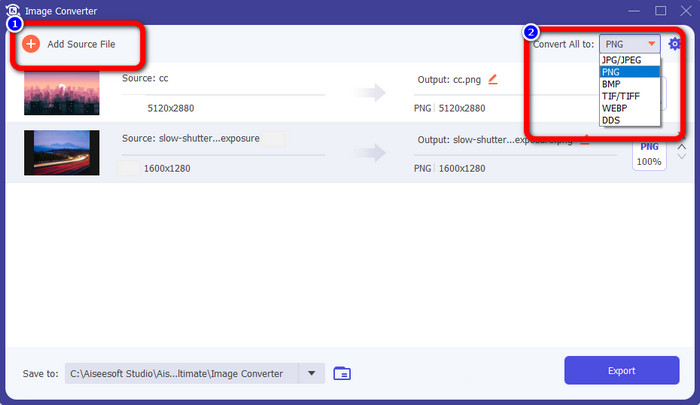
Paso 4: Si quieres añadir más archivos para realizar un proceso de conversión por lotes, haz clic en Add Source File. Ve a la esquina superior derecha de la interfaz y haz clic en la opción Convert All to. Selecciona el formato PNG como formato de salida deseado.
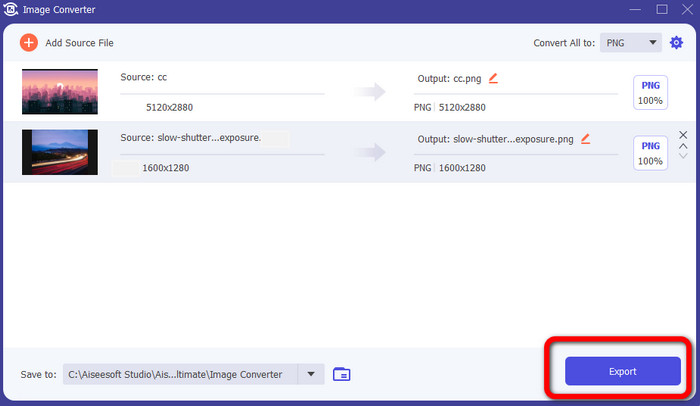
Paso 5: Por último, procede al proceso de conversión haciendo clic en el botón Export. Después de eso, tus archivos se guardarán en la ubicación que hayas asignado desde este conversor de imágenes.
Parte 5. Preguntas frecuentes sobre la conversión de ICO a PNG
1. ¿Cómo puedo guardar un ICO en PNG en Photoshop?
Lamentablemente, no puedes guardar ICO como PNG en Photoshop. Esto se debe a que Photoshop no es compatible con el formato de archivo de imagen ICO. Si quieres guardar ICO en formato PNG, puedes utilizar un conversor de imágenes como FVC Free Image Converter. Este conversor en línea te permite convertir ICO a PNG fácilmente.
2. ¿Es posible usar PNG como ICO?
Sí, lo es. Para obtener información adicional, los archivos ICO pueden ser archivos PNG. ICO puede contener un archivo PNG y un mapa de bits + alfa al mismo tiempo.
3. ¿Cuál es el mejor convertidor de ICO a PNG que puedo usar?
El mejor conversor de ICO a PNG es FVC Free Image Converter. Este conversor puede convertir tu archivo al instante. Además, puedes usar este conversor de forma gratuita.
Conclusión
Ahora ya has aprendido las maneras más sencillas de convertir de ICO a PNG rápidamente. Pero, si estás buscando un conversor de imágenes que sea gratuito y simple, utiliza FVC Free Image Converter.
-
 Los métodos más sencillos para convertir SVG a PNG
 Sepa cómo cambiar su archivo de imagen de SVG a PNG utilizando útiles convertidores de imágenes. Lea esta guía para aprender todo lo que necesita saber sobre la conversión
-
 Maneras a gran escala de convertir JPG a PNG en línea y fuera de línea
 ¿Está buscando métodos útiles para convertir el formato de archivo JPG a PNG? Esta guía tiene la respuesta que necesita. Para descubrir estos métodos, lea el artículo
-
 Detalles completos sobre las diferencias de JPEG frente a JPG frente a PNG
 Esta publicación le brindará suficiente información sobre las diferencias entre JPEG, JPG y PNG. Además, aprenderá cómo convertir imágenes a estos archivos.
