


 Video Converter Ultimate
 Grabador de pantalla
 Reparación de vídeo
 Descarga segura
Cómo convertir SVG a JPG rápidamente [Formas súper fáciles]
Es posible que quieras convertir una imagen SVG a JPG por varias razones. Una de ellas es simplificar la edición. Para los SVG se necesita un editor de imágenes basado en vectores. Sin embargo, los editores de imágenes de mapa de bits son mucho más habituales entre los usuarios. Microsoft Paint y Adobe Lightroom forman parte de este tipo de programas. Puede que usar Lightroom para editar un SVG sea posible si antes lo conviertes a JPG. Compartir imágenes en línea es otro motivo para convertir SVG a JPG. Los JPG casi siempre son aceptados por las páginas web y aplicaciones que permiten subir imágenes. En cambio, es poco probable que acepten un SVG. Por ejemplo, aunque Instagram acepta JPG, no acepta SVG. En este artículo conocerás métodos prácticos para pasar de SVG a JPG. Además, descubrirás los mejores conversores de imágenes que puedes utilizar tanto en línea como sin conexión.

Parte 1. Comparar SVG y JPG
| Formato de archivo | SVG | JPG |
| Extensión de nombre de archivo | .svg | .jng |
| Desarrollado por | Consorcio Mundial de la red | El Comité JPEG |
| Desarrollado por | SVG es un formato de archivo de imagen vectorial para gráficos 2D basado en XML. Se admiten la animación y la interactividad. En los archivos de texto XML, se definen las imágenes SVG y su comportamiento. Dado que los archivos SVG son solo archivos XML, se pueden editar con cualquier editor de texto. | JPG Se utilizan para sitios web y correo electrónico porque tienen tamaños de archivo reducidos. Sin embargo, dado que JPG tiene pérdida, afectará la calidad de la imagen después de la compresión. El archivo "con pérdida" resultante significa que se ha perdido la calidad. Las tarjetas de memoria para cámaras digitales utilizan el formato JPG. |
| Detalles técnicos | SVG es un formato utilizado para definir gráficos vectoriales basados en XML para la Web. Este archivo no perderá calidad de imagen incluso cuando se amplíe o cambie de tamaño. Todos los elementos y atributos del archivo SVG se pueden animar. | JPG es un formato de archivo de imagen para editar fotos fijas. Proporciona una técnica de compresión simétrica que requiere un uso intensivo del procesador. También requiere mucho tiempo tanto en la compresión como en la descompresión. JPEG es un estándar común de la Unión Internacional de Telecomunicaciones. También incluye la Organización Internacional de Normalización. |
| Programas Asociados | Adobe Photoshop Vista previa de Adobe Taller de pintura Corel Pro Visor SVG de Corel | Visor de galería de fotos de Microsoft Windows Adobe Photoshop Vista previa de Adobe Taller de pintura Corel Pro |
Parte 2. La mejor manera de convertir SVG a JPG en línea
La mejor herramienta que puedes usar es FVC Free Image Converter. Puede convertir SVG a JPG con facilidad. Además, es posible convertir varios archivos SVG a JPG al mismo tiempo. Ofrece una interfaz e instrucciones fáciles de seguir, ideal para los usuarios. Este conversor de imágenes permite la conversión por lotes. Además, puedes descargar numerosos archivos convertidos con un solo clic. Uno de los aspectos positivos de esta herramienta es que no contiene anuncios molestos. Puedes concentrarte en convertir archivos sin encontrarte con publicidad. Asimismo, admite archivos de entrada en varios formatos, como PNG, BMP, TIFF, GIF, etc. Además, no es necesario instalar este conversor. Puedes controlarlo directamente desde tu navegador. Por otra parte, tras la conversión, la calidad de la imagen será la misma que la original. De este modo, puedes asegurarte de que tu imagen siga teniendo un aspecto excelente. También, tu información está segura en este sitio web. Después de convertir y guardar las imágenes, eliminará automáticamente todos tus datos.
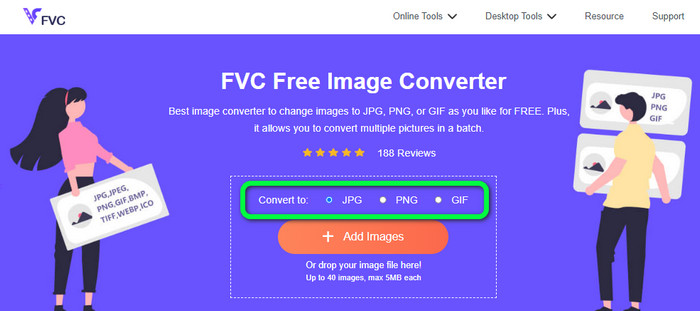
Paso 1: Ve al sitio web principal de FVC Free Image Converter. Antes de añadir el archivo de imagen SVG, elige el formato de salida que desees. Haz clic en el formato JPG en la opción de formato.
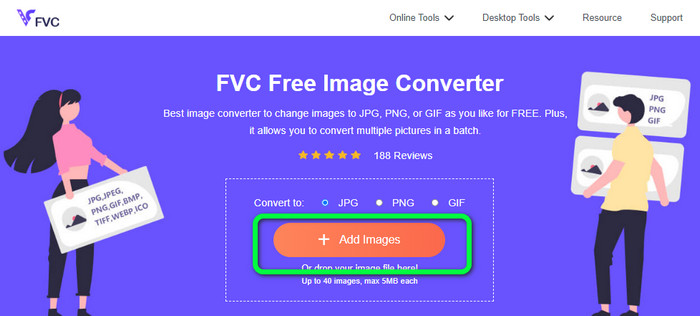
Paso 2: Haz clic en el botón Add Images en la parte central de la interfaz. Después de eso, aparecerá la carpeta de archivos en tu pantalla. Elige la imagen SVG que quieres convertir y ábrela. También puedes arrastrar el archivo SVG directamente a la caja. Haz clic de nuevo en el botón Add Images para realizar un proceso de conversión por lotes.
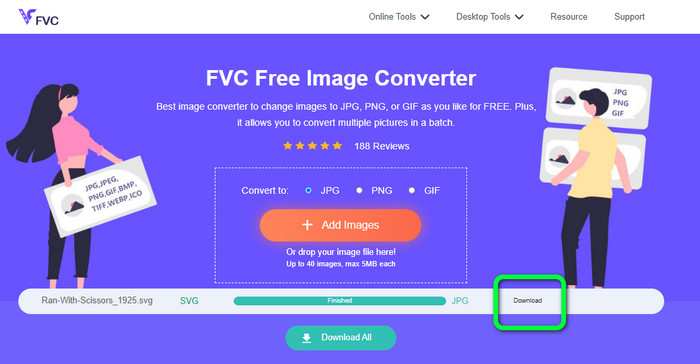
Paso 3: Mientras se sube el archivo, la imagen se convertirá automáticamente. Para el último paso, haz clic en el botón Download en la parte derecha de la interfaz. Tras el proceso de guardado, abre la imagen convertida en tu ordenador.
Parte 3. Método fácil para convertir SVG a JPG en Windows
En esta sección descubrirás el mejor método para convertir SVG a JPG sin conexión en ordenadores con Windows. El uso de HitPaw Video Converter es uno de los métodos más eficaces. La función Image Convert de HitPaw Video Converter facilita la conversión de imágenes por lotes. Puedes importar fotos y gráficos en varios formatos y convertirlos al formato que desees. Es una excelente opción tanto para ajustes de formato de imagen masivos como individuales. También es compatible con todos los formatos de foto más utilizados. Estos formatos incluyen PNG, JPG, HEIC, RAW, BMP y otros. Por lo tanto, también puedes usar esta herramienta para convertir BMP a JPG o PNG. Además, este programa descargable ofrece otras funciones además de la conversión. Puedes descargar archivos de música y vídeo con este software. También puedes editar tus vídeos girándolos, recortándolos y aplicando filtros. Sin embargo, HitPaw Video Converter es difícil de usar, sobre todo para principiantes. Tiene una interfaz confusa, lo que dificulta su comprensión. Además, el proceso de instalación lleva mucho tiempo.
Paso 1: Instala HitPaw Video Converter en tu ordenador con Windows. Después de la instalación, ejecuta la aplicación.
Paso 2: Ve al panel Toolbox y selecciona la herramienta Image Converter. Selecciona en la carpeta de tu ordenador el archivo de imagen SVG que quieres convertir.
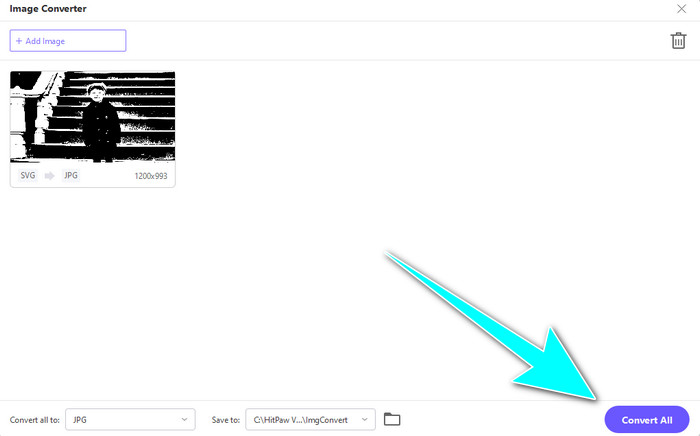
Paso 3: Haz clic en la opción Convert All to en la esquina inferior izquierda de la interfaz. Luego, selecciona el formato JPG como formato de salida.
Paso 4: Por último, haz clic en el botón Convert All en la esquina inferior derecha de la interfaz. Espera a que finalice el proceso de conversión. Después, ya podrás abrir tu imagen en formato de archivo PNG.
Parte 4. Cómo convertir SVG a JPG en Mac
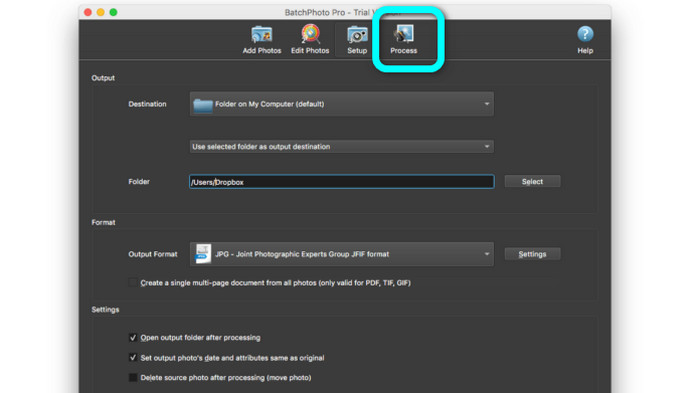
Si quieres convertir SVG a JPG en Mac, utiliza BatchPhoto Pro. Es compatible con varios formatos de imagen. Incluye JPG, PNG, ICO, SVG, EPS y más de 170 formatos adicionales. Incluso puedes guardar imágenes como PDF. También ofrece un proceso de conversión por lotes. De este modo, puedes convertir varios archivos simultáneamente. Además, aparte de convertir imágenes, ofrece otra función. Puedes editar tu foto cambiando el tamaño, girándola y ajustando la configuración del color. No obstante, debes comprar el programa si quieres usarlo de forma continuada. Solo ofrece una versión de prueba de pocos días. El proceso de conversión también es difícil de entender. Los usuarios sin experiencia lo encontrarán complicado para convertir imágenes.
Paso 1: Descarga e instala BatchPhoto Pro. Puedes hacerte con la versión de prueba gratuita. Después de instalar la aplicación, ábrela.
Paso 2: En la parte superior de la interfaz, selecciona la opción Add Photos. Tras hacer clic, añade las imágenes SVG que quieras convertir a formato JPG. Puedes añadir varios archivos a la vez.
Paso 3: Ve a la opción Set Up en la parte superior de la interfaz. Dirígete a las opciones de Output Format y selecciona el formato JPG.
Paso 4: Haz clic en la opción Process para iniciar el proceso de conversión. Una vez terminado, ve a tu carpeta de salida y comprueba tu imagen convertida.
Parte 5. Preguntas frecuentes sobre la conversión de SVG a JPG
1. ¿Por qué debería convertir SVG a JPG?
En comparación con SVG, JPG es más adecuado para las redes sociales y otros dispositivos. Es uno de los formatos de imagen populares que puedes usar hoy en día. En SVG, solo puede abrir este archivo en navegadores web. Por lo tanto, la conversión de SVG a JPG es necesaria para un uso más compatible.
2. ¿Cuáles son las ventajas y desventajas de los archivos SVG?
Puede expandir o reducir un archivo SVG a cualquier tamaño sin perder calidad. Los SVG no se preocupan por el tipo de pantalla o el tamaño de la imagen. La forma en que parecen es constante. Los SVG también brindan a los diseñadores y desarrolladores un gran control sobre cómo se ven. Es mejor que editarlos en un editor de texto. Incluso otros elementos visuales como sombras y gradaciones de color son ajustables. Sin embargo, hay mejores formatos que SVG para una foto detallada y de alta calidad. Los usuarios construyen gráficos vectoriales utilizando puntos y rutas en lugar de píxeles. El código también es necesario.
3. ¿Cómo abro un archivo SVG?
La mejor manera de abrir un archivo SVG es hacerlo desde tu navegador. Pulsa ctrl+o en el teclado. Luego, elige el archivo SVG que quieres ver y haz clic en Open.
Conclusión
¡Pues eso es todo! La información anterior muestra las formas de convertir SVG to JPG en Windows, Mac y en línea. Sin embargo, descargar un conversor de imágenes puede ser un engorro. Así que, si quieres una forma más sencilla de convertir imágenes, utiliza FVC Free Image Converter. Este conversor de imágenes en línea te permite convertir imágenes directamente en el navegador.
-
 Métodos útiles sobre cómo convertir TIFF a JPG/PNG fácilmente
 No se pierda estas excelentes formas de convertir TIF a formatos JPG/PNG. Esta publicación le dará la información necesaria que necesita saber. Incluye sus diferencias.
-
 Convierta JPEG a JPG de manera eficiente [Cinco métodos enumerados]
 Ven y obtén los tutoriales más sencillos sobre cómo convertir el formato de archivo de imagen JPEG a JPG. Haga clic en esta guía y comience a aprender sus métodos preferidos
-
 Los 5 principales tutoriales para convertir PNG a JPG rápidamente
 Si necesita convertir su archivo PNG a formato JPG, puede aprender las mejores formas aquí. También aprenderá la diferencia entre los formatos de archivo PNG y JPG.
