


 Video Converter Ultimate
 Grabador de pantalla
 Reparación de vídeo
 Descarga segura
Revisión de iMazing HEIC Converter y sus mejores alternativas para usar en el escritorio
Con el nacimiento del formato HEIC y la adopción por parte de Apple Inc. de este formato de imagen, no hay ningún problema con él. Aunque el formato se convirtió en el nuevo estándar de imagen para dispositivos Apple como iOS y Mac, aún presenta inconvenientes: la compatibilidad. Cuando surge un problema como este, es posible que necesites un conversor en tus dispositivos iOS o Mac para transformar el formato en otro compatible, como JPEG. Sin embargo, los conversores disponibles en el mercado son demasiados, ya que ofrecen distintas funciones y características que podrías necesitar en tu conversor, como iMazing. Por ello, hoy vamos a hacer una reseña para ti sobre iMazing HEIC Converter para ayudarte a entender qué puede ofrecerte este conversor y cuáles son las mejores alternativas que puedes usar en Windows y Mac.

Parte 1. Revisión completa sobre iMazing HEIC Converter
iMazing es un software dedicado a transferir datos del dispositivo iOS a una Mac o viceversa. Aunque no tenga experiencia en el manejo de la transferencia de datos, aún usando este software, no necesitará ver un tutorial sobre cómo hacerlo. Además de su capacidad de transferencia, puede usar este software para cambiar el formato de su HEIC a un nuevo formato que sea más adecuado que dicho formato de imagen. Pero, ¿qué hace que el convertidor sea especial de los otros convertidores que puede tener en su escritorio? Para responder a esa pregunta, a continuación, haremos una revisión de iMazing de una manera mucho más detallada, y luego le enseñaremos cómo usarlo.
Funciones principales de iMazing Converter:
◆ Admite funciones de arrastrar y soltar para cargar el archivo HEIC aquí fácilmente.
◆ Con un convertidor como este, puede cargar su HEIC aquí y luego cambiar la extensión a JPG/JPEG o PNG si lo desea.
◆ Admite agregar varios archivos a la lista de espera y convertirlos todos en el formato elegido.
◆ Con una interfaz como la que tiene esta herramienta, no tendrá que preocuparse por la curva de aprendizaje porque cualquier usuario puede convertir fácilmente su archivo HEIC.
◆ Hay otras funciones disponibles, como transferir la información de su dispositivo Apple a otro dispositivo Apple con unos pocos clics.
Pros
- Cargar su archivo HEIC aquí es mucho más fácil que el otro software.
- Tienes la opción de convertir la imagen a JPG o PNG.
- Descargue el software en su escritorio o dispositivo iOS si desea intentar usarlo.
Contras
- Existe una gran posibilidad de que la conversión de HEIC en su elección falle porque la razón detrás de esto aún es cuestionable.
- La conversión por lotes no es compatible con todos los dispositivos iPhone, pero esta función está disponible en la versión de escritorio.
- No puede ajustar la saturación de color, el brillo, la gamma y otras funciones para mejorar la imagen.
Tutorial sobre cómo convertir HEIC a JPEG o PNG con iMazing HEIC Converter
Como hicimos una revisión del convertidor iMazing HEIC, ahora está más claro si es la mejor opción para cambiar el formato de HEIC a JPEG o PNG. Entonces, si desea saber cómo usar el software en esta reunión, debe leer el tutorial que agregamos a continuación para saber cómo convertir el formato de archivo HEIC.
Paso 1. Puedes descargar el software de forma gratuita desde la página oficial de iMazing que encontrarás en tu navegador.
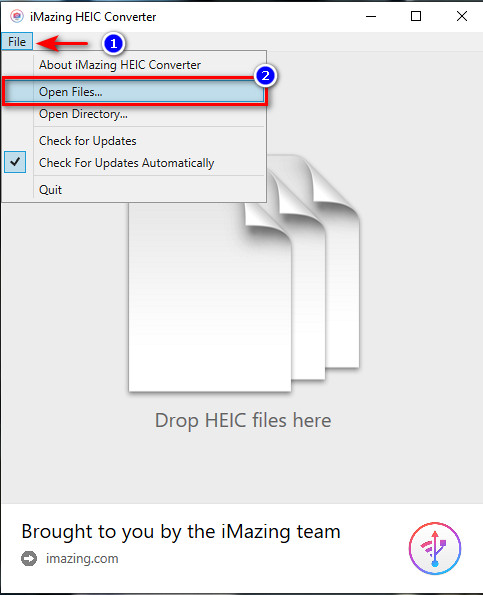
Paso 2. Pulsa en File y luego en Open File, selecciona el archivo HEIC que quieras convertir y haz clic en Open para insertarlo.
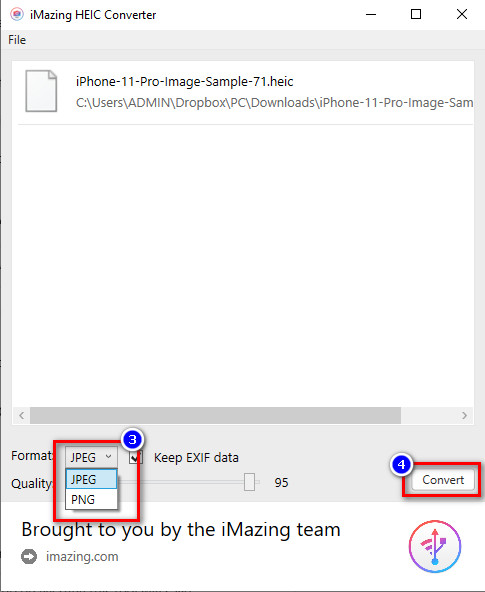
Paso 3. Haz clic en el botón desplegable y elige JPG o PNG, luego haz clic en Convert para iniciar el proceso de conversión.
Parte 2. Las 2 mejores alternativas web para iMazing HEIC Converter
Convertidor HEIC a JPG gratuito de FVC
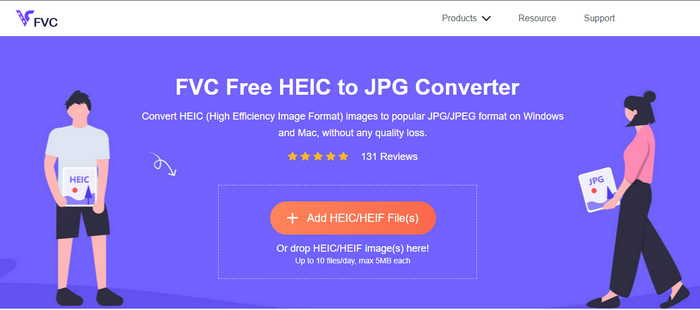
Con la mejor alternativa a iMazing disponible en la web, FVC Free HEIC to JPG Converter es imprescindible. Aunque no quieras descomprimir el archivo ni descargar e instalar nada, no tendrás que hacerlo si utilizas este software. En lugar de realizar la instalación que necesitas en iMazing, esta herramienta te ahorrará ese paso porque solo necesitas buscar y luego convertir. Increíble, ¿verdad? Al igual que el conversor anterior, puedes usar fácilmente este software para cambiar el formato de imagen a otro como JPEG.
Aunque la herramienta web es excelente, solo admite JPG como formato de salida, por lo que no puedes elegir el formato que quieras. Además, solo tienes diez oportunidades al día para convertir HEIC a JPEG y debes asegurarte de que la imagen que tengas pese menos de 5 MB. Parece un problema, pero, a decir verdad, no lo es, sino que es una ventaja para nosotros, especialmente si necesitas convertir un archivo HEIC a JPG de inmediato. Si quieres usar la herramienta web, haz clic en el enlace de arriba para abrirla en una nueva pestaña.
Freetoolonline.com
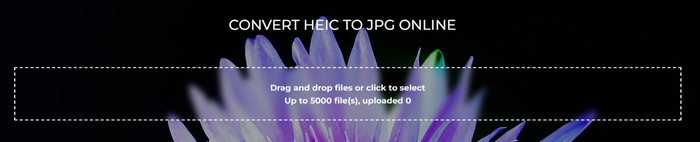
Freetoolonline.com es un conversor de código abierto al que puedes acceder en línea y que depende de la conexión a Internet que tengas. Con una herramienta web tan sencilla como esta, subir archivos y aprender a usarla se hace más fácil sin recursos adicionales. A diferencia de iMazing, esta herramienta es compatible con cualquier ordenador de sobremesa, ya que está disponible en diferentes navegadores. Sin embargo, la interfaz gráfica de esta herramienta es muy diferente a la del primer conversor HEIC mencionado en línea y a la de iMazing HEIC Converter.
A pesar de ser de código abierto y libre de anuncios, el software en línea no funciona bien en la conversión por lotes. Aunque es compatible, la función que proporciona no es sobresaliente como iMazing. Pero si desea utilizar esta herramienta en línea, puede buscar el software, pero notará que la imagen de fondo en la interfaz cambia automáticamente.
Parte 3. Preguntas frecuentes sobre iMazing HEIC Converter
¿Es seguro descargar iMazing?
Absolutamente sí, descargar iMazing HEIC Converter es completamente seguro. Intentamos descargar el software en su sitio web oficial para probarlo y proporcionar solo evidencia sólida sobre el software. Sin embargo, sería útil si tuviera en cuenta que todavía hay muchos sitios web falsos que utilizan la popularidad de iMazing para piratear otras computadoras. Para evitar esto, debes verificar la conexión a internet para ver si está protegido y descargarlo solo en su sitio web oficial.
¿Puedo descargar iMazing en Windows?
Hasta ahora, el software está disponible en Windows y Mac, pero la función que ofrece en Mac es mejor que en Windows. Por lo tanto, si tiene la intención de usar el software y probar todo su potencial, le sugerimos que lo descargue ahora en su dispositivo Mac y no en Windows porque su versión en Windows parece una prueba gratuita.
¿Hay algún otro software que funcione mejor que iMazing?
Según nuestra investigación, Aiseesoft HEIC Converter es un software sencillo que puedes descargar en tu Windows o Mac y que resulta mejor que iMazing. Si quieres saber más sobre el mejor conversor HEIC que puedes usar en tu ordenador, debes hacer clic en este enlace para abrir un nuevo artículo con toda la información que necesitas aprender.
Conclusión
Con su compostura para terminar de leer la revisión de iMazing que hicimos, podemos decir ahora que lo entendemos mejor. Si necesita conocer las funciones o características clave del uso de iMazing, la lista anterior le dirá todo. Sin embargo, si no desea descargar software en su disco porque ocupa espacio, debe elegir uno en la herramienta web. Puede probarlos si iMazing tiene un tamaño de archivo grande que la unidad no puede transportar. Cualquiera que sea la opción que elija, no debe preocuparse por todo, especialmente por convertir el HEIC en un JPEG.
-
 Las 3 formas más fáciles de convertir HEIC a JPG en iPhone como un experto
 ¿No tienes idea de cómo cambiar el HEIC a JPG en iPhone? Si usted es uno de los usuarios que tiene problemas con el HEIC, lea esto.
-
 Convierta HEIC a PDF usando las 4 formas mejoradas principales en 2022
 Para obtener más información sobre el mejor convertidor de HEIC a PDF, puede descargar este 2022. Puede leer este artículo ya que proporcionamos una revisión sobre ellos.
-
 5 de las mejores selecciones de convertidores de HEIC a JPG este 2022
 Con el convertidor HEIC a JPC, puede cambiar fácilmente el formato de la imagen a un JPG portátil. ¿Quieres saber cuáles son estas 5 herramientas? Lee este artículo.
