


 Video Converter Ultimate
 Grabador de pantalla
 Reparación de vídeo
Revisión de Cutout Pro Image Enhancer: características principales para cautivar
Los potenciadores de imágenes se han convertido en una tendencia en el ámbito de la imagen digital, y encontrar la herramienta adecuada para elevar tus fotos de lo ordinario a lo extraordinario es fundamental. Existen muchas herramientas que mejoran tus imágenes, pero es difícil dar con una que sea fiable, segura y eficiente. Por suerte, Cutout Pro Image Enhancer resulta ser exactamente lo que buscas en una herramienta. En esencia, Cutout Pro Image Enhancer está diseñado para desbloquear el potencial de tus fotos y potenciar aquello de lo que carecen. Ofrece resultados fluidos y de calidad, adaptándose a tus necesidades visuales. Al recorrer sus funciones más destacadas, que hacen que esta herramienta sea ideal para ti, este artículo te proporcionará sin duda un análisis en profundidad de Cutout Pro Image Enhancer, desde la calidad del resultado hasta los formatos de imagen compatibles. Si sigues leyendo este artículo, obtendrás la información necesaria para mejorar fotos con Cutout Pro. Además, también se presentará una alternativa recomendada a la que conviene prestar atención. No te limites a disparar, editar y subir tus fotos; incluye la mejora de imagen entre tus pasos a partir de hoy.

Parte 1. Revisión de Cutout Pro Image Enhancer
Cutout Pro crea una herramienta útil que ayuda a los usuarios con la edición rápida de imágenes, en este caso el potenciador de imágenes. La interfaz de Cutout Pro Image Enhancer es fácil de usar tanto para principiantes como para profesionales para lograr resultados de calidad de imagen sin pérdidas. Este potenciador de imágenes utiliza IA para refinar los detalles más finos que incluso los profesionales pueden haber pasado por alto. En un instante, ahorrarás tiempo al permitir que la IA haga el trabajo de identificar y mejorar partes de tu imagen. Esta herramienta impulsada por IA no solo se ocupa de la mejora de imágenes, sino que también tiene funciones como eliminación de fondo y conversor de imágenes, lo que la convierte en una herramienta flexible a la hora de realizar múltiples tareas. A continuación se enumeran algunas de las características principales que puede esperar.
Principales características
◆ Mejora de fotos. La tecnología de IA integrada en las herramientas utiliza un procesamiento avanzado para aumentar la resolución, corregir el color, enfocar y reducir el ruido, según las necesidades de tu imagen.
◆ Disponibilidad en múltiples dispositivos. Cualquiera de tus navegadores web locales puede utilizar la mejora de fotos. Este acceso te permite usar sus funciones con toda comodidad en tu dispositivo de referencia.
◆ Procesamiento por lotes. Cutout Pro Image Enhancer se enorgullece de su capacidad de multitarea y ahorro de tiempo, convirtiendo la herramienta en un sistema de procesamiento por lotes que te permite procesar varias imágenes sin interrupciones, sin necesidad de esperar a que termine una para poder mejorar la siguiente.
◆ Herramientas de recorte con IA. Te permite eliminar objetos, personas, elementos molestos e imperfecciones no deseadas en tus imágenes que arruinan la estética general. Lo mismo ocurre con el texto no deseado en las imágenes, ¿cómo eliminar texto de una imagen?
◆ Eliminación de fondo. Esta función ofrece una de las mejores precisiones en eliminación de fondos. No se necesita croma, ya que su IA identifica automáticamente el punto de interés y traza alrededor del sujeto para eliminar el fondo con precisión.
◆ Coloreador de fotos. Puede devolver la vida a tus antiguas fotos en blanco y negro aplicando los colores que la herramienta considera que las representan de forma más vibrante.
Calidad de salida
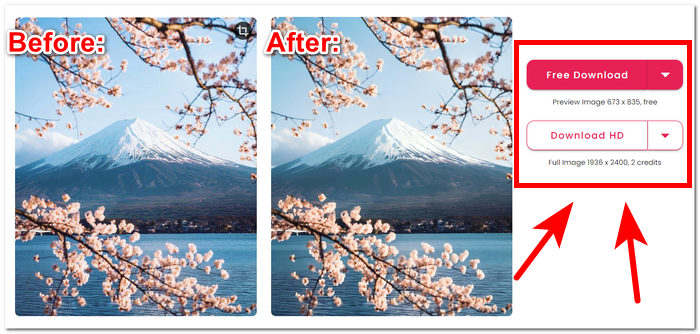
La calidad de salida de Cutout Pro Image Enhancer está limitada hasta 2 veces únicamente y se paga mediante créditos. A continuación se enumeran las calidades de salida disponibles en Cutout Pro Image Enhancer.
Descarga gratuita: PNG y JPG - calidad 673 x 835
Descarga HD: PNG y JPG - calidad 1936 x 2400
Formatos de imagen admitidos
Cutout Pro Image Enhancer admite una variedad de formatos de imagen, lo que garantiza flexibilidad en el manejo de diferentes tipos de archivos. Los formatos de imagen admitidos incluyen PNG, JPG, JPEG, BMP y WEBP. Ya sea que esté trabajando con imágenes transparentes, fotografías de alta calidad o varios formatos compatibles con la web, Cutout Pro permite a los usuarios mejorar y editar imágenes sin problemas en una variedad de extensiones de archivo de uso común.
Las funciones de Cutout Pro Image Enhancer seguramente pueden resolver sus problemas de mejora de la calidad de la imagen con facilidad. Sin embargo, es esencial verificar la versión específica y las actualizaciones de Cutout Pro para obtener la información más precisa y actualizada sobre los formatos de imagen admitidos, las características y la calidad de salida.
Parte 2. Alternativa a Cutout Pro para mejorar la foto
¿Buscas una alternativa eficiente, gratuita y fiable a Cutout Pro para esos casos en los que no puedas acceder a él? No te preocupes; FVC Free Image Upscaler está ahí para ayudarte. Se considera una de las mejores herramientas basadas en la web dentro de la categoría de potenciadores de imagen, con opciones de ampliación de hasta 8 veces mejores que otras herramientas en línea, lo que la convierte en la alternativa ideal a Cutout Pro Image Enhancer. FVC utiliza tecnología de IA avanzada para producir resultados impecables y casi perfectos, teniendo en cuenta que es gratuita. Cutout Pro Image Enhancer, por otro lado, puede tener una calidad de salida limitada para los usuarios gratuitos y ofrece ajustes de aumento de hasta 2 veces para mejorar tu imagen. Para descubrir qué hace destacar a FVC Free Image Upscaler, a continuación se enumeran algunas de sus características clave.
◆ Escalador de imágenes con IA integrada. Al utilizar IA para reconocer las partes borrosas y afinarlas automáticamente, hace que la tarea sea rápida y sencilla sin preocuparse por la pérdida de calidad. Mejora tu imagen según lo que tu foto necesita ajustando píxeles, nitidez y colores.
◆ Ampliación ocho veces superior. FVC va más allá de las cifras habituales. Normalmente, las herramientas de mejora de imagen se limitan a opciones de aumento de solo dos veces, y algunas ofrecen aumentos mayores mediante suscripciones de pago. Esta herramienta permite a los usuarios mejorar su imagen hasta ocho veces más.
◆ Fácil de usar. Su interfaz es tan sencilla como su objetivo: ayudar a los usuarios a mejorar sus imágenes sin anuncios ni cargos ocultos.
◆ Impresión y fondo de pantalla. Los resultados pueden utilizarse para imprimir y como fondo de escritorio o de móvil sin perder calidad. Los potenciadores de imagen de alta calidad hacen posible reutilizar tus fotos borrosas para otros usos, como impresiones y fondos de pantalla.
◆ Compatibilidad versátil de formatos. ¡Transforma tu imagen en una obra maestra impresionante! Independientemente del formato, ya sea JPG, JPEG o BMP, puedes subirla fácilmente a nuestra plataforma. ¡Déjanos ayudarte a dar vida a tu visión!
◆ Mejora a velocidad relámpago. Las velocidades de procesamiento son rápidas y garantizan resultados prometedores, ya que la IA está entrenada para procesar millones de imágenes con resultados de alta calidad para lograr una perfección de píxel.
Para resumir, ambas herramientas producen resultados profesionales con la mejor calidad. No deja lugar para imágenes borrosas ni defectos, lo que hace que FVC y Cutout Pro sean una herramienta confiable de usar. En términos de funciones, Cutout Pro tiene la ventaja en disponibilidad en múltiples dispositivos y procesamiento por lotes. Por otro lado, FVC Free Image Upscaler ganó en resultados de calidad, procesamiento rápido y disponibilidad de funciones gratuitas.
Parte 3. Preguntas frecuentes sobre Cutout Pro Image Enhancer
¿Cutout Pro guarda fotos?
Cutout Pro permite a los usuarios guardar sin esfuerzo sus fotografías mejoradas al ofrecer una variedad de opciones de guardado. Con la flexibilidad de elegir entre diferentes formatos y resoluciones, los usuarios pueden personalizar sus imágenes guardadas para alinearlas con sus preferencias específicas y requisitos del proyecto. Esta característica garantiza una experiencia fluida y personalizable para preservar los resultados editados con claridad y detalle óptimos.
¿Cutout Pro ofrece aplicaciones sin conexión?
Cutout Pro no proporciona aplicaciones fuera de línea y no brinda a los usuarios la posibilidad de editar y mejorar sus fotos sin la necesidad de una conexión continua a Internet. Para utilizar las funciones de mejora de imágenes de Cutout Pro, debe conectarse a Internet, ya que es una herramienta basada en web.
¿Puedo hacer una foto de 2×2 con Cutout Pro?
Con Cutout Pro, los usuarios pueden crear fácilmente una foto de 2×2 utilizando sus versátiles herramientas de edición. El software admite dimensiones personalizadas, lo que brinda la flexibilidad de recortar y cambiar el tamaño de las imágenes con precisión según requisitos específicos, lo que lo hace ideal para crear diseños fotográficos personalizados de 2×2. Esta característica permite a los usuarios lograr la composición y el formato deseados para sus imágenes sin esfuerzo.
¿Cutout Pro es bueno o malo?
La efectividad de Cutout Pro varía según las preferencias individuales y los requisitos específicos. Si bien se reconoce ampliamente como un potente mejorador de imágenes con diversas características, su idoneidad depende de factores como interfaces fáciles de usar, funcionalidades deseadas y preferencias de edición personales. Se recomienda a los usuarios potenciales que exploren el software para determinar su compatibilidad con sus expectativas y flujo de trabajo.
¿Cutout Pro es gratuito?
Cutout Pro ofrece a los usuarios versiones gratuitas y premium. Antes de optar por una versión en particular, es fundamental examinar detenidamente los detalles de precios y las opciones de licencia asociadas a ella. Tenga en cuenta que las funciones o capacidades avanzadas pueden ser exclusivas de las versiones premium, lo que dificulta y hace menos probable que elija ser su herramienta de referencia.
Conclusión
En conclusión, tanto Cutout Pro Image Enhancer como FVC Free Image Upscaler destacan como herramientas de nivel profesional, que aprovechan el poder de la IA para llevar la mejora de imágenes a niveles de calidad sin precedentes. Su compromiso con superar los límites de la excelencia visual las convierte en recursos valiosos para todo el mundo. En última instancia, la elección entre estas dos herramientas excepcionales se reduce a la comodidad y la practicidad personales. Tanto si optas por las funciones avanzadas de Cutout Pro como por el enfoque fácil de usar de FVC Free Image Upscaler, podrás mejorar tus imágenes con tecnología integrada de IA adaptada a tus necesidades específicas. El campo de la edición de imágenes sigue enriqueciéndose con estas herramientas, que ofrecen una amplia gama de opciones para la mejora visual.
-
 Revisión de PicWish Photo Enhancer y herramienta alternativa para probar
 Descubra la magia que el potenciador de imágenes PicWish aporta al mundo de la edición de fotografías. Una revisión en profundidad y la exploración de alternativas viables para que las pruebe.
-
 Revisión de Fotor para eliminar el fondo y mejorar las fotografías
 Todo lo que necesitas saber sobre Fotor Background Remover y Photo Enhancer. Mire algunas de sus características y vea la alternativa sugerida que se adapte a sus necesidades.
-
 Cómo aumentar el tamaño de la imagen en línea y fuera de línea
 Descubre la forma más sencilla de aumentar el tamaño de la imagen sin perder calidad. Vea nuestras herramientas y software de cambio de tamaño para garantizar una calidad óptima para sus imágenes.
