


 Video Converter Ultimate
 Grabador de pantalla
 Reparación de vídeo
 Descarga segura
Mejore la calidad de la imagen con estos métodos rápidos y sencillos
Do you have an image that is blurry or has a low quality? The best solution that you must do is to increase the quality of your image. Luckily, numerous tools can help you improve your image’s quality. However, not all applications or tools on a computer have the best features. That’s why we searched for the most popular photo enhancers online, offline, and on iPhone. To learn how to improve image quality, read this post.

Parte 1. Cómo mejorar la calidad de imagen en línea
Usar un potenciador de imágenes en línea es más conveniente que descargar una aplicación de software en su computadora. La ventaja de utilizar una herramienta online es que puedes acceder a ella libremente en tu web. Esta parte le mostrará cómo aumentar la calidad de su imagen usando el mejorador de fotos en línea más asombroso.
FVC Free Image Upscaler is an online, free-to-use image enhancer popular with many. This online application can set the magnification to 2x, 4x, 6x, and 8x. In addition to that, it supports the most standard image formats, including PNG, JPG, JPEG, and BMP. You can also access it on all web browsers, including Google, Firefox, and Safari. Also, you do not need to worry about the safety of your data because this tool is safe to use.
Además, cuenta con una potente tecnología de IA que reconoce automáticamente las partes borrosas de tu imagen. Además, FVC Free Image Upscaler puede reparar los píxeles perdidos, las texturas de color y más detalles. Si desea utilizar este excelente escalador de imágenes, siga la sencilla guía a continuación.
Cómo mejorar la calidad de la imagen en línea usando FVC Free Image Upscaler:
Step 1. Open your browser and search FVC Free Image Upscaler on the search box. You can go directly to their main page by clicking the link provided.
Step 2. Next, click the Upload Photo button on the main interface to upload the image you want to upscale. Wait for your image to upload, then proceed to the next step.
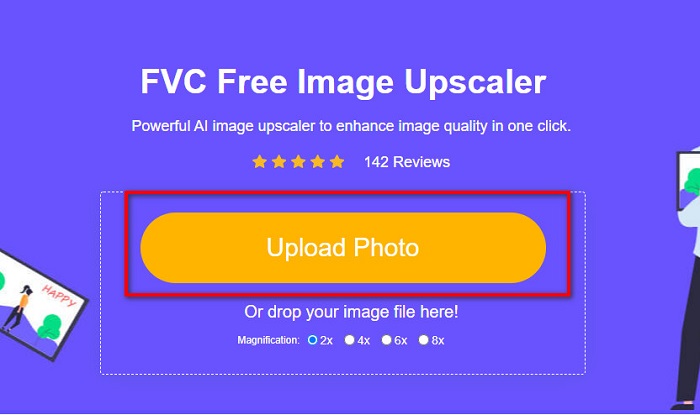
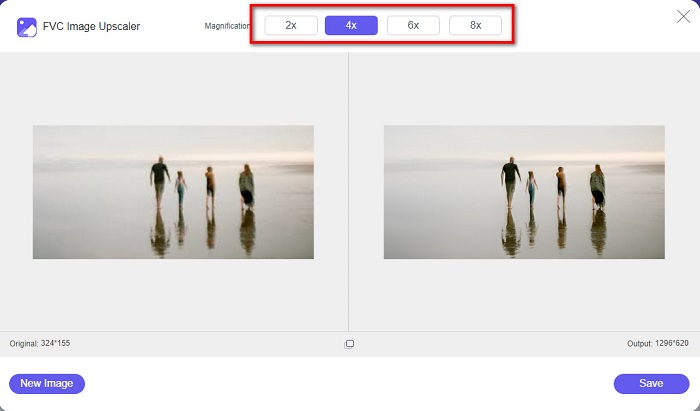
Step 3. And then, choose the Magnification that you want for your image. You can choose between 2x, 4x, 6x, and 8x.
Step 4. You can see the preview of your image, and if you are content with it, click the Save button to save your upscaled image on your device.
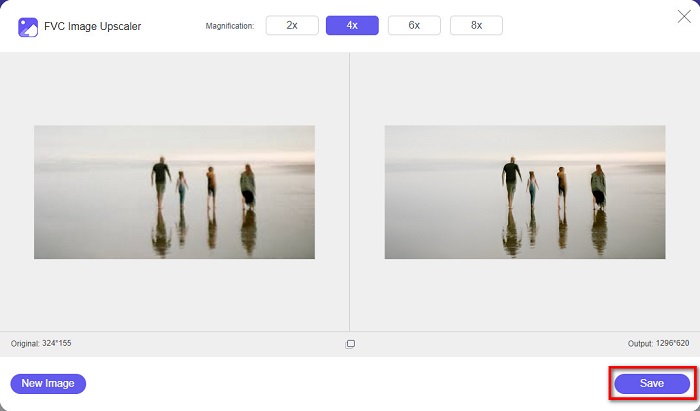
¡Y eso es! Ahora puede ver su imagen en su computadora con una vista de alta calidad.
Parte 2. Cómo mejorar la calidad de la imagen en Photoshop
Tenemos lo que buscas si te gusta usar una herramienta profesional para aumentar la calidad de tu imagen. Esta parte le enseñará cómo mejorar la calidad de las fotos usando Adobe Photoshop.
Adobe Photoshop is a professional editing app that you can use to enhance the quality of your image. Adobe Photoshop has many editing tools that you can use to edit images. Additionally, many professionals use this tool because it has many functions. Also, this application produces high-quality outputs that you can share on other social media platforms or websites. Moreover, Adobe Photoshop is one of the best creations of Adobe Company which you can download on almost all media platforms. By using this editing application, you can design logos, banners, brochures, and more. But many users do not know that it can also enhance an image. However, many users have difficulty using this tool because it has a hard-to-operate software interface and is a bit costly to download.
Pasos sobre cómo mejorar la calidad de la imagen en Photoshop:
Step 1. First, download Adobe Photoshop on your computer. Follow the installation process, then open the app.
Step 2. Go to File > Open on the main interface and select the image you want to improve.
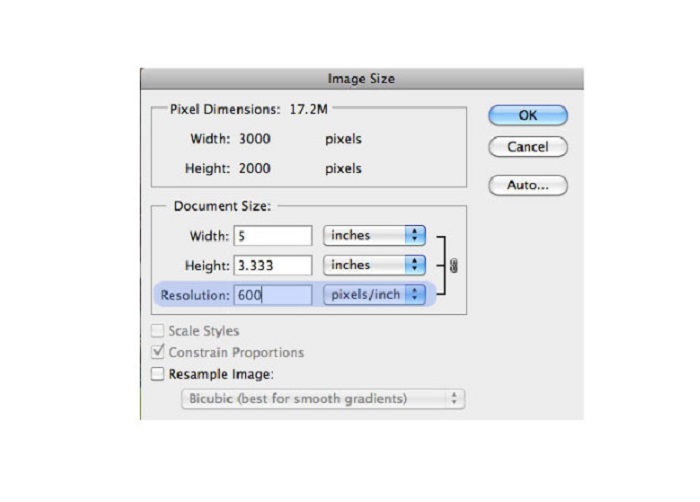
Step 3. And then, go to Image > Image Size. Then a dialog box will prompt where you will uncheck the Resample Image box so that it will only change the resolution of your image. And on the resolution option, type in the resolution that you want for your image.
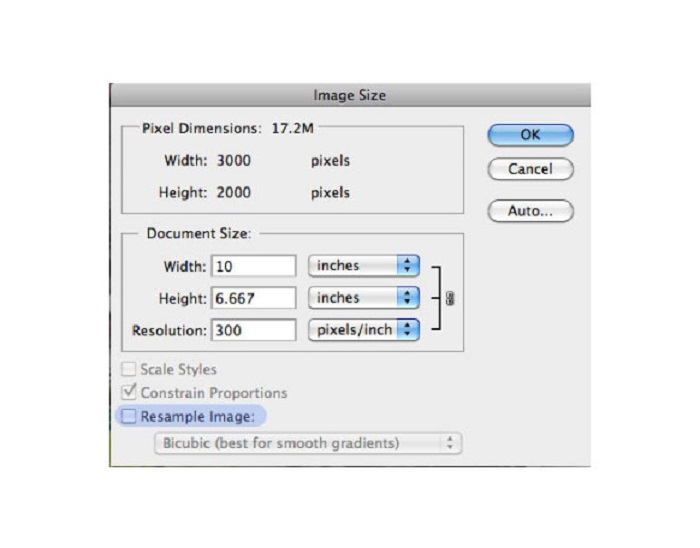
Step 4. Once you change the Resolution, the Width and Height of your image will also change. Then, click the OK button to save the change you made to your image. With this way, you can convert low resolution images to high.
Parte 3. Cómo mejorar la calidad de una foto en iPhone
Algunas aplicaciones pueden mejorar su imagen de baja calidad si es un usuario de iPhone. Aunque muchas aplicaciones para mejorar fotos están disponibles en AppStore, elegimos las más famosas entre ellas. Lea esta parte para aprender cómo mejorar la calidad de una foto en un iPhone.
Remini is one of the best apps that you can use to enhance your low-quality image. This amazing app has a simple interface, making it a user-friendly app. Furthermore, it also uses AI technology that automatically detects the blurred parts of your image. It is also a safe-to-use app, so your files are safe when using this app. The downside of this app is that you need to watch an ad to view and download the result, or you can purchase its full version to download the results without watching an ad.
Cómo mejorar la calidad de la imagen en iPhone usando la aplicación Remini:
Step 1. Download the Remini app on AppStore. After downloading it, open the app on your phone.
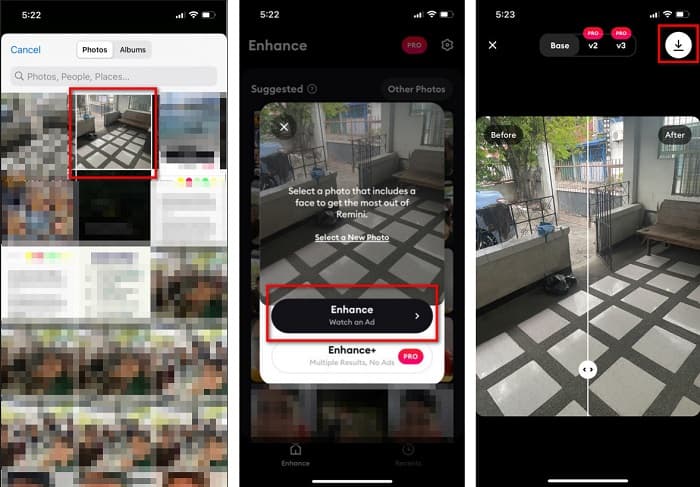
Step 2. And then, on the main app’s interface, select the image you want to upscale.
Step 3. Next, tap the Enhance button to improve the quality of your image. If you avail of the pro version of the app, you do not need to watch an ad. But if not, it will require you to watch an ad to see and save the result.
Step 4. Now, you can view your improved image. Then, tap the Download icon in your screen's top-right corner. And voila! With those easy steps, you can improve the quality of your image.
Parte 4. Preguntas frecuentes sobre cómo mejorar la calidad de las fotos
¿Hay alguna aplicación que pueda mejorar la calidad de imagen en Android?
Mejorar la calidad de la foto es una de las mejores aplicaciones de mejora de la calidad de la imagen para mejorar la calidad de la imagen. El uso de los efectos de embellecimiento de la imagen le dará a su imagen un aspecto profesional.
¿Cómo mejorar la calidad de las fotos en Lightroom?
Adobe Lightroom is another Adobe product that you can use to enhance the resolution of your image. Read the simple steps below to learn how to improve photo quality in Lightroom. 1. Download Adobe Lightroom on your computer. 2. Then, open your image in Lightroom. 3. Click Choose Photo > Enhance. 4. Next, select the Super Resolution, then click Enhance. 5. And then, you will see that Lightroom will increase the resolution of your image and save it as a DNG file.
¿Afectará el tamaño del archivo si mejora su imagen?
Cambiar la resolución de impresión no cambiará la cantidad de píxeles de su imagen y no afectará el tamaño de su imagen.
Conclusión
It is easy to improve image quality, especially now that you have a guide to follow. Also, many apps on a computer or iPhone can help you upscale your image. However, if you want to use a free image upscaler that automatically upscales your blurred image, use FVC Free Image Upscaler now.
-
 5 formas de eliminar la marca de agua B612 con las mejores herramientas
 ¿Quieres saber cómo eliminar las marcas de agua B612 de tus fotos? Puede eliminar sin esfuerzo la marca de agua B612 de sus imágenes utilizando estas excelentes herramientas.
-
 Pasos sencillos sobre cómo eliminar la marca de agua del control deslizante WOW [resuelto]
 WOW Slider es una aplicación para crear una fantástica presentación de diapositivas. Sin embargo, incrusta marcas de agua en su salida. Lea a continuación para aprender cómo eliminar la marca de agua WOW Slider.
-
 Métodos sencillos sobre cómo eliminar la marca de agua Shootproof
 Elimine la marca de agua Shootproof siguiendo estos sencillos métodos. Utilice estos increíbles eliminadores de marcas de agua para eliminar fácilmente la marca de agua Shootproof de su imagen.
