


 Video Converter Ultimate
 Grabador de pantalla
 Reparación de vídeo
 Descarga segura
Aplicaciones de ampliación de fotos en línea y fuera de línea que no debe perderse
Cambiar el tamaño de una imagen puede ser un poco arriesgado porque, cuando la redimensionas para hacerla más grande, puedes perder calidad. Algunas personas quieren cambiar el tamaño de sus fotos para obtener mejor calidad. Una imagen está compuesta por miles de píxeles y, cuando intentas ampliarla, puede estropearse la calidad porque, al aumentar su tamaño, los píxeles de la imagen se vuelven visibles. Así que, si quieres agrandar tu imagen pero no quieres perder calidad, tenemos estas fantásticas herramientas para ti. Para conocer las mejores herramientas de ampliación de fotos, lee detenidamente esta publicación.

Parte 1. Las mejores ampliadoras de fotos en línea
Es la mejor opción para usar una ampliadora de fotos en línea porque ahorrará espacio en su dispositivo. Una herramienta en línea no requerirá descargar nada en su dispositivo, siempre que tenga una velocidad de Internet rápida. Además, la mayoría de las aplicaciones en línea son accesibles de forma gratuita. Dicho esto, aquí están los tres mejores redimensionadores de imágenes en línea.
Mejorador de imagen libre de FVC
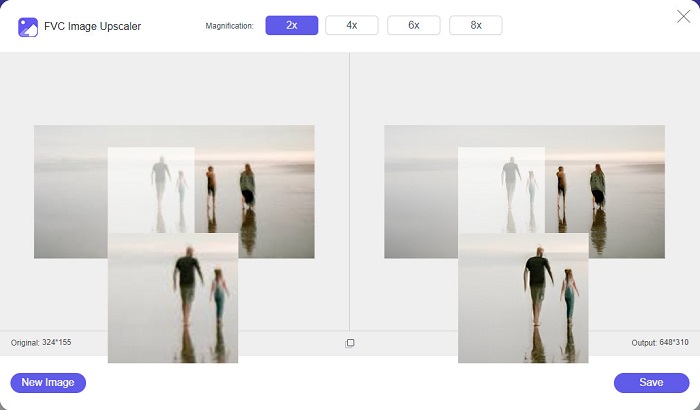
FVC Free Image Upscaler es la primera de la lista de los mejores redimensionadores de imágenes en línea. Esta aplicación online es gratuita y segura de usar. Puedes mejorar o ampliar tu imagen con aumentos de 2x, 4x, 6x y 8x sin perder la calidad de la imagen. Además, es compatible con casi todos los formatos de imagen, como PNG, JPG, JPEG y BMP. Lo más fantástico de esta herramienta es que utiliza tecnología de IA (Inteligencia Artificial) que detecta automáticamente las partes borrosas de tu imagen y luego las mejora. Además, puedes acceder a ella desde todos los navegadores web, incluidos Google, Firefox y Safari. FVC Free Image Upscaler es una herramienta apta para principiantes, así que, si estás empezando, esta puede ser tu mejor opción.
Pros
- Amplía su imagen sin pérdidas.
- Tiene un proceso de escalado rápido.
- Le permite reparar píxeles perdidos, texturas de color y más.
- Puede usarlo en su dispositivo Windows o Mac.
Contras
- Es una herramienta dependiente de Internet.
Foto Enlarger.com
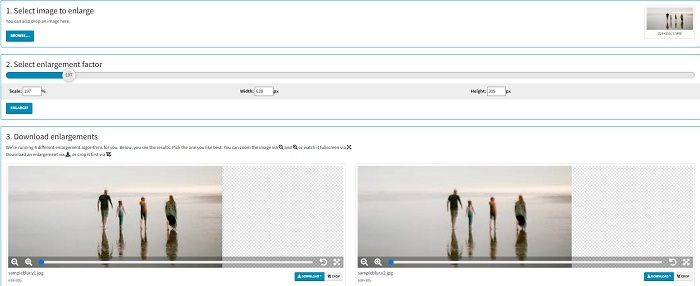
Photo Enlarger.com es un ampliador de fotos en línea que muchos principiantes utilizan por su sencilla interfaz. Este redimensionador de fotos online te permite agrandar tu imagen seleccionando el factor de ampliación. Además, puedes ajustar la escala y el porcentaje de ancho y alto de tu imagen. Photo Enlarger.com te dará cuatro resultados con diferentes resoluciones y factores de ampliación. También puedes optar por descargar estas imágenes fácilmente.
Además, puede recortar las salidas de imagen ampliadas para eliminar las partes innecesarias de su imagen. Sin embargo, contiene muchos anuncios molestos que pueden molestar mientras amplía una imagen. No obstante, es una herramienta eficaz para ampliar su imagen.
Pros
- Admite los formatos de imagen más comunes, como PNG y JPG.
- Es gratis y seguro de usar.
- Puede usarlo en casi todos los navegadores web, incluidos Google y Firefox.
Contras
- Depende de Internet.
- Tiene muchos anuncios.
Image Enlarger.com
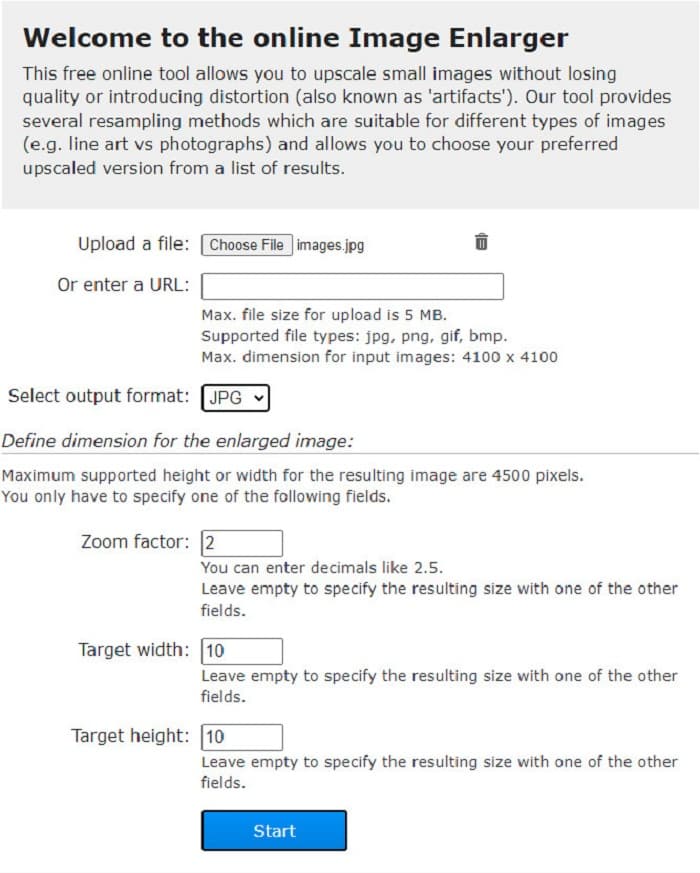
Otro ampliador de imágenes gratuito en línea que puedes usar para agrandar tu imagen es Image Enlarger.com. Este redimensionador de fotos online te permite ajustar el factor de zoom, el ancho y el alto de tu imagen. Además, tiene una interfaz intuitiva, lo que lo convierte en una herramienta fácil de usar. También es compatible con los formatos de imagen más habituales, como PNG y JPG. Image Enlarger.com admite una altura y un ancho máximos de hasta 4500 píxeles. Asimismo, ofrece diferentes métodos de remuestreo que se adaptan a distintos tipos de imágenes. El inconveniente de esta herramienta online es que tendrás dificultades para ampliar tu imagen cuando tu conexión a Internet sea lenta.
Pros
- Es una herramienta segura de usar.
- Es de uso gratuito.
Contras
- Contiene anuncios que pueden distraerlo.
- No puede obtener una vista previa de la salida de su imagen.
Parte 2. Las mejores ampliadoras de fotos sin conexión
A veces, las personas prefieren usar un software de ampliación de imágenes en lugar de un editor de imágenes normal porque puede arruinar su calidad cuando usa un editor de imágenes estándar para ampliar una imagen. Es por eso que buscamos las mejores ampliadoras de imágenes sin conexión del mercado y seleccionamos las mejores entre ellas. Estas ampliadoras de fotos que presentaremos están disponibles para descargar en dispositivos Windows o Mac. Aquí están los tres redimensionadores de fotos sin conexión más potentes sin más preámbulos.
Ampliadora Smilla
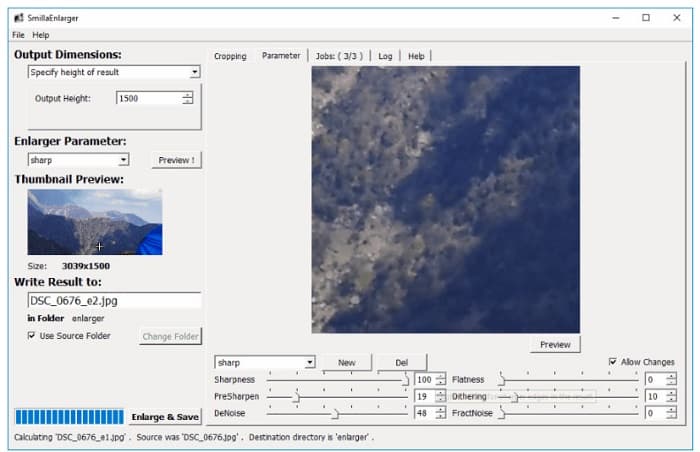
Smilla Enlarger es un ampliador de imágenes sin conexión que puedes usar para cambiar el tamaño de tu imagen fácilmente. Esta aplicación de software es gratuita y de código abierto para tu ordenador con Windows. Además, puedes usar sus opciones de recorte para ampliar cualquier imagen compatible con la herramienta. También puedes configurar las dimensiones de la imagen y los parámetros de ampliación para ajustar la nitidez y el ruido de tu imagen. Todas estas opciones te ayudarán a elegir la ampliación que deseas para tu imagen.
Además, admite casi todos los formatos de imagen, como PNG, JPEG, JPG y WebP. Además, puede ver su salida con esta herramienta porque le permite obtener una vista previa de su imagen. La desventaja de esta aplicación es que debe comprarla antes de acceder a sus otras características únicas.
Pros
- Es una herramienta fácil de usar.
- Se puede descargar gratis en una computadora con Windows.
- Tiene perfiles de mejora para mejorar su imagen.
Contras
- A veces tiene un proceso de carga lento.
Ampliador de imagen Resombreado
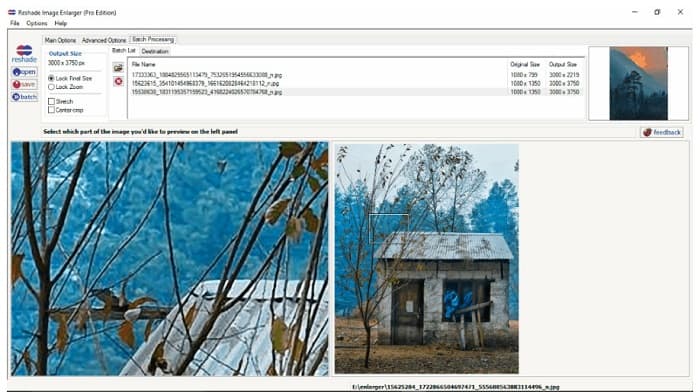
Reshade Image Enlarger es una aplicación de ampliación de fotos que puedes descargar si quieres agrandar o mejorar tu imagen. Reshade Image Enlarger también es un ampliador de imágenes con IA porque mejora automáticamente tu imagen utilizando su tecnología de inteligencia artificial. Además, esta herramienta amplía tu imagen ajustando el ancho y el alto personalizados que prefieras, activando funciones de recorte, eliminando ruido, reduciendo artefactos y más. Lo aún más impresionante de esta aplicación es que sus opciones avanzadas te permiten controlar la compresión JPEG, la fidelidad del procesamiento y los degradados suaves del resultado de tu imagen. Y para usar su función de procesamiento por lotes, ve a la pestaña Batch Processing.
Pros
- Puede descargarlo en todas las plataformas de medios, incluidas Windows y Mac.
- Tiene un proceso de ampliación por lotes.
- Tiene características avanzadas para usar.
Contras
- Tiene una interfaz de usuario difícil de operar.
Una escala más nítida
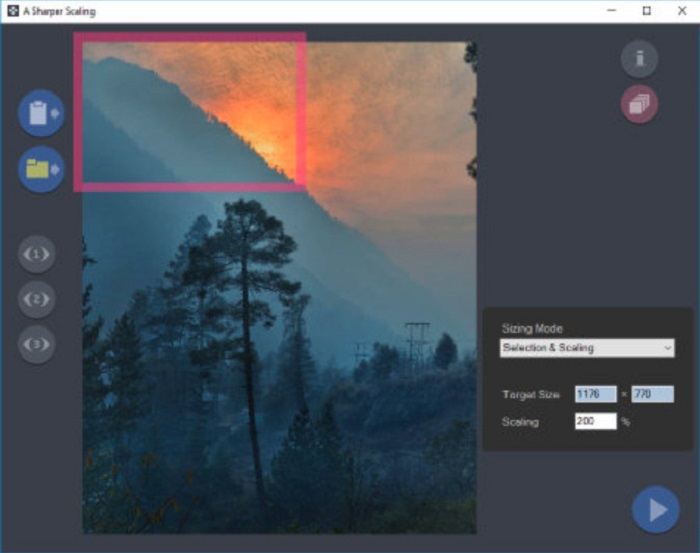
Otro magnificador de fotos que merece la pena usar es la aplicación A Sharper Scaling. Este software es una herramienta fantástica si quieres cambiar el tamaño de tus imágenes. Aunque es un poco más avanzada que otras herramientas sin conexión presentadas arriba, puede ofrecerte resultados de gran calidad. Además, A Sharper Scaling amplía una parte de tu imagen y la enfoca sin añadir ruido, por lo que tu imagen tendrá un aspecto nítido y definido. Lo impresionante de esta herramienta es que también puede ampliar por lotes tus imágenes rápidamente sin perder calidad. Asimismo, tiene una interfaz fácil de usar, lo que la convierte en una herramienta adecuada para principiantes. Por lo tanto, si quieres redimensionar tu imagen rápidamente, A Sharper Scaling sin duda te ayudará.
Pros
- Puede seleccionar modos para ampliar su imagen.
- Puede ampliar muchas imágenes simultáneamente
- Admite los formatos de archivo estándar, como PNG, JPG y JPEG.
Contras
- Tiene algunas opciones de edición para usar.
- Tiene un proceso de exportación lento.
Imagen de Kneson
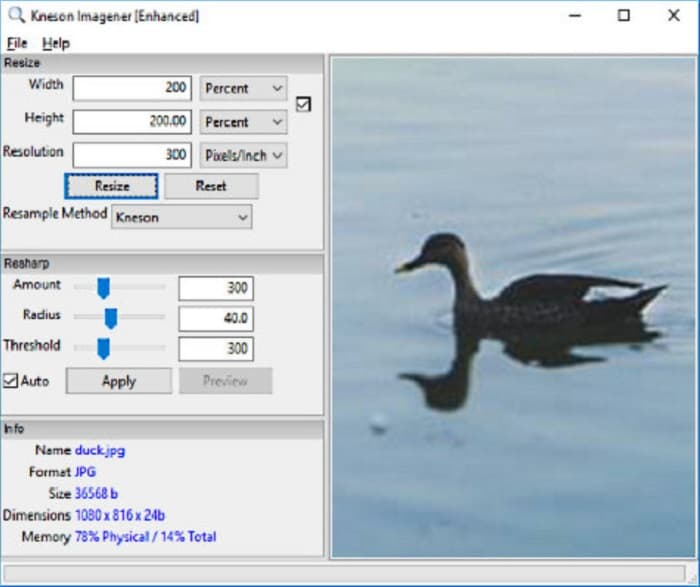
Kneson Imagener también se encuentra entre los mejores ampliadores de fotos para PC. Esta excelente aplicación se puede descargar gratis en casi todas las plataformas. Además, te permite ampliar tu imagen según el porcentaje, los píxeles, las pulgadas y los centímetros de tu imagen. También puedes cambiar la resolución de la imagen para mejorar su calidad. Asimismo, puedes usar esta herramienta si quieres reducir el tamaño de tu imagen para ahorrar espacio en tu dispositivo.
Además, estos son los métodos de remuestreo disponibles que puede usar para ampliar su imagen: Normal, Bilineal, Bicúbico, Kenson y Kenson Progresivo. Pero tenga en cuenta que si desea descargar esta aplicación de software, debe registrar una identificación de correo electrónico que funcione en su sitio web para recibir un boletín informativo. Después de eso, recibirá un enlace de descarga en su correo electrónico donde podrá descargar la aplicación por completo.
Pros
- Tiene una función de recorte.
- Puede ajustar la cantidad, el radio y el umbral de Resharp de su imagen.
- Tiene una interfaz de usuario simple.
Contras
- Debe inscribirse en un correo electrónico que funcione para descargarlo.
Relacionado con:
Los 7 mejores potenciadores de píxeles para todos los navegadores web que debes usar
Mejor app para redimensionar fotos: online, offline, Android y iPhone
Parte 3. Preguntas frecuentes sobre las aplicaciones Photo Enlarger
¿Puedo reducir el tamaño de mi imagen?
Sí. Ajustando la resolución, los píxeles y el formato de su imagen. La resolución, los píxeles y el formato de su imagen determinan su tamaño. Entonces, si desea comprimir el tamaño de su imagen, use una herramienta de compresión de fotos.
¿Puedo ampliar mi foto en Adobe Photoshop?
Adobe Photoshop es ideal para muchos profesionales porque puede ampliar su imagen sin pérdidas y con una calidad excelente. Sin embargo, muchas personas tienen dificultades para usar esta herramienta para ampliar una foto porque tiene una interfaz difícil de operar.
¿Kapwing Photo Resizer es una excelente aplicación para ampliar imágenes?
Kapwing Photo Resizer es un ampliador de imágenes en línea gratuito que mucha gente recomienda. También es una gran aplicación para mejorar o ampliar su imagen sin pérdidas.
Conclusión
Todos estos ampliadores de fotos presentados arriba se encuentran entre los mejores ampliadores de imágenes que encontrarás en Internet. Además, te aseguramos que las aplicaciones mencionadas son seguras de usar y que todas las descripciones son precisas. Pero si prefieres usar una herramienta gratuita y online, te recomendamos utilizar el mejor ampliador de imágenes en línea, FVC Free Image Upscaler.
-
 Restauración de fotos antiguas en línea y fuera de línea [Pasos sencillos]
 ¿Quieres restaurar una foto antigua? Con estas herramientas, conocerá el proceso de restauración de fotos antiguas. Lea esta publicación para conocer los métodos más sencillos.
-
 Cómo corregir la calidad de la imagen en línea y en Adobe Photoshop
 Si tiene una imagen de baja calidad, debe corregir la resolución de su foto. Si desea aprender a corregir la calidad de la imagen, lea este artículo por completo.
-
 Los 7 principales potenciadores de píxeles para todos los navegadores web que debe usar
 Si desea conocer los mejores potenciadores de píxeles para usar, es mejor que consulte esta publicación. Este artículo enumera los siete mejores potenciadores de píxeles de fotos para todos los navegadores web.
