


 Video Converter Ultimate
 Grabador de pantalla
 Reparación de vídeo
 Descarga segura
Maneras notables sobre cómo eliminar marcas de agua de la foto
¿Deseas aprender cómo eliminar marcas de agua de las fotos? A veces, las imágenes que quieres guardar tienen marcas de agua que molestan a la vista y no te permiten apreciar toda la belleza de las imágenes. Afortunadamente, puedes usar aplicaciones de software para eliminar esas marcas de agua innecesarias en tu ordenador, iPhone y Android. De este modo, ya podrás guardar las fotos que quieres utilizando esas aplicaciones para quitar marcas de agua. Leer este artículo es la mejor opción para conocer métodos sencillos para eliminar marcas de agua.

Parte 1. Cómo quitar la marca de agua de una foto en su computadora
1. Eliminador de marcas de agua sin FVC
Si quieres quitar una marca de agua de una foto gratis en línea, puedes usar FVC Free Watermark Remover. Esta aplicación puede ayudarte a eliminar cualquier marca de agua de tus imágenes, como logotipos, textos, imágenes y más. Además, admite distintos formatos de imagen, como JPG, PNG, JPEG, BMP y otros. Asimismo, este software es fácil de usar y entender porque tiene una interfaz sencilla, una guía detallada y botones simples. En cuanto a la eliminación de marcas de agua propiamente dicha, FVC Free Watermark Remover te permite usar el ratón para trazar una línea poligonal o un lazo sobre la imagen para seleccionar la marca de agua que quieres eliminar. El pincel es otra opción para borrar las marcas de agua de tus fotos. Si deseas eliminar la marca de agua de la foto de forma gratuita, sigue los sencillos pasos que encontrarás a continuación.
Paso 1: Ve al sitio web de FVC Free Watermark Remover y haz clic en Upload Image. Después, añade la imagen con la marca de agua que quieres eliminar.

Paso 2: Después de abrir tu imagen con marcas de agua, puedes usar las opciones del eliminador de marcas de agua, como la herramienta Polygonal, Lasso y la herramienta Brush, para quitar las marcas de agua.
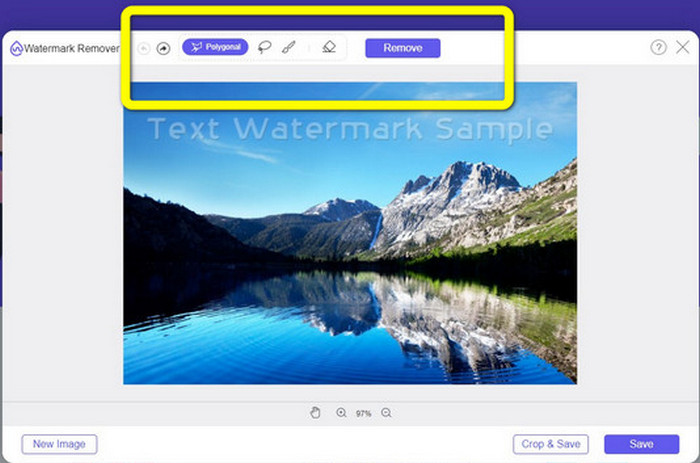
Paso 3: Usando la herramienta Brush, Lasso o la herramienta Brush, resalta las marcas de agua de tu foto.
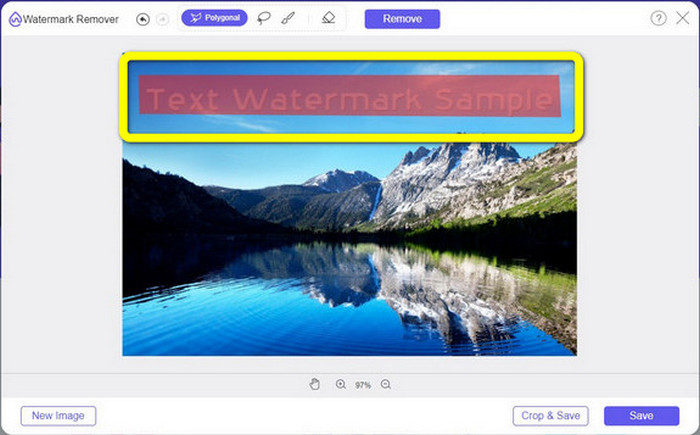
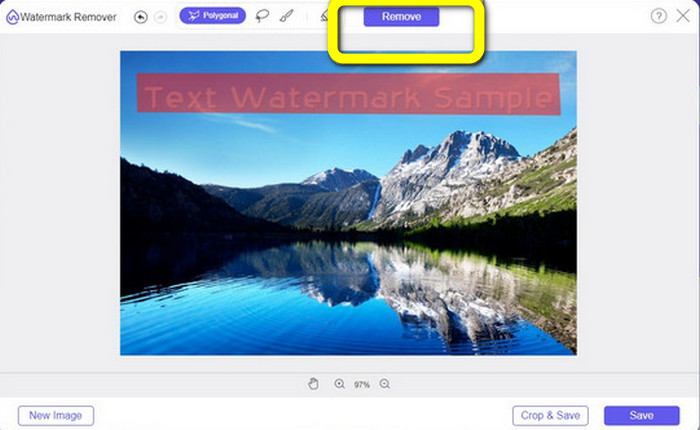
Paso 4: Cuando termines de resaltar las marcas de agua de tu foto, haz clic en el botón Remove.
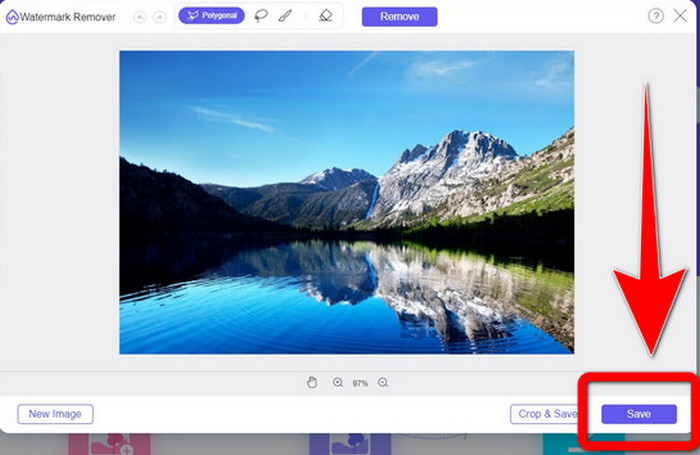
Paso 5: Si la marca de agua ya se ha eliminado de tu foto, haz clic en el botón Save para descargar tu imagen, y ya podrás disfrutar de tus fotos sin sentirte molesto por las marcas de agua.
2. Photoshop
Si también estás buscando una aplicación excelente y fiable que quieras descargar en tu ordenador, Adobe Photoshop es una de las aplicaciones de confianza que puedes utilizar. En esta parte te mostraremos cómo Photoshop elimina las marcas de agua de las fotos. Esta aplicación es adecuada para fotógrafos, diseñadores web, diseñadores gráficos, creadores de memes, etc. Sin embargo, tienes que comprar Adobe Photoshop porque solo dispone de una prueba gratuita de 7 días. Además, Photoshop no es adecuado para el trabajo por lotes con fotos y tiene curvas de aprendizaje complicadas. Si quieres conocer la forma más sencilla de quitar marcas de agua en tus imágenes, sigue estos pasos simples a continuación.
Paso 1: Abre tu Adobe Photoshop. Selecciona File > Open y añade tu foto con marcas de agua.
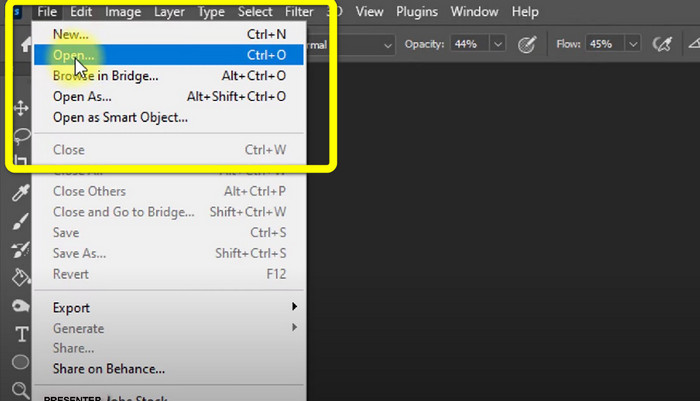
Paso 2: Haz clic en la Content-Aware Move Tool en las herramientas de edición.
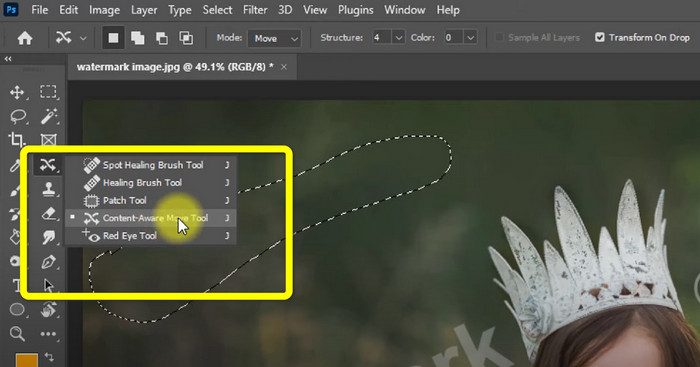
Paso 3: Después de hacer clic en Content-Aware Move Tool, selecciona el área de la marca de agua en tus fotos y pulsa Delete en tu teclado.
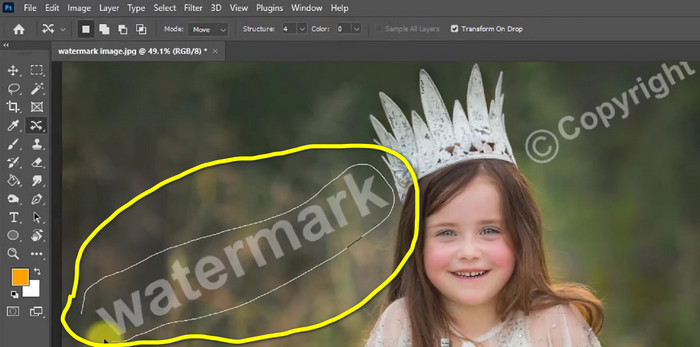
Paso 4: Cuando ya hayas pulsado Delete, aparecerá otra mini interfaz; a continuación haz clic en OK.

3. GIMP
Otra aplicación adecuada para eliminar marcas de agua en tus fotos es GIMP. Es un editor de gráficos ráster de código abierto que se utiliza para manipular y editar imágenes, lo que lo convierte en una herramienta útil para la edición de imágenes. Además, admite muchos formatos de archivo, como JPG, PNG, TIFF, GIF y otros. Sin embargo, a veces se bloquea de forma repentina y también es difícil organizar las capas. Si quieres saber cómo eliminar marcas de agua en tus fotos usando GIMP, sigue estos sencillos pasos a continuación.
Paso 1: Si estás en la página web de GIMP, haz clic en Download Directly para descargar la aplicación y sigue el proceso de instalación.

Paso 2: Abre la aplicación y haz clic en File > Open para añadir tu foto con marcas de agua.
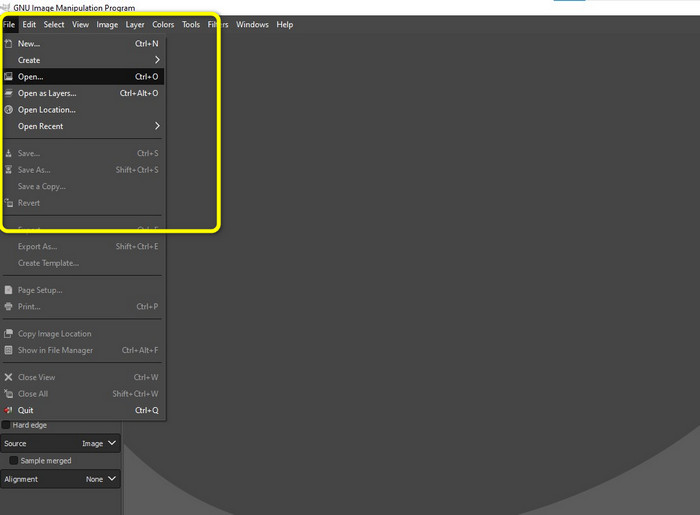
Paso 3: Haz clic en la herramienta Clone y coloca el cursor en el área vacía. Pulsa Ctrl y haz clic en el área vacía.
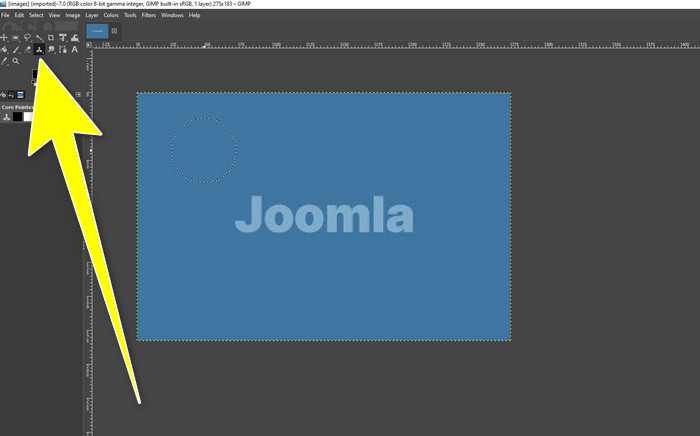
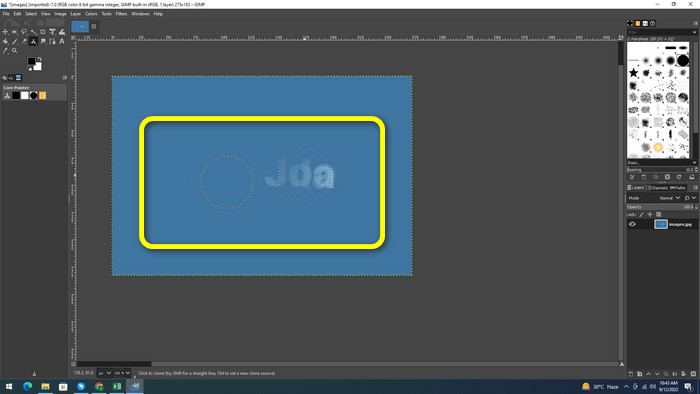
Paso 4: Arrastra el cursor sobre las marcas de agua para eliminarlas. Tu marca de agua ya habrá desaparecido. Ahora puedes guardar tu foto.
4. Eliminador de marcas de agua gratuito Aiseesoft en línea
Si quieres el mejor eliminador de marcas de agua de fotos en línea, Aiseesoft Free Watermark Remover Online es para ti. Esta aplicación puede ayudar a eliminar múltiples marcas de agua, textos, fechas, logotipos y más en tus fotos. Además, es fácil de utilizar, lo que la hace perfecta para principiantes. También admite varios formatos de imagen, como PNG, JPEG, BMP, JPG y otros. Sin embargo, esta aplicación no es totalmente gratuita; debes comprar su licencia para disfrutar de las funciones avanzadas. Si quieres eliminar marcas de agua en tus imágenes, sigue estos pasos.
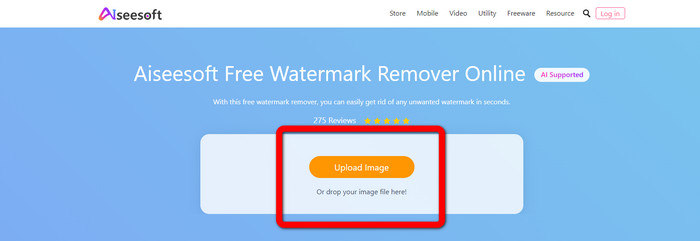
Paso 1: Ve al sitio web de Aiseesoft Free Watermark Remover Online. Luego haz clic en Upload Image para añadir tu foto con marcas de agua.
Paso 2: Si ya has adjuntado tu foto, ve a la watermark remover tool. Entonces podrás ver las herramientas de eliminación, como las herramientas Brush, Polygonal y Lasso.
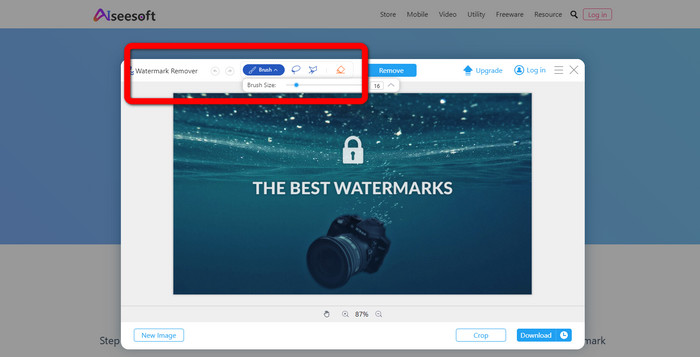
Paso 3: Usa estas herramientas y resalta las marcas de agua en tu foto y haz clic en Remove.
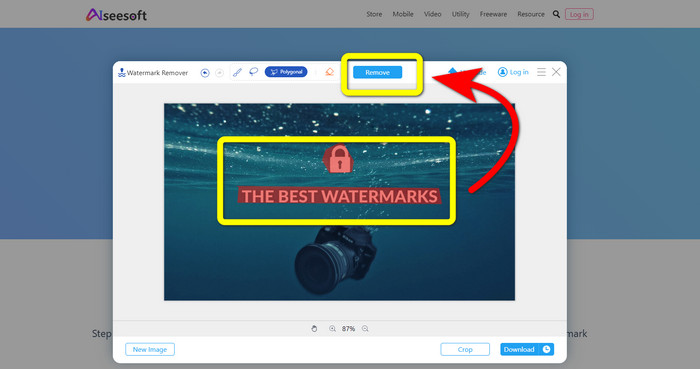
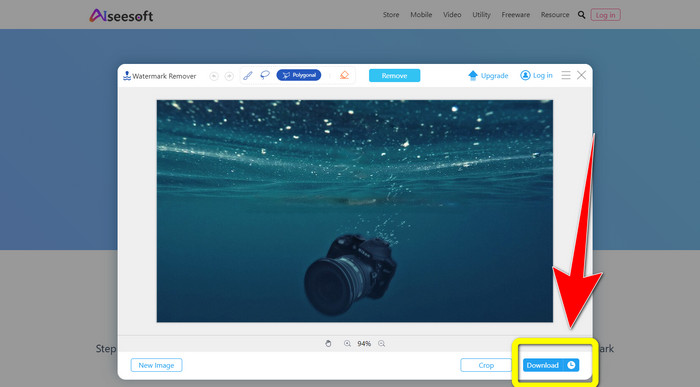
Paso 4: Si ya estás satisfecho con el resultado, haz clic en Download para guardar tu foto.
5. Pixel
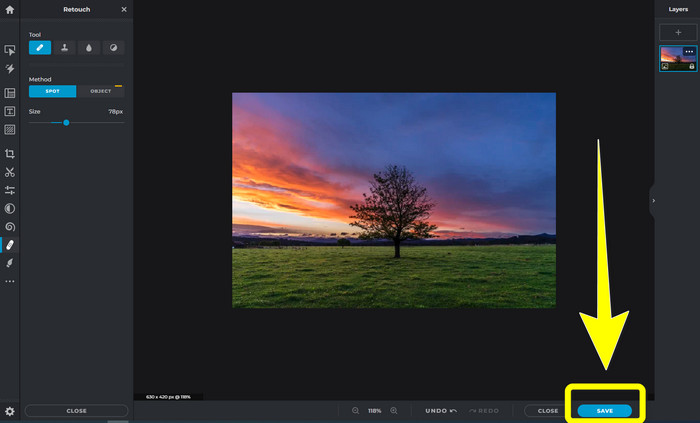
Pixlr es otra herramienta en línea que puedes utilizar para eliminar marcas de agua en tus fotos. Es fácil de usar y adecuada para principiantes. Admite diferentes formatos de imagen, como PSD, PNG, JPEG, WEBP y PXZ. Además, puedes usar esta aplicación en tus dispositivos, como iPhone, Android, ordenador de sobremesa y portátil. Pero no tiene tantas opciones como otras aplicaciones y cuenta con efectos limitados. Si quieres aprender cómo borrar la marca de agua de una imagen, sigue los pasos que aparecen a continuación.
Paso 1: Ve al sitio web de Pixlr. Haz clic en Open Image para añadir la imagen con la marca de agua.

Paso 2: Después de añadir tu foto, ve a la herramienta retouch > heal.
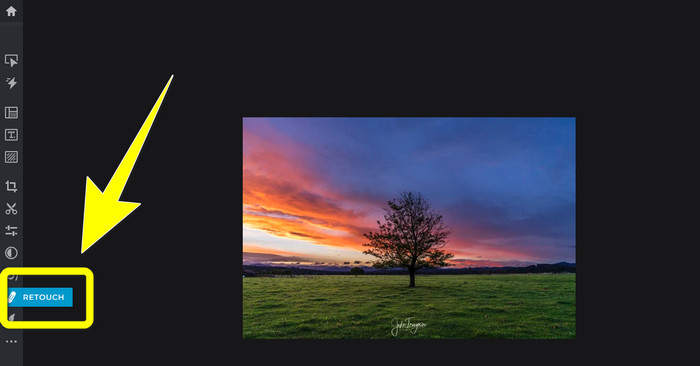
Paso 3: Después de hacer clic en la herramienta retouch > heal, haz clic en la marca de agua de tu imagen.
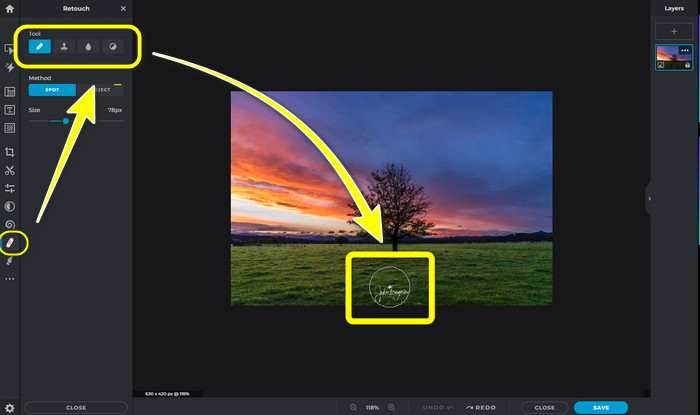
Paso 4: Si la marca de agua ha desaparecido, haz clic en el botón Save.
6. Repintar
Inpaint es otra aplicación en línea que puedes usar si quieres eliminar marcas de agua en tus imágenes. No solo marcas de agua, sino también logotipos y texto. También admite formatos de imagen como JPG, PNG y WEBP. Sin embargo, si quieres obtener imágenes de alta calidad, tienes que comprar la aplicación. Si deseas quitar marcas de agua en tus fotos, sigue los sencillos pasos que se indican a continuación.
Paso 1: Ve al sitio web de Inpaint. Haz clic en Upload Image y en tu imagen con la marca de agua.

Paso 2: Cuando cargues tu imagen, selecciona las watermark remover tools como Marker, Polygonal, Lasso y la Eraser tool y resalta las marcas de agua de tu foto.
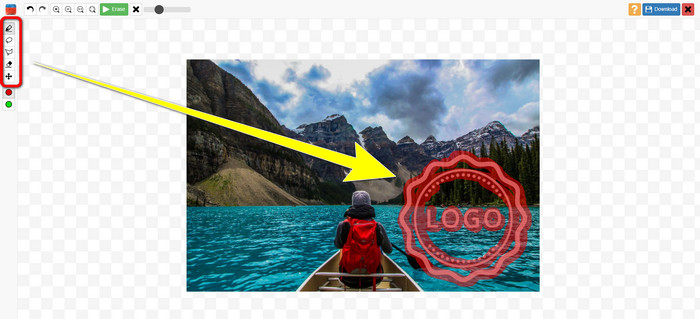
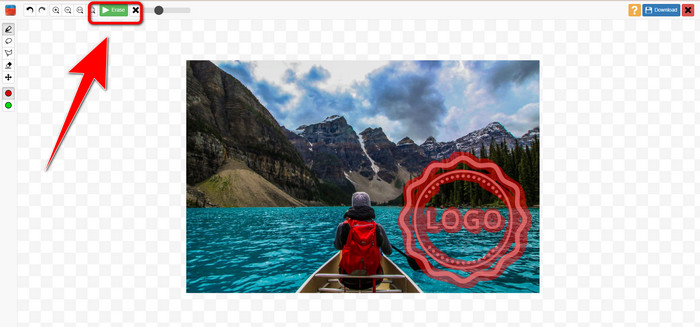
Paso 3: Cuando termines de resaltar las marcas de agua, haz clic en Erase.
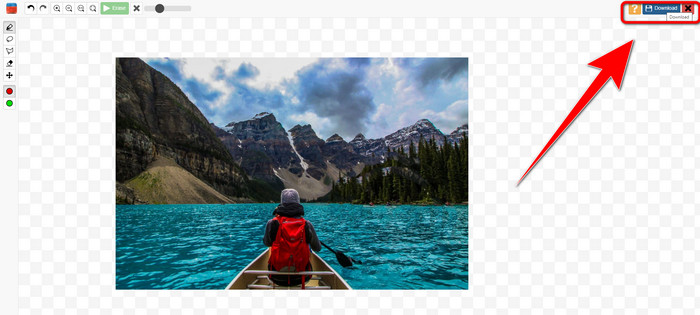
Paso 4: Si la marca de agua ha desaparecido, haz clic en el botón Download para guardar tu imagen.
7. Eliminador de sellos fotográficos
Photo Stamp Remover es una aplicación que puedes usar con tu computadora. Puedes descargarlo gratis. Esta aplicación puede eliminar rápidamente objetos innecesarios de sus imágenes, como logotipos, texto, marcas de agua y fechas. Pero no funciona bien en imágenes con fondos complicados. Además, este software puede restaurar los colores y la textura de la foto original para cubrir las marcas de agua y que luzca auténtica. Siga estos pasos para eliminar marcas de agua en sus imágenes.
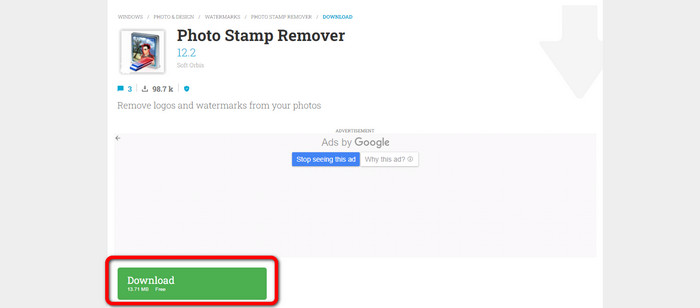
Paso 1: Haz clic en el botón Download para descargar Photo Stamp Remover en tu Windows y sigue el proceso de instalación.
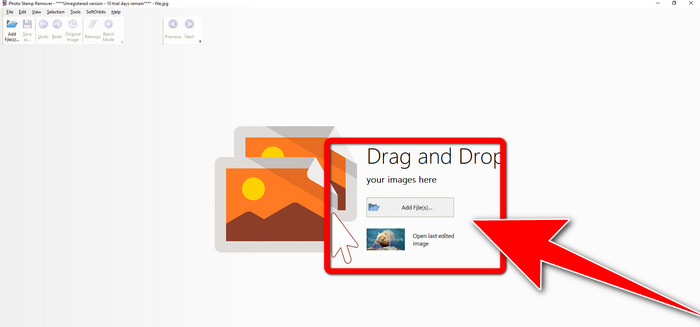
Paso 2: Inicia la aplicación y haz clic en Add File para añadir tu foto con las marcas de agua.
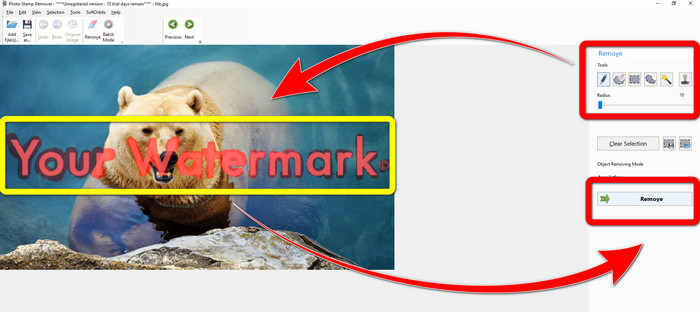
Paso 3: Ve a Remover tools y haz clic en Selection Marker. Resalta las marcas de agua y haz clic en Remove.
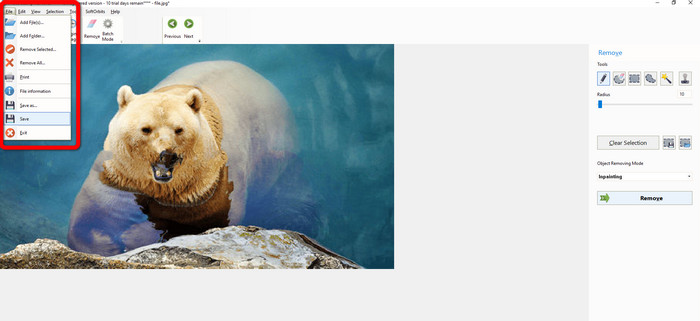
Paso 4: Si ya has eliminado las marcas de agua de tu imagen, haz clic en File > Save. Y habrás terminado de quitar las marcas de agua de tu imagen.
Parte 2. Cómo quitar la marca de agua de una foto en iPhone y Android
1. Borrador de video
Si quieres saber qué aplicación puede ayudarte a aprender cómo eliminar marcas de agua de una foto usando Android, Video Eraser es para ti. Esta aplicación puede eliminar objetos innecesarios de tus fotos, como texto, marcas de agua, etc. Además, con esta aplicación también puedes eliminar marcas de agua de tus vídeos. Pero la imagen se volverá manchada en la zona donde se haya borrado la marca de agua. Si quieres aprender a usar Video Eraser, sigue los pasos que encontrarás a continuación.
Paso 1: Instala Video Eraser en tu Android. Abre la aplicación cuando la instalación haya terminado.

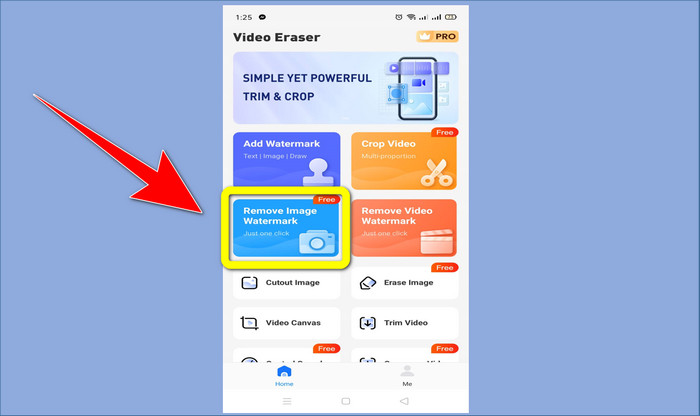
Paso 2: Haz clic en Remove Image Watermark para añadir tu foto con las marcas de agua.
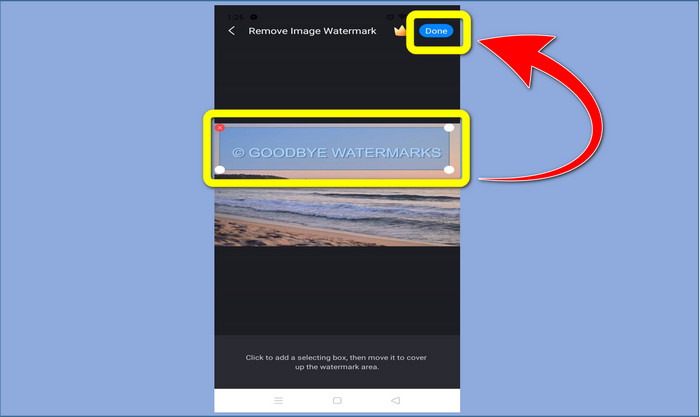
Paso 3: Resalta la marca de agua de tu foto y haz clic en Done.
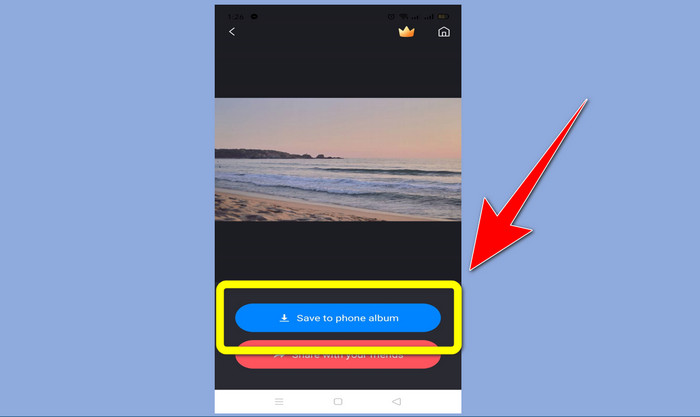
Paso 4: Después de hacer clic en Done, la marca de agua desaparecerá. Haz clic en Save to Photo Album para guardar tu foto.
2. Semilla instantánea
Snapseed es un excelente editor que puedes usar, especialmente si quieres aprender cómo quitar una marca de agua de una foto en un iPhone. Esta aplicación es buena si quieres eliminar marcas de agua en tus imágenes. Además, cuenta con varias herramientas de edición que puedes utilizar, como recortar, girar y más. Esta aplicación tampoco es para principiantes, sobre todo en lo relativo a la edición avanzada, y aunque es fácil de usar, tiene un ligero proceso de aprendizaje. Sigue los pasos que se indican a continuación para eliminar marcas de agua en tu foto usando esta aplicación.
Paso 1: Instala Snapseed en tu iPhone. Cuando termine la instalación, abre el software.
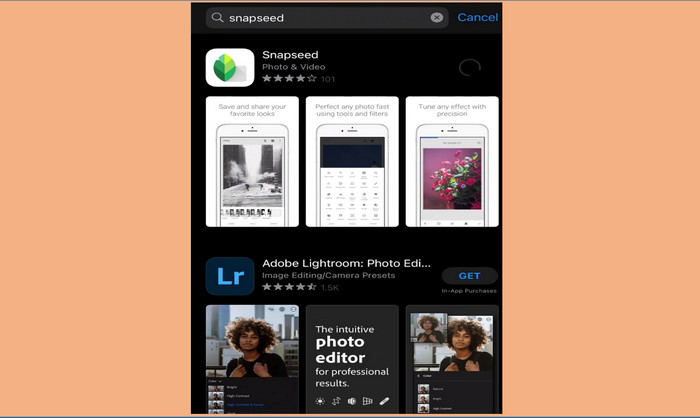
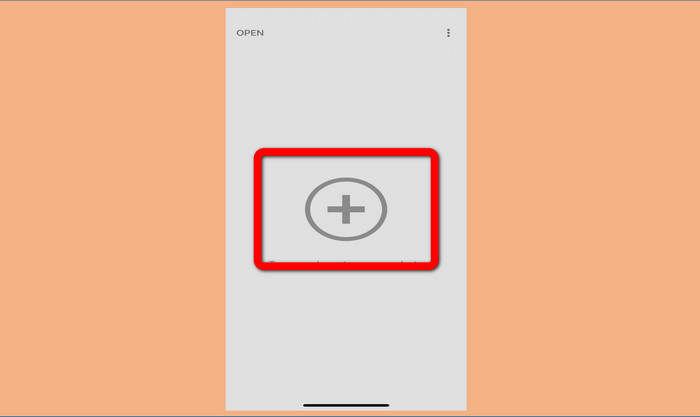
Paso 2: Haz clic en el botón con el Plus sign para añadir tu foto con las marcas de agua.
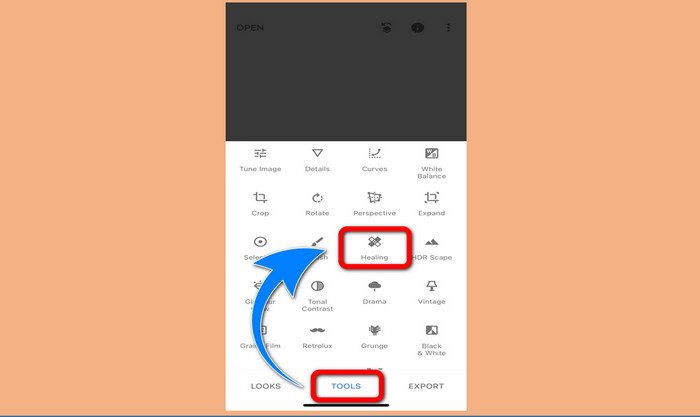
Paso 3: Cuando ya hayas añadido la foto, selecciona Tools > Healing y resalta las marcas de agua de tu imagen. Después de resaltar las marcas de agua, desaparecerán automáticamente.
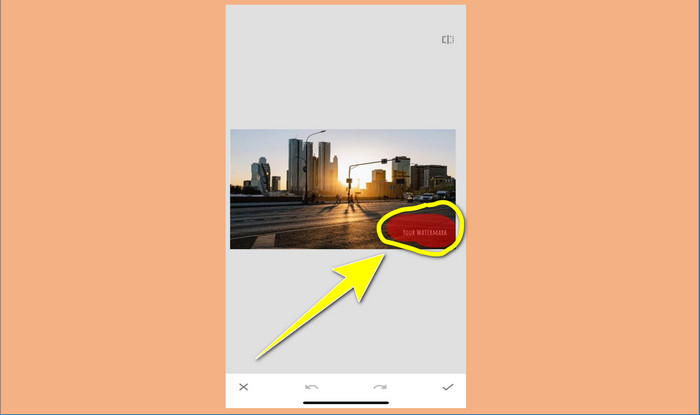
Paso 4: Después de resaltar las marcas de agua, desaparecerán automáticamente.
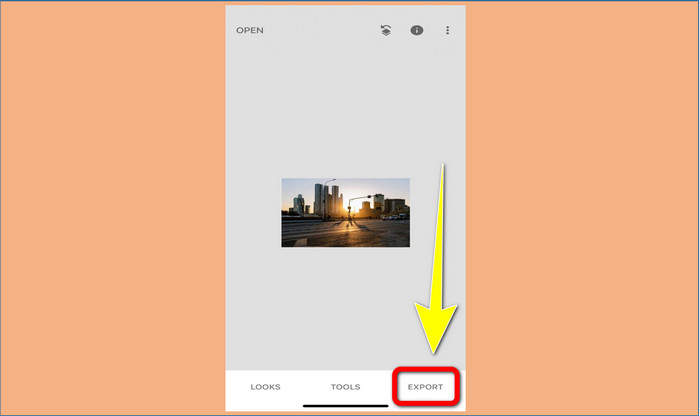
Paso 5: Cuando hayas terminado de eliminar las marcas de agua de tu foto, haz clic en el signo de Check y en Export para guardar tu imagen en tu iPhone.
Relacionado con:
Truco más rápido para eliminar la marca de agua de Adobe Stock de un vídeo [ Tutorial ]
5 maneras de eliminar una marca de agua de un vídeo de forma profesional
Parte 3. Preguntas frecuentes sobre la eliminación de marcas de agua de las fotos
¿Hay algún eliminador de marcas de agua que pueda usar de forma gratuita, especialmente para Mac?
Sí, ¡la hay! Puedes utilizar muchos eliminadores de marcas de agua en tu Mac, como FVC Free Watermark Remover. Es una aplicación en línea para eliminar marcas de agua en tu Mac.
¿Hay alguna manera de eliminar las marcas de agua de un video?
¡Definitivamente! Es algo fácil de hacer. Algunas de las aplicaciones de eliminación de marcas de agua que puede usar ahora pueden eliminar marcas de agua en fotos y videos. Todo lo que necesita hacer es buscar el eliminador de marcas de agua en el cuadro de búsqueda y ver la página de resultados.
¿Es fácil quitar las marcas de agua?
¡Sí, por supuesto! Si ya tiene la aplicación que usará, debe buscar herramientas de eliminación, como pincel, marcador, lazo y herramientas poligonales. Luego, resalta las marcas de agua y listo.
Conclusión
Como se ha mostrado arriba, este artículo ofrece formas notables de eliminar marcas de agua de las fotos. Pero si quieres una herramienta excelente que puedas usar para quitar marcas de agua, FVC Free Watermark Remover es la mejor opción para ti.
-
 Cómo deshacerse de la marca de agua Power Director de forma gratuita [Completa]
 ¿Cómo deshacerse de la marca de agua Power Director de forma gratuita? Las mejores herramientas para eliminar la marca de agua están aquí, así que apréndelas leyendo esto.
-
 Las mejores técnicas para eliminar la marca de agua de la versión de prueba de Canvasjs que debe conocer
 La mejor manera de eliminar la marca de agua de Canvasjs es usar una herramienta. Si no ha elegido una herramienta, puede seleccionarla en este artículo.
-
 Cómo eliminar la marca de agua de Animaker sin costo [Formas comprobadas]
 ¿Cómo quitar la marca de agua de Animaker? Con las mejores herramientas que enlistamos en este blog puedes usarlas para deshacerte de la marca de agua.
