


 Video Converter Ultimate
 Grabador de pantalla
 Reparación de vídeo
 Descarga segura
Una revisión paso a paso sobre el removedor de marcas de agua Inpaint
¿Estás dispuesto a aprender a usar Inpaint para eliminar una marca de agua? ¡Pues aquí estamos para ayudarte! Si estás leyendo esta guía, es posible que estés buscando el mejor método para quitar marcas de agua de tus imágenes. Entonces ya no tendrás que preocuparte más. Esta publicación te ofrecerá reseñas sinceras de los programas que necesitas usar, como Inpaint Watermark Remover. Conocerás lo suficiente sobre cada herramienta, incluidos sus funciones, ventajas, desventajas y coste. Además, te ofreceremos la mejor alternativa a Inpaint para eliminar marcas de agua de tus fotos. De este modo, tendrás otra opción de eliminador de marcas de agua que podrías utilizar. Lee este artículo para descubrir información adicional y útil.

Parte 1: Descripción general de Inpaint
El excelente y fiable software llamado Inpaint está diseñado para eliminar elementos no deseados de las imágenes, como marcas de agua, logotipos, textos, sellos, etc. Existen numerosos programas avanzados de edición fotográfica disponibles. Inpaint no forma parte de ellos. Te gustará la sencillez y rapidez de Inpaint si eres un fotógrafo ocasional, un principiante o un usuario ocupado que no siempre tiene tiempo para usar programas sofisticados de edición de imágenes como Photoshop. Además, Inpaint puede utilizarse tanto en Windows como en Mac. Puedes descargar las aplicaciones y también usarlo directamente en línea. Por último, la herramienta de marcación inteligente de Inpaint hace que eliminar objetos no deseados sea pan comido. Asimismo, Inpaint puede ayudarte a restaurar perfectamente cualquier foto antigua dañada. Sin embargo, debes adquirir una suscripción si quieres guardar tu imagen en alta resolución. Solo puede ofrecer baja calidad al usar la versión gratuita.
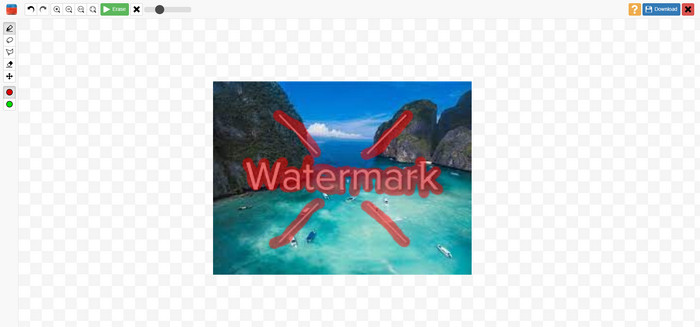
Características, pros y contras de Inpaints
Funciones
◆ Eliminar elementos no deseados de una foto.
◆ Reparación de fotos antiguas.
◆ Capaz de retoque facial
Pros
- Ofrece una interfaz intuitiva, que es fácil de utilizar.
- Puede eliminar las marcas de agua al instante. Puede eliminar las marcas de agua al instante.
Contras
- No funciona bien en fotos con fondos complicados.
- Compra una suscripción para disfrutar de excelentes funciones.
Cómo usar Inpaint para eliminar una marca de agua
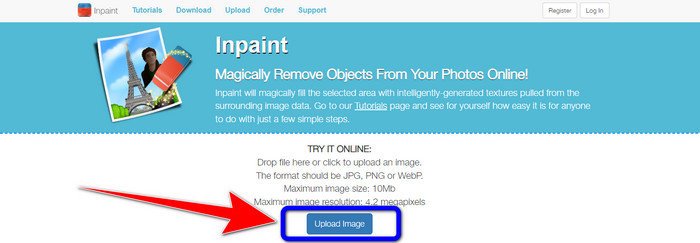
Paso 1: Visita el sitio web de Inpaint. Luego, haz clic en el botón Upload Image para añadir la foto con la marca de agua que quieres eliminar.
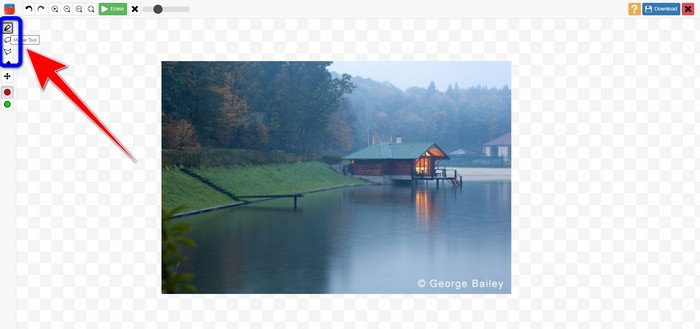
Paso 2: Después de añadir tu foto, debes resaltar las marcas de agua usando las herramientas para eliminar marcas de agua. Estas herramientas son Marker, Polygonal y Lasso.
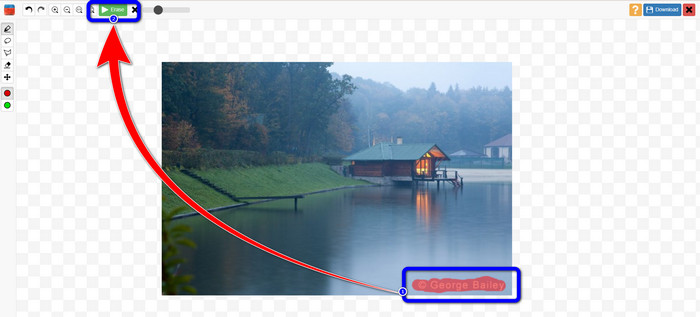
Paso 3: Cuando termines de resaltar las marcas de agua de tus fotos, haz clic en el botón Erase en la parte superior izquierda de la pantalla y espera al proceso de eliminación.
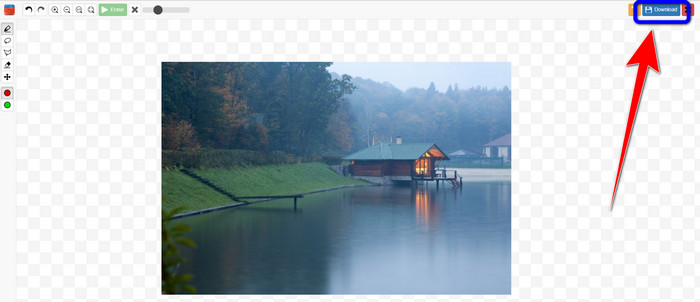
Paso 4: Cuando la marca de agua haya desaparecido, haz clic en el botón Download y guarda el resultado en tu ordenador.
Parte 2: la mejor alternativa a Inpaint para eliminar marcas de agua de fotos en línea
Después de conocer el método efectivo de cómo usar Inpaint para eliminar una marca de agua, esta es la mejor alternativa que puede usar para eliminar las marcas de agua de sus fotos.
Eliminador de marcas de agua sin FVC
La mejor herramienta en línea que puedes usar además de Inpaint es FVC Free Watermark Remover. Este software en línea te permite eliminar todos los elementos innecesarios de tus imágenes, como marcas de agua, logotipos, textos, firmas y más. Puedes usar muchas herramientas de eliminación, como Brush, Polygonal y Lasso. Pero eso no es todo. Este programa en línea tiene una función de recorte (Cropping), lo que significa que puedes eliminar cualquier marca de agua recortando tu foto. Tiene un proceso de eliminación rápido, por lo que no necesitas dedicarle mucho tiempo. Después de eliminar las marcas de agua, puedes guardar tu resultado final en el mismo formato. También es compatible con varios formatos de imagen, como JPG, PNG, BMP y otros. Además, este eliminador de marcas de agua tiene una interfaz fácil de entender con pasos sencillos de seguir, lo que resulta adecuado para usuarios no profesionales.
Funciones
◆ Capaz de recortar imágenes para eliminar marcas de agua.
◆ Exportar imágenes con la calidad original.
◆ Elimine elementos desagradables de las fotos con las herramientas Lazo, Pincel y Poligonal.
Pros
- Perfecto para usuarios no profesionales.
- Tiene una interfaz de usuario comprensible.
- Totalmente libre.
- Tiene un proceso de eliminación rápido.
- Garantizar la privacidad de cada usuario.
- No es necesario instalar la aplicación.
Contras
- Para operar la aplicación, se necesita una conexión a Internet.
Usar las herramientas de eliminación de marcas de agua
Dado que el área de la marca de agua se encuentra en el centro de la foto, utilizaremos la herramienta de eliminación de marcas de agua en lugar de la herramienta de recorte. Siga estos sencillos pasos a continuación para eliminar las marcas de agua de sus fotos con FVC Free Watermark Remover.
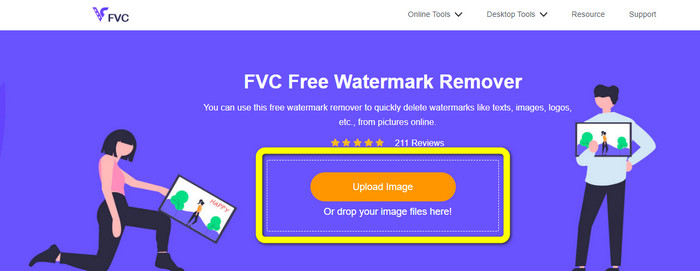
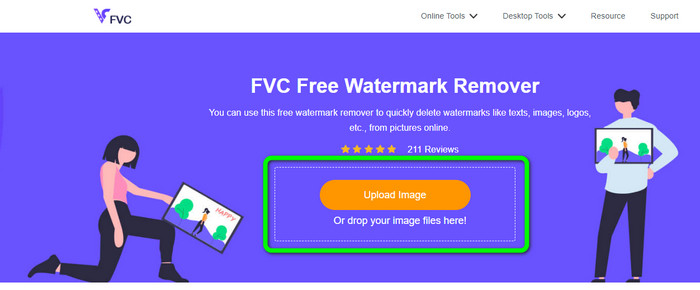
Paso 1: Ve al sitio web de FVC Free Watermark Remover. Haz clic en el botón Upload Image para subir tu imagen con marca de agua. También puedes arrastrar tu archivo directamente.
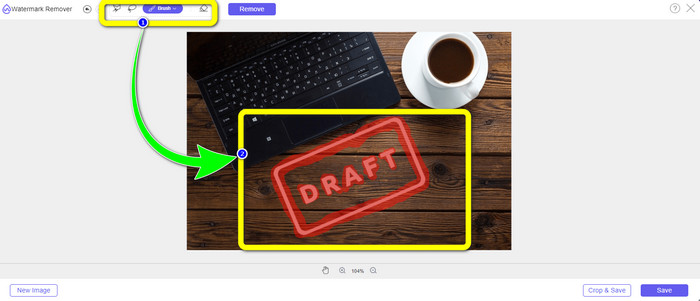
Paso 2: Resalta las marcas de agua usando las herramientas de eliminación que puedes ver en la parte superior de la interfaz.
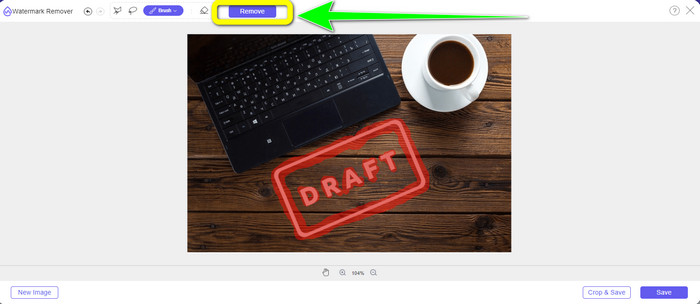
Paso 3: Cuando hayas terminado de resaltar la marca de agua de tu imagen, haz clic en el botón Remove para eliminarla y espera el rápido proceso de eliminación.
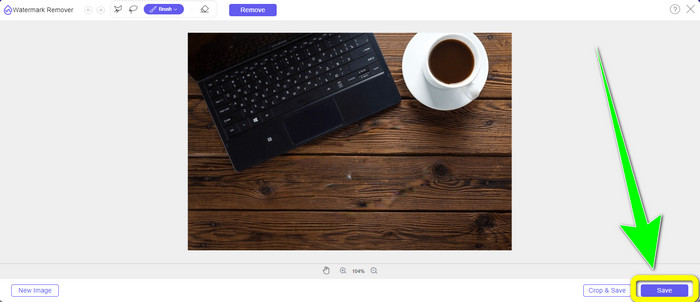
Paso 4: Después de eliminar por completo la marca de agua de tu foto, haz clic en el botón Save para descargar la foto sin la marca de agua.
Usar la herramienta de recorte
En este método, debe considerar el área de la marca de agua de su foto. Si la marca de agua está en la esquina o el borde de su imagen, puede usar la herramienta de recorte. Siga los sencillos pasos a continuación para aprender cómo recortar una foto para eliminar una marca de agua.
Paso 1: Haz clic en el botón Upload Image para insertar tu foto con una marca de agua.
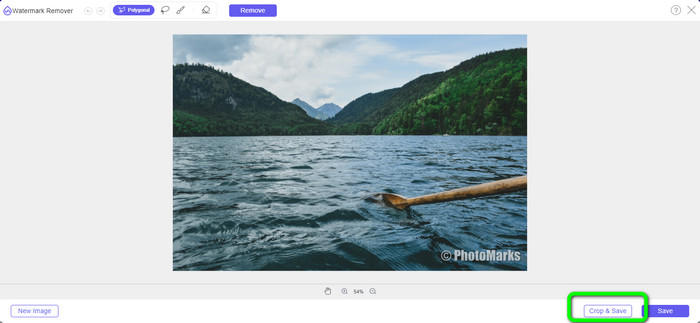
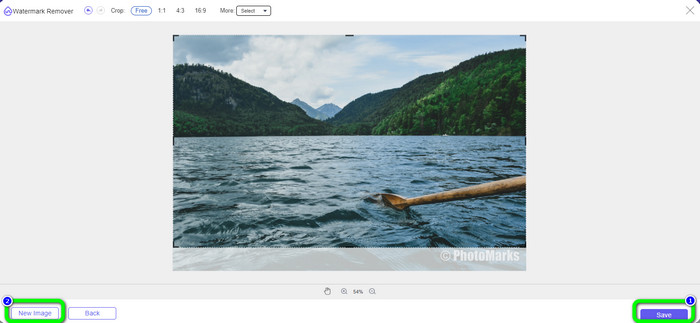
Paso 2: Después de insertar la foto, haz clic en el botón Crop & Save en la parte inferior derecha de la interfaz.
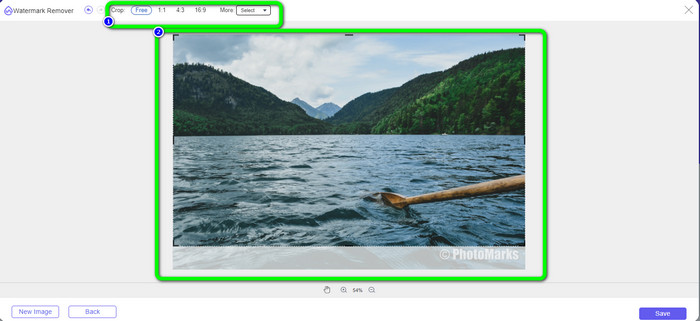
Paso 3: En la parte superior de la interfaz, hay opciones de recorte entre las que puedes elegir. Estas opciones te ayudarán a recortar tu foto. Pero si quieres recortar la foto manualmente, haz clic en la opción Free.
Paso 4: Después de eliminar la marca de agua recortando la foto, pulsa el botón Save en la parte inferior derecha de la interfaz para descargar tu foto sin marca de agua. Luego, si aún quieres recortar otra foto, haz clic en el botón New Image en la parte inferior izquierda de la interfaz.
Relacionado con:
Formas de eliminar fácilmente las marcas de agua de Reddit de las imágenes
Cómo eliminar marcas de agua en Lightroom Mobile [Solucionado]
Parte 3: Preguntas frecuentes sobre el removedor de marcas de agua Inpaint
¿Cuándo debo usar Inpaint?
Puede usar Inpaint para eliminar elementos no deseados de sus fotos, como personas, marcas de agua, logotipos, calcomanías y más. Con esta herramienta, puede hacer que su foto sea más fantástica y agradable a la vista de sus espectadores.
¿Puedo usar Inpaint en mi computadora?
¡Sí tu puedes! Puedes descargar Inpaint porque ofrece una versión de escritorio. Esta aplicación descargable tiene más funciones excelentes que la versión en línea. Puede adjuntar imágenes sin limitaciones y proporciona una mayor calidad de restauración con un mejor algoritmo de pintura.
¿Es Inpaint un mejor eliminador de marcas de agua?
Inpaint es fiable para eliminar marcas de agua de una foto. Sin embargo, tiene limitaciones. Tiene un límite de tamaño de archivo y de resolución, lo cual no es ideal para los usuarios. Puedes usar FVC Free Watermark Remover si quieres un eliminador de marcas de agua mejor. No tiene limitaciones y puedes quitar marcas de agua de una foto de forma gratuita.
Conclusión
Como puedes ver, esta publicación te ha proporcionado una reseña honesta sobre Inpaint Watermark Remover. Además, ofrece las mejores alternativas que puedes usar para eliminar marcas de agua de tus fotos. Si quieres un eliminador de marcas de agua 100 % gratuito, puedes usar FVC Free Watermark Remover.
-
 Cómo quitar marcas de agua de videos en After Effects fácilmente
 Este artículo ayudará a eliminar las marcas de agua del video usando After Effects. Además, brindará las mejores alternativas para eliminar objetos molestos.
-
 Guías paso a paso sobre cómo eliminar emojis de un video
 ¿Te sientes molesto con los emojis en tus videos? Esta publicación le brindará los mejores procedimientos para eliminar instantáneamente emojis de sus videos utilizando excelentes herramientas.
-
 Excelentes maneras de cómo quitar la etiqueta de la foto y el video
 ¿Quieres eliminar sin esfuerzo pegatinas de videos y fotos? Estas son las formas efectivas, incluidos los métodos más confiables y fáciles que puede probar.
