


 Video Converter Ultimate
 Grabador de pantalla
 Reparación de vídeo
 Descarga segura
Elimine profesionalmente la marca de agua Shootproof con estas fantásticas herramientas
Shootproof es una galería de fotos para clientes y un sitio web de portafolio. Si buscas imágenes maravillosas en línea, Shootproof puede ayudarte con ello. Este sitio web ofrece montones de imágenes hermosas que crean los vendedores. Shootproof es una empresa reconocida de compartición de galerías para fotógrafos. Además, permite a los fotógrafos crear una tienda en línea para sus fotos. Sin embargo, muchos vendedores añaden marcas de agua a sus imágenes para que otros no puedan apropiarse de ellas fácilmente. Por lo tanto, si eres uno de los usuarios que busca cómo eliminar la marca de agua de Shootproof, sigue leyendo esta publicación.

Parte 1. 2 métodos para eliminar la marca de agua Shootproof sin esfuerzo
Eliminar la marca de agua Shootproof no es difícil si tiene un eliminador de marcas de agua adecuado. Y para ayudarlo a elegir el mejor eliminador de marcas de agua, buscamos el eliminador de marcas de agua gratuito más utilizado en línea. Para conocer esta herramienta, lea esta parte con todo incluido.
Eliminador de marcas de agua sin FVC
FVC Free Watermark Remover es uno de los eliminadores de marcas de agua en línea más conocidos. Esta aplicación en línea es gratuita y segura de usar. Además, es accesible desde todos los navegadores web, como Google, Firefox y Safari. Es compatible con formatos de imagen estándar, incluidos PNG, JPEG, JPG, BMP y otros. Y en su función de eliminación de marcas de agua, puedes elegir entre diferentes herramientas de selección para eliminar la marca de agua de tu imagen.
Además, muchos principiantes pueden usar este eliminador de marcas de agua porque es fácil de usar. Además, cuando exporte su imagen, tendrá el formato de archivo original. Esta herramienta tampoco requiere que inicie sesión o se registre.
Cómo eliminar la marca de agua Shootproof con FVC Free Watermark Remover:
Paso 1. Primero, abre tu navegador y busca FVC Free Watermark Remover en el cuadro de búsqueda.
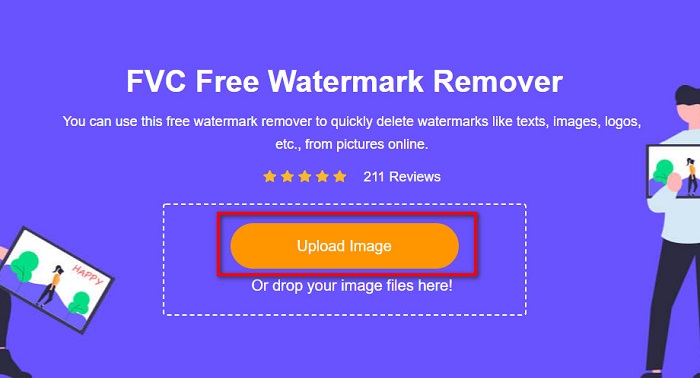
Paso 2. Después, haz clic en el botón Upload Image en la interfaz principal para subir la imagen a la que quieres quitarle la marca de agua.
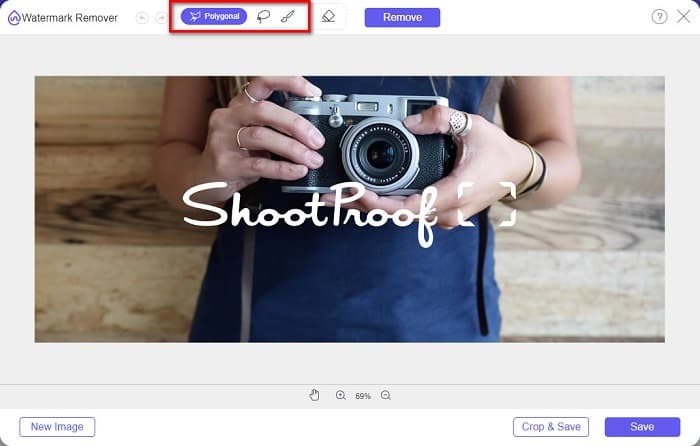
Paso 3. A continuación, elige la herramienta de selección que quieras usar para eliminar la marca de agua de tu imagen. Puedes elegir entre Polygonal, Lasso y Brush.
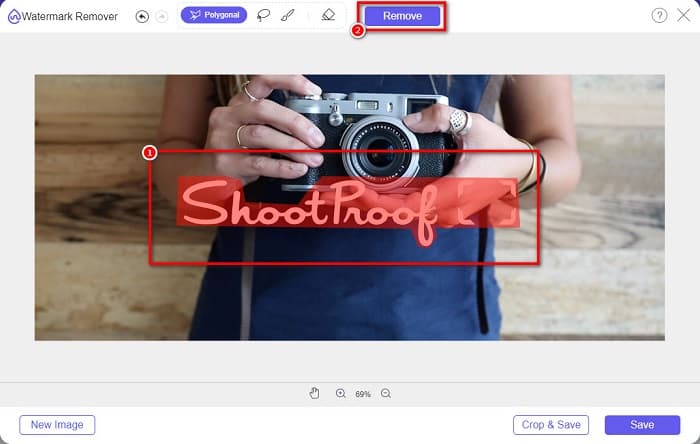
Paso 4. Luego, traza el área de la marca de agua en tu imagen. Después, haz clic en el botón Remove una vez que esté seleccionada. Verás que la marca de agua ha desaparecido.
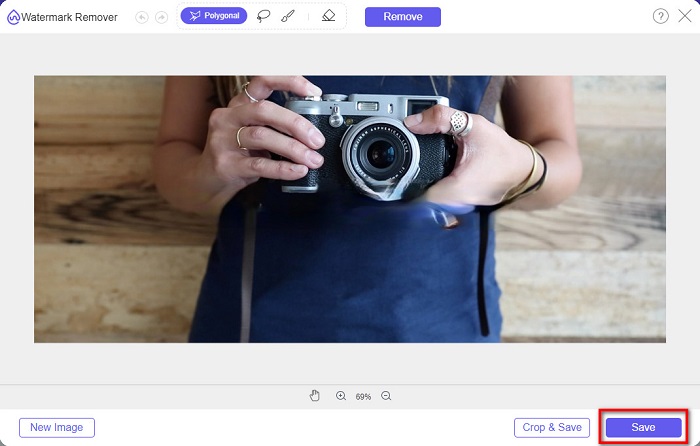
Paso 5. Por último, haz clic en el botón Save para guardar tu resultado en tu dispositivo. ¡Y eso es todo! Con estos sencillos pasos, podrás tener una imagen de Shootproof sin marca de agua.
Eliminador de marcas de agua en línea de Apowersoft
Apowersoft Online Watermark Remover es una conocida aplicación en línea para eliminar cualquier marca de agua de tu imagen. Es una aplicación en línea fácil de usar porque tiene una interfaz intuitiva. Además, es compatible con los formatos de imagen más estándar, como PNG y JPG. Tampoco tienes que preocuparte por la seguridad de tus archivos, ya que esta herramienta en línea es segura de usar. También cuenta con una función para eliminar marcas de agua en vídeos. Sin embargo, cuando tu conexión a internet es lenta, puedes experimentar procesos lentos de subida y exportación.
Cómo eliminar la marca de agua Shootproof usando Apowersoft Online Watermark Remover:
Paso 1. Busca Apowersoft Online Watermark Remover en tu navegador, luego ve a su página principal. Y en la interfaz principal, haz clic en la opción Remove Watermark From Image.
Paso 2. Luego, en la siguiente interfaz, verás un cuadro de eliminación de marca de agua y lo colocarás sobre el área de la marca de agua.

Paso 3. Para eliminar la marca de agua de tu imagen, haz clic en el botón Erase.
Parte 2. Consejos sobre el uso de la función de marca de agua a prueba de disparos
Con la función de marca de agua de Shootproof, puede agregar y eliminar marcas de agua en su imagen. Si desea evitar que otros usuarios sean dueños de su foto, puede agregar texto en su imagen que sirva como marca de agua.
Cómo agregar una marca de agua en Shootproof:
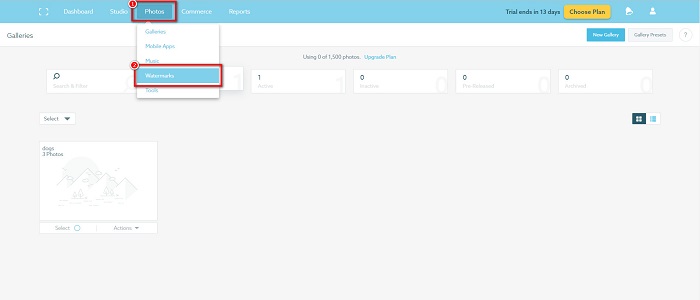
Paso 1. Ve a Photos y luego haz clic en la opción Watermarks.
Paso 2. Después, elige entre marca de agua de texto o imagen.
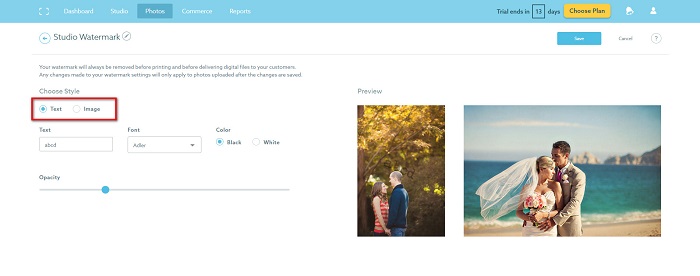
Si desea utilizar la marca de agua de la imagen, se recomienda cargar un archivo PNG de alta resolución con un fondo transparente. También puede utilizar archivos JPG.
Paso 3. A continuación, ajusta los Watermark Settings. En los ajustes de marca de agua, puedes seleccionar la posición de la marca de agua en tu foto. También puedes ajustar el tamaño y la opacidad de tu marca de agua.
Paso 4. Por último, haz clic en el botón Save para aplicar los ajustes que has hecho.
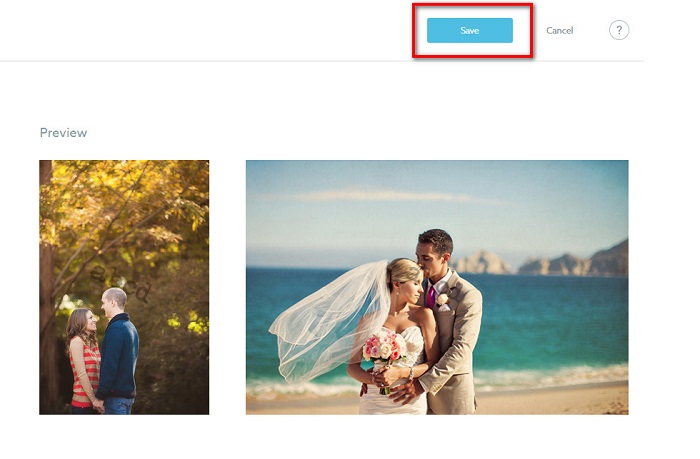
Aplica una marca de agua en las imágenes que subas.
En la página Marca de agua, puede elegir una Marca de agua predeterminada. También puede activar las marcas de agua para todas sus cargas futuras. Puede cambiar esto antes de cargar nuevas imágenes.
Y cuando cargue nuevas fotos a su galería a través del cargador basado en la web o el cargador de escritorio, puede seleccionar la marca de agua que desea usar en la pantalla de carga.
Cómo quitar la marca de agua en Shootproof
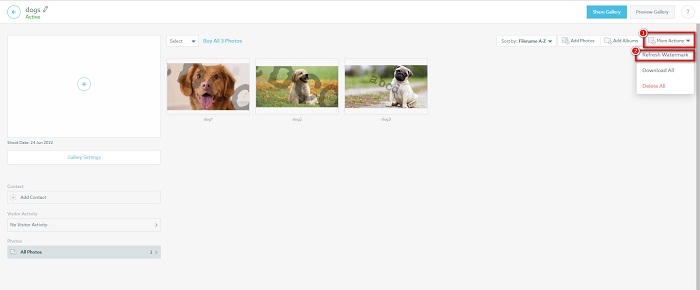
Recuerde siempre que editar o agregar una marca de agua existente solo afectará sus cargas futuras. Los cambios que realizó no afectarán las imágenes que ya están en su galería. Pero si desea cambiar la marca de agua o eliminar la marca de agua Shootproof, puede actualizar la marca de agua para actualizarla en su galería. Así es como puede eliminar o cambiar la marca de agua Shootproof.
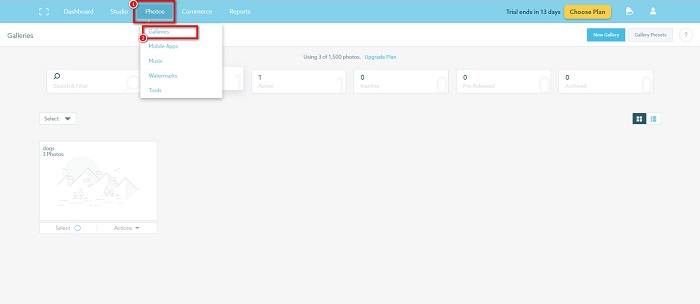
Paso 1. Ve a Photos > Galleries y luego haz clic en tu galería.
Paso 2. En la galería, haz clic en el botón More Actions en la esquina superior derecha de la interfaz.
Paso 3. Después, selecciona Refresh Watermark para eliminar las marcas de agua de cada imagen que subas.
Paso 4. Para quitar la marca de agua, desactiva la barra deslizante. Y si solo quieres cambiar la marca de agua, selecciona New Watermark.
Paso 5. Por último, haz clic en Apply Change para guardar los cambios que has realizado.
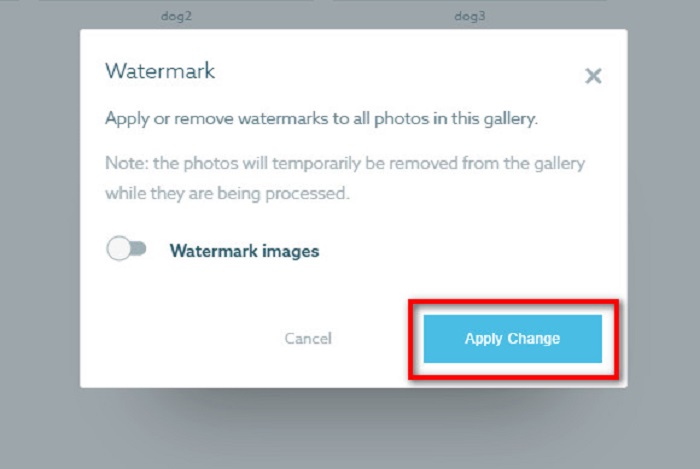
Verá que las fotos se mostrarán automáticamente como procesamiento. Cuando se apliquen los cambios, verás que las imágenes volverán a tu galería.
Relacionado con:
Magníficos eliminadores de marca de agua de Arnold Maya que no te puedes perder
Eliminadores de marca de agua de 123rf: análisis exhaustivo de las herramientas definitivas
Parte 3. Preguntas frecuentes sobre Shootproof Remove Watermark
¿Se pueden eliminar las marcas de agua digitales?
Eliminar marcas de agua digitales invisibles es difícil. Por ejemplo, los incrustados por el complemento Digimarc Photoshop son difíciles de eliminar. Recortar, cambiar el tamaño, agregar ruido y desenfoque moderado pueden no funcionar con marcas de agua digitales.
¿Se puede eliminar una marca de agua de logotipo de un video?
Sí. Es posible eliminar una marca de agua de logotipo en su video. Muchos eliminadores de marcas de agua le permiten eliminar logotipos en sus videos. Si desea eliminar un logotipo en su video, use Video Converter Ultimate.
¿Shootproof muestra si tomas una captura de pantalla?
Shootproof toma varias medidas para proteger las fotos del vendedor. Sin embargo, Shootproof no puede evitar que las personas tomen capturas de pantalla de su imagen en su galería.
Conclusión
Y eso es todo. Siguiendo los métodos mencionados anteriormente, ahora puedes eliminar la marca de agua de Shootproof de tu imagen. Aunque eliminar la marca de agua en Shootproof es gratis, seguir el proceso puede resultar algo complicado. Así que, si quieres quitar fácilmente la marca de agua de Shootproof de tu imagen, usa FVC Free Watermark Remover.
-
 Excelente removedor de marca de agua de Photobucket en línea y fuera de línea
 Aprenda a eliminar la marca de agua de Photobucket de sus fotos con este increíble eliminador de marcas de agua de Photobucket. Lea este artículo para aprender las formas.
-
 Elimine fácilmente la marca de agua de PDF con pasos simples
 Elimine Watermark de PDF siguiendo estos sencillos pasos. Aprenda a eliminar fácilmente las marcas de agua de su archivo PDF con estas increíbles herramientas.
-
 Maneras fáciles de eliminar la marca de agua de las imágenes de graduación
 ¿Quieres saber las mejores formas de eliminar las marcas de agua de las fotos de graduación? Al leer este artículo, podrá saber cómo eliminar fácilmente las marcas de agua en las fotos de graduación.
