


 Video Converter Ultimate
 Grabador de pantalla
 Reparación de vídeo
Descubra formas de cómo reproducir archivos MKV en PS4
No solo la Xbox One S permite la reproducción de películas. Ahora la PS4 también intenta ponerse al día con esta tendencia. Mediante el uso de un cable USB y a través de DLNA, la PS4 ahora puede reproducir MKV, MP4, AVI y muchos más formatos. Esto significa que MKV forma parte de los archivos que puedes reproducir. Para ver la lista completa de formatos compatibles, visita la página web oficial de PS4. Además, no seguirías leyendo este artículo si no estuvieras interesado en reproducir un archivo MKV en PS4. Continúa, a medida que avances descubrirás formas de reproducir MKV en PS4.

Parte 1. ¿Se pueden reproducir todos los archivos MKV en PS4?
¿Puedo reproducir archivos MKV en PS4? Seguro que puedes. El formato de archivo MKV es compatible con PS4. Pero no todos los archivos MKV pueden reproducirse correctamente. Es posible que experimente fallas al jugarlo. Esto se debe a que debe cumplir con el estándar establecido por PS4. Principalmente, se admiten H.264 / MPEG-4 AVC. Se aplican las mismas reglas si va a reproducir archivos MKV desde una unidad USB. Mientras tanto, para audio MP3, AAC LC, AC-3 son compatibles. La mayoría de esos formatos son formatos Dolby Digital. Si cree que ha cumplido con el estándar, puede continuar con los pasos sobre cómo reproducir MKV en PS4 directamente.
Paso 1. Descarga e instala DivX Media Server y ejecuta el reproductor. Luego activa la opción de uso compartido en tu ordenador.
Paso 2. Sube o importa el archivo MKV al servidor.
Paso 3. Antes de pasar al siguiente paso, asegúrate de que tanto el ordenador como la PS4 estén conectados a la misma red Wi‑Fi. A continuación, descarga e instala el reproductor multimedia DivX en tu PS4. Después, abre la aplicación de reproductor multimedia de la PS4 y elige DivX Media Server de la lista de dispositivos que aparecerá.
Paso 4. Por último, busca Vídeo, marca el vídeo que quieres reproducir y comienza a transmitirlo.
Parte 2. Guía paso a paso sobre cómo reproducir MKV en PS4 desde USB
Mientras tanto, si está utilizando un almacenamiento USB, asegúrese de que esté formateado FAT o exFAT, o de lo contrario no se detectará. Si cree que está listo y la unidad flash es compatible, consulte la guía paso a paso a continuación.
Paso 1. Enciende la PS4 e introduce el USB. Ve al Menú principal. Ahora selecciona Vídeo y busca el nombre de tu unidad USB.
Paso 2. Cuando veas la lista de nombres de archivos, haz clic en Mostrar todo para ver la lista completa de archivos que guardaste en el USB. Copia el archivo y transfiérelo a la PS4.
Paso 3. Por último, asegúrate de que todavía tienes suficiente espacio de almacenamiento para completar la transferencia.
Parte 3. Forma alternativa de jugar MKV en PS4 a través del servidor Plex
Además de DivX, también hay un reproductor alternativo que puedes usar para reproducir MKV en PS4. Se trata de un servidor multimedia en streaming llamado Plex. Este servidor multimedia te permite transmitir vídeos de alta calidad, música, series de TV y pódcasts desde tu ordenador. Aunque algunas personas tienen problemas al reproducir ciertos archivos MKV, aún puedes usarlo como alternativa. Mientras tanto, si realmente quieres usar Plex y reproducir un archivo incompatible, deberías considerar convertir el vídeo. Algunos conversores son capaces de transformar tus archivos MKV a un formato compatible con Plex. Ajustando el códec de vídeo, la tasa de fotogramas, el bitrate y otros parámetros, es posible. ¿Existe una herramienta capaz de hacer eso? Sí, la hay, puedes probar Video Converter Ultimate. Sí, esta herramienta es capaz de hacerlo. Intenta usarla para resolver este problema.
Paso 1. Descarga e instala Video Converter Ultimate en tu PC.
Descarga gratuitaPara Windows 7 o posteriorDescarga segura
Descarga gratuitaPara macOS 10.7 o posteriorDescarga segura
Paso 2. Añade los archivos que quieres convertir haciendo clic en Añadir archivos o simplemente arrastrando y soltando el archivo en la interfaz.
Paso 3. Después, elige el formato compatible con Plex haciendo clic en el desplegable Convertir todo a.
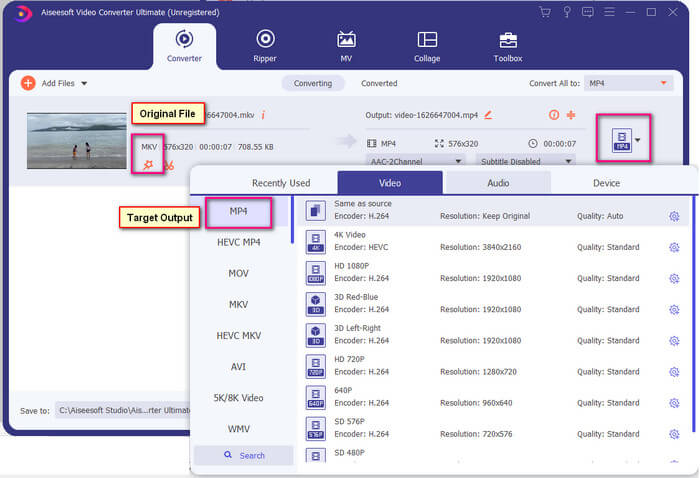
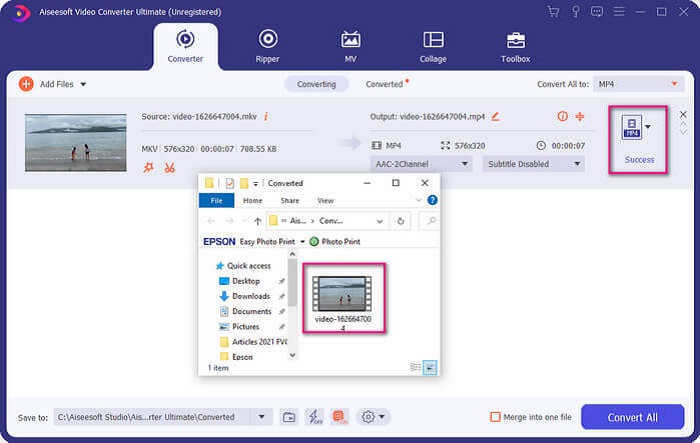
Paso 4. Una vez elegido el formato, haz clic en el botón Convertir todo para iniciar el proceso de conversión. Cuando la conversión haya terminado, se abrirá automáticamente la carpeta donde se ha guardado el archivo.
Hay más con Ultimate video Converter. Puede consultar la lista de ventajas y desventajas a continuación para conocer otras buenas características que ofrece.
● Esta herramienta convierte en tan solo tres segundos.
● Tiene tecnología de aceleración que puede mejorar el archivo convertido.
● Admite calidad HD.
● Tiene funciones de edición como agregar filtros y efectos básicos.
● Puede ajustar los subtítulos y la pista de audio.
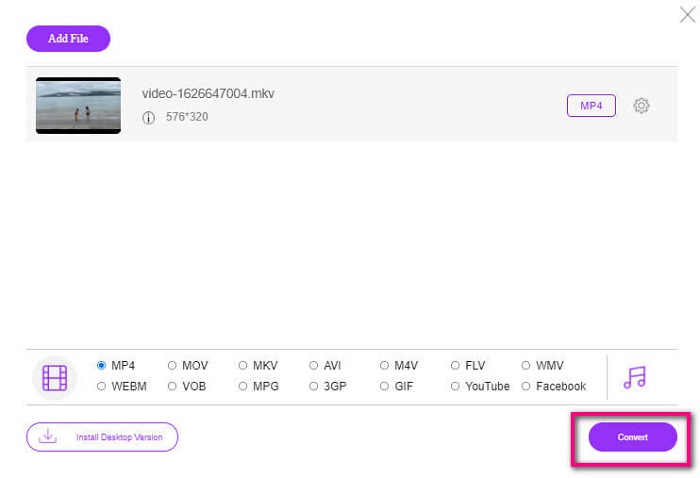
Si en algún caso estás buscando un conversor gratuito, también puedes considerar FVC Free Online Video Converter. Puede que no sea tan bueno como Ultimate Video Converter, pero aun así está a la altura. Sin duda, puede convertir el archivo y hacerlo compatible con Plex o DivX. Todo lo que tienes que hacer es…
Paso 1. Inicia la herramienta visitando la página oficial indicada en la descripción.
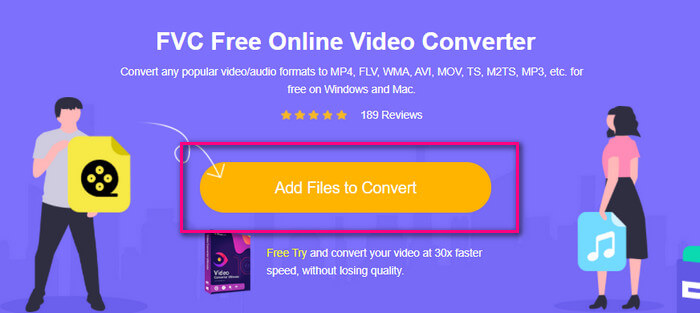
Paso 2. Sube el vídeo haciendo clic en Añadir archivos para convertir.
Paso 3. Cambia el formato marcando el círculo de abajo.
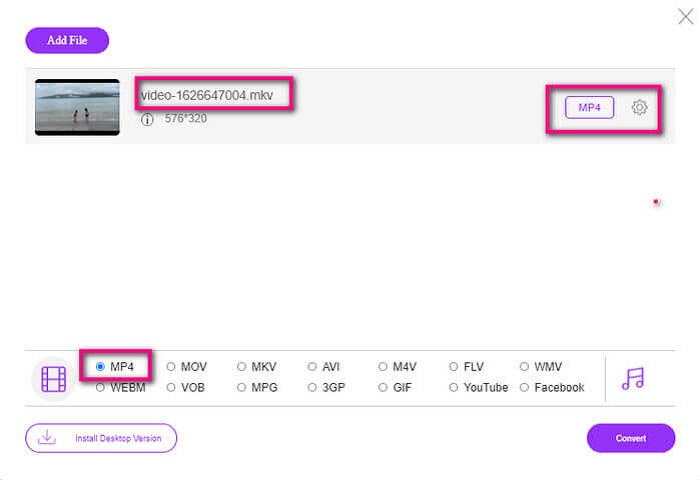
Paso 4. Por último, haz clic en el botón Convertir y selecciona la ubicación donde quieres que se guarde el archivo. Desde ahí haz clic en Aceptar. Puedes hacer clic en el icono de la Carpeta para ver el archivo convertido.
Lecturas recomendadas
Reproducir MKV en Windows Media Player
Parte 4. Más información sobre la reproducción de archivos MKV en PS4
¿Cuánto cuesta una PS4?
El precio de venta al público en el mercado es de 399,99 USD en los Estados Unidos y en Canadá de 399,99 CAD. Los precios pueden variar según el precio de venta al público de su país.
¿Existe la posibilidad de jugar CC o Close Caption MKV en PS4?
Sí, la hay. Está en los Ajustes de accesibilidad. La ruta es: ve a los Ajustes de tu PS4, Accesibilidad y luego selecciona Mostrar subtítulos para sordos. Desde ahí haz clic en Opciones para activar los subtítulos.
Si PS4 es compatible con MKV, ¿por qué no se reproducen mis archivos?
Como se mencionó anteriormente, debe asegurarse de que el archivo MKV cumpla con el estándar del reproductor que está utilizando. Solo tiene que verificar el requisito de PS4 u otro servidor de transmisión de medios. La mayoría de los servidores de medios también tienen clasificación para reproducir archivos MKV.
¿Cuáles son los formatos compatibles con PS4?
Hay varios formatos de archivo compatibles con PS4. Pero notará que la mayoría de los formatos no están comprimidos y contienen un archivo grande. Aunque también es compatible con los sin comprimir como Mp4. Mientras tanto, aquí está la lista de formatos de los que estamos hablando: MKV, AVI, MPEG-2 PS, MPEG-2 TS, AVCHD y XAVC y MP4.
Conclusión
Para concluir, hay muchas formas de reproducir archivos MKV directa o indirectamente en PS4. Los que se enumeraron son los medios más utilizados. DivX Stream Server y Plex son solo algunas alternativas que puede utilizar. Se recomienda encarecidamente convertir el archivo para evitar problemas y demasiados procesos.
-
 [Resuelto] El reproductor VLC no reproduce MKV, cómo solucionarlo
 ¿El reproductor VLC admite archivos MKV? ¿Por qué VLC no reproduce MKV? Esta publicación comparte 4 consejos útiles para que arregles que el reproductor VLC no reproduzca archivos MKV.
-
 Cómo reproducir archivos MKV en iPad (2025)
 ¿Cómo reproducir archivos MKV en iPad 2? ¿Puedo convertir MKV a MP4 para reproducir en iPad Pro / Air / 2? Esta publicación comparte 2 formas sencillas de reproducir MKV en iPad.
-
 Cómo descargar el códec MKV en Windows Media Player para una reproducción fluida
 ¿No puede reproducir videos MKV en Windows Media Player? Puede descargar gratis el códec MKV para Windows Media Player. Por el contrario, convierta el MKV para que se pueda reproducir en Windows Media Player.
