


 Video Converter Ultimate
 Grabador de pantalla
 Reparación de vídeo
 Descarga segura
Reparación del código de error 224003: todo lo que necesita saber
Lo mínimo que una persona desea experimentar es ver la aparición del Código de error 224003 en su pantalla. Comprender las causas comunes del código de error 224003, como problemas de red, compatibilidad del navegador y software desactualizado, es fundamental para una resolución de problemas eficaz. Es necesario conocer las herramientas adecuadas cuando se trata de un asunto de este tipo, lo que requiere la toma de decisiones para garantizar que no arruinará el archivo de vídeo por completo.
Este artículo profundizará en soluciones paso a paso, abordando cada posible causa y proporcionando consejos prácticos para resolver el error. Al final de esta guía, contarás con los conocimientos necesarios para manejar las complejidades del Código de error 224003 y garantizar una experiencia digital sin interrupciones. Ya sea que te encuentres con este error por primera vez o lo hayas sufrido repetidamente, nuestra guía pretende darte las herramientas para diagnosticar, corregir y prevenir el Código de error 224003 en el futuro. Asegúrate de leer hoy el artículo completo para saber cómo afrontarlo en futuras ocasiones.

Parte 1. Comprensión del código de error de vídeo 224003
El código de error 224003 puede manifestarse de varias formas, a menudo indicando una falla o problema dentro del sistema. Los usuarios pueden encontrar este error al utilizar aplicaciones, servicios de transmisión o navegadores específicos, lo que genera inconvenientes importantes. Para abordar y resolver eficazmente este error, es fundamental comprender sus posibles causas, que se enumeran a continuación.
Causas comunes del código de error 224003
◆ Problemas de red: Una conexión a Internet deficiente o inestable puede desencadenar el Código de error 224003, especialmente al reproducir contenido en streaming. Esta es también la causa del Código de error 232404.
◆ Compatibilidad del navegador: Es posible que ciertos navegadores no sean totalmente compatibles con la aplicación o el servicio, lo que provoca el error.
◆ Software desactualizado: El software obsoleto, incluidos navegadores y aplicaciones, puede ser un factor en la aparición de este error.
◆ Cache o cookies dañadas: La acumulación de caché o las cookies dañadas en tu navegador pueden interferir en el funcionamiento correcto de la aplicación, dando lugar al Código de error 224003.
¿En qué situaciones ocurre el código de error?
◆ Problemas con la plataforma de streaming: Los problemas en el lado del servidor de la plataforma de streaming, como tareas de mantenimiento, incidencias técnicas o un tráfico muy elevado, pueden dar lugar al Código de error 224003. En estos casos, el usuario tiene un control limitado sobre la resolución del problema y puede que tenga que esperar a que la plataforma lo solucione.
◆ Aceleración por hardware: La aceleración por hardware en la configuración de tu navegador a veces puede generar problemas de compatibilidad con cierto contenido de vídeo, lo que provoca el Código de error 224003. Desactivar la aceleración por hardware podría ser una posible solución en estos casos, así como para otros problemas de reproducción de vídeo como el vídeo con pantalla verde, bloqueos del vídeo y más.
◆ Incompatibilidad con el dispositivo: Algunos dispositivos o sistemas operativos pueden no ser totalmente compatibles con el contenido de vídeo, lo que provoca errores durante la reproducción.
◆ Cortafuegos de red o software de seguridad: Ciertos programas de seguridad o cortafuegos pueden bloquear la reproducción de contenido de vídeo específico, lo que da lugar a la aparición del Código de error 224003.
◆ Interferencia de extensiones del navegador: Algunas extensiones o complementos del navegador pueden interferir en el correcto funcionamiento de los reproductores de vídeo en línea, provocando el Código de error 224003.
Es fundamental comprender que las condiciones específicas que dieron lugar al código de error 224003 pueden diferir; por lo tanto, las medidas de solución de problemas también pueden diferir. Identificar el motivo subyacente depende del contexto en el que se produce el error para solucionar el problema adecuadamente.
Parte 2. Guía paso a paso para resolver el error 224003
Reparación de vídeo Aiseesoft
El error 224003 le puede ocurrir a cualquiera, en cualquier momento y con cualquier archivo de vídeo, y cuando se produce puedes ver un mensaje como Error 224003: No se puede reproducir el archivo de vídeo. Aiseesoft Video Repair es una herramienta fiable para solucionar problemas como archivos de vídeo dañados o corruptos, como el error 224003. Puede reparar vídeos en varios formatos, incluidos MP4, MOV, AVI, WMV, MKV y FLV. También permite reparar vídeos dañados por virus, malware y otros factores. Sigue esta guía paso a paso para resolver tu problema usando Aiseesoft Video Repair y recuperar tus vídeos en perfecto estado.
Pasos para resolver el error 224003 con Aiseesoft Video Repair:
Paso 1. Visita la página web de Aiseesoft, descarga Video Repair y sigue las instrucciones de instalación.
Descarga gratuitaPara Windows 7 o posteriorDescarga segura
Descarga gratuitaPara macOS 10.7 o posteriorDescarga segura
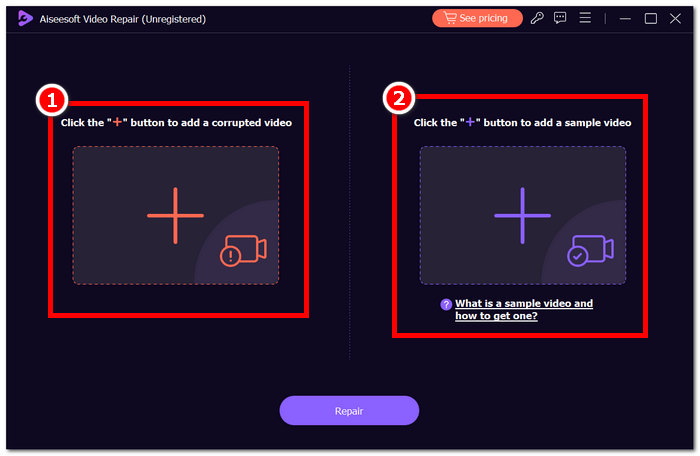
Paso 2. Abre Aiseesoft Video Repair y añade el vídeo que presenta el Código de error 224003 en el símbolo + rojo. Haz clic en el símbolo + morado de la derecha para añadir tu vídeo de muestra.
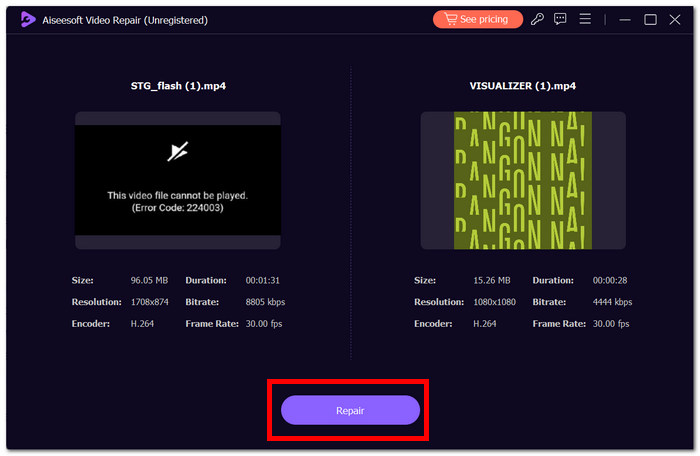
Paso 3. Haz clic en Repair, y el software analizará y reparará el vídeo.
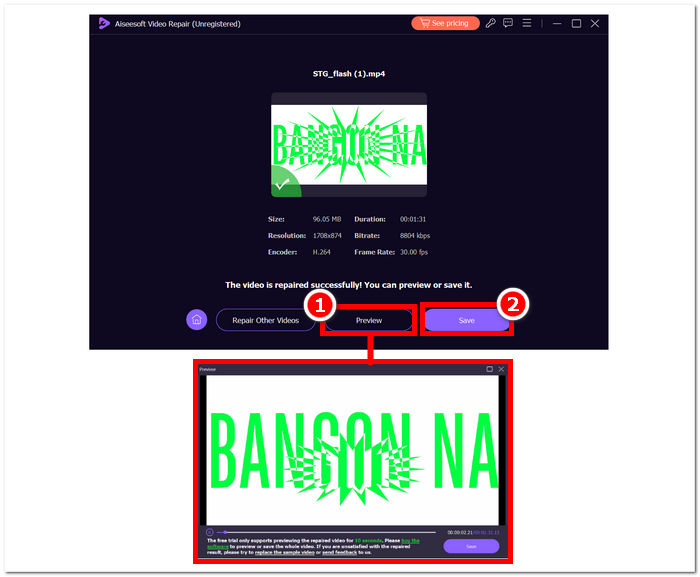
Paso 4. Tras la reparación, haz clic en Preview para comprobar el resultado. Haz clic en Save para descargar el vídeo reparado y ábrelo con tu reproductor multimedia para verificar si el error 224003 se ha solucionado.
Consejos adicionales:
◆ Mantenga una copia de seguridad del archivo de vídeo original antes de intentar cualquier reparación.
◆ Asegúrese de utilizar la última versión de Aiseesoft Video Repair para un rendimiento óptimo.
Si sigue diligentemente estas instrucciones paso a paso, puede emplear Aiseesoft Video Repair de manera eficiente para abordar y eliminar el Error 224003, devolviendo sus archivos de video a un estado funcional y agradable. Recuerde guardar el video reparado en su ubicación preferida y disfrute de una visualización ininterrumpida sin la frustración del Error 224003. Si encuentra algún desafío durante el proceso, consulte la documentación de Aiseesoft Video Repair o busque ayuda de sus recursos de soporte para obtener más orientación.
Parte 3. Preguntas frecuentes sobre el código de error 224003
¿Por qué Firefox sigue diciendo el código de error de vídeo 224003?
El error de video 224003 de Firefox puede surgir debido a problemas de conectividad de red, discrepancias en la configuración del navegador o incompatibilidad con el contenido del video. Para solucionar este error, comience verificando la estabilidad de su conexión a Internet, asegurándose de que su navegador esté actualizado y borrando el caché y las cookies de su navegador. Además, eliminar temporalmente extensiones de su navegador puede ayudar a identificar y resolver conflictos de compatibilidad, eliminando potencialmente la aparición del error 224003 durante la reproducción de video.
¿Arreglar el archivo de video disminuye la calidad del video?
Se puede reparar un archivo de video sin comprometer la calidad si se ejecuta correctamente. Este proceso aborda principalmente problemas como corrupción o errores de formato dentro del archivo. Es fundamental confiar en herramientas confiables de reparación de video y, como medida de precaución, crear una copia de seguridad del archivo de video original antes de iniciar cualquier procedimiento de reparación.
¿Puedes corregir un código de error de video en línea?
Para solucionar un código de error de video en línea como 224003, actualice la página, verifique su conexión a Internet y actualice su navegador. Si el problema persiste, considere probar con otro navegador para comprobar la compatibilidad. Si todo lo demás falla, comuníquese con el soporte de la plataforma o los foros de la comunidad para obtener ayuda para resolver el error y restaurar la reproducción de video sin interrupciones.
Conclusión
El Código de error 224003 puede resultar muy molesto, pero con la información adecuada y los procedimientos de solución de problemas podrás superarlo. Puedes corregir fácilmente este error y recuperar una experiencia digital impecable identificando y corrigiendo posibles causas como problemas de red, compatibilidad del navegador y software desactualizado. Si vuelves a encontrarte con el Código de error 224003, consulta nuestro tutorial para seguir una solución paso a paso. Con estas indicaciones, tus frustraciones tecnológicas serán cosa del pasado y podrás disfrutar de tus actividades digitales sin interrupciones y con total comodidad.
-
 ¿Qué es el error 0xc10100bf en vídeo y cómo solucionarlo?
 ¿Tu video no se reproduce debido al error 0xc10100bf y estás buscando formas de solucionarlo? En este artículo, aprenderá qué es y cómo solucionarlo.
-
 Soluciones rápidas para solucionar el error 150 que no se puede reproducir el video
 ¿Alguna vez te has encontrado con la frustrante imposibilidad de reproducir el error 150 de vídeo durante tu experiencia de visualización de vídeos? No se preocupe porque le explicamos cómo solucionarlo.
-
 [Guía detallada] Cómo reparar el video de Google Drive que no se reproduce en la computadora
 Los videos en Google Drive no se reproducen con el error "Hubo un problema al reproducir este video". Puede ser causado por Google Drive o por problemas de Chrome. Este artículo presentará 6 soluciones en detalle.
