


 Video Converter Ultimate
 Grabador de pantalla
 Reparación de vídeo
 Descarga segura
La mejor grabadora de voz OGG ayuda a grabar OGG en todas las plataformas
OGG es el mejor formato de archivo de audio frente al MP3. Este formato de audio de código abierto está mantenido por Xiph.org. Este tipo de formato es utilizado por la industria de los videojuegos como su formato de audio, porque suena mejor y permite comprimir el archivo a un tamaño mucho menor. Sin embargo, muchos usuarios lo consideran complicado porque algunos grabadores no son compatibles con este formato, ya que el formato de audio estándar es el MP3. La siguiente lista muestra los mejores grabadores OGG que admiten este formato. Para profundizar en pasos e información más detallados, lee con atención para comprender las funciones de las distintas herramientas y elegir la que mejor se adapte a tus necesidades como usuario y, quizá en el futuro, como cliente.

Parte 1. El mejor software de grabación OGG para usuarios de PC y Mac
En la lista a continuación se encuentran las mejores grabadoras OGG que están disponibles en todas las funciones diferentes con pasos e información.
Grabador de audio gratuito FVC

Una herramienta especializada en la grabación de audio. FVC Free Audio Recorder es conocida como la mejor herramienta en línea que puedes encontrar en la web. Esta herramienta de código abierto puede ayudarte a grabar audios que puedas necesitar en cualquier lugar con conexión a Internet. Además, es una buena opción como tu grabador OGG. Para ofrecerte detalles más completos sobre esta increíble herramienta, sigue leyendo y consulta los pasos sobre cómo realizar la grabación de audio.
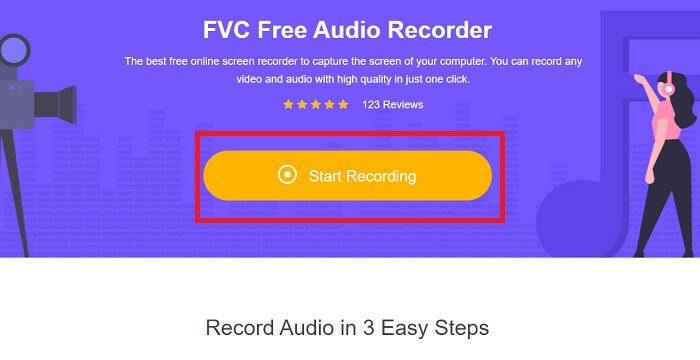
Paso 1. Haz clic en este enlace para ir a la página web de la herramienta. Haz clic en Start Recording y lanza la herramienta.
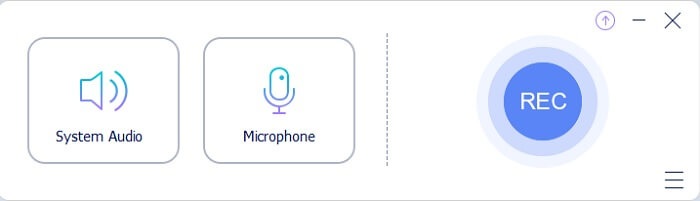
Paso 2. Aparecerá en la pantalla una barra de herramientas flotante como esta.
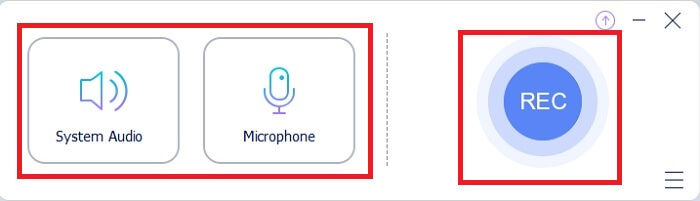
Paso 3. Activa el Speaker para añadir el sonido del sistema y el Mic para añadir tu voz. Haz clic en el botón Round para empezar a grabar.
Paso 4. Tras hacer clic en el botón de grabación, verás esta pantalla, lo que significa que la grabación ya ha comenzado.
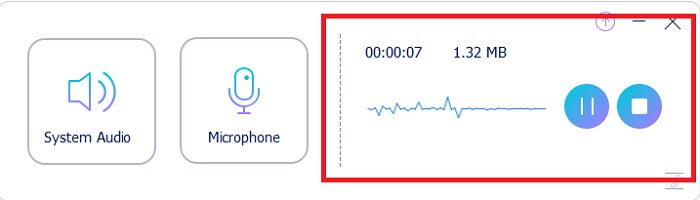
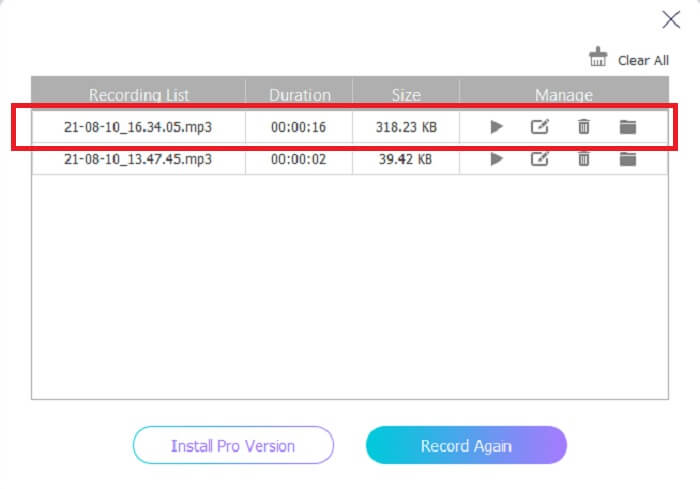
Paso 5. Cuando termine la grabación, haz clic en el botón Stop y se guardará automáticamente en tu dispositivo. En la pantalla verás el historial de tus grabaciones. Disfruta del resultado de la grabación con la máxima calidad.
Pros
- Fácil de usar debido a su instrucción puntual.
- Produce un formato de audio comprimido, por lo que también es fácil de almacenar.
- De código abierto, por lo que está disponible para cualquier persona que desee utilizar la herramienta.
Contras
- Necesita una conexión a Internet antes de poder usarlo.
- No tiene cancelación de ruido como la premium.
Parte 2. Otros grabadores OGG útiles para todos los sistemas operativos
1. Grabador de pantalla FVC
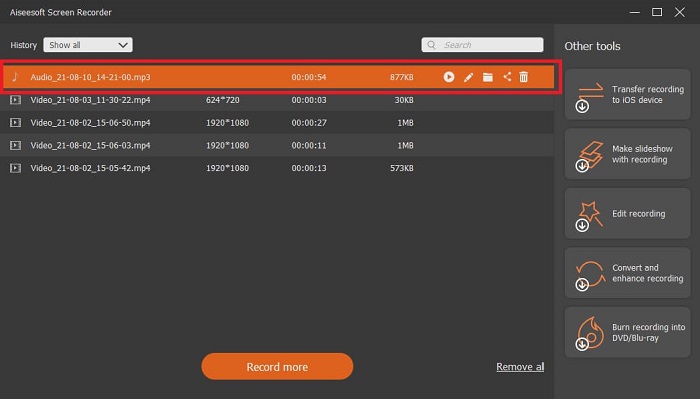
Si crees que la herramienta anterior es una herramienta inteligente, para darte un ejemplo más concreto, si Galileo Galilei es el padre de la ciencia moderna, entonces esta herramienta es el padre del sistema de grabación moderno. FVC Screen Recorder es el mejor grabador tanto para audio como para vídeo. Te ofrece uno de los mejores resultados y, aun así, no tendrás que esforzarte nada para utilizar la propia herramienta. A diferencia de otras herramientas, este programa está diseñado para ofrecer al usuario la mejor experiencia que puedas imaginar. Así que, si eres de los usuarios a los que les resulta difícil grabar su audio, sigue estos sencillos pasos que se indican a continuación y síguelos con atención.
Paso 1. Descarga la herramienta de acuerdo con las especificaciones de tu sistema operativo. Solo tardará unos segundos en descargarse y luego instalarse. Cambia la Preference según tus preferencias y haz clic en Finish para continuar.
Descarga gratuitaPara Windows 7 o posteriorDescarga segura
Descarga gratuitaPara macOS 10.7 o posteriorDescarga segura
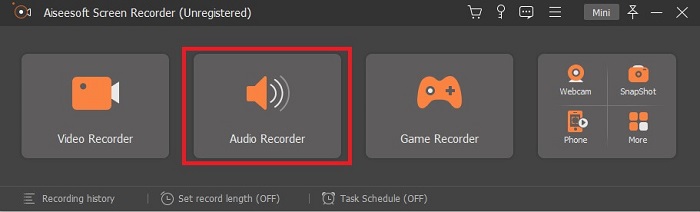
Paso 2. En la barra de herramientas haz clic en Audio Recorder.
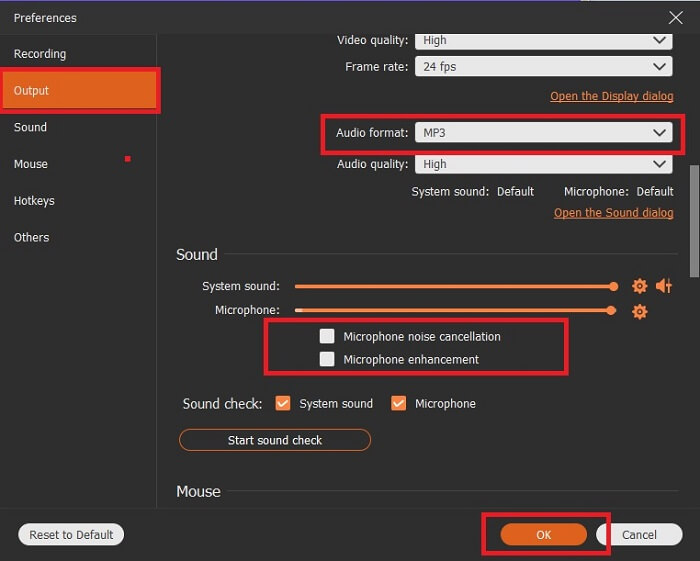
Paso 3. Busca el icono de la Gear para ajustar otras opciones. Ve a Output para cambiarlo a formato MP3, WMA o cualquier otro formato que desees. Desplázate con la rueda del ratón. Otras opciones que puedes utilizar mientras grabas incluyen Noise cancelling y Microphone enhancement. Haz clic en OK para continuar.
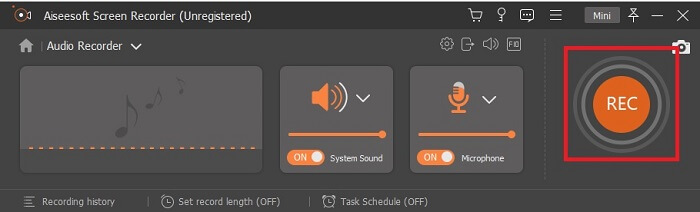
Paso 4. Después de ajustar la configuración, en la barra de herramientas abre tu Speaker y el Microphone para añadir la salida de audio a tu grabación. Por último, haz clic en el botón de Round-shape para iniciar la grabación.
Paso 5. Si quieres terminar la grabación, haz clic en el botón Square para detenerla. Haz clic en Save y Next para continuar. Luego reproduce tu grabador de voz OGG en cualquier plataforma multimedia.
Pros
- Puede grabar en cualquier momento y en cualquier lugar con esta herramienta con audio nítido.
- Proporciona una gran experiencia para el usuario que ya utiliza esta herramienta.
- Grabación todo en uno.
Contras
- Pago por uso.
- Necesita 2,4 MB de almacenamiento.
2. Screencast-O-Matic
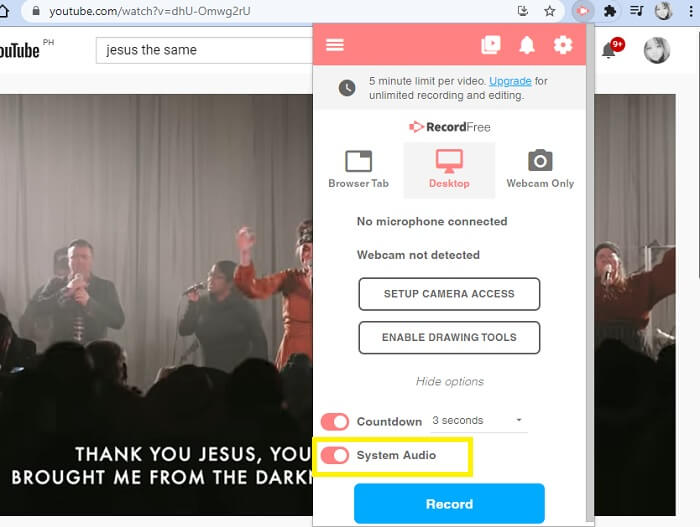
Otra mejor herramienta de grabación de pantalla que hará el trabajo. Screencast-O-Matic es una de las mejores herramientas que encontrará en la web. Hace que su grabación sea fácil y eficiente. También tiene su herramienta en línea si visita el sitio web en línea, pero el proceso tardará uno o dos minutos en finalizar la herramienta en línea. Entonces, si no eres fanático de esperar en la fila, esta no es la mejor opción para ti. Pero si te gusta esperar, vale la pena hasta el final.
Pros
- Es más fácil de usar que Camtasia.
- Trabaje como una organización en lugar de un individuo con la contraseña de seguridad.
- Muy atractivo y es una buena grabadora.
Contras
- La interfaz de la herramienta está en el punto pero es monocromática, así que espere que tenga un color suave, lo que la hace menos interesante de usar.
- Solo permite al usuario grabar un máximo de 15 minutos en la versión gratuita.
3. ShareX
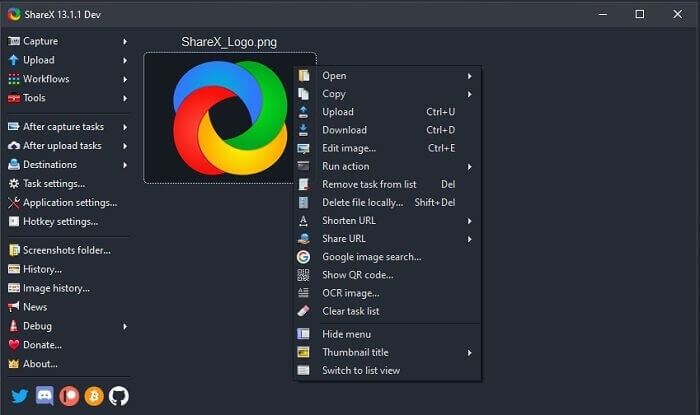
Una de las herramientas que puedes encontrar en la web si buscas un grabador de pantalla. Solo está disponible para el sistema operativo Windows. Esto significa que si eres usuario de Mac o Linux, esta herramienta no funcionará en tu sistema porque no es compatible con esos programas. Share puede situarse fácilmente entre los 20 mejores grabadores de pantalla disponibles en la web, ya que admite más de 80 destinos a los que puedes transferir el resultado final.
Pros
- Herramienta personalizable.
- Proporciona sus propias herramientas de edición si es necesario.
- Cambie las teclas de método abreviado para facilitar la grabación.
Contras
- Abrumador para alguien nuevo en esta herramienta. Es un dolor de cabeza aprender a utilizar esta herramienta.
- No disponible para usuarios de mac.
Parte 3. Cuadro comparativo
| Características | Grabador de audio gratuito FVC | Grabador de pantalla FVC | Screencast-O-Matic | ShareX |
| Grabación de audio |  | | | |
| Cancelación de ruido |  | | | |
| Mejora del micrófono | | | | |
| Complejidad de la herramienta | Instrucción de grabación en línea puntual. | Fácil de usar ya que ya está indicado en la herramienta cuál es el propósito y cómo se realiza. | Es una herramienta fácil de usar con menos detalles. | La complejidad de la herramienta es difícil para el nuevo usuario. |
| Plataformas disponibles | Todos los sistemas operativos. | Todos los sistemas operativos. | PC con Windows, Mac y Chromebook. | Windows 7 SP1 o posterior. |
| Formato de audio disponible | MP3 y OGG | MP3, WMA, AAC, M4A, FLAC, OGG, Opus y muchos más. | No se puede grabar audio por separado. | MP3 y WAV |
| Rango de precios | Herramienta online gratuita | Por 1 mes: $25.00 Por un año: $31.20 Para licencia de por vida: $55.20 | Tiene una versión gratuita. Para el solo premium. De lujo $1.65 / mes Primer ministro $4.00 / mes Para planes de equipo. Puede establecer equipo de lujo o premier de equipo. | programa gratuito y de código abierto. |
Parte 4. Preguntas frecuentes sobre la grabadora OGG
¿Cómo hacer un archivo OGG con una grabadora de sonido?
Utilice una grabadora de audio como la de la lista anterior. Para obtener información más detallada, lea el artículo anterior para obtener información y los pasos sobre cómo grabar con el formato de salida de audio para OGG.
¿Cuál es el mejor formato de audio? MP3 u OGG?
OGG es el mejor formato de archivo de audio. Pero los usuarios tienden a usar MP3 porque es más estándar que el OGG. Sin embargo, OGG contiene metadatos con menos almacenamiento y la mejor salida de audio, por ejemplo, el nombre del artista y los datos de la pista.
¿Por qué mi formato OGG no se puede reproducir en mi reproductor multimedia?
Algunos reproductores multimedia no son compatibles con este tipo de formato. Por lo tanto, puedes utilizar FVC Free Online Video Converter como tu conversor. Este te permitirá convertir el archivo OGG a MP3 u otro formato de audio que prefieras para que pueda reproducirse. O puedes utilizar FVC Free Video Player u otros reproductores OGG para reproducir este tipo de formato, ya que esta herramienta reproduce casi todos los tipos de formatos de audio y vídeo.
Conclusión
Al final de la discusión, ahora ha adquirido un nuevo conocimiento con solo leerlo y seleccionar qué herramienta se adapta a su demanda. En este artículo se enumeran diferentes opciones con pasos e información sobre la herramienta. Simplemente siga los pasos y dedique tiempo a leerlo para que lo entienda. Debes elegir sabiamente.
Pero, a modo de ejemplo, FVC Screen Recorder cumple con las exigencias del usuario. Como usuario, debes priorizar tus necesidades y deseos en un grabador. Por ejemplo, que el grabador sea fácil de usar, óptimo para grabar audio, disponible en casi todas las plataformas; si es de pago, que sea económico y que la calidad del resultado sea excelente. Todos estos ejemplos se cumplen en FVC Screen Recorder. No te conformes con menos porque te mereces más.
-
 Análisis de Snagit 2025: ventajas, desventajas y la mejor alternativa
 ¿Cuál es la mejor alternativa a Snagit? ¿Existe una herramienta de captura de pantalla como Snagit? Esta publicación revisará Snagit y compartirá la mejor alternativa a Snagit para capturar la pantalla.
-
 Grabación de pantalla QuickTime - Grabe video con audio en Mac y PC
 La pantalla de grabación con audio en Mac es útil. El reproductor integrado QuickTime Player puede hacerlo. Lea su publicación y sepa cómo capturar la pantalla con sonido en Mac y PC.
-
 Análisis de la grabadora DU 2025: seguridad, precio, funciones, uso y valoraciones
 DU Recorder es un grabador de pantalla y audio para iPhone y Android. ¿Vale la pena descargarlo? ¿Es seguro? Lea la revisión completa para ver si la aplicación es adecuada para usted.
