


 Video Converter Ultimate
 Grabador de pantalla
 Reparación de vídeo
 Descarga segura
FLAC vs. MP3: Introducción y Comparación de Formatos de Audio
The debate between FLAC vs. MP3 file formats has been ongoing for years. While MP3 is one of the oldest and most widely-used formats, FLAC has gained popularity among audiophiles for its lossless audio compression. But which one is better? In this guide, we'll take a closer look at the differences between FLAC and MP3, including their sound quality, file size, compatibility, and more, to help you decide which format to choose for your music collection.

Parte 1. FLAC vs. MP3: Introducción de formatos de audio
MP3 Anecdote
MP3 es un formato popular para archivos de audio digital que se ha utilizado ampliamente desde su introducción en la década de 1990. Utiliza una forma de compresión con pérdida para reducir el tamaño de los archivos de audio manteniendo una buena calidad de sonido. Los archivos MP3 se pueden compartir, descargar y reproducir fácilmente en varios dispositivos, lo que los convierte en una opción conveniente para los entusiastas de la música digital. La pregunta es, ¿es FLAC mejor que MP3? Averigüémoslo leyendo la descripción de FLAC.
FLAC Anecdote
FLAC (Free Lossless Audio Codec) es un formato de archivo de audio de alta calidad que utiliza compresión sin pérdidas para conservar los datos de audio originales sin sacrificar la calidad. Esto significa que los archivos FLAC son mucho más grandes que los archivos MP3, pero mantienen el mismo nivel de fidelidad de audio que el material de origen original.
Parte 2. Dispositivos/plataformas compatibles de FLAC y MP3
Ahora, veamos la comparación MP3 vs. FLAC para ver cómo se desempeñan con respecto a las plataformas o dispositivos que admiten.
MP3 es un formato de archivo de audio ampliamente compatible que se puede reproducir en diferentes plataformas, que incluyen:
◆ Computadoras con sistemas operativos Windows, macOS y Linux.
◆ Portable media players, such as iPods and other MP3 players.
◆ Teléfonos inteligentes y tabletas con iOS, Android y otros sistemas operativos móviles.
◆ Autoradios con USB o entradas auxiliares.
◆ Sistemas de cine en casa y receptores estéreo con conectividad USB o de red.
◆ Los servicios de transmisión de música, como Spotify y Apple Music, a menudo usan MP3 como formato predeterminado para transmitir y descargar música.
FLAC no es tan ampliamente compatible como MP3, pero aún se puede reproducir en una variedad de plataformas, que incluyen:
◆ Computadoras con sistemas operativos Windows, macOS y Linux.
◆ Algunos reproductores multimedia portátiles, como Astell&Kern AK Jr y PonoPlayer.
◆ Algunos teléfonos inteligentes y tabletas con Android y otros sistemas operativos móviles.
◆ Algunos estéreos para automóviles y sistemas de cine en casa con conectividad USB o de red.
◆ Algunos servicios de transmisión de música, como Tidal, que ofrecen opciones de descarga y transmisión FLAC de alta fidelidad.
Parte 3. ¿Es FLAC mejor que MP3?
Esta vez, permítanos enumerar la diferencia entre FLAC y MP3 comparando exhaustivamente estos formatos de audio.
Aquí hay una comparación completa de FLAC y MP3 basada en varios factores:
Sound quality: FLAC offers better sound quality than MP3, for it is a lossless format that preserves all the audio data in the source material. On the other hand, MP3 is a lossy format that discards some audio data during compression, which can result in a loss of audio quality.
File size: MP3 files are much smaller than FLAC files, as MP3 uses lossy compression to reduce the file size. This makes MP3 a more practical choice for those with limited storage space or those who need to share or download music files quickly over the internet.
Compatibility: MP3 is widely compatible with various devices and software, including desktop and laptop computers, portable media players, smartphones, car stereos, and streaming music services. FLAC, on the other hand, may not be compatible with some devices and software due to its larger file size and lossless compression.
Bitrate: MP3 files can be encoded at a lower bitrate to reduce the file size further, but this also results in a loss of audio quality. FLAC files, on the other hand, always maintain the same bitrate as the original source material.
Editing: FLAC is a better choice for audio editing, as it offers a higher level of audio fidelity and doesn't introduce any additional compression artifacts. MP3 files, on the other hand, may introduce additional compression artifacts during editing due to their lossy compression.
Price: Both FLAC and MP3 are free and open-source formats, so there is no cost associated with using either format.
Parte 4. Convierte FLAC a MP3 o MP3 a FLAC
Ahora que hemos terminado con el proceso para comparar FLAC con MP3, pasemos al proceso de cómo convertir MP3 a FLAC o viceversa.
Video Converter Ultimate is a powerful software tool that allows you to easily convert audio and video files from one format to another. One of the many formats supported by FVC Video Converter Ultimate is FLAC, a high-quality, lossless audio format that is often used by audiophiles and music enthusiasts. You can quickly and easily convert your FLAC files to MP3, allowing you to save space on your device and make your music more easily shareable. Video Converter Ultimate offers a user-friendly interface and a range of options for customization, making it a convenient and helpful tool for anyone who needs to convert audio and video files.
Para convertir archivos de audio entre formatos FLAC y MP3 con esta herramienta, debe seguir unos sencillos pasos.
Step 1. First, download and install the program on your computer by clicking on one of the Free Download buttons and following the setup wizard. Next, launch the program to access its user-friendly interface.
Descarga gratuitaPara Windows 7 o posteriorDescarga segura
Descarga gratuitaPara macOS 10.7 o posteriorDescarga segura
Step 2. Next, add the audio file you want to convert by clicking the plus sign button from the main interface. Once added, you'll see a thumbnail of each file on the interface.
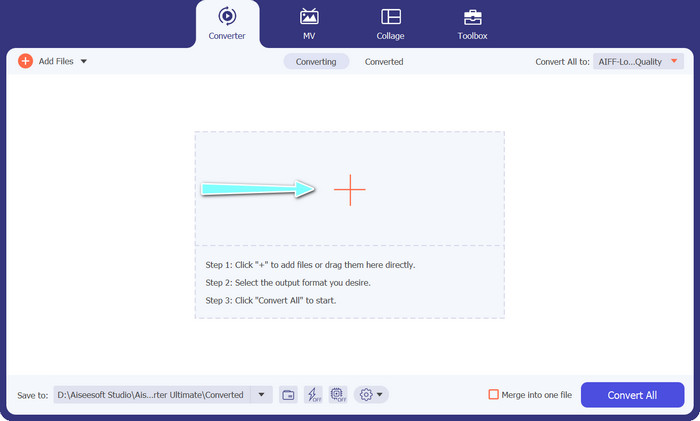
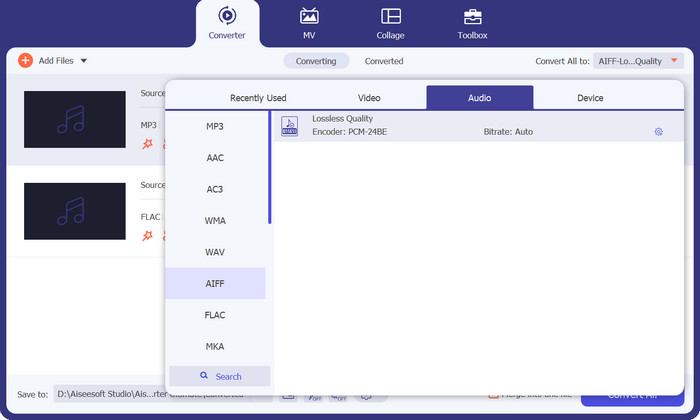
Step 3. Specify the output format by selecting the Audio tab from the Profile menu on the upper right side of the tool. Choose either MP3 or FLAC, depending on the direction of the conversion.
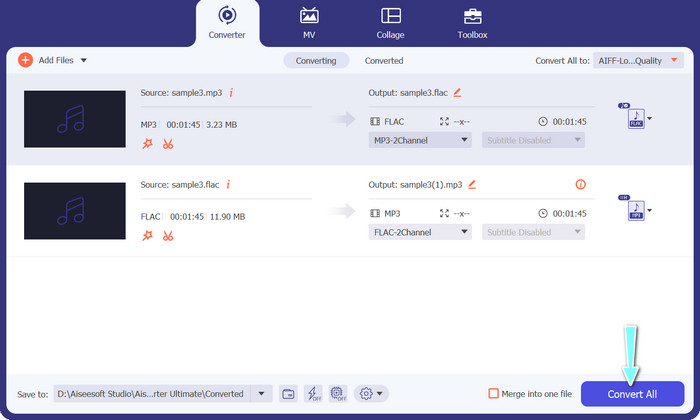
Step 4. Specify the output folder where you want to save the converted files by selecting the appropriate location at the bottom of the interface. Lastly, hit on the Convert All button to start the conversion process.
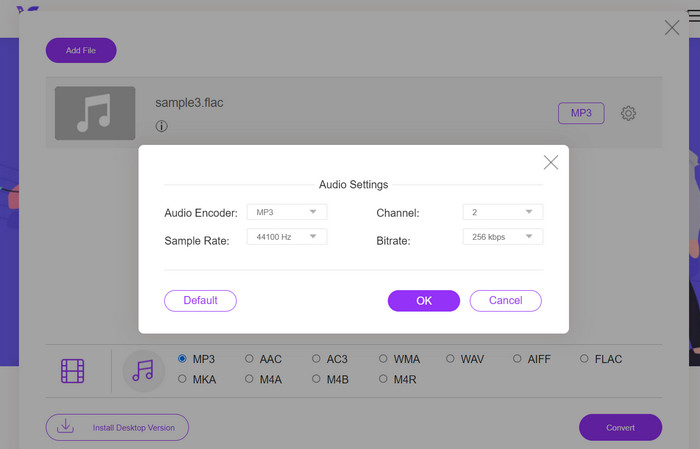
If you're in need of a free online tool to convert FLAC to MP3, look no further than Free Video Converter Online. This convenient program allows users to convert video and audio files without any cost and also offers the ability to customize output settings according to your preference. The conversion speed is also reliable, so long as you have an internet connection. To get started, follow these steps:
Step 1. Launch your preferred web browser and navigate to the Free Video Converter Online website.
Step 2. Click the Add Files to Convert button to upload the FLAC file you want to convert to MP3.
Step 3. Choose MP3 as the output format from the list of available formats under the Audio format menu. You can also select your desired bitrate or output quality for the MP3 file.
Step 4. Click the Convert button to start the conversion process.
Parte 5. Preguntas frecuentes sobre FLAC vs. MP3
¿Cuál es mejor entre FLAC de 16 bits y MP3 de 320 Kbps?
La elección entre FLAC de 16 bits y MP3 de 320 kbps depende de las preferencias personales y del uso previsto del archivo de audio. Si prioriza la calidad del audio y tiene suficiente espacio de almacenamiento, FLAC de 16 bits puede ser la mejor opción. Si necesita un tamaño de archivo más pequeño sin comprometer demasiado la calidad del audio, el MP3 de 320 kbps puede ser una buena opción.
¿Los archivos FLAC son más grandes que los archivos MP3?
Sí, los archivos FLAC suelen ser más grandes que los archivos MP3 debido a su naturaleza sin pérdidas.
¿Todos los reproductores multimedia son compatibles con FLAC?
No, no todos los reproductores multimedia son compatibles con FLAC. Sin embargo, muchos reproductores multimedia y software modernos admiten la reproducción FLAC, incluidos VLC, Foobar2000 y Winamp.
Conclusión
Choosing between MP3 and FLAC depends on your personal preference and specific needs. Therefore, FLAC vs. MP3 is a must for your decision-making. Ultimately, the decision on which format to use comes down to your priorities in terms of sound quality, file size, and compatibility.
-
 4 mejores métodos para convertir MOV a MP3 en Windows y Mac fácilmente
 Cuando desee extraer los archivos de audio MP3 de los archivos MOV, puede obtener más información sobre los 4 convertidores de MOV a MP3 más eficientes para obtener los archivos deseados del artículo.
-
 Los mejores convertidores de MP3 para transformar archivos de audio a MP3 fácilmente
 Convierta sin esfuerzo cualquier formato de audio a MP3 con nuestros convertidores de MP3 en línea y fuera de línea fáciles de usar. Obtenga resultados de alta calidad con solo unos pocos clics.
-
 Los 3 mejores editores de metadatos FLAC en Mac y Windows [Actualizado en 2023]
 ¿Quieres cambiar los metadatos de FLAC? En este caso, debe leer este artículo, ya que proporcionamos suficiente conocimiento sobre el último editor de metadatos de FLAC que puede usar.
