


 Video Converter Ultimate
 Grabador de pantalla
 Reparación de vídeo
 Descarga segura
¿Qué es JPG/JPEG y cómo convertir imágenes a JPG?
Los formatos de archivo JPG, PNG y GIF son los más populares en la actualidad. Cuando se trata de usar imágenes en tu sitio web o en publicaciones de redes sociales, estos son los archivos con los que puedes encontrarte. Es fundamental tener en cuenta que cada uno de ellos tiene capacidades distintas. Es decir, cada formato tiene características únicas. Pero, en esta publicación, nos centraremos en el formato de archivo JPG/JPEG. Aprenderás su definición, sus capacidades y cómo abrir archivos JPG/JPEG. Además, conocerás la mejor manera de convertir imágenes al formato JPG/JPEG utilizando una herramienta en línea.

Parte 1. Información sobre JPG o JPEG
¿Qué es el formato JPG/JPEG?
El formato de archivo de imagen JPG es el mejor archivo cuando se comprime una imagen. JPG es un archivo popular para los usuarios. Lo usan para fotografías y gráficos de Internet. Además, se conoce como archivos JPEG o JPG. El nombre completo de JPEG es Grupo Conjunto de Expertos. Este grupo crea este popular archivo de imagen. Además, la mayoría de las imágenes de mapa de bits tienen una extensión de archivo .jpg. La razón principal es reducir el tamaño de los archivos. JPG es un formato con pérdida, que afecta la calidad de la imagen cuando se comprime demasiado. Este formato es accesible en todos los programas. De esta manera, no necesita pensar en cómo abrir este archivo en diferentes programas o dispositivos. Su algoritmo de compresión reduce el tamaño del archivo. Es una de las razones por las que se ha vuelto popular en estos días. De esta manera, crear una historia, compartir y publicar fotos en los sitios web es más placentero. Para obtener información adicional, puede encontrar instancias en las que los sitios web no reconocen el archivo JPEG. Por ejemplo, algunos visores y editores de fotos solo abrirán una imagen con el archivo .JPG. La mejor solución que puede hacer es cambiar el nombre de la extensión del archivo. Puede cambiar el archivo JPEG a un archivo JPG. De esta manera, el sitio web puede reconocer la imagen.
Además, el archivo JPG tiene ventajas que debes conocer. JPG es una imagen de alta resolución. Su alta definición es una de las grandes ventajas de este archivo de imagen. Admite colores de 24 bits con hasta 16 millones de colores. La resolución seguirá siendo excelente, incluso después de aplicar la edición de alto nivel con algunas herramientas. Además, JPG es más pequeño en tamaño. En comparación con otros formatos de archivo de imagen, tiene un tamaño de archivo ideal. Incluso si tiene un tamaño más pequeño, no afecta la calidad y resolución de una imagen. Después de conocer las ventajas, necesita conocer sus desventajas para una mayor conciencia. Al disparar en JPG, debe limitar el procesador de la cámara y las variaciones de color. Este archivo tampoco admite imágenes en capas. Si planea editar una imagen y necesita una capa adicional, JPG no es el formato perfecto para esto.
Parte 2. Cómo abrir el archivo JPG/JPEG
Si tiene problemas para abrir su archivo JPG en sus dispositivos, esta parte lo ayudará. ¿Quiere saber cómo abrir un archivo JPG en Windows 11, Android y iPhone? Puede seguir las instrucciones dadas a continuación.
Para usuarios de Windows
Paso 1: Pulsa Ctrl + E en tu teclado para abrir el Explorador de archivos. Es como un icono de carpeta con un clip azul.
Paso 2: Ve al panel de la carpeta Acceso rápido. Después, dirígete a la opción Descargas para ver la foto JPG que has guardado.
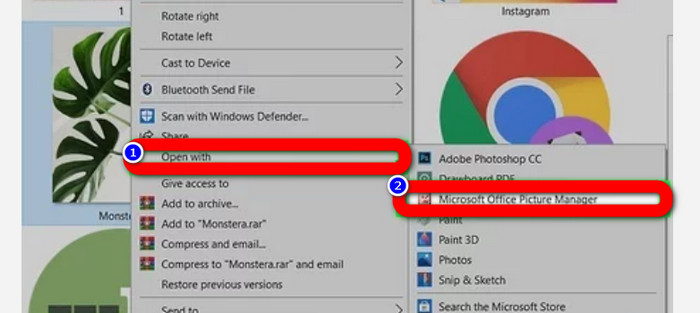
Paso 3: Cuando ya veas los archivos JPG/JPEG, ábrelos usando otros programas además de Fotos. Para abrirlos, haz clic con el botón derecho en la foto, selecciona la opción Abrir con y elige el programa.
Para usuarios de Android
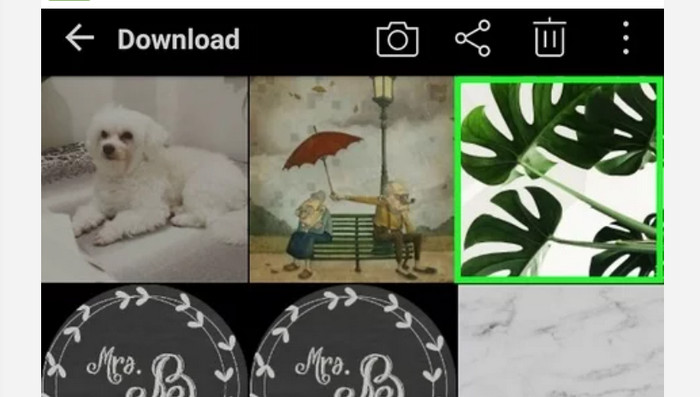
Paso 1: Abre la aplicación Galería en tu dispositivo Android.
Paso 2: Abre el álbum de la cámara para ver las fotos que tomas con la cámara de tu teléfono. También hay varios álbumes en tu teléfono.
Paso 3: Si ves numerosas fotos, pulsa una sola foto para abrirla en modo de pantalla completa. De este modo, podrás ver tu imagen JPG/JPEG.
Para usuarios de iPhone
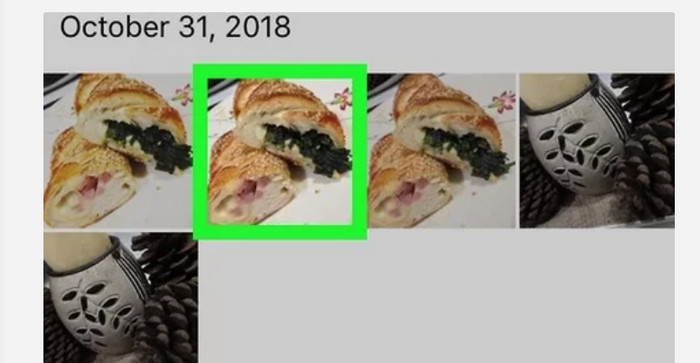
Paso 1: Toca Fotos en tu iPhone. Esta app contiene todas las imágenes que tienes de tu cámara y de internet. El aspecto de esta app es como una flor de colores.
Paso 2: Después de abrir la aplicación Fotos, podrás ver todas las fotos allí. Además, al igual que en un teléfono Android, encontrarás varios álbumes dentro de la aplicación.
Paso 3: Haz clic en la imagen para abrirla a pantalla completa. Así podrás ver la imagen con mayor claridad. Además de abrir la imagen, también puedes editar la foto en la aplicación Fotos. Hay iconos que puedes usar para mejorar tus imágenes.
Parte 3. Excelente método para convertir imágenes a JPG
El FVC Free Image Converter es una herramienta en línea que puedes usar para convertir imágenes a JPG. Te permite convertir tu imagen en unos pocos clics. Además, admite varios formatos de entrada como JPG, PNG, GIF, TIFF y más. Así que ya no tendrás que preocuparte si determinadas herramientas o dispositivos dejan de poder abrir tu imagen. Usa este conversor de imágenes en línea para convertirlas. También puede conservar la excelente calidad de las fotos originales. Tras el proceso, no notarás diferencia entre el archivo original y el archivo convertido. Además, este conversor de imágenes es fácil de manejar. Ofrece un proceso de conversión comprensible, lo que lo hace adecuado para principiantes. También es capaz de convertir imágenes por lotes. De este modo, puedes convertir muchos archivos a la vez. Además, puedes acceder a esta aplicación en numerosos navegadores como Google, Safari, Mozilla, Explorer y otros. Por último, esta aplicación garantiza la privacidad de cada usuario. Después de descargar y convertir la imagen, este conversor de imágenes eliminará tu foto automáticamente.
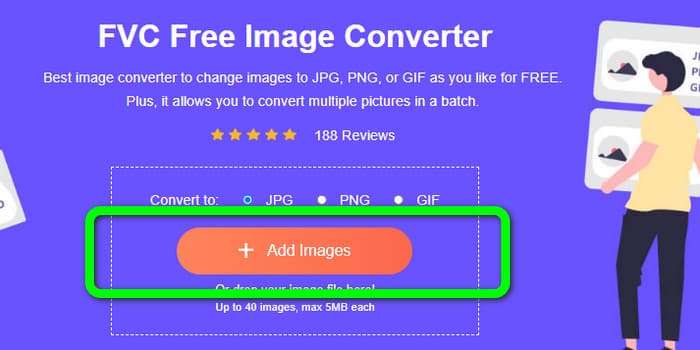
Paso 1: Primero, visita el sitio web de FVC Free Image Converter. Ve a las opciones de formato y selecciona el formato de archivo JPG.
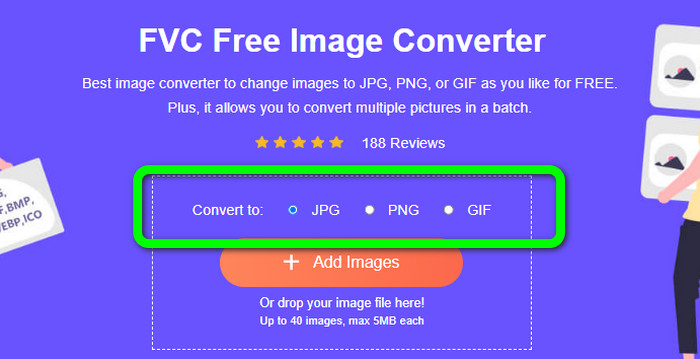
Paso 2: Para subir una foto que quieras convertir, haz clic en el botón Añadir imágenes. Si quieres un proceso de conversión por lotes, haz clic de nuevo en Añadir imágenes.
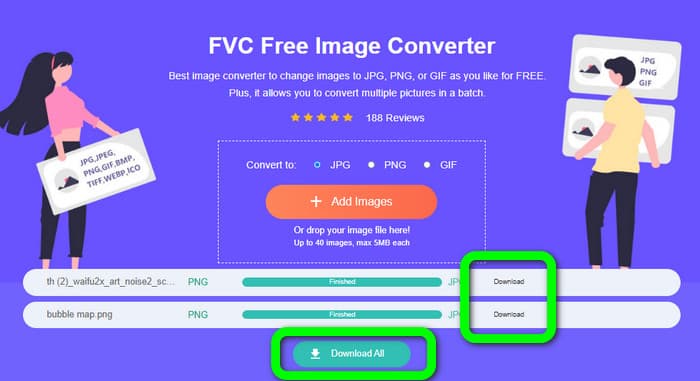
Paso 3: Cuando termine el proceso de conversión, haz clic en el botón Descargar para guardarlas una por una. Si quieres guardarlas todas a la vez, haz clic en el botón Descargar todo.
Relacionado con:
Detalles completos sobre las diferencias entre JPEG, JPG y PNG
8 asombrosos conversores de imágenes [Información completa]
Parte 4. Preguntas frecuentes sobre archivos JPG/JPEG
1. ¿Cómo sé si mi foto es un archivo JPG?
Puede hacer clic derecho en la foto en su carpeta de archivos. Luego, ve a la opción Propiedades. Navegue al menú General y vea el tipo de archivo de su imagen.
2. ¿Qué tan bien comprime imágenes JPEG?
Muy bien. Los datos sin comprimir para fotografías a todo color son de 24 bits/píxel. Los métodos de compresión sin pérdidas más populares pueden comprimir dichos datos en un promedio de 2:1. JPEG puede lograr una compresión de 10:1 a 20:1 sin pérdida perceptible. Reduce la cantidad necesaria de almacenamiento a 1 o 2 bits por píxel. Con datos diminutos, la compresión de 30:1 a 50:1 es factible para eliminar fallas. Mientras que los usos de baja calidad, como los índices de archivo, pueden comprimirse 100:1 con relativa facilidad. La proporción de 100:1 de una imagen JPEG comprimida utiliza la misma cantidad de espacio que una imagen a todo color a escala de una décima parte. A pesar de tener muchos más detalles que una miniatura, los tiene.
3. ¿Cómo abrir un archivo JPG en Photoshop?
Inicie Photoshop en su computadora. Vaya a la opción Archivo > Abrir. El archivo de la carpeta aparecerá en su pantalla. Elija el archivo JPG y haga clic en Aceptar. Después de eso, verá el archivo de imagen JPG en Photoshop.
Conclusión
Este artículo te explica qué significa JPG/JPEG, incluyendo su definición y sus características. Como extra, también te hemos presentado el método más sencillo para convertir imágenes al formato JPG usando FVC Free Image Converter. Entonces, ¿a qué estás esperando? Usa esta herramienta para convertir tus imágenes al formato JPG sin esfuerzo.
-
 Métodos sobre cómo convertir imágenes a JPG en línea y sin conexión
 ¿Quieres convertir el archivo a formato JPG por alguna razón? Entonces este articulo es para usted. Te enseñaremos el mejor método para convertir tu imagen a JPG
-
 Métodos útiles para convertir fácilmente imágenes a formato PNG
 ¿Está buscando la mejor manera de guardar su imagen como PNG? Esta guía ofrece excelentes soluciones para convertir imágenes a PNG en línea y fuera de línea
-
 Convierta HEIC a JPG con las 6 formas efectivas fuera de línea y en línea
 ¿Quieres saber cómo convertir HEIC a JPG? En este caso, agregamos 6 formas en línea y fuera de línea que puede usar para terminar y manejar esta tarea por completo.
