


 Video Converter Ultimate
 Grabador de pantalla
 Reparación de vídeo
Directrices más nuevas y sencillas sobre cómo convertir AMV a AVI [2021]
Quieres editar tu vídeo en el mejor editor de vídeo que tengas, pero no puedes subirlo porque el editor de vídeo no admite el formato de tu vídeo AMV. Por otra parte, si quieres convertir AMV a AVI, ¿cuáles son las posibilidades de encontrar la mejor herramienta para resolver tu problema? Este tema tan novedoso merece la pena leerlo para ampliar tus conocimientos sobre cómo convertir AMV a AVI, así como sus detalles, comparaciones y diferencias entre sí.

Parte 1. Cómo convertir AMV a AVI en Windows y Mac
Video Converter Ultimate es el mejor conversor que puedes encontrar en Internet tanto para convertir como para editar. Hay muchas cosas que puedes hacer con este software que pueden llevar tu vídeo a otro nivel. Una de las principales funciones que ofrece es la gran cantidad de formatos de vídeo que admite, por lo que no tendrás que preocuparte por formatos de vídeo poco habituales que necesites convertir. Es una herramienta profesional capaz de convertir vídeos con una calidad excelente. Por eso convertir AMV a AVI no va a ser una tarea complicada. Abróchate el cinturón y aprende todos los procedimientos que este software puede ofrecer para convertir AMV a AVI.
Paso 1. Antes que nada, debes descargar el software haciendo clic en el botón Descarga gratis de abajo. Puedes elegir si quieres descargar el software para Windows o para Mac. Cuando finalice la descarga, instálalo en tu ordenador y podrás empezar a usarlo haciendo clic en Empezar ahora.
Descarga gratuitaPara Windows 7 o posteriorDescarga segura
Descarga gratuitaPara macOS 10.7 o posteriorDescarga segura
Paso 2. Abre el software que has descargado. Tras iniciarlo, aparecerá una ventana emergente y verás la interfaz de Convertidor.
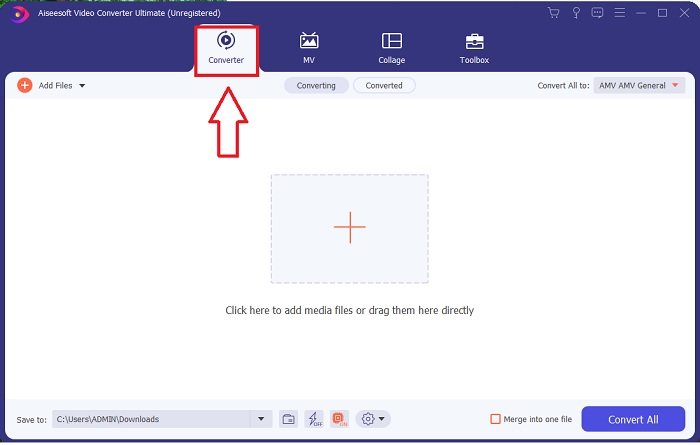
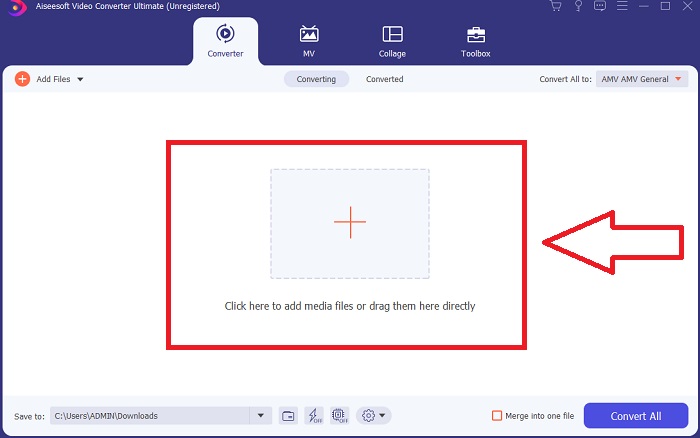
Paso 3. Continúa con la conversión importando tus archivos al conversor. Haz clic en el icono + o arrastra el archivo de vídeo que quieras convertir.
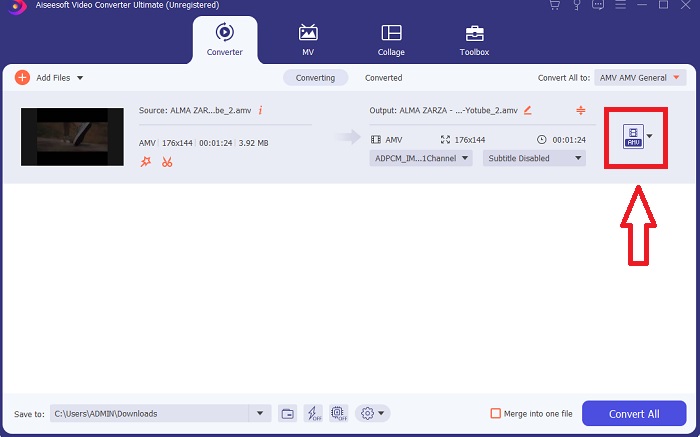
Paso 4. Haz clic en la selección de formatos de vídeo en la esquina derecha. Localiza y elige el formato AVI. Después de seleccionar el formato, podrás elegir entre distintas calidades de vídeo que el formato AVI puede ofrecer. Pero también puedes personalizar la calidad del vídeo si la salida que prefieres no aparece entre las opciones. Puedes cambiar y ajustar la resolución, la velocidad de fotogramas e incluso la configuración de calidad de audio haciendo clic en el icono de engranaje. Haz clic en Crear nuevo para guardar los cambios.
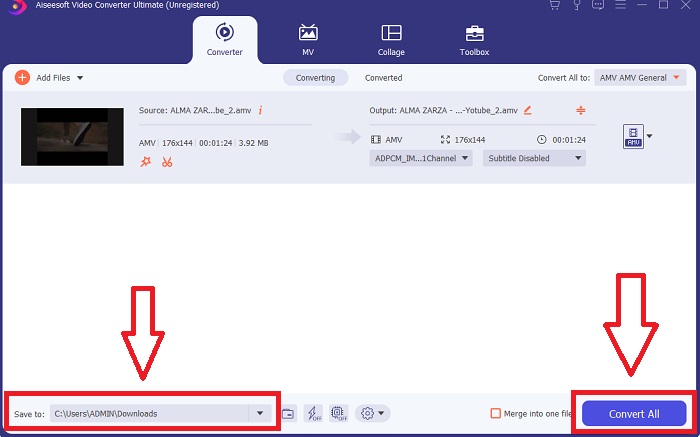
Paso 5. Cuando hayas ajustado el archivo de vídeo y esté listo para convertirse, cambia primero la carpeta de destino de tu archivo de vídeo convertido y haz clic en Convertir todo para transferirlo a tu ordenador.
Parte 2. Cómo convertir AMV a AVI en línea
¿Y si no tienes tiempo para descargar aplicaciones o programas que usar al convertir AMV a AVI? Esta herramienta online viene al rescate de tu problema: te presentamos ConvertFiles. Esta herramienta online puede ayudarte a convertir gratis numerosos formatos compatibles directamente en la web; solo necesitas una buena conexión para convertir los archivos. Además, esta herramienta online es muy fácil de usar gracias a su interfaz intuitiva, que hace que el proceso de conversión sea muy sencillo y no incluye aplicaciones de terceros. Estos son los pasos que debes conocer para convertir usando esta herramienta online:
Paso 1. Busca ConvertFiles en cualquier motor de búsqueda. Haz clic en la herramienta online y aparecerá la interfaz de la herramienta web.
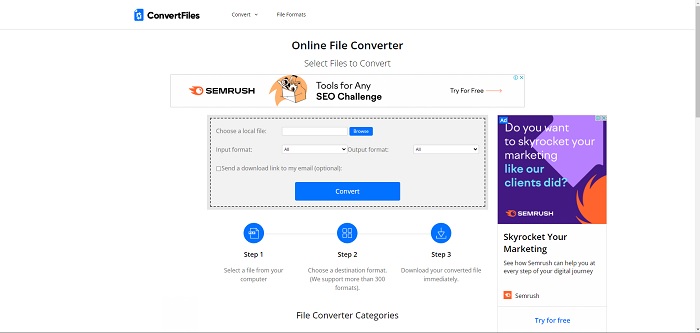
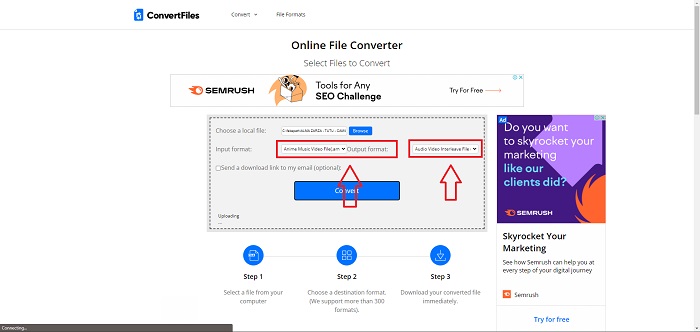
Paso 2. Sube un archivo haciendo clic en Examinar. De este modo podrás buscar en tu ordenador el vídeo que quieres y añadirlo a la herramienta web. Elige un formato de entrada; este será, básicamente, el formato del archivo de vídeo que quieres convertir. Y luego el formato de salida, es decir, el formato de vídeo al que se convertirá tu archivo de vídeo original.
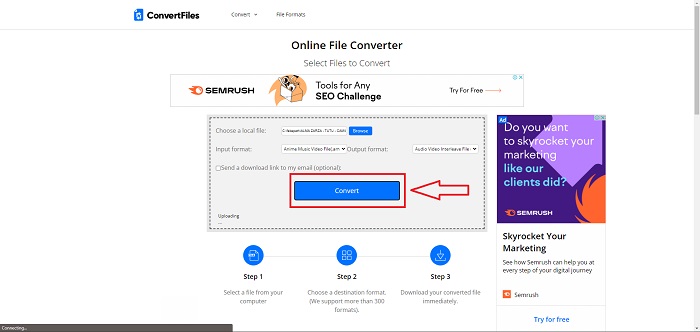
Paso 3. Para convertir y exportar el archivo, haz clic en Convertir y espera un momento a que el archivo se procese. Cuanto mayor sea el tamaño del archivo, más tardará en procesarse. Después, haz clic en el enlace que aparecerá para descargar el archivo.
Parte 3. Datos que desea saber sobre AMV y AVI
Los archivos de video en formato AMV (Actions Media Video) solo se pueden reproducir en reproductores de MP3 MP4 y S1 con capacidad de video. Es un formato de contenedor o envoltorio de video creado por Microsoft que almacena datos de video codificados en varios códecs y puede ser reproducido por una variedad de reproductores de video. Sin embargo, en comparación con otros formatos de video como MPEG y MOV, un archivo AVI usa menos compresión y por lo tanto consume más espacio. Los archivos AVI no tienen que estar comprimidos cuando se crean. Debido a que los archivos ya no están comprimidos, son mucho más grandes y ocupan mucho espacio, alrededor de 2 a 3 GB por minuto de video. No importa cuántas veces abra o guarde un archivo sin pérdidas, la calidad no se degradará. Además, no se requieren códecs para la reproducción.
Parte 4. Preguntas frecuentes sobre la conversión de AMV a AVI
¿AMV y AVI son lo mismo?
Un contenedor AVI modificado sirve como transporte para los datos. Todos los archivos AMV conocidos reproducen el audio a 22.050 muestras por segundo y utilizan una variante de IMA ADPCM en la que los primeros 8 bytes de cada fotograma son el origen (16 bits), el índice (16 bits) y el número de muestras codificadas de 16 bits (32 bits).
¿Puedes convertir AVI a MP4 sin perder calidad?
Con VLC Media Player puedes convertir archivos AVI a archivos MP4. Se puede acceder al menú Medio de VLC desde la barra superior seleccionándolo y haciendo clic en Convertir/Guardar. En la ventana Medio abierto, haz clic en Añadir para seleccionar los vídeos que quieres convertir. En la parte inferior, hay un botón Convertir/Guardar en el que debes hacer clic.
¿Es AVI mejor que MP4?
En lo que respecta a YouTube, tanto AVI como MP4 son formatos aceptados, pero MP4 funciona mucho mejor porque puede comprimirse sin sacrificar la calidad de vídeo o de audio. Es más fácil editar archivos de vídeo en AVI, pero la calidad se resiente porque debe comprimirse para que quepa en un archivo más pequeño. Puedes leer más en AVI vs. MP4 para obtener información más detallada.
Conclusión
Después de todo lo tratado en este artículo, AMV no es un archivo de vídeo muy habitual que otros conversores, tanto online como offline, admitan. Dispones de Video Converter Ultimate, que puedes descargar en cualquier momento y es gratuito. Ahora puedes convertir AMV a varios tipos de formatos de vídeo. Además, puedes ajustar y cambiar la calidad de vídeo del resultado convertido para que se adapte a cualquier propósito que tengas para la salida deseada, ya sea para entretenimiento, negocios o trabajos escolares. Estas serán las mejores opciones que debes tener en cuenta a la hora de convertir este tipo de formato con el que no estás familiarizado.
-
 3 métodos sencillos para convertir FLV a AVI en el escritorio y en línea
 Aquí hay tres métodos para ayudarlo a convertir de manera eficiente sus archivos de video FLV a formato AVI en Windows y Mac, para que pueda verlos con alta calidad.
-
 ¿Cuál es la mejor manera de convertir GIF a AVI [Open-source & Premium]
 ¿Quieres convertir tu GIF a formato AVI sin perder la calidad del video? Siga leyendo para aprender cómo convertir su archivo GIF a AVI.
-
 4 formas eficientes de convertir MOV a AVI en PC y Mac [2021]
 ¿Quieres saber cuál es el mejor conversor de MOV a AVI en la web? Y por qué FVC Ultimate Video Converter podría ser el indicado para usted.
