


 Video Converter Ultimate
 Grabador de pantalla
 Reparación de vídeo
Guía completa sobre cómo convertir AMV a WMV con pasos [resuelto]
¿Quieres disfrutar viendo archivos de vídeo AMV en tu Windows o usarlos para retransmisiones en línea? Si es así, debes leer este artículo para saber cómo convertir AMV a WMV, mejorar la calidad y hacerlos compatibles. En esta lista, conocerás el software que puedes usar para convertir tus archivos AMV. Así que, sin más preámbulos, abróchate el cinturón y aprende mucho más sobre los formatos AMV y WMV.

Parte 1. Convierta AMV a WMV con FVC Video Converter Ultimate
FVC Video Converter Ultimate es nuestra primera opción para convertir AMV a WMV porque permite transcodificar formatos multimedia y específicos de dispositivos. Además, es capaz de convertir no solo uno, dos o tres archivos simultáneamente, sino muchos más. Asimismo, este conversor está pensado para ofrecer a sus usuarios solo lo mejor en sus conversiones. ¿Quieres saber por qué? Entonces lee las funciones clave a continuación.

FVC Video Converter Ultimate
4,355,888+ Descargas- Puede ayudarlo con su problema de conversión de AMV a WMV, AVI, FLV, SWF, MP4, AVI.
- Admite conversión ultrarrápida para convertir el formato aún más rápido.
- Edite sus videos AMV con las funciones de edición únicas que ofrece esta herramienta.
- Ayudarle a ser un experto con unos pocos clics.
- Es compatible con todas las plataformas como Windows y macOS.
Descarga gratuitaPara Windows 7 o posteriorDescarga segura
Descarga gratuitaPara macOS 10.7 o posteriorDescarga segura
¿Está sorprendido por las características de la herramienta? Si es así, leamos el procedimiento para convertir archivos AMV y copiemos los pasos para lograr la conversión.
Paso 1. Descarga FVC Video Converter Ultimate en el disco de tu ordenador haciendo clic en el botón de descarga que se muestra a continuación. A continuación, haz clic en el instalador para instalarlo y pulsa Start Now para iniciar la herramienta.
Descarga gratuitaPara Windows 7 o posteriorDescarga segura
Descarga gratuitaPara macOS 10.7 o posteriorDescarga segura
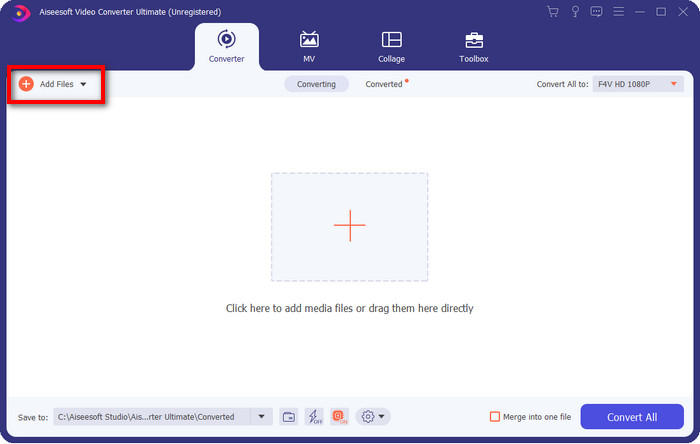
Paso 2. Después de iniciar el software, puedes añadir uno o más archivos haciendo clic en la opción Add Files. La carpeta del ordenador aparecerá en tu pantalla, selecciona el archivo AMV y pulsa Open para subirlo.
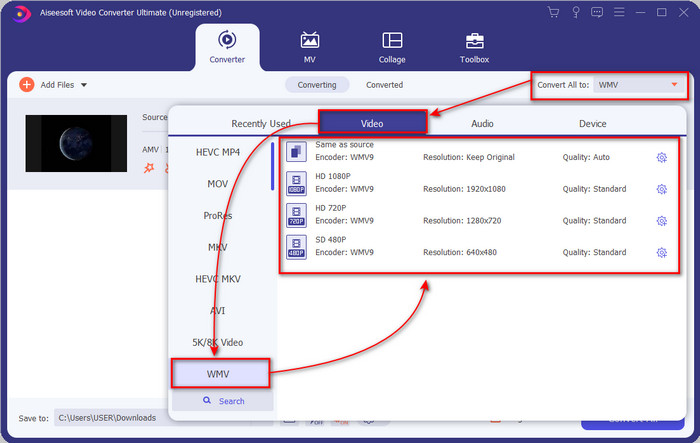
Paso 3. Al hacer clic en la opción Convert All to, se mostrará una lista de formatos. Busca el formato WMV y elige la resolución, el códec y la calidad que deseas tener.
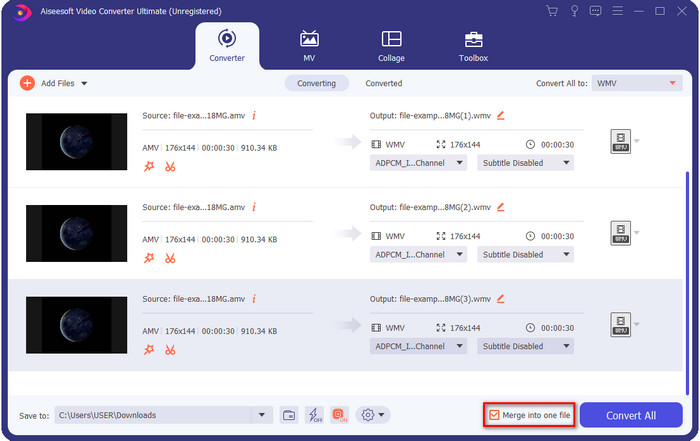
Opcional. ¿Quieres convertir tus archivos AMV en un solo archivo WMV? Entonces debes marcar la casilla que dice merge into one file.
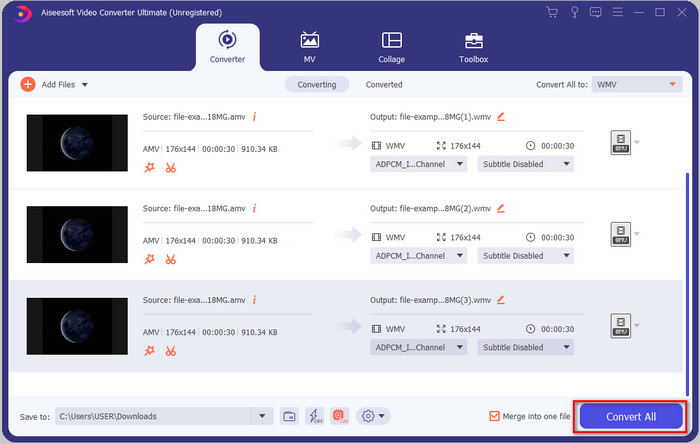
Paso 4. Pulsa Convert All para que comience el proceso de conversión. Tras el proceso, aparecerá en tu pantalla una carpeta con el archivo WMV convertido.
Parte 2. Convierta AMV a WMV en línea
¿No quieres descargar un conversor de escritorio porque no tienes suficiente espacio para instalar uno? Entonces utiliza FVC Free Online Video Converter. Porque no necesitarás descargar el conversor completo; en su lugar, solo necesitarás el lanzador, que es muy pequeño y no afectará al almacenamiento de tu ordenador. Además, este conversor web convierte AMV a WMV ajustando la resolución. Sin embargo, la conversión del archivo dependerá de la velocidad de tu conexión a Internet. ¿Tienes conexión a Internet? Entonces deberías probarlo y experimentar la conversión en línea.
Paso 1. Haz clic en este enlace para abrir la página principal del conversor.
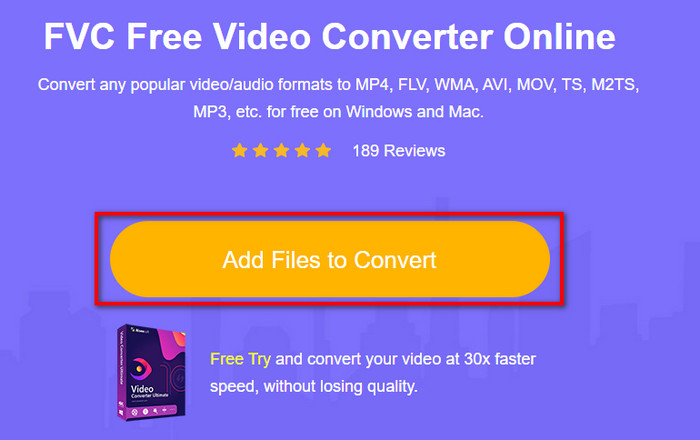
Paso 2. Al hacer clic en Add Files to Convert, aparecerá una carpeta donde podrás buscar el archivo AMV y pulsar Open.
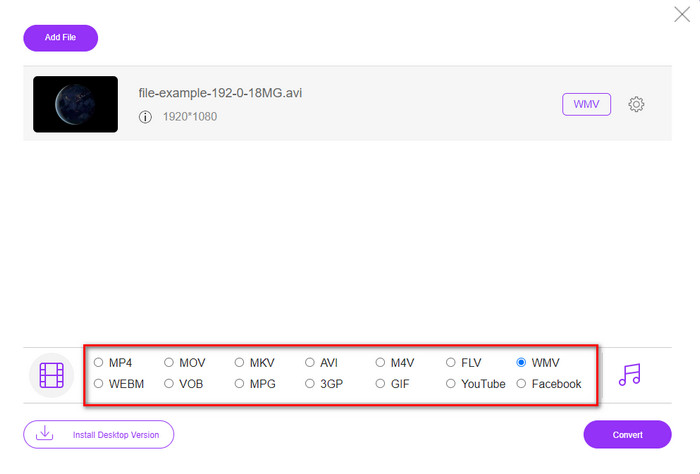
Paso 3. Elige el formato WMV que se mostrará en la pantalla.
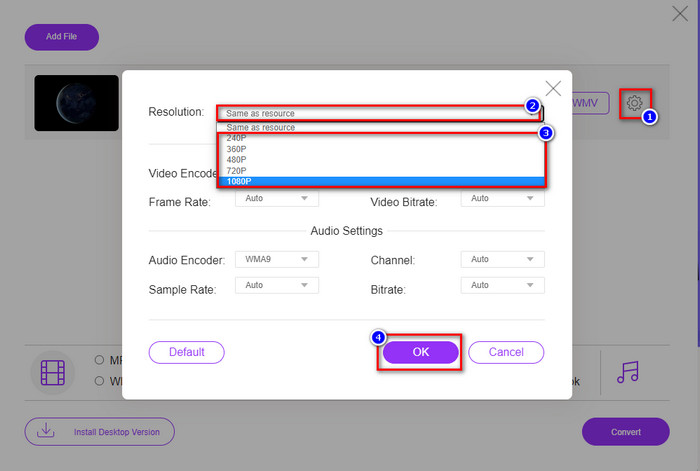
Opcional. Como hemos dicho antes, aquí puedes ajustar la resolución. Así que ahora vamos a modificar la resolución haciendo clic en el botón de engranaje. En la parte superior, haz clic en el botón desplegable y se mostrará una lista de resoluciones; elige una y pulsa OK para continuar.
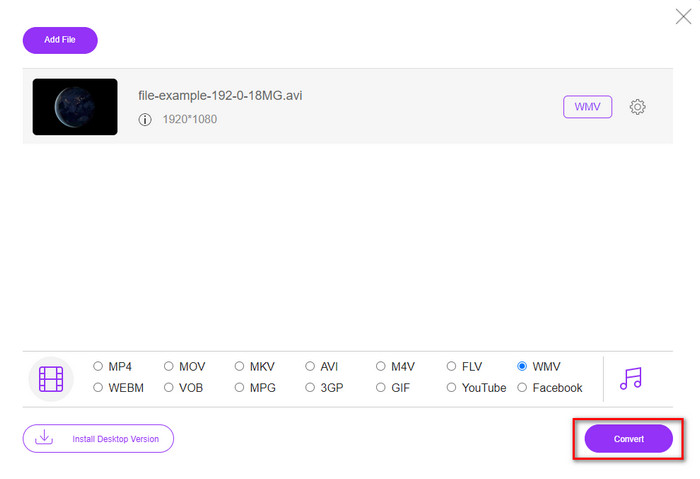
Paso 4. Ahora, si quieres iniciar la conversión, puedes hacer clic en el botón Convert y comenzará el proceso.
Parte 3. ¿Cuál es la diferencia entre AMV y WMV?
En primer lugar, estos dos contenedores de medios se hicieron populares debido a sus capacidades únicas como formato. Pero hoy estudiaremos cuáles son las ventajas y desventajas del formato en sí. Además, especificaremos tres aspectos haciéndolo una pregunta para saber más sobre AMV y WMV.
¿Qué formato tiene mejor resolución multimedia?
Entre los dos formatos, sin duda, el WMV tiene mejor calidad. Un archivo WMV puede almacenar y transmitir una resolución de video de hasta 300 000 píxeles para una salida visual más detallada. Pero puede establecer la tarifa en una resolución de pantalla de 528x576. Y para AMV, la calidad que puede contener es de 96x96 a 320x240, que es bastante baja en comparación con la baja resolución de WMV. Una de las razones por las que AMV tiene una resolución más pequeña es que debe caber en la pantalla del reproductor multimedia chino.
¿Qué formato tiene un tamaño de archivo más pequeño?
Esta victoria irá con el AMV porque este formato es súper comprimido. Aunque WMV tiene un compresor, el tamaño de AMV es más económico, especialmente en el disco de su computadora, que el WMV.
¿Qué formato es más compatible?
Podemos decir que tienen diferentes puntos fuertes si hablamos de compatibilidad, porque WMV es solo para programas de Windows. Si eres usuario de Mac, no puedes simplemente usar este formato y reproducirlo en QuickTime o editarlo en iMovie. En su lugar, tendrás que convertir WMV a MOV para hacerlo compatible. En el caso de AMV, este formato se reproduce originalmente en un reproductor multimedia portátil chino. Pero hoy en día puedes usar un reproductor multimedia portátil estándar en lugar de comprar un reproductor AMV específico. Sin embargo, buscar un reproductor AMV es un auténtico fastidio, porque hay muy pocos reproductores que admitan este tipo de formato y su códec. Podemos afirmar que WMV ha logrado mucha más compatibilidad que AMV, especialmente cuando transferimos el archivo a Windows.
Y ahora que sabemos el motivo, en este caso es necesario convertir el archivo a un nuevo formato. Por ese motivo, debe aprender a convertir AMV a WMV para que el archivo multimedia sea compatible con el software de Windows.
Parte 4. Preguntas frecuentes sobre la conversión de AMV y WMV
¿Cómo convertir mi AMV a MOV?
Hay muchas técnicas y métodos que podemos buscar y probar, disponibles si los consultamos en la web. Pero es difícil elegir qué herramienta es mejor para convertir AMV a MOV. Así que, para resumir, haz clic en este enlace y comprende cómo convertir AMV a MOV y hacerlo compatible con macOS.
¿Puedo usar un reproductor multimedia VLC para ver y reproducir AMV?
Por supuesto, puedes descargar el reproductor multimedia VLC en tu ordenador para reproducir tus archivos AMV sin necesidad de instalar códecs adicionales. Pero si quieres saber más sobre VLC y sus alternativas, intenta leer este artículo haciendo clic en este enlace.
¿Por qué necesito comprimir AMV?
Comprimimos nuestros archivos multimedia y AMV porque necesitamos liberar algo de espacio en nuestro disco duro. ¿Así que quieres aprender cómo comprimir archivos AMV? Entonces haz clic en este enlace.
Conclusión
Estas dos soluciones brindan excelencia para que su conversión de AMV a WMV sea fácil y exitosa. Además, estas son las mejores soluciones que podemos encontrar en la web. Así que ahora está en tu mano elegir qué convertidor usar para convertir tu archivo AMV a WMV. Para lograr el éxito, debe utilizar las herramientas de FVC proporcionadas anteriormente.
-
 Mejor método para usar en la conversión de AMV a AVI [Aprobado]
 ¿Tiene dificultades para convertir su archivo de video en formato AMV a AVI? Aquí hay algunos consejos proporcionados que solo puede encontrar en este artículo.
-
 [Probado] 2 formas de convertir AMV a FLV fuera de línea y en línea
 ¿Alguna vez ha considerado probar un convertidor para convertir sus archivos AMV al formato de archivo FLV? Para resolver su problema al ver un video AMV, lea este artículo para conocer los convertidores adecuados que debe usar.
-
 Gratis | 3 mejores métodos para convertir MP4 a WMV sin perder calidad
 Esta publicación comparte cómo convertir videos MP4 a formato WMV en Mac o Windows. También le ofreceremos varias opciones, que incluyen tanto software de escritorio como convertidores en línea basados en la web. ¿Listo para conocer las mejores herramientas de conversión de MP4 a WMV?
