


 Video Converter Ultimate
 Grabador de pantalla
 Reparación de vídeo
 Descarga segura
Procedimientos detallados para convertir archivos AVI a formato M4V
El formato de contenedor multimedia AVI, que significa Audio Video Interleaved, es una función del software de vídeo de Windows. Permite la reproducción simultánea de datos de audio y vídeo combinados en un solo archivo. Gracias a sus capacidades únicas, como el control sincronizado y la visualización en tiempo real, AVI se situó rápidamente entre los formatos de vídeo más utilizados. Pero si quieres reproducir tu vídeo en tu Mac, debes convertir AVI a M4V, porque M4V es un formato de Apple que puede reproducirse en iTunes, Apple QuickTime Player y dispositivos iOS. En ocasiones, puede que quieras convertir archivos .avi en un Mac a un formato universal como M4V. En este caso, se recomienda convertir AVI a M4V para que funcione correctamente en el sistema operativo Mac. Te mostraremos los mejores métodos para convertir AVI a M4V usando aplicaciones en línea y sin conexión.

Parte 1: Introducción a AVI y M4V
| AVI | M4V | |
| Nombre del archivo | Intercalado de audio y video | Vídeo MPEG-4 |
| Extensión de archivo | .avi | .m4v |
| Descripción | El formato de archivo AVI es uno de los contenedores multimedia más populares jamás creados. El acrónimo AVI, que significa audio video intercalado, fue inicialmente puesto a disposición del público por Microsoft en 1992 como un componente de su marco multimedia, "video para Windows". Un archivo AVI con la extensión de nombre de archivo .avi puede tener contenido de audio y video sincronizado porque es un formato contenedor. Por lo tanto, los autores pueden editar y codificar secuencias de audio y video o secuencias de video utilizando el estándar. | Apple creó la extensión de archivo M4V, que es notablemente similar a la extensión de archivo MP4, para el contenido de la tienda iTunes. Los dispositivos Apple son los únicos que pueden reproducir archivos M4V. Para reproducir en dispositivos Apple, otros formatos de video como MP4 y MOV pueden convertirse a M4V. La distinción principal entre los formatos de archivo M4V y MP4 es que el primero es compatible con DRM-Copyright Protection, que prohíbe la infracción de los derechos de autor de contenido multimedia. La computadora debe otorgar permiso iniciando sesión en la cuenta de iTunes para comprar el archivo multimedia para reproducir un archivo M4V protegido por DRM. Sin embargo, si los archivos no están protegidos por DRM, el usuario simplemente puede cambiar el nombre de la extensión de archivo M4V a MP4 para que sea compatible con dispositivos que no sean de Apple. |
| Desarrollado por | Microsoft | Apple Inc. |
| Programas Asociados | Reproductor de multimedia VLC Reproductor QuickTime de Apple Adobe Premiere Pro 2020 reproductor de medios de Windows | KMPlayer Reproductor multimedia clasico Reproductor de zoom \Reproductor de multimedia VLC |
| Categoría de archivo | Vídeo | Vídeo |
| Tipo de Mimica | video/x-video | vídeo/x-m4v |
Parte 2: la mejor manera de convertir AVI a M4V
¿Quieres convertir AVI a M4V gratis? Puedes usar FVC Free Video Converter Online. Esta herramienta puede convertir fácilmente tu archivo AVI a formato M4V. Además, es compatible con más formatos de vídeo, como FLV, MP4, MOV, WMA y otros. Asimismo, si planeas convertir varios archivos AVI a distintos formatos de archivo, puedes usar esta aplicación, ya que ofrece un proceso de conversión por lotes. También puedes editar tus vídeos antes de convertirlos, por ejemplo, cambiar su velocidad de fotogramas, resolución y tasa de bits. Además, FVC Free Video Converter Online puede convertir archivos de audio como MP3, AAC, AC3, FLAC, etc.
Caracteristicas
◆ Convierta numerosos formatos de archivos de video, como M4V, AVI, MP4, MOV, VOB, FLV, WMV, etc.
◆ Puede cambiar la resolución, la velocidad de bits y la velocidad de fotogramas del video.
◆ Convierta archivos de audio como MP3, AAC, AC3, FLAC, etc.
Siga las sencillas guías a continuación para convertir AVI a M4V fácilmente.
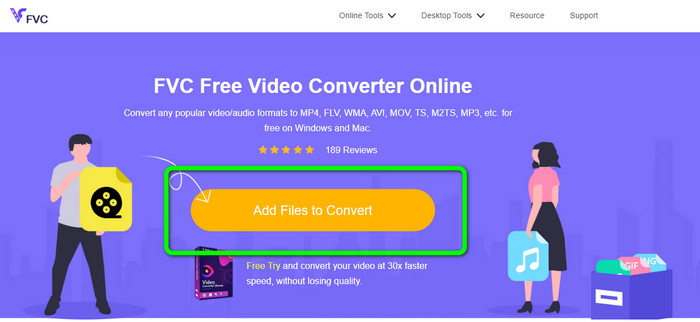
Paso 1: Primero, abre tu navegador y visita la página web de FVC Free Video Converter Online. Pulsa el botón Add Files to Convert para subir tu archivo AVI.
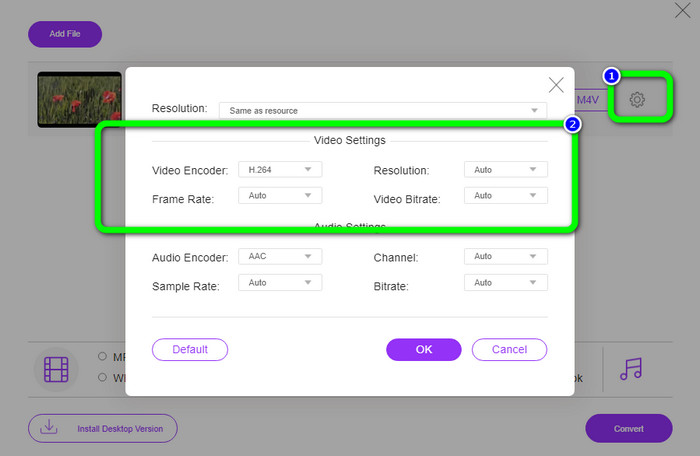
Paso 2: Si deseas cambiar la resolución, la velocidad de fotogramas y la tasa de bits de tu vídeo, haz clic en el icono de Configuración en la parte izquierda de la interfaz. Cuando termines de modificarlos, pulsa OK.
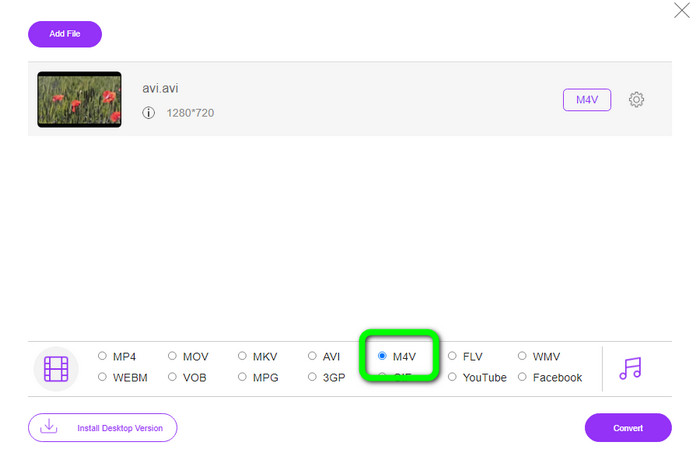
Paso 3: Luego, en la parte inferior de la interfaz, selecciona el archivo M4V como formato de salida.
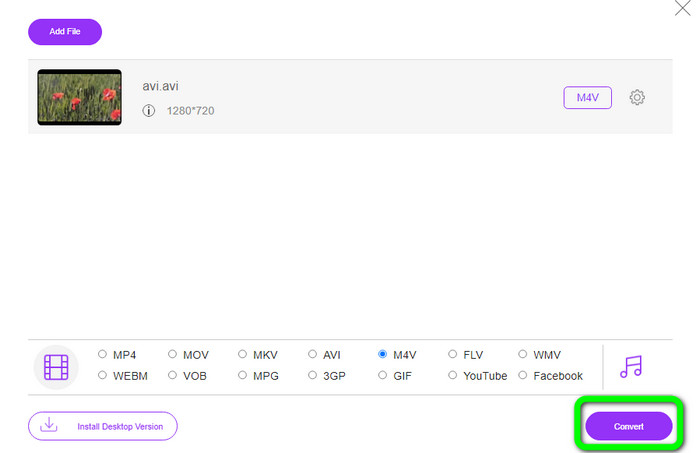
Paso 4: Por último, para guardar tu archivo de vídeo, haz clic en el botón Convert. Espera el proceso de conversión y descarga el resultado final.
Parte 3: Método fácil para convertir AVI a M4V en Windows y Mac
Otro excelente convertidor que puedes usar es FVC Video Converter Ultimate. Esta herramienta puede convertir AVI a M4V en Windows. Puede convertir tus archivos al instante porque dispone de un proceso de conversión a velocidad ultra-rápida, hasta 30 veces más rápido. Además, puedes convertir varios archivos a la vez porque permite la conversión por lotes. Asimismo, ofrece un método básico con una interfaz intuitiva que es perfecta para principiantes. Por otra parte, esta herramienta sin conexión no solo es accesible en Windows; también está disponible en Mac. Además, puedes hacer algunos cambios en tus vídeos mientras se convierten. Puedes editar tus vídeos mejorándolos, recortándolos, añadiendo filtros y mucho más.
Funciones
◆ Convierte más de 100 archivos de video, incluidos M4V, MP4, AVI, FLV, MKV, MOV, VOB, WMV y más.
◆ Está disponible la creación de un collage con plantillas y filtros gratuitos.
◆ Ofrece creador de videos musicales.
◆ Edita vídeos usando un mejorador de vídeo, recortador, eliminador de marcas de agua, compresor, etc.
◆ Convierta formatos de archivo de imagen, como BMP, JPG, PNG, etc.
◆ Acelerar y ralentizar un video.
Use las guías detalladas a continuación para saber cómo convertir AVI a M4V en Windows y Mac usando FVC Video Converter Ultimate. Usaremos la versión de Windows.
Paso 1: Descarga FVC Video Converter Ultimate en tu Windows o Mac haciendo clic en el botón de descarga.
Descarga gratuitaPara Windows 7 o posteriorDescarga segura
Descarga gratuitaPara macOS 10.7 o posteriorDescarga segura
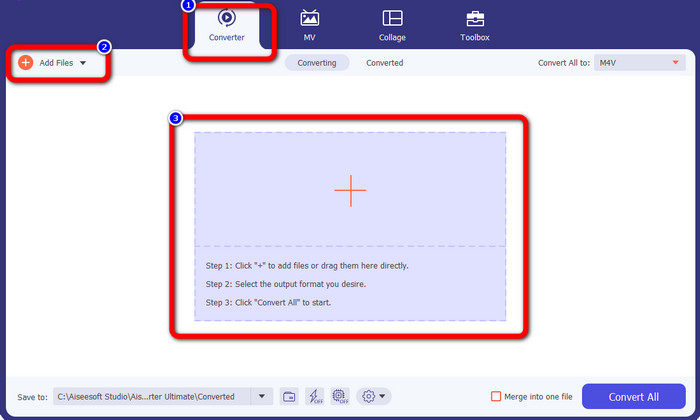
Paso 2: Ve al panel Converter después de abrir la aplicación. Luego, tienes tres opciones para insertar tu archivo AVI. Primero, puedes hacer clic en el botón Add File en el segundo cuadro. La segunda opción es hacer clic en el signo Plus en el tercer cuadro. Y, por último, soltar el archivo directamente en el centro.
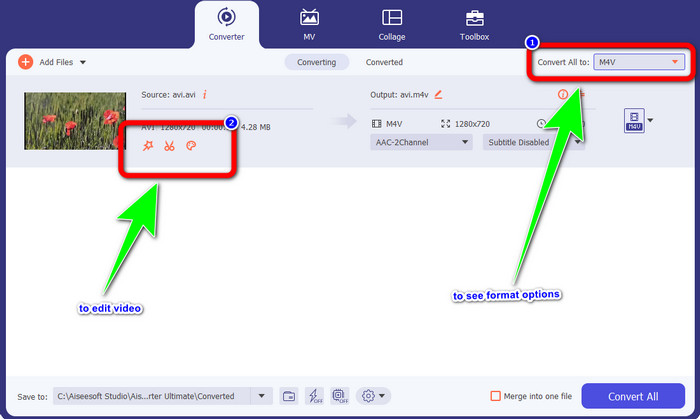
Paso 3: Después de añadir tu archivo AVI, haz clic en el botón Convert All to para ver las opciones de formato y selecciona el formato de archivo M4V. Luego, si quieres editar tu vídeo, puedes ir al segundo cuadro. Puedes usar las herramientas para editar tu vídeo, como añadir filtros, rotar y recortar vídeos, cortar y más.
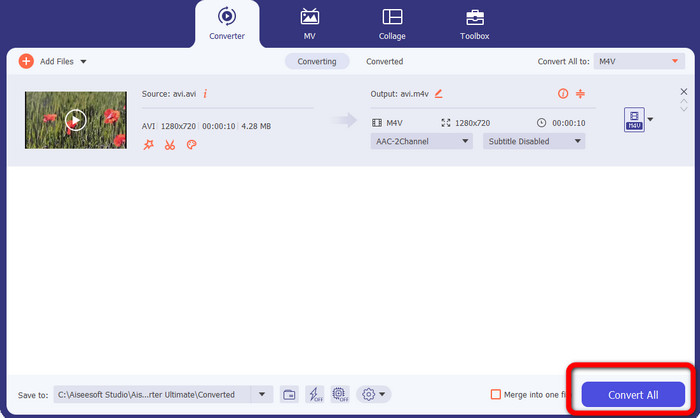
Paso 4: Para el paso final, haz clic en el botón Convert. Espera el rápido proceso de conversión y guarda tu vídeo convertido.
Parte 4: Cómo convertir AVI a M4V usando Handbrake
Handbrake es otro conversor para convertir AVI a M4V de forma gratuita. Puede convertir varios archivos como WEBM, M4V, MP4, MKV, etc. Con la ayuda de esta herramienta, puedes convertir muchos archivos fácilmente. Sin embargo, Handbrake es complicado de usar. Necesitas tener conocimientos suficientes sobre este conversor. Además, su proceso de instalación es confuso. Debes realizar muchos procedimientos antes de utilizarlo, lo que resulta lento y consume tiempo para los usuarios.
Paso 1: Descarga Handbrake en tu ordenador.
Paso 2: Selecciona el archivo AVI que deseas convertir.
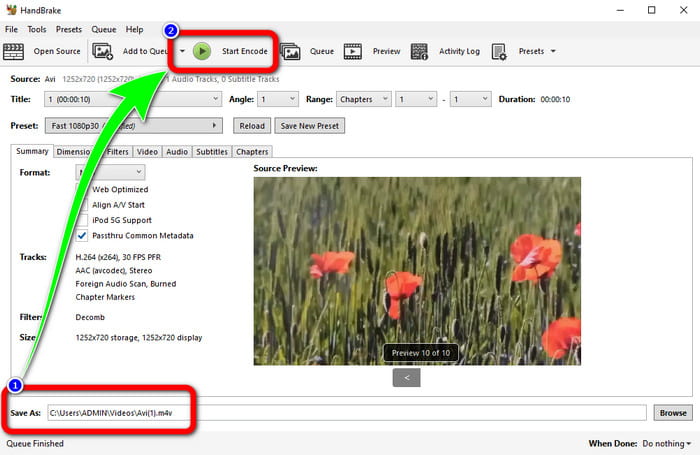
Paso 3: Ve a formato y selecciona M4V. Luego inicia el proceso de conversión haciendo clic en el botón Start.
Parte 5: Preguntas frecuentes sobre la conversión de AVI a M4V
1. ¿Cómo convertir AVI a M4V en Mac?
Puede utilizar FVC Video Converter Ultimate. Este convertidor puede convertir fácilmente su AVI a M4V usando su Mac.
2. ¿Qué tan grande es un archivo AVI?
Dado que los videos AVI no están comprimidos, ocupan más espacio en el disco duro. Por ejemplo, una sola hora de metraje de video AVI de 352x288 puede usar hasta 33 GB (3300 MB) de espacio en el disco duro.
3. ¿El archivo AVI es universal?
Sí. Aunque formatos más modernos como MP4, MOV o WMV han sustituido en gran medida al formato AVI, la gente sigue usando AVI por lo portátil que es. Prácticamente cualquier ordenador o dispositivo puede reproducir archivos AVI.
Conclusión
Esta guía te muestra los excelentes métodos para convertir archivos AVI a M4V usando los tres conversores. Pero, si quieres un proceso de conversión ultra-rápido, utiliza FVC Video Converter Ultimate. Y si quieres un método más sencillo, usa FVC Free Video Converter Online.
-
 Los 5 mejores reproductores M4V para Windows / Mac / Android / iOS que debe conocer
 Cuando no pueda reproducir sus videos M4V en QuickTime Player, debe aprender más de los 5 excelentes reproductores M4V para Windows, Mac, Android e iOS de este artículo.
-
 AVI VS MP4: diferencias y similitudes entre los formatos AVI y MP4
 ¿Cuál es mejor formato de video, AVI o MP4? Si desea obtener una comparación detallada, puede consultar este artículo AVI VS MP4. Puedes conocer las diferencias y similitudes entre AVI y MP4 en muchos aspectos
-
 3 Programa de conversión de video utilizado para convertir iTunes M4V a AVI en Mac
 ¿No tienes idea de cómo convertir MKV a un formato AVI? A medida que sigamos leyendo este artículo, conoceremos las 3 herramientas que pueden ayudarte a convertir este formato de archivo.
