


 Video Converter Ultimate
 Grabador de pantalla
 Reparación de vídeo
 Descarga segura
Los 10 mejores conversores gratuitos en línea/Windows/Mac
¿Estás cansado de buscar el mejor convertidor de vídeo AVI gratuito para tus vídeos? ¡No busques más! Tanto si eres un profesional de la edición de vídeo como si acabas de empezar, contar con las herramientas adecuadas puede marcar la diferencia. En este artículo, hemos analizado una lista de los conversores de vídeo AVI mejor valorados para simplificar tu búsqueda. Desde conversores online fáciles de usar hasta potentes programas de escritorio, lo tenemos todo cubierto. ¡Prepárate para explorar un mundo de posibilidades y encontrar la solución perfecta para tus necesidades de conversión de vídeo!

Parte 1. El mejor conversor de vídeo AVI gratuito en línea
FVC Free Video Converter Online
FVC Free Video Converter Online es una herramienta especializada en convertir vídeos AVI a otros muchos formatos. Garantiza una conversión rápida conservando la calidad original de los vídeos en HD. Además, esta herramienta admite la conversión por lotes, lo que permite a los usuarios convertir varios archivos AVI de forma simultánea sin sacrificar calidad.
| Plataforma | Basado en web |
| Mejor para | Lo mejor para cualquiera que necesite una herramienta fácil de usar para convertir videos y archivos de audio. |
| Formatos soportados | Admite la conversión de casi todos los videos y audio convencionales a MP4, FLV, MKV, MOV, M4V, MTS, TS, M2TS, WMV, ASF, VOB, MP3, AAC, AVI, MOV, WMV, MKV. |
Para utilizar esto, siga los pasos a continuación:
Paso 1. Ve al sitio web de FVC Free Video Converter Online.
Paso 2. Ahora, pulsa el botón Add Files to Convert para añadir el vídeo que quieres convertir.
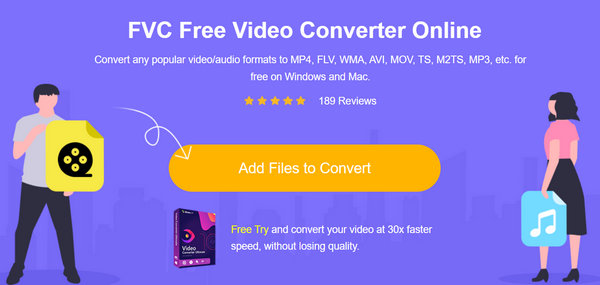
Paso 3. Ahora, elige el formato que desees.
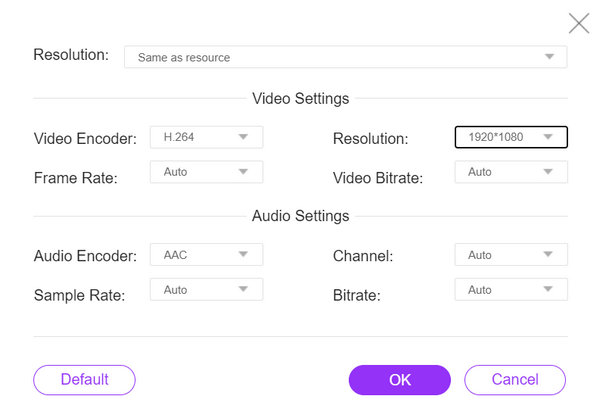
También puede configurar automáticamente lo que se adapta a tu vídeo.
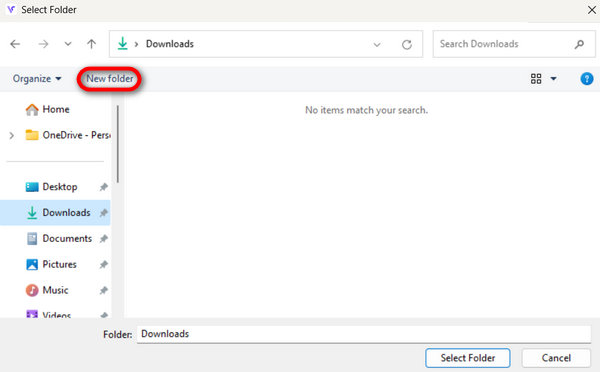
Paso 4. Para iniciar la conversión, haz clic en el botón Convert. Luego selecciona o crea una New Folder donde el vídeo se guardará automáticamente.
Una vez hecho esto, verá un mensaje de texto informándole que su conversión se ha completado.
FVC Free Video Converter Online proporciona una solución confiable y eficiente, lo que hace que el proceso de conversión sea cómodo y sin complicaciones.
Parte 2. Los 4 mejores conversores de vídeo AVI gratuitos para escritorio
Convertidor de vídeo gratuito Aiseesoft
Aiseesoft ofrece un conversor de vídeo gratuito que permite a los usuarios convertir vídeos entre distintos formatos. Aiseesoft Free Video Converter es compatible con formatos de vídeo habituales como AVI, MP4, MOV y otros. También puedes usarlo para tareas básicas de edición, como recortar el metraje o hacer ajustes de encuadre (cropping).
Plataforma: Windows y Mac.
Ideal para: Cualquier usuario que necesite una herramienta de conversión de vídeo sencilla con funciones básicas de edición.
Pros
- Interfaz amigable.
- Funciones básicas de edición.
- Soporta múltiples formatos.
Contras
- Es posible que le falten funciones avanzadas.
Paso 1. Descarga e instala Aiseesoft Free Video Converter Online en tu dispositivo.
Descarga gratuitaPara Windows 7 o posteriorDescarga segura
Descarga gratuitaPara macOS 10.7 o posteriorDescarga segura
Paso 2. Ahora, pulsa el botón Add Files para añadir el vídeo AVI que deseas convertir.
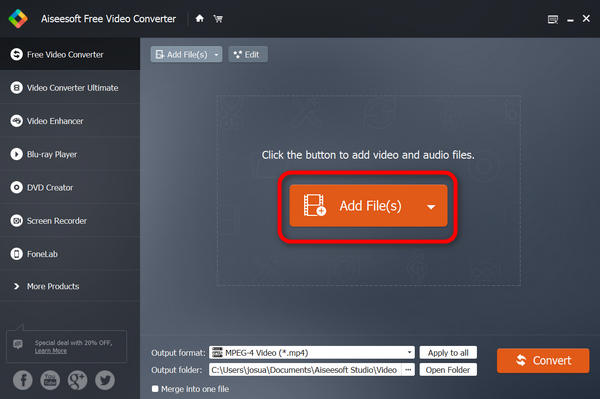
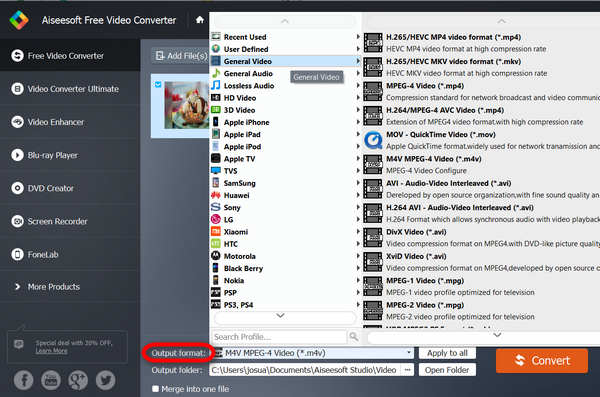
Paso 3. Ahora, ve a Output Format y selecciona el formato que desees.
Paso 4. Por último, haz clic en Convert para iniciar el proceso.
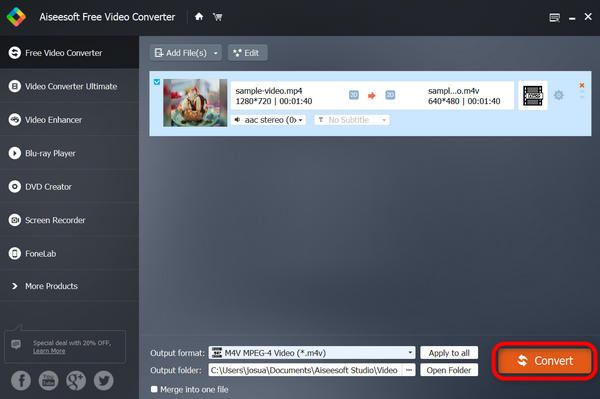
Su video se guardará automáticamente en su dispositivo y, debajo, dice completo cuando la conversión se realiza correctamente.
Aiseesoft Free Video Converter es de hecho uno de los mejores conversores de vídeo AVI gratuitos en línea que garantiza una conversión fluida, fácil y gratuita para cualquier tipo de formato. Por lo tanto, si está buscando un conversor de vídeo gratuito pero eficaz, le recomendamos este.
Reproductor de multimedia VLC
VLC media player es un software multimedia que no sólo reproduce varios formatos de audio y vídeo, sino que también funciona como un conversor de vídeo AVI gratuito. Con esta herramienta, los usuarios pueden convertir sus archivos de vídeo al formato que deseen. Otra cosa es que ofrece versatilidad y comodidad en la gestión de contenidos multimedia.
Plataforma: Windows, Mac y Linux.
Ideal para: Es ideal para usuarios que quieren una solución todo en uno para reproducir archivos multimedia y convertir vídeos de forma ocasional.
Pros
- Versatilidad
- Características avanzadas.
Contras
- La interfaz puede resultar menos intuitiva para los principiantes.
Paso 1. Primero, descarga VLC en tu dispositivo e instálalo.
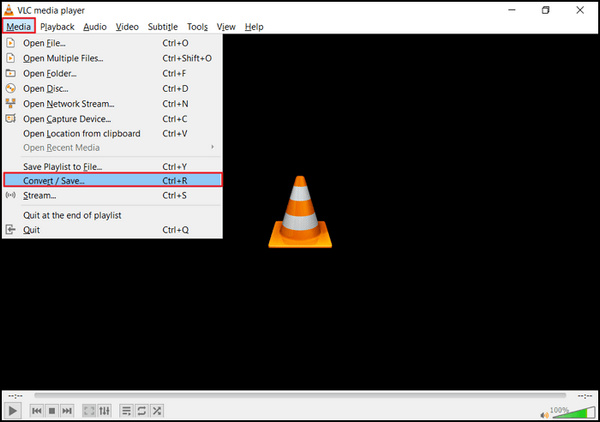
Paso 2. Inicia el programa y ve a la pestaña Media, luego selecciona Convert/Save.
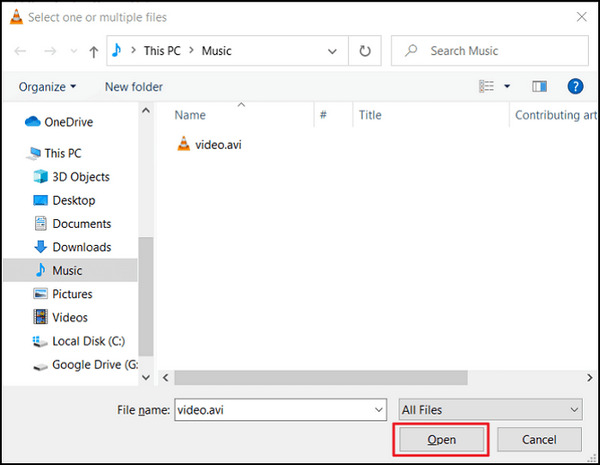
Paso 3. Ahora, haz clic en el botón Add para importar el vídeo AVI que deseas convertir.
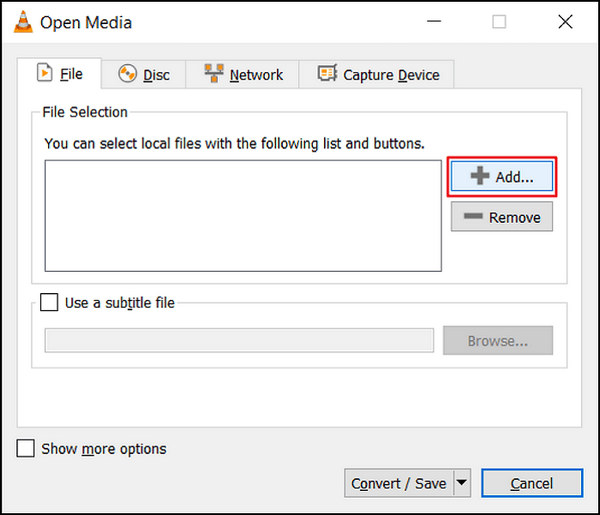
Paso 4. Especifica el nombre del archivo y la carpeta de destino en el cuadro Convert.
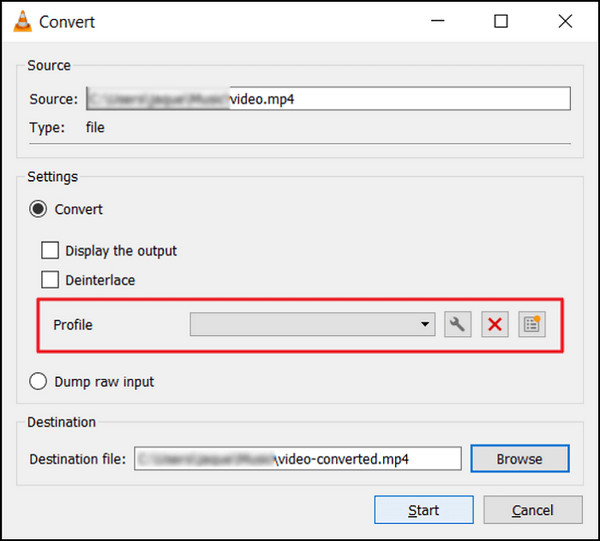
Paso 5. Elige Convert/Save y selecciona el formato que desees antes de hacer clic en Start.
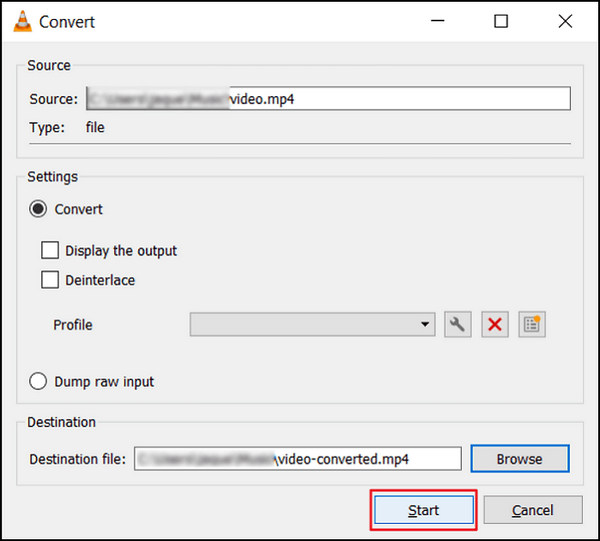
Paso 6. Por último, haz clic en Start para iniciar el proceso de conversión. VLC Media Player se encargará del resto.
VLC va más allá de ser un simple reproductor multimedia; también puede ayudarte a convertir vídeos AVI. Sin embargo, es importante tener en cuenta que este versátil software carece de funciones avanzadas de edición que suelen encontrarse en conversores de vídeo dedicados. Si quieres una herramienta similar a VLC, consúltala aquí.
Freemake Video Converter
Freemake Video Converter es un software multimedia que permite a los usuarios convertir libremente vídeos AVI entre diferentes formatos, además de admitir archivos de audio e imágenes.
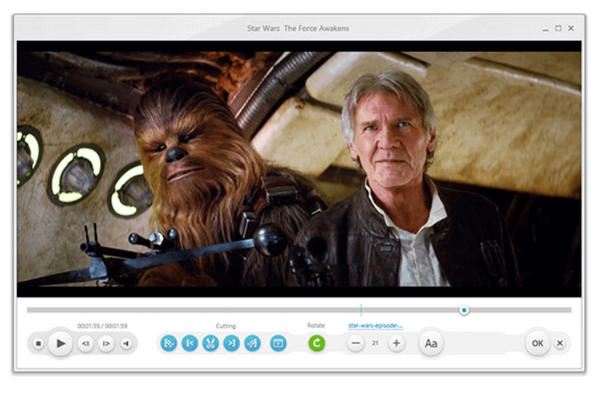
Plataforma: Solo Windows.
Ideal para: Cualquiera que necesite convertir vídeos para dispositivos o plataformas específicos.
Pros
- Hay muchos perfiles preestablecidos disponibles.
- Interfaz amigable
Contras
- Tenga en cuenta el software incluido durante la instalación.
- Filigrana
Paso 1. Descarga e instala Freemake Video Converter en tu dispositivo.
Paso 2. Haz clic en Add Files para añadir al programa los archivos de vídeo AVI que quieres convertir.
Paso 3. Despliega la lista Output Format y selecciona tu formato preferido, como MP4, MOV, etc.
Paso 4. Haz clic en el botón Downward Arrow para establecer la ruta de salida donde se guardarán los archivos convertidos.
Paso 5. Por último, haz clic en el botón Run.
Freemake Video Converter es una mejor opción para conversores de vídeo AVI gratuitos en ordenadores de escritorio. Sin embargo, su versión gratuita carece de algunas funciones que están disponibles en otros conversores de vídeo gratuitos.
Freno de mano
HandBrake es una herramienta de código abierto que se utiliza para convertir vídeos AVI desde casi cualquier formato, incluidos AVI y otros códecs ampliamente compatibles. Con esta herramienta, puedes convertir fácilmente
Plataforma: Windows, Mac y Linux
Pros
- Ligero.
- Configuraciones personalizables.
Contras
- Funciones avanzadas limitadas.
Paso 1. Descarga e instala HandBrake en tu dispositivo.
Paso 2. Haz clic en File u Open Source para importar el vídeo AVI que deseas convertir.
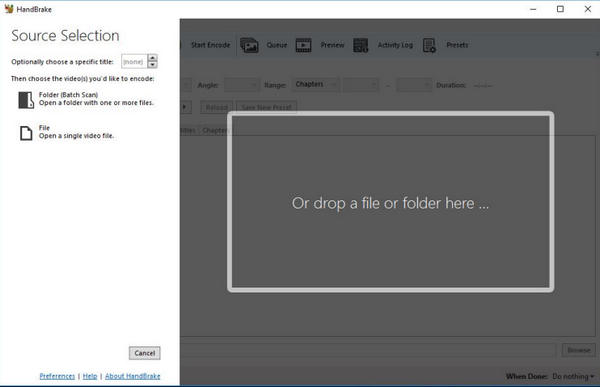
Paso 3. En la sección Destination, indica dónde quieres guardar el archivo convertido y asígnale un nombre.
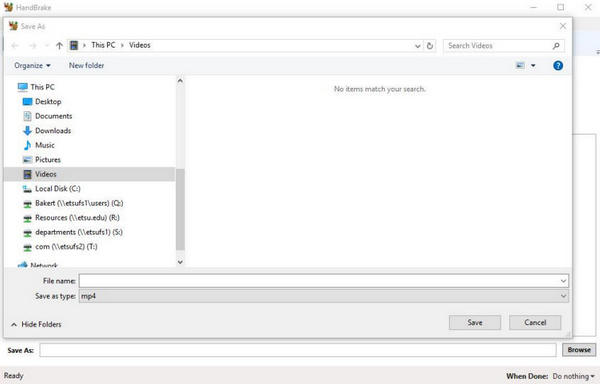
Paso 4. Explora las Output Settings para acceder a opciones más avanzadas. Además, elige el formato que desees.
Paso 5. Por último, haz clic en el botón Start para comenzar a convertir AVI a MP4 y a otros formatos.
HandBrake mostrará el progreso y le notificará cuando haya terminado. Una vez que se complete la conversión, tendrás un nuevo archivo de video en la ubicación especificada.
Parte 3. Preguntas frecuentes sobre AVI Video Converter
¿Puedo convertir videos AVI a otros formatos usando convertidores de video AVI gratuitos?
Sí. La mayoría de los conversores de vídeo AVI gratuitos admiten la conversión de vídeos AVI a varios formatos populares. Consulte el artículo anterior y verá los formatos admitidos por cada programa de conversión de video.
¿La conversión de videos AVI usando un conversor de video afectará la calidad del video?
El impacto en la calidad del vídeo depende en gran medida de la configuración y opciones elegidas durante el proceso de conversión. Generalmente, si utiliza un conversor de vídeo AVI de buena reputación y mantiene configuraciones similares, la pérdida de calidad debería ser mínima.
¿Es seguro utilizar los conversores de vídeo AVI gratuitos?
Muchos conversores de vídeo AVI gratuitos y de buena reputación son seguros de usar y no contienen malware ni virus dañinos. Sin embargo, es fundamental descargarlos de su sitio web oficial u otras fuentes confiables.
¿Puedo convertir varios vídeos AVI simultáneamente con un conversor de vídeo AVI gratuito?
Sí. La mayoría de los conversores de vídeo AVI gratuitos ofrecen funcionalidad de conversión por lotes, lo que le permite convertir varios vídeos AVI a la vez, ahorrando tiempo y esfuerzo.
¿Existe alguna limitación al utilizar convertidores de vídeo AVI gratuitos?
Si bien los conversores de vídeo AVI gratuitos ofrecen funcionalidades de conversión básicas, pueden tener limitaciones en comparación con el software pago, como menos formatos compatibles, velocidades de conversión más lentas o funciones de edición menos avanzadas.
Conclusión
En conclusión, a la hora de elegir un convertidor de vídeo AVI gratuito, ten en cuenta factores como la compatibilidad de formatos, la facilidad de uso y las funciones adicionales. Cada conversor ofrece ventajas específicas y se adapta a diferentes necesidades. Tanto si se trata de soluciones web como FVC Free Video Converter Online como de aplicaciones de escritorio como Aiseesoft Free Video Converter, dispones de una amplia variedad de opciones entre las que elegir según tus preferencias.
-
 Cómo comprimir archivos AVI grandes en Windows / Mac / en línea de forma gratuita
 Lea y obtenga 3 formas gratuitas de comprimir archivos AVI en su computadora. Puede reducir el tamaño de archivo de su video AVI sin perder calidad. El tamaño de su video AVI puede ser tan pequeño como imagina.
-
 Los 4 mejores grabadores de pantalla AVI gratuitos para capturar videos de pantalla como archivos AVI
 Para grabar pantallas en archivos AVI de alta calidad, el artículo identifica y comparte los 4 mejores grabadores de pantalla AVI gratuitos en esta publicación. Léelo y obtén lo que deseas.
-
 Cómo convertir AVI a MOV con sencillos pasos y herramientas
 ¿Quieres saber cómo convertir AVI en un MOV reproducible? Debes seguir este artículo para saber cómo hacerlo y consejos para tener una conversión exitosa.
