


 Video Converter Ultimate
 Grabador de pantalla
 Reparación de vídeo
4 formas más fáciles de cómo convertir archivos F4V a formato de archivo multimedia AVI
Macromedia presentó F4V y, más tarde, Adobe lo desarrolló para competir con el almacenamiento de video moderno y de alta calidad. Además, se crea como un formato sustituto de FLV ya que FLV tiene una limitación. Una explicación adicional es que el archivo F4V utiliza el formato de archivo de medios base ISO con un códec H.264 para reducir el tamaño del archivo. Aunque el formato contiene salida de alta calidad, el F4V tiene menor compatibilidad que el otro formato. Y no solo eso, sino que este formato también se ha ido eliminando porque Adobe Flash Player ya se ha retirado.
Así que, si tienes el mismo problema que otros porque sus archivos .f4v no pueden reproducirse en su reproductor multimedia, sigue leyendo. Hemos reunido diferentes herramientas que te ayudarán a reproducir el .f4v que no se puede reproducir convirtiendo el formato a AVI. Y ahora, continuemos y veamos cómo convertir F4V a AVI con las herramientas en línea y de escritorio disponibles.

Parte 1. Aprenda a convertir F4V a AVI con el fenomenal convertidor de F4V a AVI
Si estás buscando el mejor conversor que te ayude con este problema, entonces FVC Video Converter Ultimate debe ser la solución. Probamos la herramienta nosotros mismos y leímos algunos de los comentarios; “ultimate” no es solo parte del nombre, sino que el rendimiento y las funciones del software también son realmente definitivos. Además, una de las funciones más impresionantes que ofrece esta herramienta es la conversión rápida y la aceleración por hardware, de modo que los usuarios que utilicen este software no tendrán que esperar.
Además, si quieres crear GIF, acelerar vídeos o ralentizarlos, invertirlos, aumentar el volumen del audio, etc., esta herramienta lo permite con funciones avanzadas. Aun así, tendrás que pagar para poder usarla, pero no te preocupes, porque no gastarás más de cien dólares. Así que ahora, si todavía estás decidiendo si comprar esta herramienta, lee los pasos indicados a continuación y convierte el archivo F4V a AVI siguiendo estas instrucciones.
Paso 1. Antes de poder usar esta potente herramienta, debes descargarla ahora en tu ordenador. Luego instálala y realiza la configuración rápidamente; haz clic en Start Now para abrir el programa.
Descarga gratuitaPara Windows 7 o posteriorDescarga segura
Descarga gratuitaPara macOS 10.7 o posteriorDescarga segura
Paso 2. Una vez que la herramienta esté abierta, ve a Add Files o haz clic en el botón +, se abrirá una carpeta; busca el archivo con extensión .f4v y haz clic en Open.
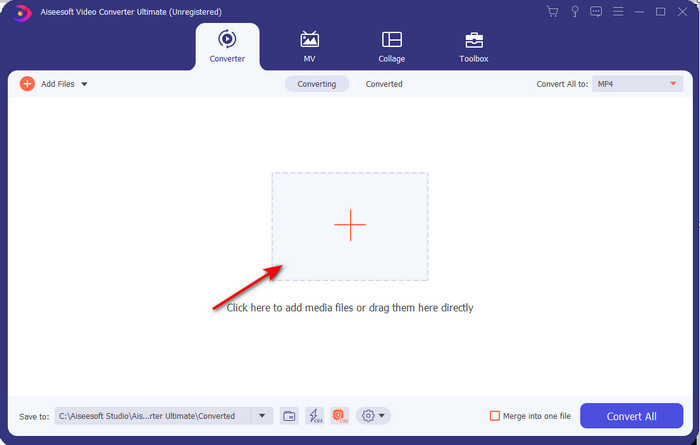
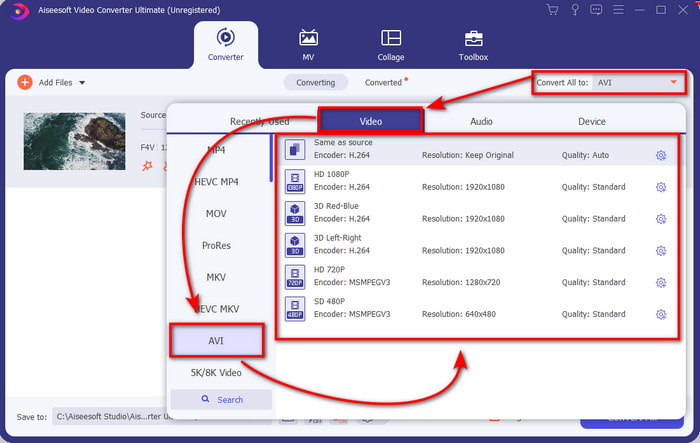
Paso 3. Después de insertar el archivo, haz clic en Convert All to en la parte superior derecha de la interfaz y elige el formato AVI.
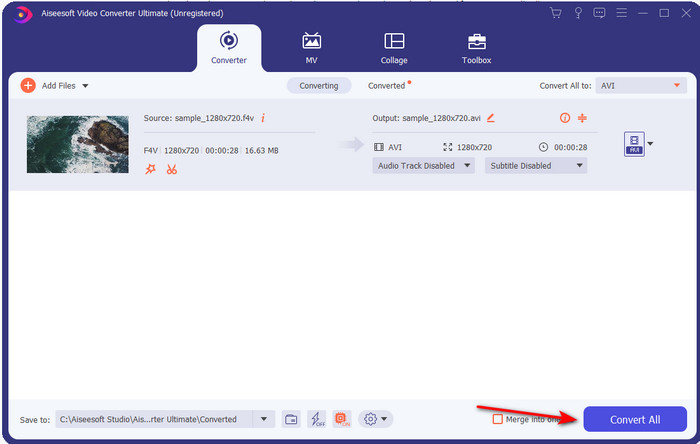
Paso 4. Ahora, para iniciar el proceso de conversión, haz clic en Convert All. Espera varios minutos para convertir tu archivo de F4V a AVI.
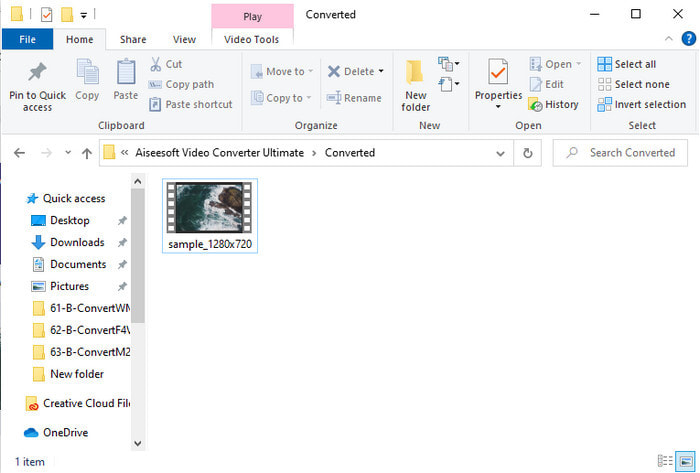
Paso 5. Se abrirá automáticamente una carpeta en tu ordenador con el archivo .f4v convertido que acabas de crear aquí. Haz clic en el archivo de vídeo para ver en tu ordenador el vídeo que antes no se podía reproducir, o transfiérelo a tu móvil si lo prefieres.
Parte 2. Aprenda a convertir F4V a AVI en línea con los 3 convertidores web disponibles
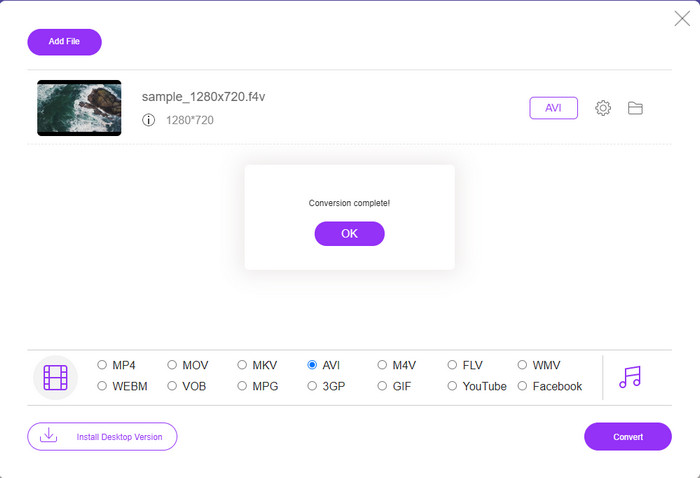
1. Convertidor de video gratuito FVC en línea
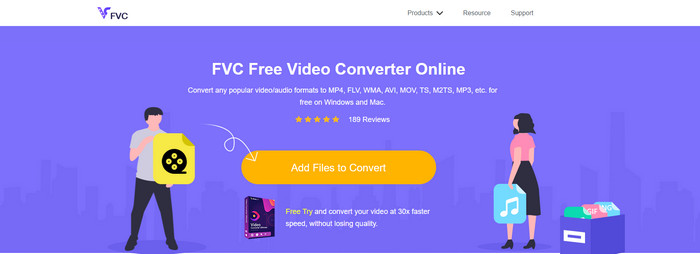
Si quieres saber cuál es el mejor conversor web, es posible que FVC Free Video Converter Online lo sea. Aquí encontrarás todas las funciones que te gustaría usar, ya que puedes cambiar la tasa de bits y los fps del vídeo para que tenga mayor calidad antes de convertirlo. Millones de usuarios de internet ya han alabado el rendimiento general de esta herramienta web. Además, esta herramienta online admite una gama media de formatos entre los que puedes elegir y subir. Sin embargo, no te permite mejorar el aspecto del vídeo tanto como lo hace la versión Ultimate. Aun así, si quieres probar y convertir F4V a formato AVI, sigue estos pasos.
Paso 1. Haz clic en este enlace para ir a FVC Free Video Converter Online.
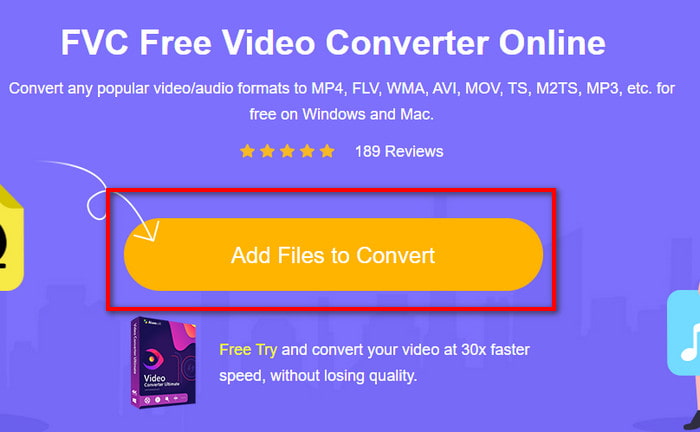
Paso 2. Luego pulsa Add Files to Convert para iniciar la herramienta y selecciona en la carpeta el archivo que quieres convertir a un nuevo formato haciendo clic en Open.
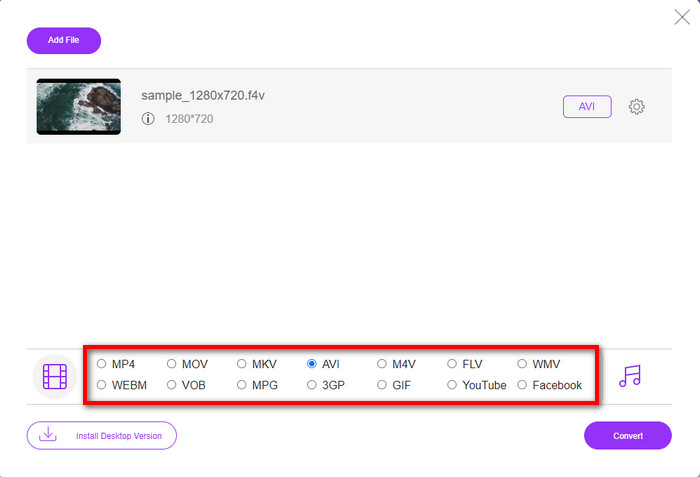
Paso 3. Una vez que el archivo esté cargado, elige el formato AVI en la parte inferior entre los formatos disponibles a los que lo quieres convertir.
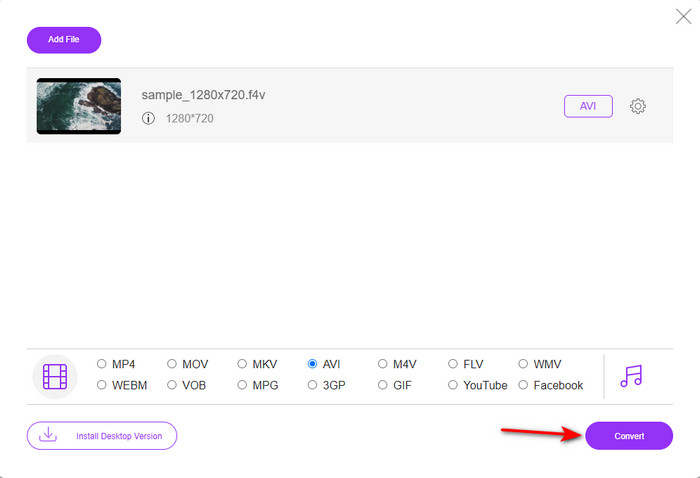
Paso 4. Después de seleccionar el formato AVI, es el momento de convertirlo haciendo clic en el botón Convert.
Paso 5. Espera varios minutos a que se descargue el archivo y, a continuación, aparecerá una carpeta con el archivo convertido.
2. Zamzar
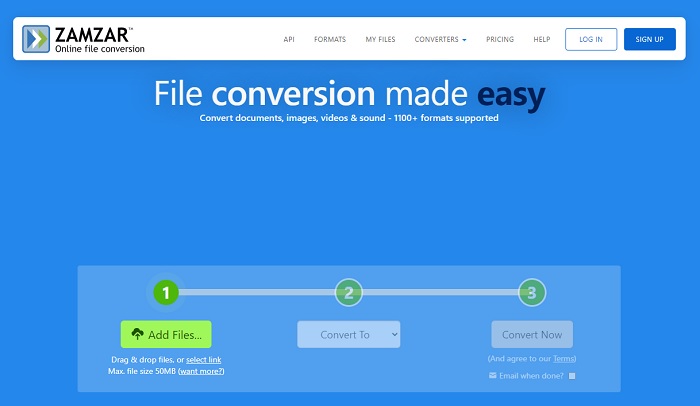
Otro conversor alternativo que puedes usar online es Zamzar. Como cualquier otro conversor, esta herramienta necesita conexión a internet para poder usarse o acceder a ella. Todas las herramientas web presentadas aquí necesitan internet para llevar a cabo la conversión. Dado que muchos usuarios la utilizan, Zamzar se ha hecho popular porque admite muchos formatos entre los que puedes elegir y usar. Además, es gratuita, aunque tiene una limitación en el tamaño de archivo que puede convertir. Así que, si tu archivo .f4v pesa más de 50 MB, no podrás convertirlo aquí, tal y como se especifica a continuación. Y si tu archivo es menor que eso, puedes intentar usarla para convertir F4V a AVI online siguiendo el procedimiento que aparece abajo.
Paso 1. Abre tu navegador web y busca Zamzar.
Paso 2. Pulsa Add Files y localiza el archivo que quieres convertir. Luego, elige el formato AVI en Convert to y, después de eso, haz clic en Convert.
Paso 3. Espera a que finalice el proceso; luego aparecerá una nueva interfaz y haz clic en Download para guardar el archivo.
3. Convertir archivos
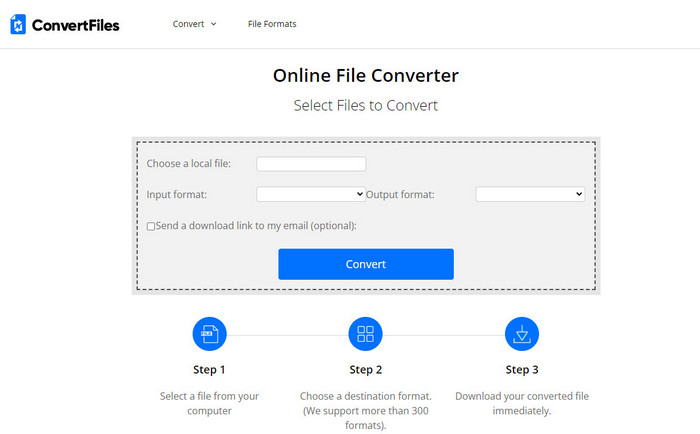
Si quieres un proceso de conversión más sencillo que solo lleve unos minutos, prueba a usar ConvertFiles. La herramienta ofrece un buen rendimiento durante la conversión y también después. Pero los anuncios perjudican bastante esta herramienta porque hay muchos en la interfaz del sitio. Además, el proceso tarda más en comparación con otros conversores en línea y de escritorio. El tamaño de archivo que puedes subir aquí es mucho mayor que en Zamzar. Así que, si quieres usar esta herramienta para convertir el archivo F4V a AVI, sigue estos pasos.
Paso 1. Ve a tu navegador web y busca ConvertFiles, luego ábrelo.
Paso 2. Haz clic en Choose a Local File para abrir la carpeta y localizar el archivo y, en Output Format, haz clic en AVI. Luego haz clic en Convert para iniciar la conversión.
Paso 3. Después de la conversión, haz clic en la URL resaltada en azul que te llevará a una nueva página web. Haz clic en ese enlace para descargar el formato convertido.
Parte 3. ¿Qué formato es mejor? F4V frente a AVI
Bueno, F4V y AVI hacen su trabajo como contenedor en el mejor de los casos. Sin embargo, hay muchos de estos formatos en común y su propósito no es el mismo. Por ejemplo, si desea almacenar un video de alta calidad en un archivo de tamaño pequeño y mantener y proteger los datos de video DRM MPEG-4, F4V es la mejor opción. Pero suponga que desea almacenar un video de alta calidad que admita la reproducción multimedia sincronizada. En ese caso, debes elegir el formato AVI porque tiene un contenedor diferente tanto para audio como para video. A pesar de eso, el tamaño del archivo AVI es demasiado para muchos dispositivos e incluso computadoras de escritorio porque no está comprimido.
Parte 4. Preguntas frecuentes sobre la conversión de F4V a AVI
¿La conversión de F4V reduce la resolución después de la conversión?
La resolución del video debe conservar su calidad original incluso después de convertirlo a un nuevo formato. En algunos casos, muchos usuarios experimentan que la calidad de su F4V ha disminuido. Una de las razones debe ser que la tasa de calidad que configuraste es baja o que la herramienta que usas no es compatible con videos de 1080 o 4k.
¿Por qué no se puede reproducir F4V en mi reproductor multimedia?
Este formato puede reproducirse en varios reproductores multimedia, pero no todos los reproductores admiten este formato. Por lo tanto, si quieres ver el vídeo en este formato, la mejor opción es convertirlo a un nuevo formato o buscar un reproductor multimedia de terceros para ver tus vídeos F4V.
¿Necesito comprimir F4V para reducir su tamaño?
El tamaño de archivo de F4V no es tan grande en comparación con el formato AVI. En cualquier caso, si intentas comprimir este contenedor de archivo, existe la posibilidad de que la calidad del vídeo disminuya. Aquí puedes aprender cómo comprimir tus vídeos F4V.
Conclusión
Al finalizar este artículo, ahora tenemos una idea de qué es F4V y por qué necesita convertirlo. Todo el software en línea y fuera de línea mencionado en este artículo funciona bien. Aunque todas las herramientas son excelentes, FVC Video Converter Ultimate aún se destaca entre el resto. Debido a que este software funciona bien, incluso si no tiene una conexión a Internet, y esta herramienta puede finalizar el proceso de conversión en un abrir y cerrar de ojos. Entonces, si desea experimentar la conversión fenomenal de la que estamos hablando, descárguelo ahora.
-
 Cómo convertir TS a AVI / MKV / MOV / WMV en línea y gratis en Win / Mac
 ¿Quiere convertir archivos TS a AVI / MKV / MOV / WMV rápidamente? Este artículo muestra convertidores de video en línea y fuera de línea con una guía completa. Tal vez puedas obtener el mejor conversor TS gratuito aquí.
-
 [Gratis y en línea] 7 formas de convertir MTS a AVI en una computadora Mac/Windows
 ¿Cómo convertir MTS a AVI con facilidad? En esta guía, encontrará 7 formas fáciles y gratuitas de convertir archivos MTS a AVI en Windows o Mac sin pérdida de calidad.
-
 Tutorial para convertir archivos MP4 a AVI con 7 convertidores de video gratuitos
 ¿Quiere obtener todas las formas gratuitas de convertir AVI a video MP4? No debes perderte este artículo. Aquí hay 7 formas de convertir archivos AVI a MP4 gratis en Windows, Mac, iPhone, Android y en línea.
