


 Video Converter Ultimate
 Grabador de pantalla
 Reparación de vídeo
 Convierta MOD a cualquier formato como MP4, MOV, AVI, MP3, etc.
7 convertidores MOD gratuitos disponibles en su plataforma para convertir el formato MOD fácilmente
¿Necesitas cambiar tu archivo MOD? Si es así, ya no tienes que preocuparte ni pasarte horas probando diferentes conversores. No te estreses, porque hoy te lo ponemos muy fácil. A continuación te mostraremos las mejores formas de convertir MOD a MP4, MOV, MPEG2, DVD o a cualquier formato de vídeo que quieras, con pasos que te ayudarán a seguir el proceso.

Parte 1. Los 7 principales convertidores MOD gratuitos para convertir archivos MOD en línea y sin conexión
1. FVC Video Converter Ultimate: el mejor convertidor de MOD en Windows y Mac
El primero de nuestra lista es el conversor de MOD más utilizado en diferentes plataformas, FVC Video Converter Ultimate. Este conversor ofrece a sus usuarios un proceso de conversión ultraacelerado y, como siempre, no les decepciona. Aunque la conversión con esta herramienta es rápida, la calidad no cambia, porque se mantiene protegida mientras se altera el formato.
¿Qué es más que su proceso a la velocidad del rayo? También es compatible con los formatos masivos que puede importar o exportar, como MOD, MP4, MOV, MKV, FLV, WMV y muchos más. Debido al formato admitido, los clientes se encariñaron con la herramienta y muchos de ellos la recomendaron a otros usuarios que necesitan convertir su formato. Entonces, si necesita ayuda para convertir MOD a MP4 o cualquier formato de video que desee, esta herramienta es una excelente ayuda siguiendo los pasos indicados a continuación.
Paso 1. Para descargar el conversor en tu ordenador, haz clic en el botón de descarga de abajo y elige la plataforma que estés utilizando. Después, sigue rápidamente el proceso de instalación y ejecuta el programa. Si eres nuevo en esto de convertir, no tengas miedo, porque los pasos que damos aquí te garantizarán que conviertes correctamente el archivo MOD.
Descarga gratuitaPara Windows 7 o posteriorDescarga segura
Descarga gratuitaPara macOS 10.7 o posteriorDescarga segura
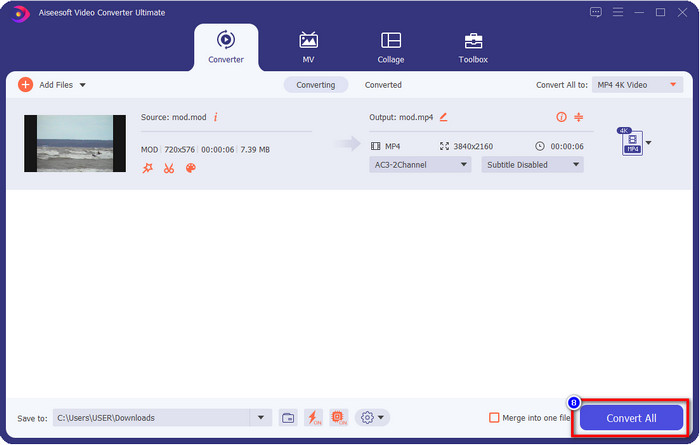
Paso 2. Sube el archivo MOD haciendo clic en Añadir archivos, o puedes pulsar el gran botón + en el centro de la interfaz. Después aparecerá una carpeta del ordenador en tu pantalla; en este momento, busca y haz clic en el archivo MOD y pulsa Abrir para pasar al siguiente paso.
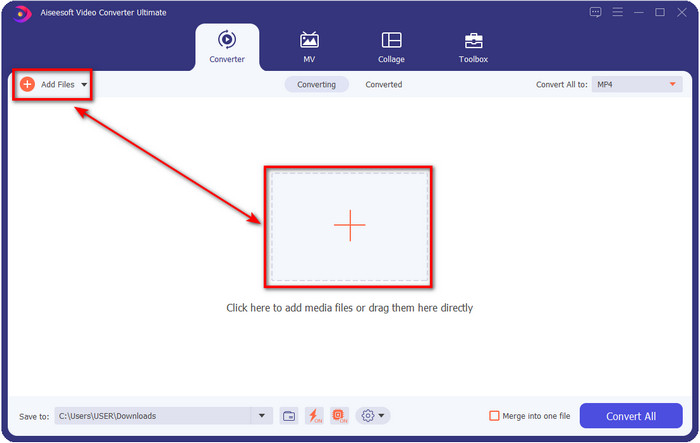
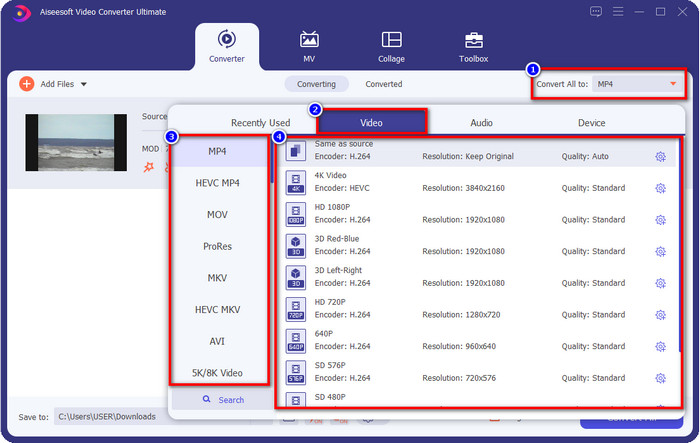
Paso 3. Para cambiar el formato a MP4, MOV, MKV o cualquier otro formato que necesites, haz clic en Convertir todo a y elige.
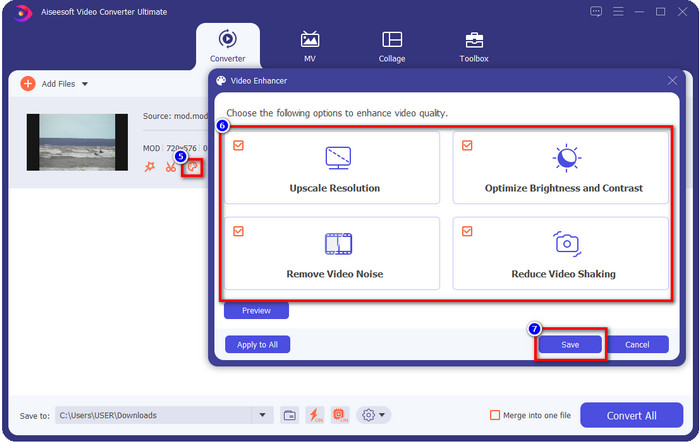
Opcional. Una de las funciones fantásticas que ofrece esta herramienta es el mejorador. Si haces clic en la bandeja de pintura, aparecerá una nueva miniinterfaz; ahora podrás hacer ajustes importantes en tu vídeo marcando las casillas. Haz clic en Guardar para aplicar los cambios que hayas hecho en tu vídeo MOD.
Paso 4. Después de todos los procedimientos, es el momento de convertir MOD haciendo clic en Convertir todo. Tan fácil como 1-2-3, ya has aprendido a convertir el formato MOD a un formato nuevo.
Pros
- Convierta MOD a MP4, MOV, MKV, FLV, AVI o en más de 200 formatos disponibles de manera efectiva.
- Las funciones de edición avanzadas incluyen recortar, cortar, recortar y más.
- Es seguro y libre de malware para descargar.
- Disponible para descargar en todas las plataformas de escritorio como Windows y Mac.
Contras
- Para aprovechar todas las funciones avanzadas, deberá comprar la herramienta.
2. Convertidor TOD gratuito de iMovieSoft
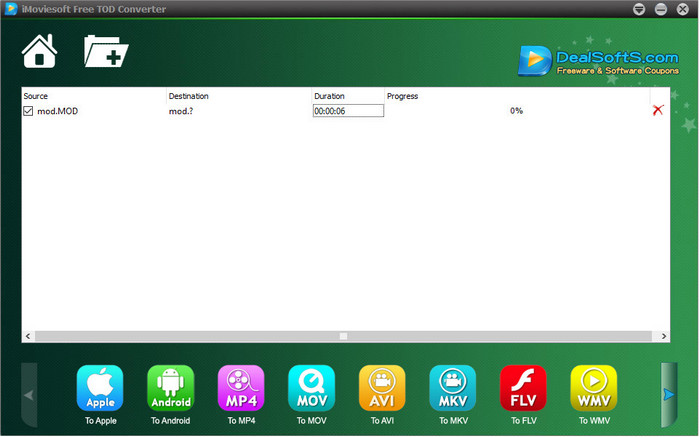
Otro conversor que puedes descargar en tu ordenador es iMoiveSoft Free TOD Converter. Con él puedes convertir fácilmente tu formato MOD a los formatos disponibles. Sin embargo, no admite demasiados formatos, aunque sí están los más conocidos. Además, la página web principal de la herramienta no tiene conexión segura; aunque aparece un aviso, lo hemos descargado en nuestro sistema para poder ofrecerte los pasos para convertir archivos MOD a MOV, MP4, AVI, etc.
Paso 1. Descarga el conversor en tu ordenador y ábrelo.
Paso 2. Haz clic en la Carpeta y busca los archivos MOD que quieras añadir.
Paso 3. Pulsa el formato que aparece abajo y haz clic en Convert.
Pros
- Se puede descargar gratis en Windows y Mac.
- Fácil de usar.
- Las funciones básicas de edición están disponibles.
Contras
- El sitio web principal no es seguro para la conexión.
- Tiene una opción de formato que puede elegir.
- La interfaz de usuario necesita mejoras.
3. Convertidor iOrgSoft
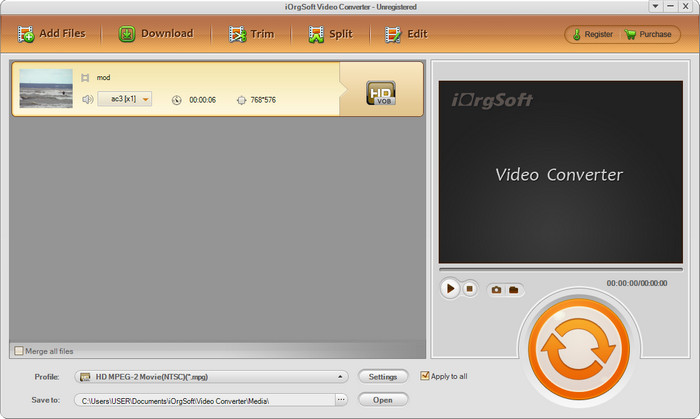
iOrgSoft Converter es una opción si necesitas convertir MOD a MPEG2 fácilmente. La página web principal de este conversor también tiene una conexión no protegida, igual que iMovieSoft. También puedes usar un enlace externo para descargar el vídeo aquí. Aunque la herramienta ofrece algunas opciones, la interfaz de usuario tiene menos prioridad, lo que significa que no esperes una IU muy atractiva. Además, se producen cierres inesperados y fallos cuando estás a punto de convertir.
Paso 1. Busca la página principal del conversor y descárgalo desde allí.
Paso 2. Abre el conversor, haz clic en Add Files para insertar archivos MOD, haz clic en la bandeja de formatos y elige el formato que quieras.
Paso 3. Pulsa el botón de convertir para iniciar la conversión.
Pros
- Admite más formatos que iMovieSoft.
- Simple de usar y fácil de entender.
- Descárgalo en Windows y Mac.
Contras
- Conexión no segura a su sitio web principal.
- La interfaz de usuario es terrible.
4. FFmpeg
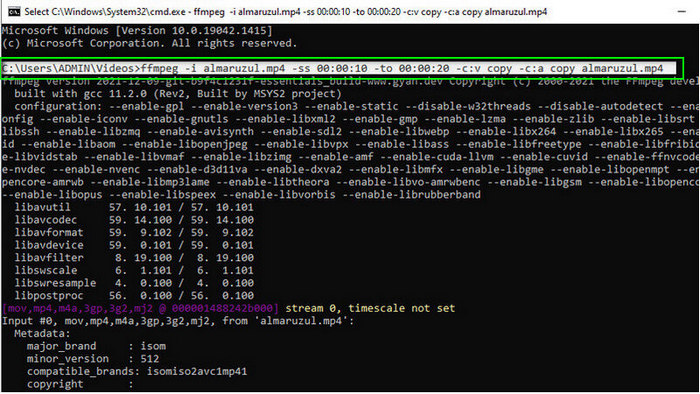
Si necesitas un conversor gratuito de MOD a MOV, entonces FFmpeg está aquí para ayudarte. A diferencia de otros conversores de esta lista, utiliza una interfaz basada en CLI para comunicarse con la herramienta mediante texto. Aunque no nos resulte tan familiar, algunos usuarios siguen utilizándolo como conversor. Así que, si este conversor ha llamado tu atención, sigue los pasos de abajo.
Paso 1. Descarga FFmpeg y ejecuta el archivo exe.
Paso 2. Abre el CMD; con él ya podrás comunicarte con la herramienta.
Paso 3. Busca la ubicación del archivo usando la ventana de comandos. Después, copia y pega este texto, ffmpeg -i input.mod -vn -ar 44100 -ac 2 -b:a 192k output.mp4 para obtener un MP4. También puedes cambiar el formato a MOV, MKV, AVI y otros. Para iniciar el proceso, pulsa Enter en el teclado.
Pros
- Convertidor de video único disponible en la mayoría de las plataformas.
- Seguro de usar.
- Es confiable en la conversión de su formato.
Contras
- No es muy fácil de usar.
- No es la mejor opción para principiantes o principiantes para convertir formato.
5. CloudConvertir
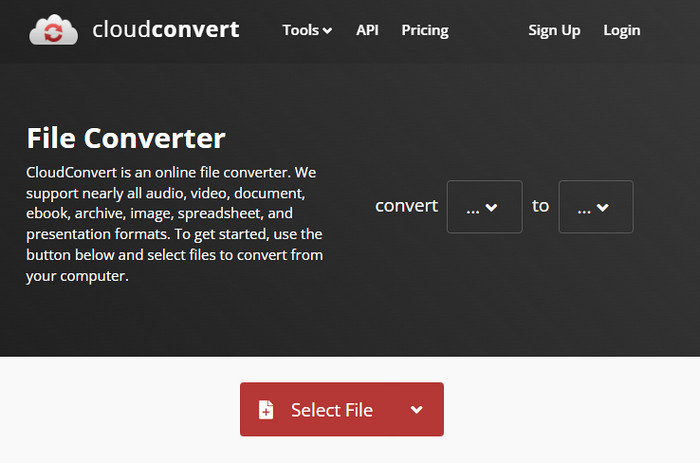
¿No quieres descargar un conversor en tu ordenador? En ese caso, aún puedes convertir el formato MOD con CloudConvert en línea. Esta herramienta online ofrece a sus usuarios un proceso de conversión sencillo pero eficaz. También admite la conversión de otros tipos de archivo como PDF, archivos comprimidos, libros electrónicos y otros a un formato nuevo.
Paso 1. Busca CloudConvert en tu navegador favorito.
Paso 2. Haz clic en Select File y sube el archivo MOD. Pulsa el botón desplegable y elige tu formato ideal. Después, haz clic en Convert.
Paso 3. Tras la carga, haz clic en Download para guardar el nuevo formato de archivo en tu disco.
Pros
- No es necesario descargar la herramienta.
- Herramienta web gratuita en línea.
- Fácil de usar.
Contras
- Dependiente de la red.
- El curso del proceso dependerá de la velocidad de tu internet.
6. Convertidor365
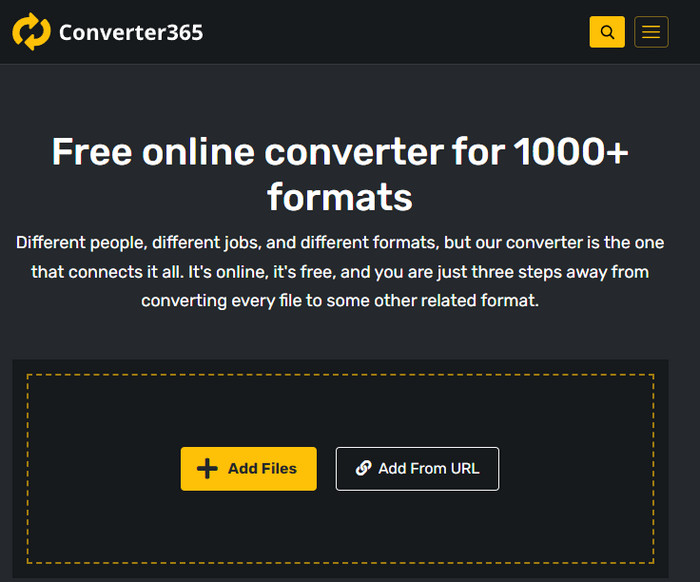
Otro conversor online gratuito de MOD a MP4 que puedes utilizar es Converter365. Es una de las herramientas online que podemos decir que tiene una interfaz con un aire elegante. Por eso, usar esta herramienta da una sensación profesional; sin embargo, tuvimos problemas al convertir archivos de vídeo aquí porque se produjeron fallos. Aun así, si necesitas convertir tu archivo MOD fácilmente, esto podría ayudarte.
Paso 1. Abre tu navegador y busca Converter365.
Paso 2. Haz clic en Add Files y luego busca el archivo .mod. Cuando lo encuentres, elige el formato haciendo clic en el botón desplegable.
Paso 3. Pulsa Start Conversion y comenzará la conversión.
Pros
- El convertidor es accesible a través de la web.
- Proporciona una conversión simple pero efectiva.
- La interfaz de usuario se ve profesional.
Contras
- Se necesita una conexión a Internet para su uso.
- A veces ocurren errores al convertir el formato.
7. Zamzar
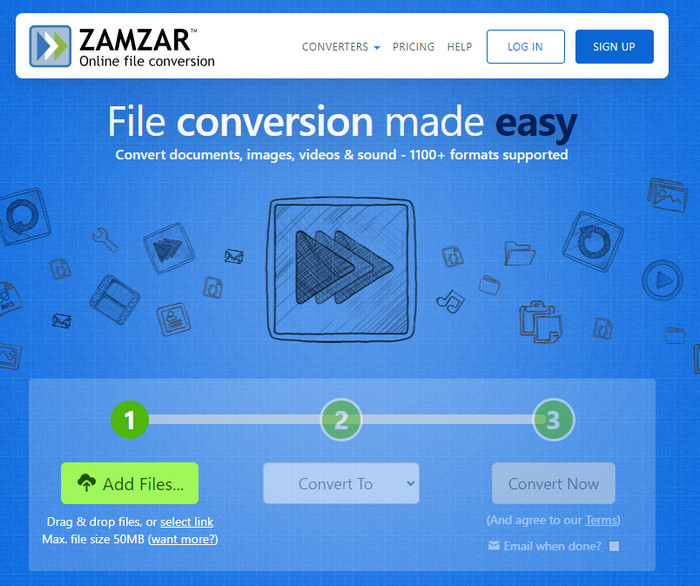
Si necesitas un conversor MOD online fácil y práctico, entonces Zamzar te será de ayuda. Esta herramienta ofrece un proceso directo para convertir tus archivos .mod. Además, es sin duda uno de los conversores más seguros disponibles en la web. Así que, si quieres probar esta herramienta, puedes seguir los pasos de abajo.
Paso 1. Accede a Zamzar buscándolo en tu navegador favorito.
Paso 2. Pulsa Add File para insertar el archivo MOD que necesitas convertir. Haz clic en Convert To y elige el formato que necesites.
Paso 3. Haz clic en Convert Now y espera el proceso. Después, pulsa Download para guardarlo en el disco de tu ordenador.
Pros
- Una de las mejores opciones si necesitas convertir un formato.
- Proporciona un proceso sencillo de conversión.
- Disponible en todos los navegadores web.
Contras
- Dependiente de Internet, sin Internet, no puedes usarlo.
- Admite menos opciones de formato.
Relacionado:
Parte 2. Preguntas frecuentes sobre los convertidores MOD
¿Qué es MOD?
MOD es un formato bidireccional que podría usarse como audio para aplicaciones estándar de seguimiento de música digital. Contiene patrones de notas, números de instrumentos y controladores de mensajes con diferentes pistas para sonidos de muestra. Como se menciona, es bidireccional; también puede usarlo como formato de video para videocámaras digitales fabricadas por Panasonic y JVC. Aunque este formato tiene soporte de marcas conocidas, está un poco desactualizado si lo comparamos con el otro contenedor de video.
¿Los reproductores multimedia admiten la extensión .mod?
No todos los reproductores multimedia admiten este formato, especialmente si su reproductor no tiene un códec de video MPEG-2 en su interior. Es un gran problema para todos; puede descargar una extensión de video MPEG-2 si la necesita para reproducir. Pero también puede convertir el archivo a un formato compatible en sus plataformas, esta es hasta ahora la forma más fácil y segura. Entonces, si necesita convertir su archivo MOD, puede usar FVC Video Converter Ultimate en su lugar. ¿No tienes idea de la herramienta? En ese caso, lea los detalles anteriores.
¿El MOD es compatible con el reproductor de DVD?
No es compatible con el reproductor de DVD; sin embargo, puede grabarlo en un DVD para que sea compatible con el reproductor de DVD.
Conclusión
Estas siete herramientas son la mejor opción si necesitas un conversor de MOD por su rendimiento y eficiencia. Probamos cuidadosamente todo el software y descubrimos que FVC Video Converter Ultimate ofrece un resultado y unas funciones extraordinarias que las demás herramientas no pueden superar. Así que, si quieres experimentar todo el potencial de la herramienta, primero puedes descargarla en tu ordenador y usarla como quieras.

FVC Video Converter Ultimate
2,999,368+ Descargas- Convierta MOD a cualquier formato popular.
- Mejore la calidad del video de forma natural
- Haga un collage de video sin problemas con salida de alta calidad
- Edite videos como un profesional, incluyendo recortar, rotar, agregar filtros, etc.
Descarga gratuitaPara Windows 7 o posteriorDescarga segura
Descarga gratuitaPara macOS 10.7 o posteriorDescarga segura
-
 2 Ultimate MPG Converters para convertir MPG a WMV gratis
 ¿Quieres convertir MPG a WMV gratis? En ese caso, tiene suerte porque descubrimos que hay dos herramientas que puede usar para convertir sus archivos MPG.
-
 Cómo cambiar iTunes M4V a MKV en Mac y Windows La forma más rápida
 Si necesita convertir M4V a MKV en Mac, debe leer este artículo. A medida que proporcionamos datos sobre los convertidores que lo ayudarán con su proceso de conversión.
-
 Los 5 principales convertidores gratuitos de MPEG a MKV disponibles en todas las plataformas
 ¿Cuáles son los convertidores de MPEG a MKV disponibles? ¿Necesita saber más sobre los convertidores MPEG disponibles en su plataforma? Entonces este articulo es para usted.
