


 Video Converter Ultimate
 Grabador de pantalla
 Reparación de vídeo
 Descarga segura
Trucos Rápidos para Convertir M4V a 3GP Fácilmente
¿Quieres convertir M4V a 3GP? M4V es un formato contenedor de vídeo creado exclusivamente para productos de Apple. Así que, si tienes tu archivo de vídeo M4V y quieres reproducirlo en tus dispositivos compatibles con 3G, la mejor solución es convertirlo. Esta publicación te mostrará el proceso sencillo para convertir tu archivo M4V a formato 3GP de forma rápida y sin esfuerzo usando tus dispositivos. Así que lee este artículo y adquiere todos los conocimientos necesarios.

Parte 1: Excelente software para convertir M4V a 3GP
El mejor conversor sin conexión para ti es Video Converter Ultimate. Esta práctica aplicación te permite convertir M4V a 3GP fácil e inmediatamente. Admite más de 1000 formatos, como MP4, FLV, MTS, DIVX, XVID, VOB, MOV, MKV, etc. Con la ayuda de este software de escritorio, puedes convertir archivos hasta 30 veces más rápido que con otros conversores. Además, tiene una interfaz sencilla y métodos fáciles para convertir M4V a 3GP, lo que resulta muy cómodo para todo tipo de usuarios.
Además, Video Converter Ultimate está disponible en casi todas las plataformas de medios, como Windows y Mac. Además, tiene otra característica que puedes disfrutar. Puede seleccionar las funciones de Toolbox si desea mejorar su video M4V antes o después de la conversión. Puede mejorar su video de muchas maneras. Si desea cambiar la velocidad de su video, puede hacer clic en la función de controlador de velocidad de video. Si está interesado en corregir el color de su video, puede usar la función Corrección de color.
Funciones
◆ Convierta varios formatos de archivos de video, como M4V, MP4, FLV, AVI, TS, SWF, etc.
◆ Excelente para crear videos musicales y ofrece numerosos temas.
◆ Ofrece una caja de herramientas para mejorar el video.
◆ Está disponible Hacer un collage.
◆ Convierta formatos de imagen como JPG, PNG, WEBP, BMP, TIF y más.
◆ Combine numerosos videoclips en una sola pieza.
◆ Capaz de ajustar la velocidad de video de un video.
Pros
- Disponible para todos los usuarios.
- Confiable en la personalización de video 3D a partir de 2D.
- Accesible en casi todas las plataformas de medios, como Mac y Windows.
- La velocidad de conversión es 30 veces más rápida.
- Mejore el video de varias maneras.
- Admite más de 1000 formatos de archivo.
Contras
- Para disfrutar de más funciones excelentes, compre la suscripción.
Siga estos sencillos pasos a continuación para convertir M4V a 3GP al instante.
Paso 1: Descarga Video Converter Ultimate en tu Windows o Mac. Después, procede con la instalación y ejecuta la aplicación.
Descarga gratuitaPara Windows 7 o posteriorDescarga segura
Descarga gratuitaPara macOS 10.7 o posteriorDescarga segura
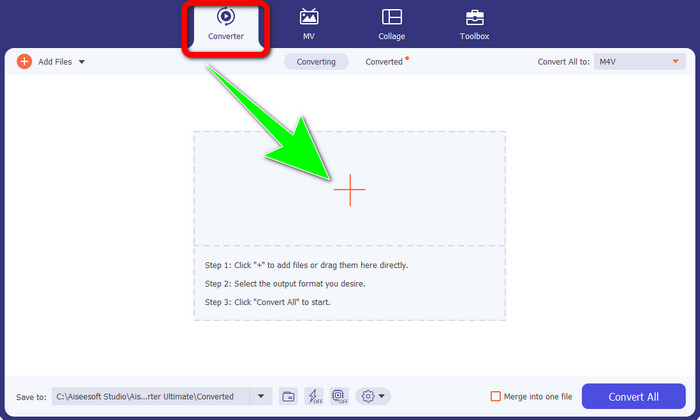
Paso 2: Una vez que inicies el programa en tu Windows o Mac, ve al panel Converter y haz clic en el icono + para insertar el archivo M4V que quieres convertir.
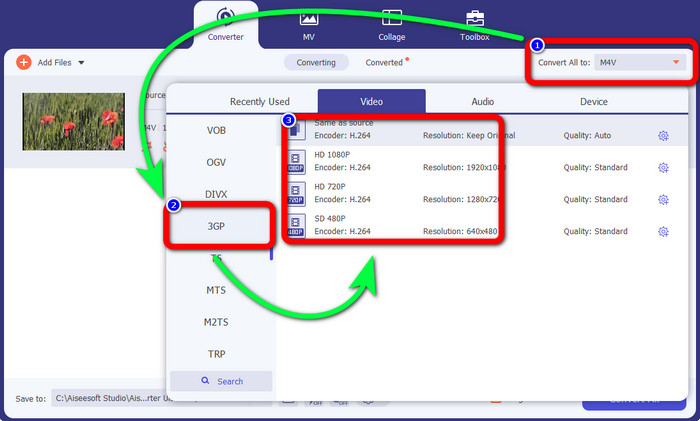
Paso 3: Cuando ya hayas añadido tu archivo M4V, haz clic en el botón Convert all to. Aparecerán las opciones de formato y selecciona el formato de archivo 3GP. También puedes elegir la resolución que prefieras.
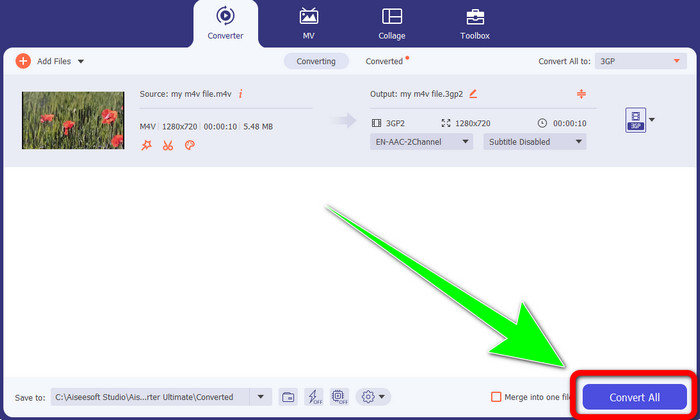
Paso 4: Por último, cuando termines de seleccionar el formato de archivo 3GP, haz clic en el botón Convert All y guarda el resultado final. Esta aplicación ofrece conversión por lotes, así que también puedes añadir más archivos y convertirlos todos a la vez.
Parte 2: Herramienta en línea para convertir M4V a 3GP
Después de conocer el mejor conversor sin conexión, podemos pasar al mejor conversor en línea para ti. Esta aplicación en línea es FVC Free Video Converter Online. Esta herramienta te permite convertir M4V a 3GP sin esfuerzo en solo unos clics. Además, admite varios formatos de vídeo y audio, como MP4, WMA, MOV, FLV, TS, MP3, etc. Asimismo, esta herramienta en línea es gratuita y puedes usarla tanto en Windows como en Mac. Si quieres convertir tu archivo M4V a formato 3GP, sigue estas instrucciones detalladas a continuación.
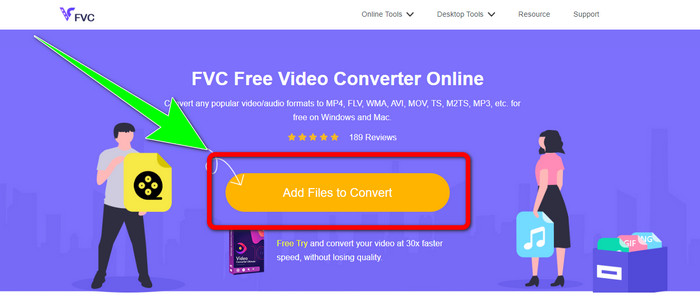
Paso 1: Ve al sitio web de FVC Free Video Converter Online. Haz clic en el botón Add Files to Convert y añade tu archivo M4V.
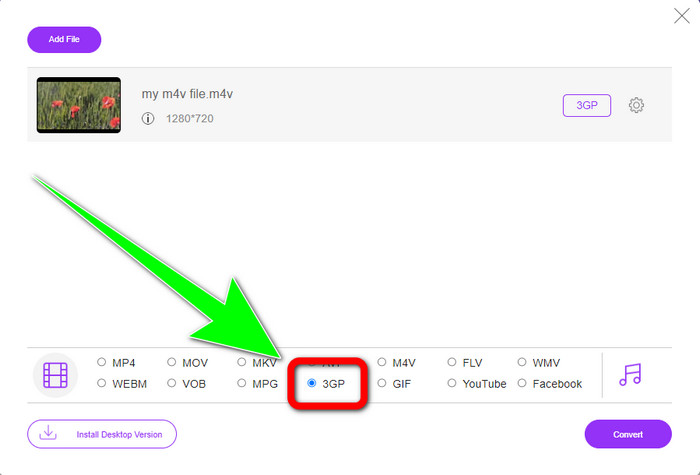
Paso 2: Haz clic en el formato de archivo 3GP entre las opciones de formato.
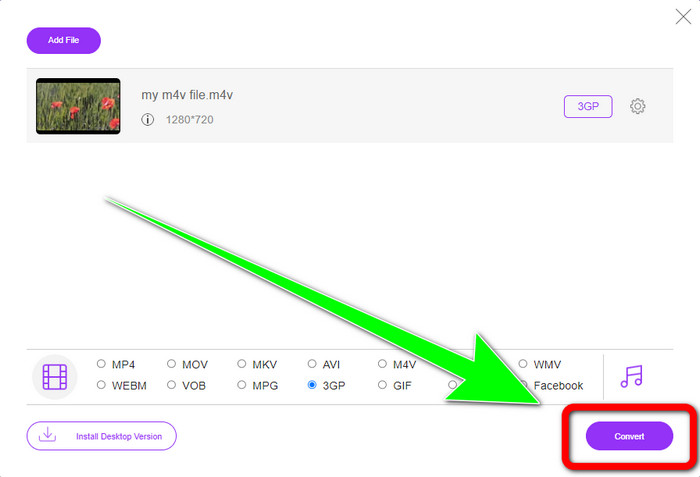
Paso 3: Después de seleccionar el formato de archivo 3GP, ya puedes hacer clic en el botón Convert para convertir tu archivo M4V a formato 3GP. Luego, espera a que finalice el proceso de conversión y guarda tu vídeo.
Parte 3: Qué convertidor de M4V a 3GP elegir
¿Quieres saber cuál es la mejor aplicación entre las dos? Sinceramente, ambas son excelentes. Si tienes pensado descargar un conversor de vídeo sobresaliente, la aplicación más recomendada que puedes utilizar es Video Converter Ultimate. Dispone de un proceso de conversión por lotes que te permite convertir múltiples archivos en una sola operación. También ofrece una interfaz intuitiva adecuada para usuarios sin experiencia. Además de convertir, cuenta con más funciones que puedes disfrutar, como editar tu vídeo, crear collages, videoclips musicales y mucho más. Por otro lado, si prefieres usar un conversor en línea, utiliza FVC Free Video Converter Online. Este software también ofrece conversión por lotes. Es perfecto para principiantes. No tienes que pagar nada porque este conversor es completamente gratuito. Con estos detalles, podemos decir que ambos conversores son excelentes y fiables.
Parte 4: Tabla de comparación entre M4V y 3GP
| M4V | 3GP | |
| Tipo de archivo | Vídeo MPEG4 | Formato multimedia 3GP |
| Descripción | M4V es un tipo de contenedor de video que se usa para almacenar información de audio y video para archivos de iTunes. Apple FairPlay DRM puede usarse para proteger archivos de este tipo de visualización y copia no autorizadas; en este caso, los archivos de audio o video deben comprarse en la tienda de iTunes. Debido a que el formato se basa en la estructura MPEG-4, los reproductores actuales casi siempre pueden ver archivos desprotegidos. | En 1998 se creó un contenedor multimedia conocido como 3GP para teléfonos basados en GSM (Global System for Mobile Communications). Es mejor para teléfonos celulares porque el contenedor usa pocos datos, ancho de banda y almacenamiento. Para archivos enviados a través de MMS, sirve como un contenedor estándar. |
| Desarrollado por | Apple Inc. | Proyecto de asociación de tercera generación |
| Pros | Adjunto a la protección de Apple. | Compatible con casi dispositivos, |
| Contras | Solo compatible con casi todos los dispositivos y programas de Apple | Almacena video en baja resolución. |
Parte 5: Preguntas frecuentes sobre la conversión de M4V a 3GP
¿Cómo convierto M4V a 3GP sin perder calidad?
Si deseas convertir tu archivo M4V a formato 3GP sin perder calidad, entonces debes usar Video Converter Ultimate. Esta aplicación se asegurará de que la calidad de tus vídeos no cambie en absoluto. También puedes utilizar esta herramienta para convertir M4V a DIVX.
¿Los archivos M4V son compatibles con otros dispositivos/sistemas?
Por supuesto que sí. Puedes utilizar una gran variedad de reproductores M4V para reproducir este tipo de vídeo en diferentes dispositivos. Los reproductores M4V ofrecen grandes ventajas, como la compatibilidad con varios sistemas como Android, Linux, iOS, Windows y Mac.
¿Es M4V más pequeño que MP4?
El tamaño depende de lo que hay dentro. Como códec de audio y video, velocidad de fotogramas, resolución y más.
Conclusión
Estos son los métodos para convertir M4V a 3GP usando herramientas sin conexión y en línea. Si quieres convertir distintos formatos de archivo en tu Windows o Mac, entonces puedes usar Video Converter Ultimate. Además, si estás buscando una excelente herramienta en línea, entonces FVC Free Video Converter Online es la mejor opción.
-
 Cómo convertir DIVX a 3GP en Windows, Mac y en línea
 ¿Cómo convertir DIVX a 3GP? Si buscas una respuesta, lee este artículo. Le mostraremos excelentes procedimientos con la ayuda de diferentes convertidores.
-
 Las 4 mejores formas de convertir SWF a 3GP en Windows, Mac y en línea
 Estos son los métodos más útiles para convertir SWF a 3GP al instante. Además, esta publicación le mostrará algunas herramientas efectivas de Windows y en línea que puede usar.
-
 Encuentre los mejores y más simples métodos para convertir TS a 3GP
 Este artículo ofrecerá una increíble descarga gratuita de convertidor de TS a 3GP que puede probar en su dispositivo. Lea este artículo para descubrir más detalles esenciales que necesita.
