


 Video Converter Ultimate
 Grabador de pantalla
 Reparación de vídeo
Cómo convertir M4V a AVI gratis con los 3 mejores programas [en línea y fuera de línea]
Los usuarios de Apple ya conocen iTunes como su reproductor multimedia local para ver películas, música e incluso series de TV. De hecho, también utilizan uno de sus formatos predeterminados, que es M4V. Sin embargo, este formato no se puede reproducir en el reproductor local de Windows y algunos programas de terceros no admiten este formato. Pero no hace falta preocuparse, porque todavía puedes ver tus archivos M4V en otros dispositivos convirtiéndolos. Además, también puedes leer la comparación entre ambos. Así que ahora te enseñaremos cómo convertir M4V a AVI gratis en la siguiente lista.
Parte 1. Breve explicación de los formatos M4V y AVI
Así que ahora, echemos un vistazo a la diferencia entre los dos formatos mencionados en la introducción. A medida que avancemos a continuación, entenderemos los dos formatos, pero desde una perspectiva diferente. Y antes de dar la vuelta, ya sabes cuál es el mejor conversor gratuito de M4V a AVI. Diferenciemos los dos formatos primero leyendo a continuación.
M4V
◆ Este formato de archivo es propiedad de iTunes y está protegido por DRM que implementa cuestiones de derechos de autor.
◆ Se utiliza para codificar archivos multimedia que se utilizan para reproducir videos, audio, programas de televisión y películas.
◆ Almacenar y transferir archivos con este formato es mucho más fácil y rápido.
◆ Tiene casi la misma estructura que el formato MP4.
◆ Como este formato está protegido y limitado a dispositivos Apple, no es tan flexible con el otro reproductor multimedia para jugar.
AVI
◆ Formato conocido que se utiliza para reproducir y almacenar un archivo de audio y video detallado.
◆ Un contenedor de archivos para almacenar una reproducción continua.
◆ El tamaño del archivo es mucho mayor en comparación con el otro formato de archivo porque no está codificado.
◆ Es necesario utilizar un compresor o un códec para reducir el tamaño del archivo.
Parte 2. Aprenda las 3 formas de convertir M4V a AVI
1er camino. FVC Video Converter Ultimate
FVC Video Converter Ultimate es uno de los conversores de M4V a AVI más destacados que puedes descargar en tu PC o Mac. Esto se debe a sus funciones de alto nivel y a las herramientas avanzadas que ofrece, teniendo en cuenta la comodidad del usuario para evitar cualquier complicación durante la conversión. A diferencia de otros conversores, este software es muy diferente en muchos aspectos. Por ejemplo, admite una amplia gama de formatos, las funciones de edición se pueden aplicar con facilidad, en cuanto a rendimiento es más rápido y mejor, y así sucesivamente.
Aunque convertir aquí es gratis y no hay limitaciones, primero deberá comprarlo antes de usarlo, pero es muy barato. En total, veamos qué se necesita para convertir un formato a uno nuevo con este convertidor. Si desea saber cómo realizar la conversión de un archivo, siga los pasos sincrónicos a continuación.
Paso 1. Descarga primero el software en tu PC o Mac. Cuando termine el proceso de descarga, será el momento de instalarlo y realizar la configuración.
Descarga gratuitaPara Windows 7 o posteriorDescarga segura
Descarga gratuitaPara macOS 10.7 o posteriorDescarga segura
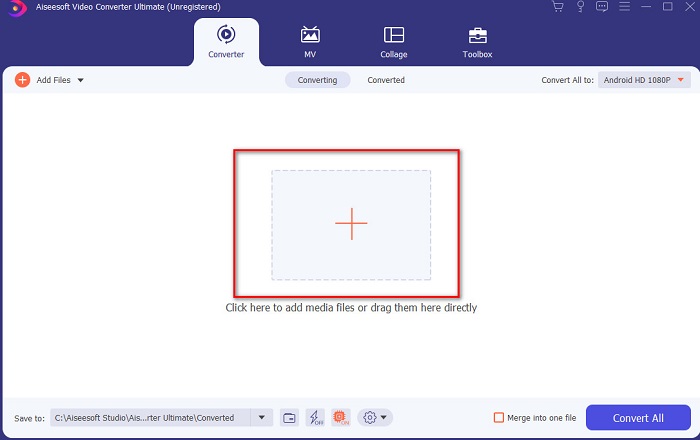
Paso 2. Inicia la herramienta y haz clic en el botón + en el centro de la interfaz; aparecerá una carpeta. Busca el archivo en ella, haz clic sobre él y pulsa Open para insertar el archivo M4V.
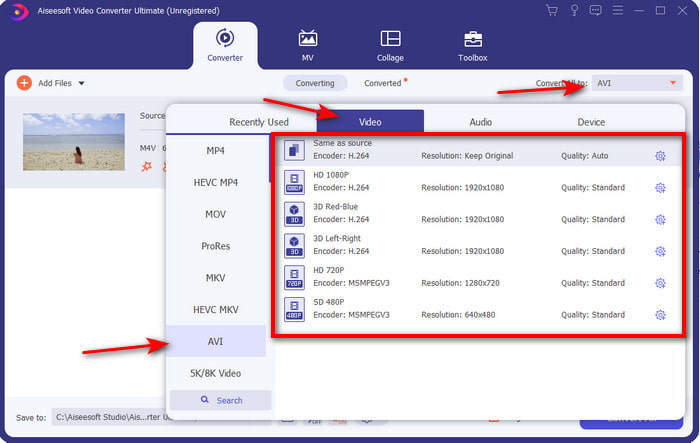
Paso 3. Antes de iniciar la conversión de M4V a AVI en Mac o PC, primero debes hacer clic en el botón desplegable y localizar el formato AVI.
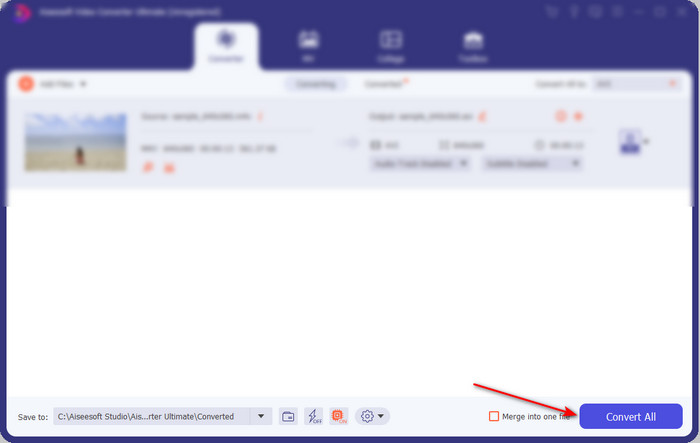
Paso 4. Después de seleccionar el formato, es el momento de convertirlo. En la parte inferior de la interfaz, haz clic en el botón Convert All.
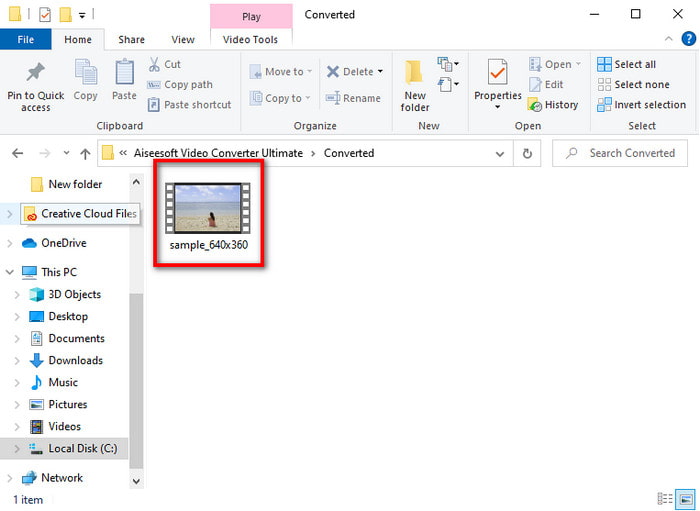
Paso 5. Espera unos segundos para que se lleve a cabo el proceso. Cuando termine, aparecerá una carpeta con el archivo convertido que has creado antes; haz clic en él para verlo de inmediato.
2nd Way. Convertidor de video gratuito FVC
Si no quieres comprar el software anterior, entonces la mejor opción es usar este conversor gratuito de M4V a AVI disponible en la web, el FVC Free Video Converter. Y si quieres conseguir una conversión de calidad similar a la de FVC Video Converter Ultimate, esta debería ser tu elección. Aunque esta herramienta ofrece una conversión adecuada, sigue siendo una herramienta web que solo admite un número reducido de formatos, no dispone de funciones de edición y es mucho más lenta al convertir que la herramienta de escritorio. Además, necesitarás conexión a Internet para poder usarla. Pero si lo que buscas es un conversor online, entonces es la opción adecuada. Ahora, sigue los pasos que se indican a continuación para saber cómo hacerlo.
Paso 1. Haz clic en este enlace para ir a la página principal del conversor FVC.
Paso 2. Si es la primera vez que lo usas, haz clic en Add Files to Convert para descargar el lanzador. Una vez descargado, vuelve a hacer clic para iniciarlo, selecciona el archivo en tu carpeta y haz clic en Open.
Descarga la versión de escritorio para convertir archivos por lotes.
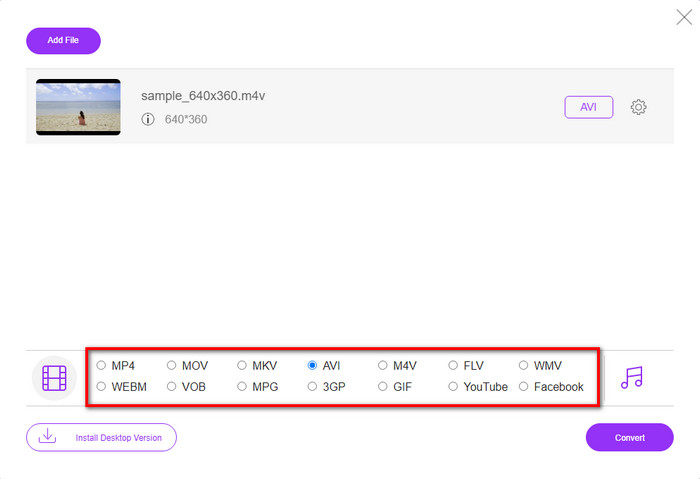
Paso 3. Elige el formato disponible en la parte inferior haciendo clic en él antes de realizar el proceso de conversión.
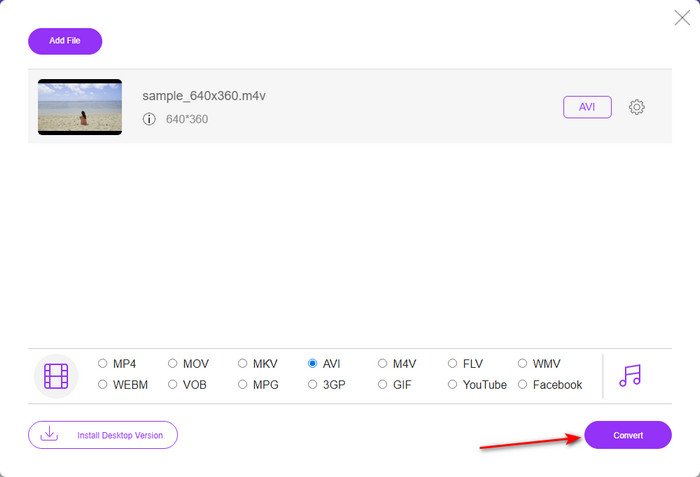
Paso 4. Después de seleccionar el formato, haz clic en Convert para continuar con el proceso de transformación del formato.
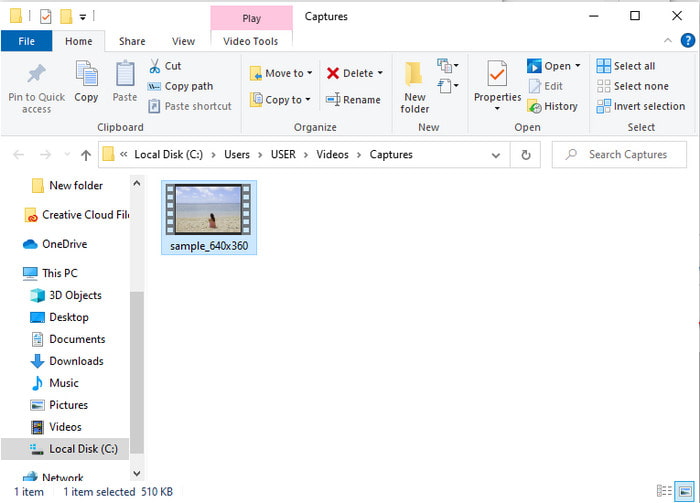
Paso 5. Espera varios minutos y, cuando el archivo esté listo, aparecerá una carpeta con el archivo convertido; después haz clic en él para verlo.
3rd Way. WinX Video Converter gratuito
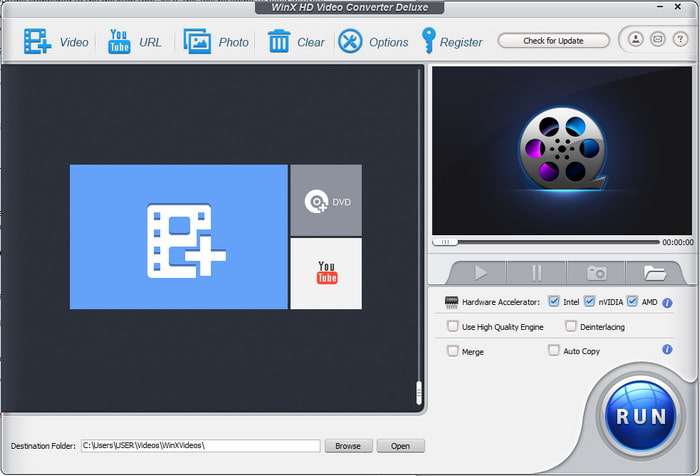
Otro software que hemos seleccionado y que te ayudará a convertir un formato de archivo es WinX Video Converter Free. Esta herramienta ofrece una muy buena calidad de conversión y, además, admite muchos formatos diferentes. Aunque su rendimiento es bastante bueno, vale la pena descargar este conversor de M4V a AVI tanto en Mac como en PC. Sin embargo, no es igual que la herramienta anterior. Así que, si quieres probarlo, sigue estos pasos.
Paso 1. Descarga el software en tu PC o Mac.
Paso 2. Luego haz clic en Video para insertar el archivo, después localiza PC General Manager y haz clic en AVI Video y luego en OK.
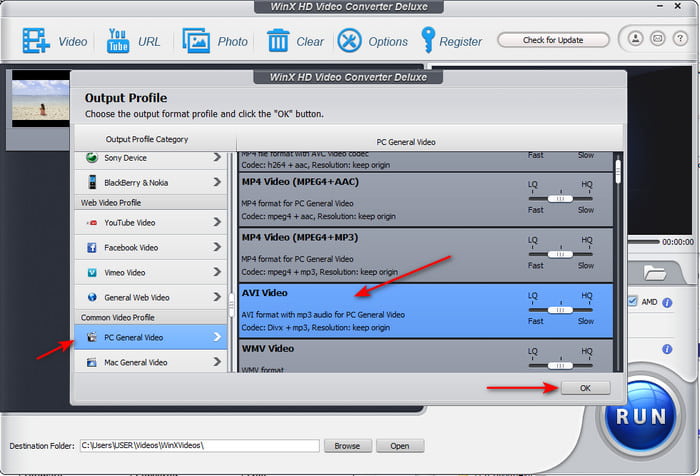
Paso 3. Haz clic en Run para iniciar la conversión.
Parte 3. Cuadro comparativo del convertidor 3 M4V a AVI
| Características | FVC Video Converter Ultimate | Convertidor de video gratuito FVC | WinX Video Converter gratuito |
| Conversión de formatos |  | | |
| Conversión múltiple | |  | |
| Aceleracion de hardware | | | |
| Conversión ultrarrápida | | | |
| Programa apoyado | Disponible en todas las plataformas | Disponible en todas las plataformas | Disponible en todas las plataformas |
M4V frente a AVI
El M4V es desarrollado por Apple, que también usa MPEG 4. Los archivos M4V se usan a menudo para almacenar los videos descargados de la tienda iTunes de Apple, como videos musicales, episodios de TV, etc. Es posible que encuentre algunos archivos M4V protegidos contra copia ya que usa Protección de derechos de autor FairPlay DRM de Apple.
Basado en el formato de archivo de intercambio de recursos (RIFF), el formato AVI fue introducido por Microsoft en 1992. Puede guardar video/audio de alta calidad ya que usa menos compresión. Pero eso también provoca el gran tamaño de archivo de un archivo AVI, lo que puede ser un problema cuando el espacio es limitado.
Parte 4. Preguntas frecuentes sobre los formatos M4V y AVI
¿Por qué necesito convertir a formato M4V?
El formato M4V solo está disponible en dispositivos Apple, así que si transfieres este formato de archivo a Windows o a cualquier otro dispositivo, no se podrá reproducir. Por tanto, es mejor convertir el archivo M4V a un nuevo formato como MP4 o AVI para poder reproducirlo.
Después de convertir M4V, ¿pierde la calidad?
En realidad, es menos probable que ocurra una pérdida de calidad en M4V o cualquier otro formato que se haya convertido en un nuevo formato. Sin embargo, esto también puede causar un mal funcionamiento del software o del convertidor. Por lo tanto, es mejor que elija el convertidor que funcione perfectamente y sea fácil de usar.
¿La conversión de M4V reduce el tamaño de archivo?
Bueno, depende del formato que estuvieras a punto de elegir. Al igual que si lo convierte en un AVI, esperaría que se hiciera un poco más grande porque el archivo no está comprimido. A diferencia, si lo convierte a MP4, el tamaño del archivo se mantendrá o disminuirá. Aunque el tamaño del archivo seguirá cambiando, sea cual sea el formato que elija, recibirá un resultado excelente al final.
Conclusión
En conclusión, las 3 herramientas web y de escritorio funcionan perfectamente bien y realmente cumplen su función como conversores. Al explorar cada uno de los programas que se enumeran aquí, hemos descubierto que FVC Video Converter Ultimate es la mejor opción para todos. Por lo fácil que es de usar, su precio asequible, su flexibilidad, las funciones avanzadas que ofrece y mucho más. Así que, si todavía dudas sobre cuál elegir, prueba este extraordinario conversor y disfruta de un proceso de conversión rápido y sencillo.
-
 Convertidor de M4V a MP3: 4 mejores métodos para extraer MP3 de archivos M4V
 Cuando desee extraer el audio MP3 de videos M4V con facilidad, puede obtener más información sobre los 4 mejores convertidores M4V a MP3 para obtener los archivos de audio deseados del artículo.
-
 ¿Cuál es la mejor manera de convertir GIF a AVI [Open-source & Premium]
 ¿Quieres convertir tu GIF a formato AVI sin perder la calidad del video? Siga leyendo para aprender cómo convertir su archivo GIF a AVI.
-
 4 formas eficientes de convertir MOV a AVI en PC y Mac [2021]
 ¿Quieres saber cuál es el mejor conversor de MOV a AVI en la web? Y por qué FVC Ultimate Video Converter podría ser el indicado para usted.

