


 Video Converter Ultimate
 Grabador de pantalla
 Reparación de vídeo
 Descarga segura
Formas sencillas de convertir M4V a DivX gratis
Como los reproductores M4V son archivos protegidos por DRM, los reproductores Blu-ray y los reproductores de DVD no pueden leer este formato. Así que, si quieres reproducir tus archivos M4V en un reproductor de DVD o Blu-ray, necesitas convertirlos a formato de archivo DivX. Afortunadamente, probamos los conversores online, offline y gratuitos más conocidos y elegimos los mejores para usar entre ellos. Por lo tanto, lee este artículo hasta el final para conocer las formas sencillas de convertir M4V a DivX gratis utilizando los mejores conversores.

Parte 1. Cómo convertir archivos M4V a DivX usando un programa de escritorio
Si estás buscando el mejor conversor offline conocido en el mercado, FVC Video Converter Ultimate es la respuesta para ti. Este conversor offline te permite convertir tu archivo M4V a un archivo DivX porque admite más de 1000 formatos. También está disponible en todas las plataformas multimedia conocidas, incluidas Mac y Windows. Además, tiene una función para crear GIF y vídeo 3D. Así que, si estás interesado en usar este conversor para convertir M4V a DivX en Mac, sigue estos sencillos pasos a continuación.
Paso 1. Descarga FVC Video Converter Ultimate en Mac haciendo clic en el botón Descargar de abajo. Sigue el proceso de instalación y luego abre la aplicación.
Descarga gratuitaPara Windows 7 o posteriorDescarga segura
Descarga gratuitaPara macOS 10.7 o posteriorDescarga segura
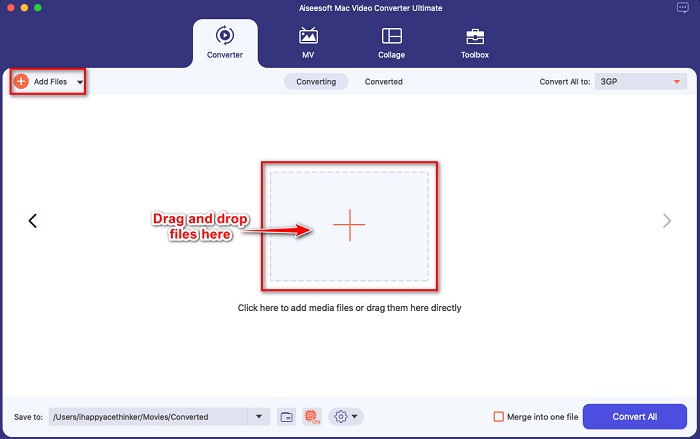
Paso 2. Después de abrir la aplicación, sube tu archivo M4V haciendo clic en el botón Añadir archivos, o arrastra y suelta tu archivo en el botón con el signo +. Entonces tu archivo se cargará en la interfaz del software.
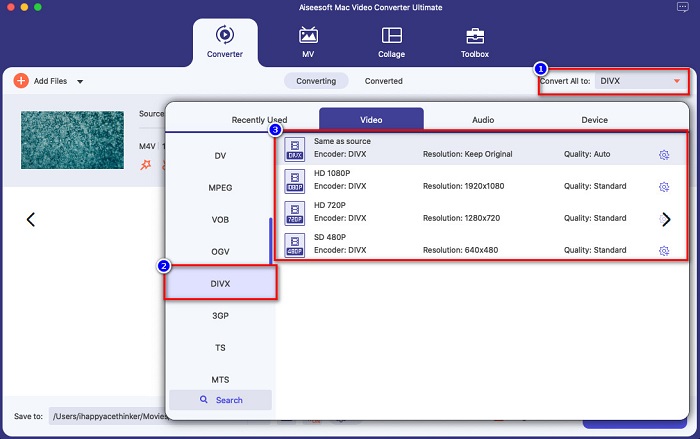
Paso 3. A continuación, elige el formato de salida que quieras haciendo clic en el botón Convertir todo a. Luego haz clic en el formato de archivo DivX. También puedes seleccionar la calidad de vídeo que desees.
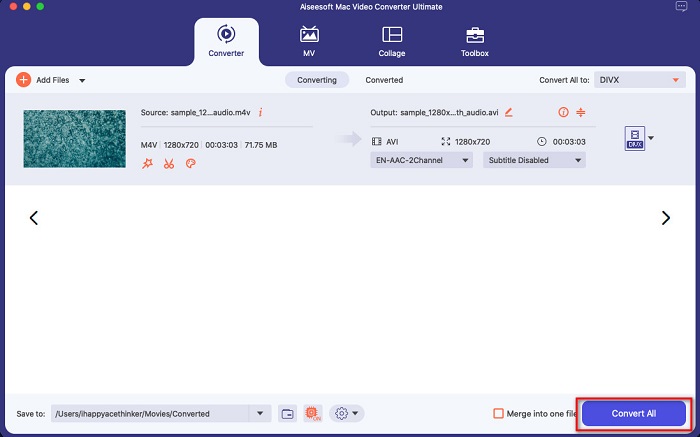
Paso 4. Haz clic en el botón Convertir todo para convertir tu archivo M4V al formato de archivo DivX como último paso. Después espera unos segundos para terminar el proceso de conversión.
¡Y eso es! Para convertir M4V a DivX, simplemente siga los sencillos pasos anteriores.
Pros
- Admite muchos formatos de archivo, incluidos M4V, DivX, WMV, AVI, FLV, MOV, MP4 y más de 1000.
- Puede fusionar múltiples formatos de archivo en uno.
- Tiene una característica donde puedes comprimir archivos.
- Disponible en todas las plataformas de medios cruzados como Mac y Windows.
Contras
- Aproveche la aplicación para usar sus funciones especiales.
Parte 2. Cómo convertir M4V a DivX usando un convertidor en línea
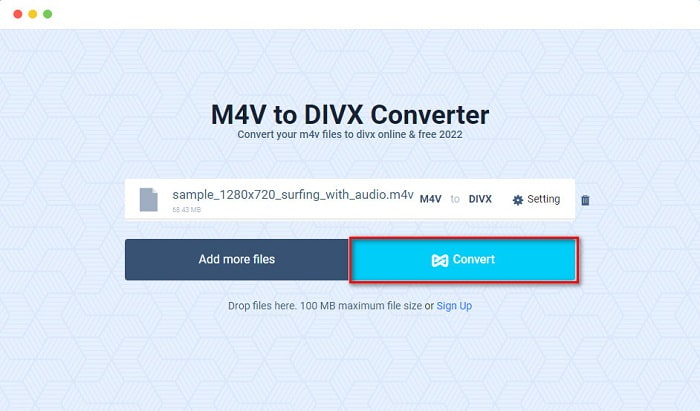
Una de las razones por las que la gente elige convertir archivos online es que resulta más cómodo. Por ello, te presentamos una herramienta online que puede cumplir tus exigencias como mejor herramienta online, que es Evano. Este conversor online es fácil de usar y no contiene anuncios. Sin embargo, al ser una herramienta basada en la web, es posible que experimentes un proceso de conversión lento. Además, solo puede admitir algunos formatos de archivo como M4V, DivX, XviD, WebM, FLV y otros. Aun así, sigue siendo una forma eficaz de convertir M4V a DivX.
Estos son los pasos para convertir M4V a DivX usando Evano:
Paso 1. En tu navegador, busca Evano. Luego, en la interfaz principal del software, haz clic en el botón Elegir archivos. Aparecerán las carpetas de tu ordenador y, a continuación, selecciona tu archivo M4V.

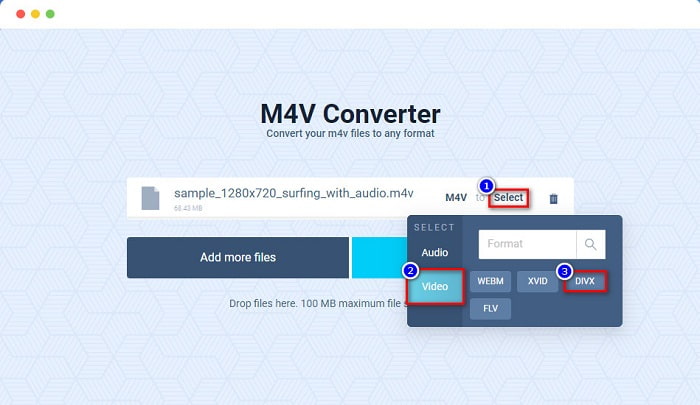
Paso 2. Después, haz clic en la palabra Seleccionar para elegir el formato de salida que quieras. Haz clic en el formato de archivo DivX.
Paso 3. Para terminar, haz clic en el botón Convertir para convertir tu archivo M4V al formato de archivo DivX.
Parte 3. Cómo convertir M4V a DivX usando una herramienta gratuita
Otra manera de convertir tu M4V a DivX es utilizando un conversor gratuito. Uno de los conversores gratuitos conocidos es Prism. Este conversor gratuito admite varios formatos de archivo como M4V, DivX, AVI, MP4, MOV, SWF, VOB y más, y puedes descargarlo gratis. Sin embargo, podrías tener dificultades para aprender a usar la interfaz del software porque tiene una GUI difícil de entender.
Pasos para usar Prism y convertir tu archivo M4V a formato de archivo DivX:
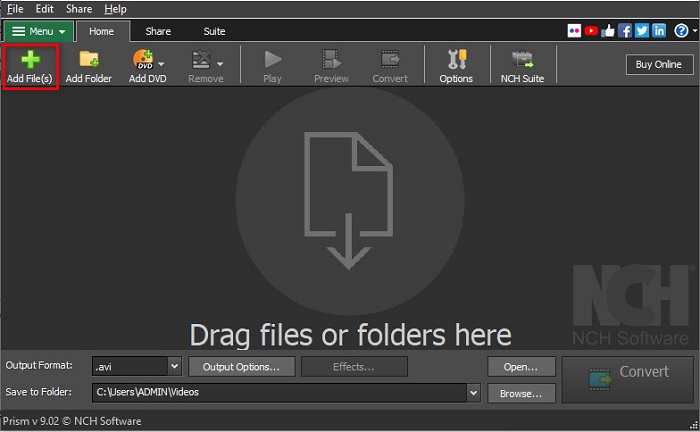
Paso 1. Descarga el conversor de archivos Prism buscándolo en tu navegador. Luego sigue el proceso de instalación y abre la aplicación. En la primera interfaz del software, haz clic en la opción Añadir archivos. Aparecerán los archivos de tu ordenador, donde subirás tu archivo M4V.
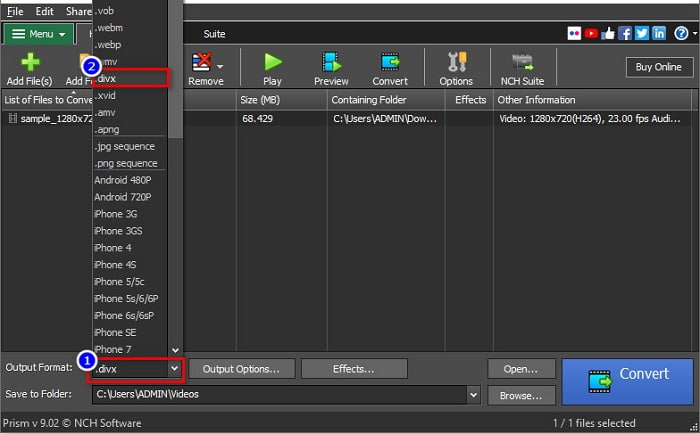
Paso 2. Luego, en el botón desplegable junto a Formato de salida, elige el formato de archivo .divx.
Paso 3. Por último, haz clic en el botón Convertir en la esquina inferior derecha de la interfaz del software. Entonces comenzará la conversión de tu M4V a DivX.
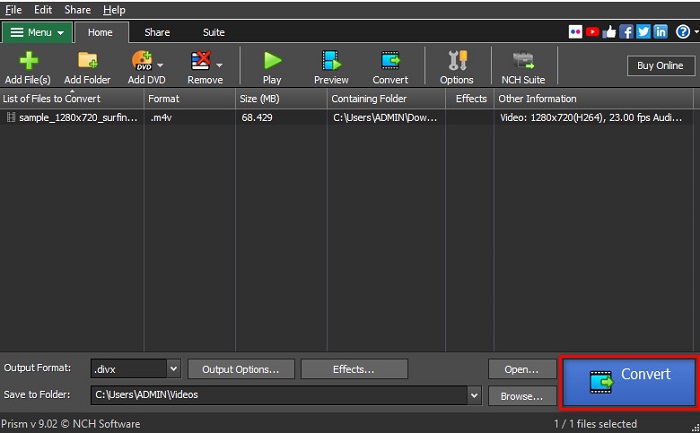
Y así es como puede convertir M4V a DivX usando un convertidor de software gratuito.
Parte 4. M4V frente a DivX
¿Tiene confusión si desea convertir su archivo M4V al formato de archivo DivX? Esta sección aprenderá sobre la diferencia entre el formato de archivo M4V y el formato de archivo DivX.
El archivo M4V es un formato de contenedor de archivos, también conocido como el archivo de video de iTunes. Apple desarrolla este formato de archivo; por lo tanto, haciéndolo jugable en dispositivos macOS. El objetivo principal de crear este tipo de archivo era poner la protección DRM Fair Play de Apple en cualquier cosa de la tienda iTunes, evitando así que alguien copie este tipo de archivo en cualquier dispositivo que Apple no haya fabricado.
Mientras que, por otro lado, DivX es un formato de archivo que comprime los archivos a la doceava parte de su tamaño original sin arruinar la calidad. Además, no ocupa mucho espacio en tu dispositivo, con un archivo de gran calidad.
| M4V | contra | DivX |
| sin comprimir | Compresión | Comprimido |
| manzana | Desarrollador | DivX, Inc. |
| ◆ VideoLAN VLC Media Player ◆ Reproductor multimedia clásico ◆ Jugador KM | Programas compatibles | ◆ VideoLAN VLC Media Player ◆ DivX ◆ Apple QuickTime Player ◆ RealNetworks Creador de videos en tiempo real |
Parte 5. Preguntas frecuentes sobre la conversión de M4V a DivX
¿Puedes reproducir archivos M4V en Windows Media Player?
Sí. Windows Media Player puede abrir archivos M4V de forma nativa, al igual que el reproductor multimedia QuickTime en Mac.
¿Puedes usar Handbrake para convertir M4V a DivX?
Por desgracia, no. Handbrake no admite el formato de archivo DivX porque solo puede manejar un número limitado de formatos. Haz clic aquí para saber más sobre los reproductores M4V disponibles.
¿Cuál es mejor M4V o MP4?
M4V y MP4 tienen casi la misma calidad de video pero diferentes extensiones de archivo. Sin embargo, M4V almacena más datos para subtítulos y protección DRM para la privacidad de datos. Además, más dispositivos admiten ampliamente el formato M4V que el formato MP4.
¿Cambiar M4V a DivX afecta el tamaño del archivo?
Sí. Cuando convierta su archivo M4V al formato de archivo DivX, el tamaño del archivo se reducirá.
Conclusión
De hecho, puede encontrar muchos convertidores de archivos en línea y fuera de línea en la web. Pero solo unos pocos pueden aprovechar al máximo su archivo. Muchos convertidores no tienen funciones para mejorar su archivo de video y otros no admiten muchos formatos de archivo. Por lo tanto, si está buscando el convertidor definitivo para convertir M4V a DivX, es posible que desee utilizar FVC Video Converter Ultimate. No hay duda de que esta es la primera opción para todos los usuarios que necesitan ayuda para convertir sus formatos de archivo. ¿Entonces, Qué esperas? Descarga esta aplicación ahora y experimenta las excelentes funciones que ofrece.
-
 2 convertidores de M4V a FLV aprobados para convertir M4V a FLV [2022]
 ¿Quieres saber el secreto de cómo convertir M4V a FLV? ¿Para reproducir el archivo en su reproductor multimedia? Luego, siga este artículo, ya que proporcionamos suficientes ideas sobre cómo hacerlo.
-
 Cómo convertir M4V a WMV rápidamente sin destruir la calidad
 ¿Está buscando una manera fácil de convertir videos M4V a WMV? En este artículo, aprenderá cómo cambiar videos M4V descargados de iTunes a WMV para que pueda disfrutarlos en otros dispositivos.
-
 Cómo cambiar iTunes M4V a MKV en Mac y Windows [Forma más rápida]
 Si necesita convertir M4V a MKV en Mac, debe leer este artículo. A medida que proporcionamos datos sobre los convertidores que lo ayudarán con su proceso de conversión.
