


 Video Converter Ultimate
 Grabador de pantalla
 Reparación de vídeo
 Descarga segura
Formas más fáciles de convertir MPG a DivX en su escritorio
¿Quieres convertir tu archivo MPG a DivX rápidamente? En ese caso, hay aplicaciones que puedes usar para convertir diferentes formatos de archivo. Hoy en día, como hemos observado, los distintos vídeos tienen diversos formatos. Sin embargo, en algunos casos ciertos formatos no son compatibles con otros dispositivos. Por ello, lo que tienes que hacer es buscar un conversor que sea capaz de transformar un archivo específico a otro formato. De este modo, puedes asegurarte de que tu vídeo se pueda reproducir en tu dispositivo, ya que será totalmente compatible y perfecto. Para convertir tu archivo MPG a un archivo DivX, debes seguir leyendo este artículo para hacerte una idea de qué aplicación o conversor necesitas utilizar.

Parte 1: Convierte MPG a DivX sin perder calidad
Si estás buscando una aplicación excelente y fiable para convertir MPG a DivX, entonces Video Converter Ultimate es la aplicación que puedes utilizar. Esta aplicación te permite convertir tu archivo MPG al formato de archivo DivX. Pero espera, hay más. No se limita solo a estos dos formatos. También puede convertir varios formatos de archivo, como FLV, MP4, MKV, MOV, VOB, DIVX, OGV, XVID y muchos más. Además, Video Converter Ultimate está disponible tanto para Mac como para Windows. Asimismo, no tienes que preocuparte por la calidad de tu vídeo, porque con esta aplicación puedes convertir tus archivos sin pérdida de calidad. Por otra parte, es una aplicación sencilla y fácil de usar, perfecta y adecuada para principiantes que quieren convertir archivos. En cuanto al proceso de conversión, esta aplicación puede convertir tus archivos muy rápido, por lo que no tendrás que esperar demasiado. Y puedes usar este software para convertir por lotes varios archivos. Además, no solo es fiable para convertir diferentes archivos. Esta aplicación también dispone de muchas herramientas de edición, como amplificador de volumen, reproductor inverso de vídeo, recortador de vídeo, corrección de color, combinador de vídeos, eliminador de marcas de agua, creador de GIF y mucho más. Si quieres convertir MPG a DivX en tu Windows y Mac, sigue los sencillos pasos que indicamos a continuación.
Paso 1: Ve al sitio web de Video Converter Ultimate y descarga la aplicación. Luego, procede con el proceso de instalación y abre la aplicación.
Descarga gratuitaPara Windows 7 o posteriorDescarga segura
Descarga gratuitaPara macOS 10.7 o posteriorDescarga segura
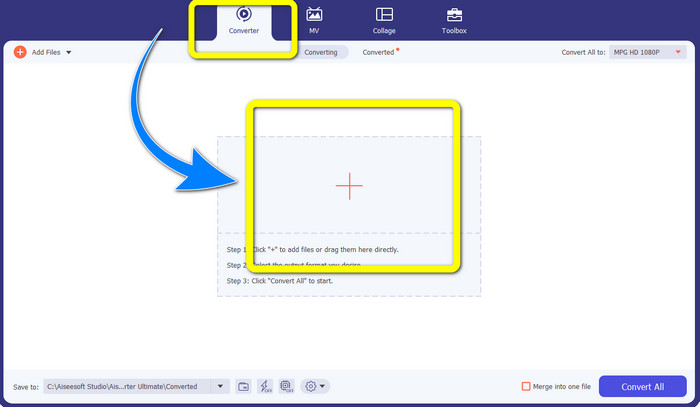
Paso 2: Después de abrir Video Converter Ultimate, ve a Converter. A continuación, selecciona el botón con el signo Más y adjunta el archivo MPG que quieres convertir a un archivo DivX.
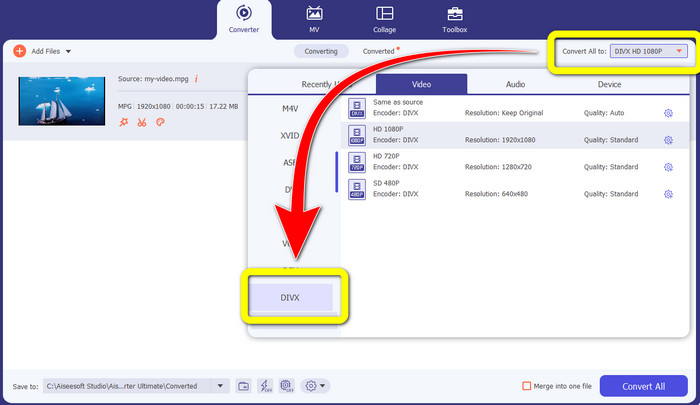
Paso 3: Una vez que hayas insertado tu archivo MPG, ve al botón Convertir todo a y elige el archivo DIVX en las opciones de formato. También puedes seleccionar la calidad que prefieras.
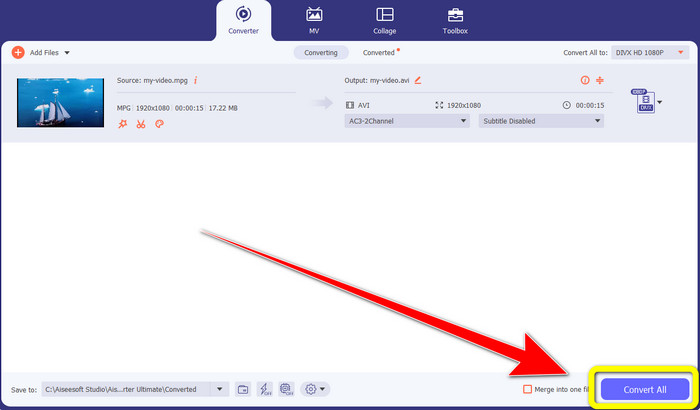
Paso 4: Cuando hayas terminado de elegir el formato de archivo DIVX, haz clic en el botón Convertir todo y guarda tu vídeo con el archivo DIVX. Esta es la forma más sencilla de convertir tu archivo MPG a un archivo DIVX en tu Mac y Windows.
Parte 2: Convierta MPG a DivX en línea gratis
Usando Media.io
Si te interesa buscar conversores de MPG a DIVX en línea y gratis, una de las herramientas online que puedes utilizar es Media.io. Este software puede convertir varios tipos de archivos, como vídeos, audio, imágenes y más. Es compatible con diferentes formatos de vídeo, como MP4, AVI, MKV, WMV, MPEG2, FLV, XVID, M4V, etc. Por lo tanto, también puedes usarlo como conversor de MPEG a DivX. Además, Media.io no solo es capaz de convertir distintos formatos de archivo. También cuenta con muchas herramientas para editar tus vídeos, como eliminador de marcas de agua, recortar vídeo, recortar encuadre, unir vídeos, cambiar la velocidad, crear presentaciones de diapositivas y más. Lamentablemente, esta versión gratuita tiene una limitación. Al convertir distintos archivos, solo puedes subir hasta un tamaño máximo de 100 MB, lo que no es ideal si quieres convertir muchos archivos. Si quieres convertir más y disfrutar de más funciones de esta aplicación, debes adquirir una suscripción. Además, su proceso de conversión es lento y tarda unos minutos en convertir tu archivo, lo que no resulta conveniente para quienes desean convertir numerosos archivos. Así pues, si quieres convertir MPG a DIVX online y gratis, sigue los sencillos pasos que indicamos a continuación.
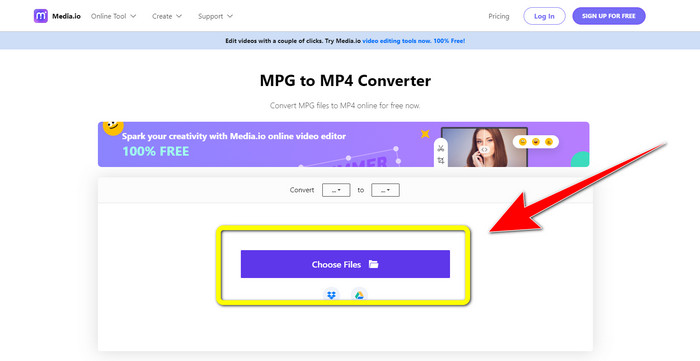
Paso 1: Visita el sitio web de Media.io. Luego, haz clic en el botón Choose Files para insertar tu vídeo con un archivo MPG.
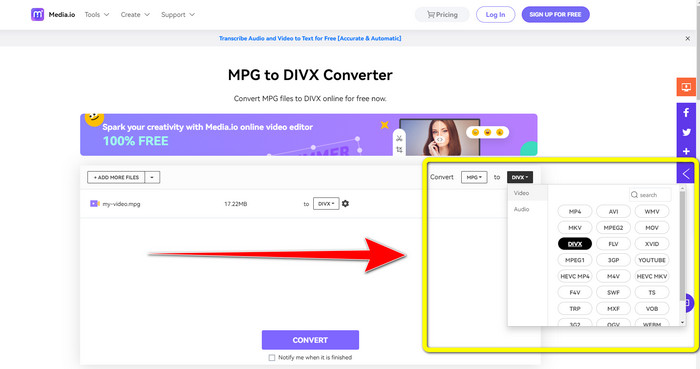
Paso 2: Después de adjuntar tu archivo MPG, ve a Convert, busca el archivo DIVX entre las opciones de formato y selecciónalo.
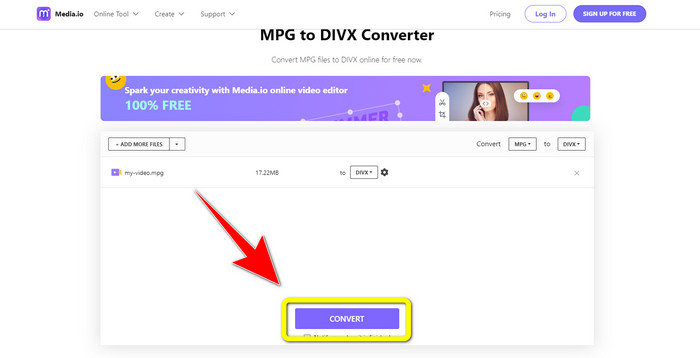
Paso 3: Una vez que hayas elegido el archivo DIVX para tu vídeo, haz clic en el botón Convert y guarda el resultado final.
Uso de FileProInfo
Otra aplicación que puedes usar para convertir MPG a DIVX online es FileProInfo. Esta aplicación online puede ayudarte a convertir tu vídeo con archivo MPG a un archivo DIVX. Además, es compatible con varios formatos, como 3GP, AAC, M4A, M4R, M4V, AVI, AMR, MP4, VOC, VOB y muchos otros formatos de vídeo. Por lo tanto, también puedes usarla para convertir 3GP a DivX. Además, puedes convertir archivos de forma gratuita. Es sencilla y fácil de utilizar para convertir. Asimismo, FileProInfo es una herramienta que puedes usar online y también puedes descargar la aplicación en tu ordenador. Además, puedes hacer más cosas con esta aplicación, como comprobación de plagio, visor de archivos, combinador, divisor, editor y más. FileProInfo es adecuada para principiantes, especialmente para convertir diferentes formatos de archivo. Sin embargo, esta herramienta online resulta demasiado compleja en lo que respecta a la edición de vídeo. Tiene algunas funciones avanzadas y difíciles de seguir, que no son adecuadas para principiantes. Asimismo, el proceso de convertir MPG a DIVX consume mucho tiempo. Si quieres convertir online tu vídeo con archivo MPG a un archivo DIVX, sigue estos sencillos pasos a continuación.
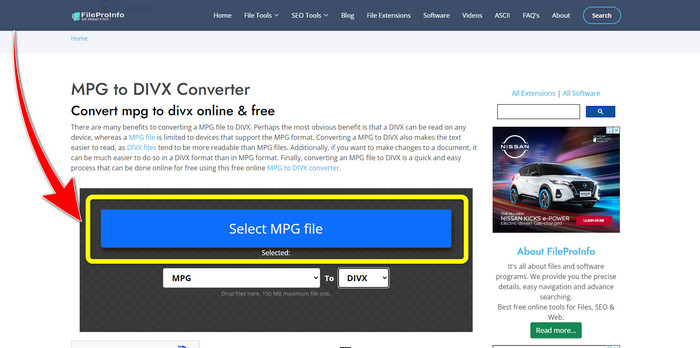
Paso 1: Visita la página web de FileProInfo. Luego, haz clic en el botón Select MPG File para adjuntar tu vídeo con archivo MPG.
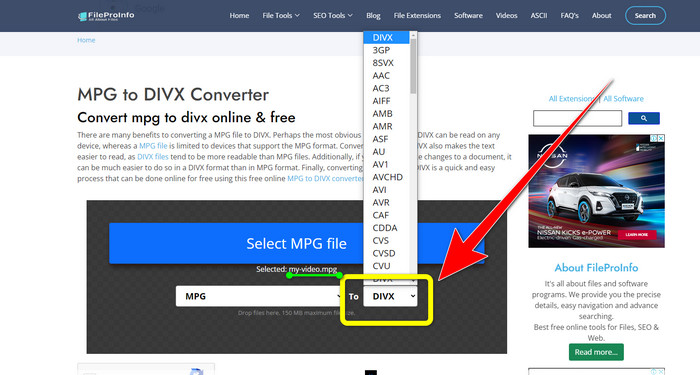
Paso 2: Después de añadir tu vídeo MPG, busca las opciones de formato y haz clic en el archivo DIVX.
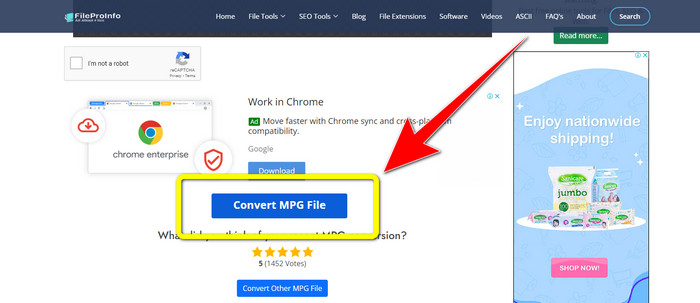
Paso 3: Cuando ya hayas hecho clic en el archivo DIVX, desplázate un poco hacia abajo y haz clic en el botón Convert MPG File.
Parte 3: Conocimiento ampliado de MPG y DivX
¿Qué es MPG?
El archivo MPG es un formato que utiliza un formato de archivo digital. Además, fue estandarizado por el Grupo de expertos en imágenes en movimiento. Por último, este formato de archivo se usaba comúnmente en películas y se distribuía en Internet.
¿Qué es DIVX?
DIVX es un códec de video de alta calidad y alta compresión que puede usar para el códec digital. Además, se clasificó como un archivo de video. Tampoco es adecuado para los programas de Windows. Además, comprime un video a una fracción de su tamaño original con poca pérdida de calidad.
Parte 4: Preguntas frecuentes sobre la conversión de MPG a DivX
¿Cuál es la ventaja de convertir un archivo MPG a un archivo DIVX?
Una de las ventajas de convertir un archivo MPG a un archivo DIVX es que el formato DIVX es más aceptado en los programas que el archivo MPG.
¿Qué navegador puedo usar para convertir MPG a DIVX?
No necesita preocuparse porque ahora puede usar casi todos los navegadores para convertir archivos MPG a DIVX en Google Chrome, Firefox, Safari, Opera y más.
¿Hay algún convertidor que tenga un proceso de conversión de velocidad?
¡Sí hay! Si está buscando una aplicación o convertidor con un proceso de conversión rápido, puede usar Video Converter Ultimate. Puede convertir archivos en solo unos segundos, a diferencia de otras aplicaciones que tardan demasiado en convertir.
Conclusiones
Como se ha mostrado arriba, puedes convertir MPG a DivX fácilmente utilizando aplicaciones descargables o en línea. Convertir archivos a otros formatos es necesario, especialmente si el archivo no es adecuado para el programa o los dispositivos. Si quieres convertir varios archivos, puedes usar Video Converter Ultimate.
-
 Cómo convertir GIF a DivX de una manera simple y fácil
 ¿Quieres convertir tu GIF a formato de archivo Divx? Mostraremos un excelente convertidor que puede usar para convertir GIF a DivX.
-
 Métodos fáciles de aprender sobre cómo convertir Xvid a DivX
 ¿Está buscando la mejor solución para convertir Xvid a DivX de forma gratuita? Este artículo te ayudará a resolver tu problema. Por lo tanto, lea la publicación continuamente.
-
 Cómo convertir M4V a DivX gratis en Mac [Mejores herramientas&93;
 ¿Está buscando formas de convertir M4V a DivX de forma gratuita? Enumeramos los mejores convertidores para que convierta su archivo M4V a DivX en Mac.
