


 Video Converter Ultimate
 Grabador de pantalla
 Reparación de vídeo
 Descarga segura
Los 2 mejores métodos notables para convertir OGV a M4V en Mac y Windows
¿No tienes idea de cómo convertir OGV a M4V? Entonces ve a esta guía y descubrirás otra información esencial que necesitas. Este artículo te ofrecerá procedimientos sencillos para convertir OGV a M4V en Mac y Windows. ¿Te entusiasma aprender estos métodos? ¡Entonces lee este artículo completo!

Parte 1: Introducción a OGV y M4V
| Nombre | OGV | M4V |
| Nombre del archivo | Archivo de vídeo OGG Vorbis | Vídeo de PEG-4 |
| Extensión de archivo | .ogv | .m4v |
| Desarrollado por | Xiph.org | Apple Inc. |
| Descripción | Microsoft Media Player es el principal responsable de los archivos OGV. Los archivos de video OGG tienen la extensión de nombre de archivo "OGV". Durante la reproducción de medios, un archivo OGV puede contener varias secuencias de video, audio, texto, datos de texto de presentación y metadatos. Theora se usa con frecuencia para codificar videos que se guardan como archivos OGV. Los videos de alta calidad se pueden almacenar a tasas de bits bajas gracias al códec Theora. Es un método de compresión de video con pérdida de código abierto. En un archivo OGV, también puede integrar los códecs de video Daala, Tarkin y Dirac. Las transmisiones de audio de OGV se pueden codificar con FLAC, Opus, Vorbis o Speex. Los archivos OGV se pueden ver y reproducir en reproductores de video como VLC y otros. | Apple desarrolló el formato de video M4V. Es un método para almacenar videos y es similar al formato MP4. Sin embargo, la protección contra copia DRM puede ser para archivos M4V esta vez, lo que marca la diferencia. Apple utiliza el estándar de codificación M4V en su iTunes Store. La protección contra copia FairPlay de Apple ayuda a evitar la copia no deseada de archivos M4V. QuickTime se refiere a los videos M4V con FairPlay DRM como 'AVC0 Media'. |
| Detalles técnicos | Un superconjunto compatible con versiones anteriores hace que el formato de compresión de video Theora sea fundamentalmente compatible con el formato de compresión de video VP3. VP3 y Theora se pueden combinar sin recompresión porque Theora es un superconjunto de VP3. | Los archivos M4V se pueden proteger con la protección de copia FairPlay de Apple para evitar la replicación no autorizada. Solo las computadoras aprobadas (a través de iTunes) con la cuenta utilizada para comprar el video pueden reproducir un archivo M4V protegido por FairPlay. |
| Programas Asociados | FFmpeg MPlayer Reproductor de multimedia VLC | itunes de apple Reproductor QuickTime de Apple Reproductor de multimedia VLC Reproductor de zoom Reproductor multimedia clasico K-reproductor multimedia Un jugador verdadero |
| Tipo de Mimica | vídeo/ogg | vídeo/x-m4v |
Parte 2: Cómo convertir OGV a M4V usando la herramienta en línea
Para convertir OGV al formato de archivo M4V fácilmente, solo necesitas un conversor fiable. Así que, en esta parte, te mostraremos cómo convertir OGV a M4V usando FVC Free Video Converter Online. Con esta herramienta puedes convertir distintos archivos, como MP4, MOV, VOB, MOV, AVI, FLV y más. También admite la conversión por lotes para que puedas convertir varios archivos sin pérdida de calidad. Además, con unos pocos clics ya puedes convertir tus archivos porque tiene una interfaz intuitiva. Con todos estos procedimientos básicos, se puede decir que este conversor de vídeo es adecuado para principiantes. También puedes ajustar la resolución hasta 1920x1080. Puedes cambiar la tasa de bits hasta 20000 kbps. Por último, puede cambiar la frecuencia de fotogramas hasta 60 fps. Además, también puedes editar tu audio accediendo a los ajustes de audio. Puedes ajustar la tasa de bits y la frecuencia de muestreo del audio. También admite formatos de audio como FLAC, MP3, AC3, AAC y más.
Funciones
◆ Convierta varios formatos de video, como OGV, M4V, MP4, AVI, FLV, MKV y más.
◆ Ofrece conversión por lotes.
◆ Edite la tasa de bits, la tasa de cuadros y la resolución del video.
◆ Admite formatos de audio como MP3, AC3, AAC, FLAC, WAV, etc.
◆ Edite la tasa de bits y la frecuencia de muestreo del audio.
Convierta su archivo OGV a formato M4V usando FVC Free Video Converter Online. Siga el sencillo procedimiento a continuación.
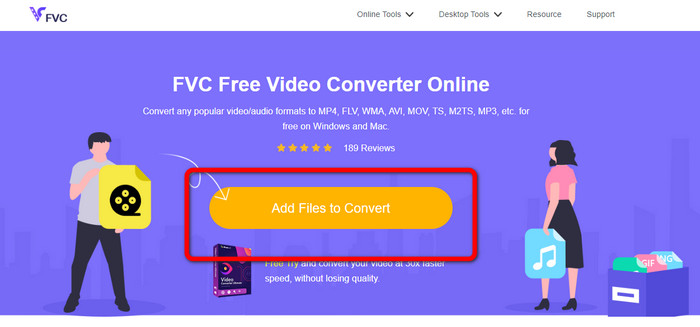
Paso 1: Ve al sitio web de FVC Free Video Converter Online. Luego, para cargar el archivo de vídeo OGV, pulsa el botón Add Files to Convert. Aparecerá tu carpeta en la pantalla y elige el vídeo que quieras convertir.
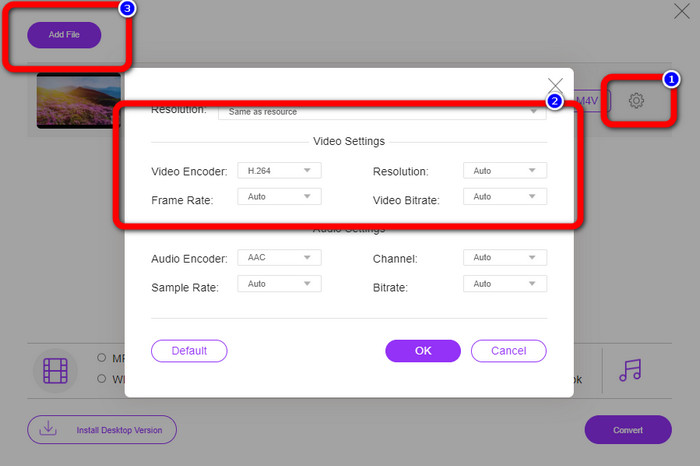
Paso 2: Después de cargar el archivo de vídeo OGV, puedes cambiar la tasa de bits, la frecuencia de fotogramas y la resolución haciendo clic en el icono de Setting. Después, haz clic en OK. Además, si quieres añadir más archivos, puedes pulsar el botón Add File en la parte superior izquierda de la interfaz.
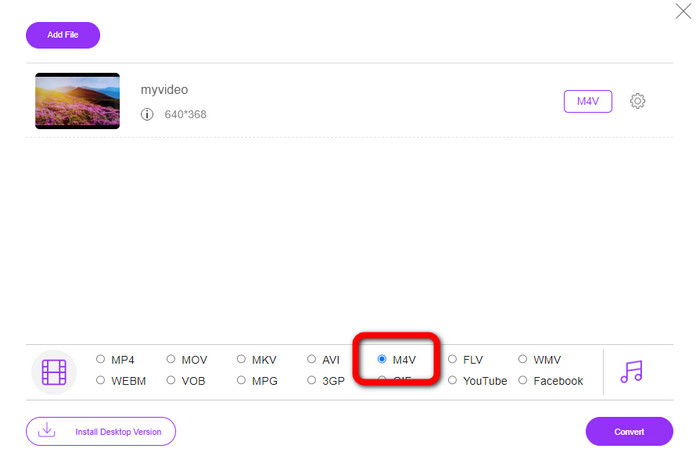
Paso 3: Después de realizar algunos cambios en tu archivo de vídeo OGV, elige el formato de archivo M4V en las opciones de formato en la parte inferior de la interfaz. Luego, guarda tu vídeo en la ubicación de archivo deseada.
Parte 3: Guía fácil para convertir OGV a M4V sin conexión
En términos de aplicación fuera de línea, puede usar Video Converter Ultimate para convertir OGV a M4V en Mac y Windows. Esta herramienta es un convertidor descargable de primer nivel. Puede convertir varios archivos fácilmente porque permite a los usuarios realizar conversiones por lotes. Además, tiene un proceso de conversión ultrarrápido, que es 30 veces más rápido que otros convertidores. De esta manera, puede convertir muchos videos con una sola mano. Además, incluso si está convirtiendo sus videos, aún puede personalizarlos o editarlos usando herramientas de edición de video. Puede agregar filtros, cortar videos, mejorar videos y más.
Además, Video Converter Ultimate tiene más funciones que puedes experimentar. Puedes sincronizar el audio con el vídeo porque tiene una función de Sincronización de Audio. Asimismo, si planeas aumentar el volumen de tu vídeo, es posible. Puedes amplificarlo hasta 200% porque esta herramienta ofrece un Amplificador de Volumen. Necesitas descubrir más funciones utilizando este conversor de vídeo.
Funciones
◆ Convierta archivos de video, como M4V, OGV, SWF, MP4, AVI, FLV, MOV, VOB, MKV, WMV y más.
◆ Puede crear un collage atractivo.
◆ Ofrece herramientas de edición de video para mejorar el video, como potenciador de video, corrección de color, recortador, eliminador de marca de agua y más.
◆ La creación de un video musical está disponible.
◆ Ajustar la velocidad del video.
◆ Ofrece compresor de video y audio
◆ Personalizar video 3D desde 2D
Paso 1: Si quieres descargar Video Converter Ultimate, haz clic en el botón Download de abajo. Luego, ejecuta la aplicación después del proceso de instalación.
Descarga gratuitaPara Windows 7 o posteriorDescarga segura
Descarga gratuitaPara macOS 10.7 o posteriorDescarga segura
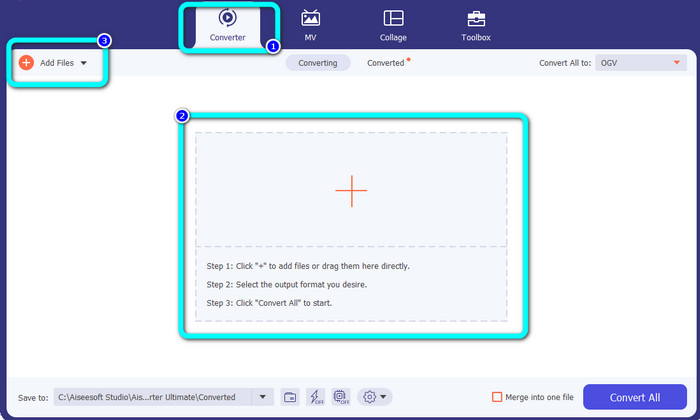
Paso 2: Elige el panel Converter y haz clic en el botón con el signo Plus para añadir el archivo de vídeo OGV. También puedes hacer clic en el botón Add Files o soltar el archivo directamente en el recuadro.
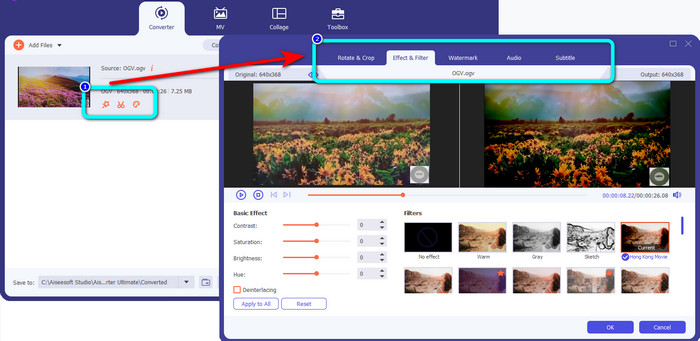
Paso 3: Si quieres editar tu vídeo OGV, haz clic en los iconos del primer recuadro. De este modo, puedes recortar y girar tu vídeo y añadir filtros, marcas de agua y más. Después de editar el vídeo, selecciona OK.
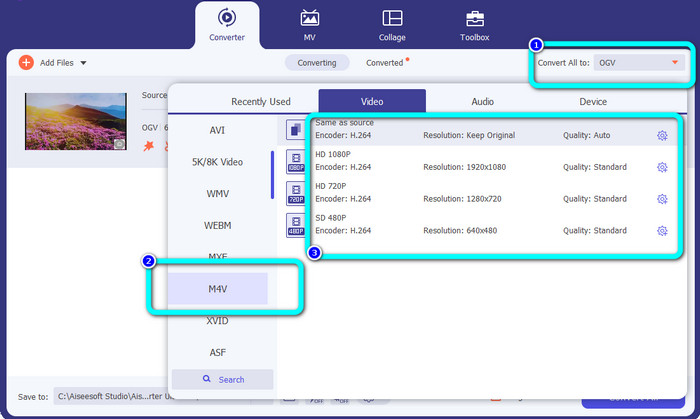
Paso 4: Después de eso, para convertir tu OGV a M4V, ve al botón Convert All to para mostrar las opciones de formato. Selecciona el formato de archivo M4V y elige la resolución deseada.
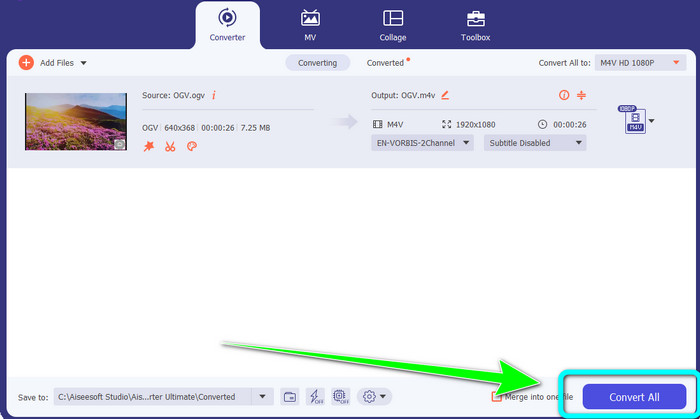
Paso 5: Para el paso final, haz clic en el botón Convert All para convertir el archivo OGV al formato M4V y guardar el vídeo en tu dispositivo.
Lecturas recomendadas:
Dos métodos excepcionales sobre cómo convertir M2TS a M4V
Aprende y descubre las mejores formas de convertir MXF a M4V
Parte 4: Preguntas frecuentes sobre la conversión de OGV a M4V
¿OGV tiene pérdidas?
Sí. El formato OGV combinado con un estándar de compresión de video de código abierto conocido como la extensión de archivo .ogv fue creado principalmente por Xiph.org; está estrechamente relacionado con OGG Vorbis y se puede usar para almacenamiento con pérdida o transmisión en línea.
¿Cuánto tiempo lleva convertir OGV a MP4?
Depende del conversor que estés utilizando. Si quieres un conversor con un proceso de conversión rápido, usa Video Converter Ultimate. Ofrece una velocidad de conversión 30 veces más rápida.
¿Puedo abrir mi archivo M4V en todos los dispositivos?
Lamentablemente no. Solo puede acceder a los archivos M4V a través de computadoras autorizadas por Apple. Si desea reproducir su video en todos los dispositivos, puede convertir su video en un archivo MP4.
Conclusión
Es fácil convertir OGV a M4V en Mac y Windows siempre que conozcas las aplicaciones prácticas que puedes usar. Este artículo te presentó dos excelentes aplicaciones para convertir OGV a M4V de forma fácil y rápida. En cuanto a un conversor en línea, puedes utilizar FVC Free Video Converter Online. Por otro lado, puedes usar Video Converter Ultimate para convertir archivos sin conexión.
-
 Fantástico convertidor de OGV a FLV que no debe perderse [Comprobado]
 Si se pregunta cómo convertir rápidamente archivos OGV a FLV, este artículo le mostrará el único convertidor que necesitará.
-
 5 convertidores OGV a WMV beneficiosos para convertir sus archivos OGV
 Hay 5 convertidores de OGV a WMV diferentes que puede usar para convertir los archivos OGV. Este artículo proporciona un hecho sólido sobre los 5 convertidores ogv disponibles.
-
 Formas asombrosas de convertir OGV a MKV de manera fácil y eficiente
 Esta guía le brindará un procedimiento sin complicaciones para convertir OGV a MKV sin pérdidas. Pruebe estos convertidores más confiables y experimente su gran función.
