


 Video Converter Ultimate
 Grabador de pantalla
 Reparación de vídeo
Cómo convertir RMVB a MKV fácilmente usando los mejores convertidores
Si eres una de las personas que busca una forma de convertir tu archivo RMVB a MKV, entonces quizá quieras leer este artículo hasta el final. Este artículo te mostrará cómo convertir tu archivo RMVB a MKV utilizando los mejores conversores gratuitos y fáciles de usar. Siéntate y relájate mientras te presentamos las mejores maneras de convertir RMVB a MKV tanto online como sin conexión.

Parte 1. ¿Qué son los archivos RMVB y MKV?
RealMedia Variable Bitrate (RMVB) es un formato de archivo de video de Real Media. Este tipo de archivo se comprime utilizando la tasa de bits. Estos tipos de archivos se crean para los reproductores multimedia producidos por RealMedia. Además, este formato es popular para películas de anime y películas asiáticas porque tienen tamaños de archivo más pequeños que otros formatos de archivo. También tienen tasas de bits más bajas, lo que afecta la cantidad de datos transferidos al audio. Mientras que, por otro lado, los archivos MKV o Matroska pueden almacenar pistas de audio, video y subtítulos. Este contenedor de archivos también está preparado para el futuro, lo que significa que está diseñado para que no quede obsoleto en el futuro.
Parte 2. Cómo convertir RMVB a MKV usando FVC Video Converter Ultimate
FVC Video Converter Ultimate es un convertidor fuera de línea que le permite convertir más de 1000 formatos de archivo disponibles en la web, como RMVB a MKV, WMV, MP4, AVI, FLV, M4V y más. Este convertidor también puede convertir a la velocidad del rayo. Tiene características únicas que le permiten editar sus archivos e incluso convertir por lotes varios archivos en uno. Además, tiene una función para crear un GIF o convertir su archivo de video en uno 3D.
Pros
- Ofrece conversión por lotes para fusionar varios archivos en uno.
- Tiene una interfaz gráfica de usuario fácil de usar, que no le dificultará su uso.
- Tiene una función que puede crear GIF y videos en 3D.
- Disponible gratis en Windows y Mac.
Contras
- Para usar sus funciones especiales, debe comprar la aplicación.
Entonces, si está satisfecho con lo que puede hacer este convertidor, siga los pasos para convertir archivos RMVB a MKV sin esfuerzo.
Paso 1. Para usar FVC Video Converter Ultimate, haz clic en el botón Descargar de abajo. Sigue el proceso de instalación y, a continuación, abre la aplicación.
Descarga gratuitaPara Windows 7 o posteriorDescarga segura
Descarga gratuitaPara macOS 10.7 o posteriorDescarga segura
Paso 2. Luego haz clic en el botón Añadir archivos o en el botón con el signo + para subir tu archivo en la primera interfaz del programa. Aparecerán los archivos de tu ordenador, donde elegirás tu archivo RMVB. Después se añadirá a la cola.
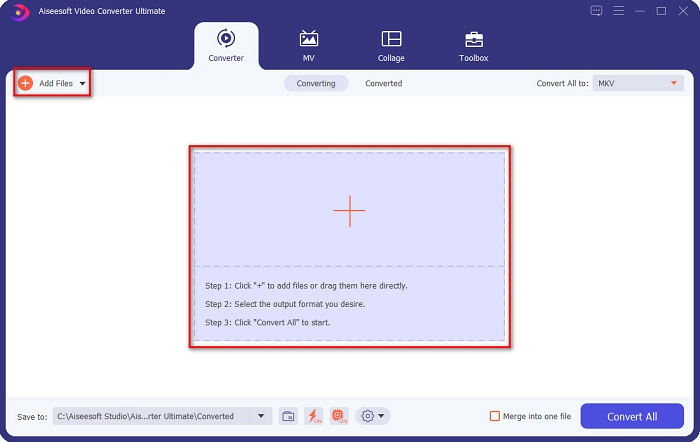
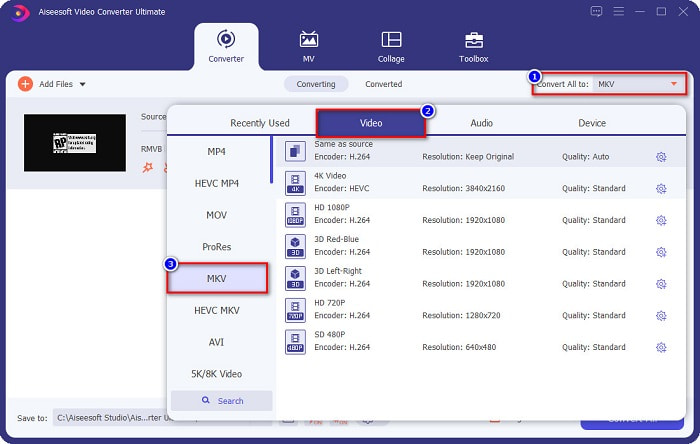
Paso 3. Tras subir tu archivo RMVB, haz clic en el botón Convertir todo a para seleccionar el formato de salida. En tu caso, selecciona archivo MKV.
Paso 4. Y por último, haz clic en el botón Convertir todo en la esquina inferior derecha de la interfaz del programa. Comenzará la conversión de tu archivo de RMVB a MKV. Solo espera unos segundos, ¡y listo!
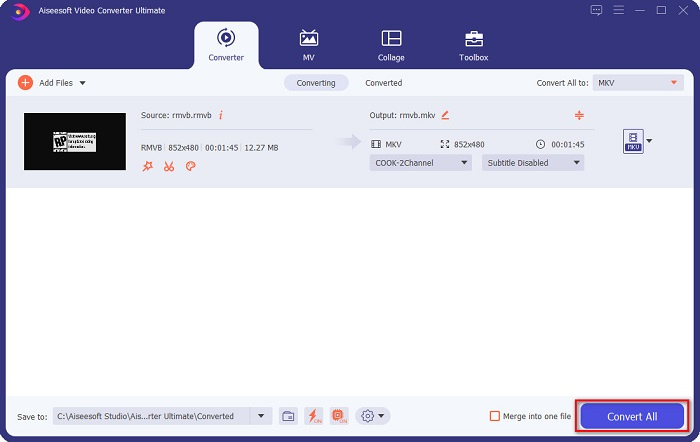
¿No es fácil? Puede convertir archivos RMVB a MKV fácilmente siguiendo estos sencillos pasos.
Parte 3. Los 2 mejores convertidores de RMVB a MKV en línea que debe probar
La conveniencia de los convertidores en línea es mejor que la de los convertidores fuera de línea. Y si desea tener un convertidor conveniente, lea los pasos a continuación sobre cómo convertir archivos RMVB a MKV gratis y en línea.
Convertidor de video en línea gratuito FVC
FVC Free Online Video Converter es un conversor online con una interfaz gráfica fácil de usar, lo que resulta muy útil para principiantes, ya que no tendrán dificultades para entender la interfaz del programa. Este conversor también admite numerosos formatos de archivo, incluyendo de RMVB a MKV, MOV, MP4, WMV, AVI y muchos más. Sin embargo, dado que este conversor es web, es posible que experimentes una conversión más lenta. Aun así, muchas personas utilizan este conversor y lo consideran uno de los mejores para convertir RMVB a MKV.
Pasos sobre cómo convertir archivos RMVB a archivos MKV usando FVC Free Online Converter:
Paso 1. Primero, busca en tu navegador FVC Free Online Converter o haz clic en este enlace. Cuando ya estés en su página web, inicia la aplicación.
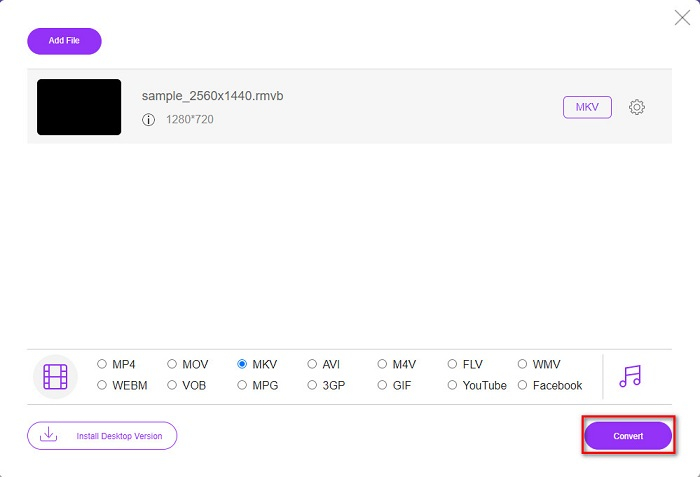
Paso 2. A continuación, haz clic en Añadir archivos para convertir. Entonces aparecerán los archivos de tu ordenador, donde seleccionarás tu archivo RMVB para subirlo.
Descarga la versión de escritorio para convertir archivos por lotes.
Paso 3. Después de seleccionar tu archivo RMVB, elige el formato de archivo que desees en la parte inferior de la interfaz del programa y, luego, haz clic en archivo MKV.
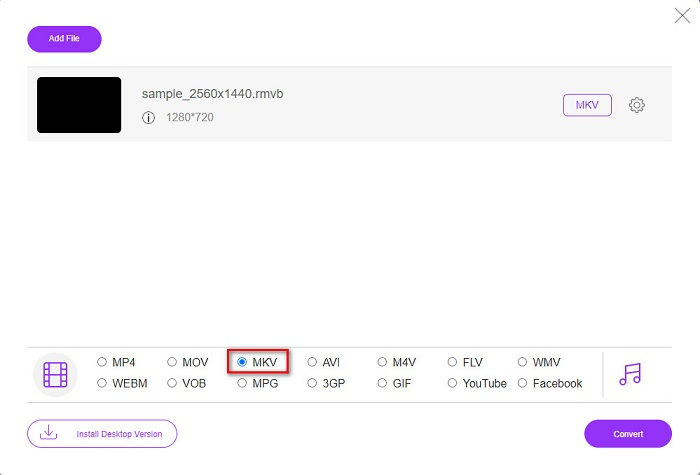
Paso 4. Por último, cuando estés listo para convertir tu archivo RMVB a MKV, haz clic en el botón Convertir y comenzará la transcodificación.
Convertidor de video
Video Converter es otro convertidor que puede convertir su RMVB a MKV de forma gratuita y en línea. Este convertidor en línea puede cambiar el formato de archivo con facilidad. También es compatible con muchos formatos de archivo y también es fácil de usar. Sin embargo, contiene muchos anuncios perturbadores que pueden distraerlo demasiado. No obstante, vale la pena probar esta herramienta debido a su conveniencia.
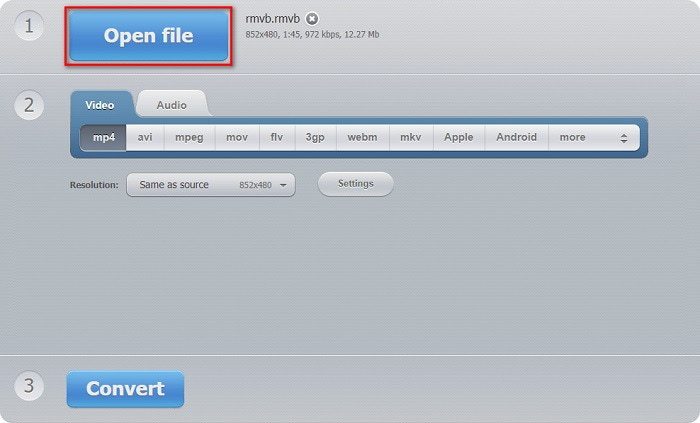
Paso 1. Busca Video Converter en tu navegador y, después, haz clic en el botón Abrir archivo. A continuación aparecerán los archivos de tu ordenador. Elige tu archivo RMVB y espera a que se cargue.
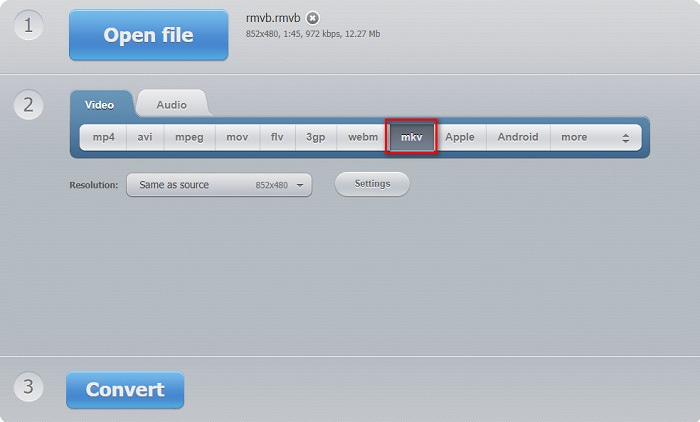
Paso 2. Después, todavía en la interfaz principal del programa, selecciona el formato de archivo de salida que quieras. Haz clic en MKV y pasa al siguiente paso.
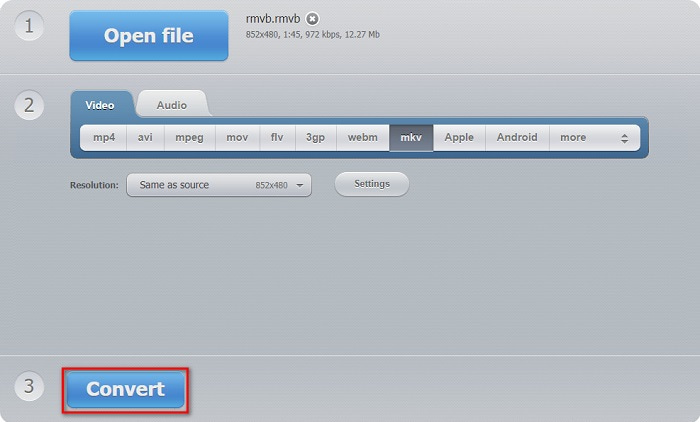
Paso 3. Para el último paso, haz clic en el botón Convertir situado debajo de la interfaz del programa. Entonces comenzará la conversión de tu archivo de RMVB a MKV.
Convertidor 365
Converter 365 es un conversor online gratuito que te permite convertir fácilmente tu archivo RMVB a MKV. También es sencillo de usar porque tiene una interfaz gráfica fácil de manejar. No obstante, tu archivo podría dañarse si se interrumpe tu conexión a Internet.
Paso 1. Haz clic en el botón Añadir archivos para subir tu archivo RMVB.

Paso 2. Luego haz clic en el botón desplegable junto a Convertir a para seleccionar el formato de salida que desees.
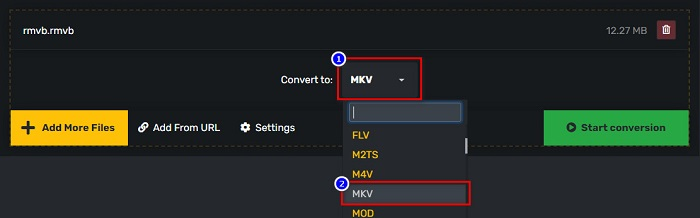
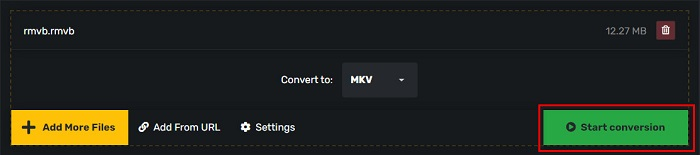
Paso 3. Y finalmente, haz clic en el botón Iniciar conversión para comenzar la conversión.
RMVB frente a MKV
RMVB, una variación más reciente del formato estándar de Real Media (.RM), es un formato de archivo de video de Real Media comprimido con una tasa de bits variable. Es un formato popular para películas asiáticas y anime. Los archivos RMVB son más pequeños y tienen tasas de bits más bajas pero de mejor calidad.
El formato de contenedor multimedia Matroska, lanzado en 2002, es un formato de código abierto que puede incluir varias pistas de video, audio, imágenes y subtítulos. Por lo tanto, puede usarlo para almacenar clips de video cortos, programas de TV y películas fácilmente. Es bastante popular para los fanáticos del anime.
Parte 4. Preguntas frecuentes sobre la conversión de RMVB a MKV
¿Puedes convertir RMVB a AVI?
Por supuesto, puedes convertir archivos RMVB a archivos AVI utilizando un conversor. FVC Video Converter Ultimate admite la conversión de archivos de RMVB a AVI. Además, si quieres saber más sobre cómo convertir RMVB a AVI, haz clic en este enlace.
¿Puede Mac reproducir archivos RMVB?
No. Mac no es compatible con archivos RMVB. Sin embargo, puedes usar una herramienta de terceros para reproducir este tipo de archivo en Mac. También puedes convertir RMVB a archivos compatibles con Mac, como MOV. Para obtener más información sobre cómo convertir RMVB a MOV, lee este artículo Convertir RMVB a MOV: pasos sencillos sin conexión y en línea.
¿Qué reproductores multimedia pueden reproducir archivos RMVB?
Los archivos RMVB no son tan populares porque muchos reproductores multimedia no admiten este tipo de archivo. Sin embargo, algunos reproductores multimedia pueden reproducir este tipo de archivo, incluidos RealNetworks Real Player (Windows), VLC Media Player y Aiseesoft Blu-ray player.
Conclusión
En resumen, todos los conversores de RMVB a MKV, tanto online como offline, que se han mostrado arriba son fáciles de usar y vale la pena probarlos. Puede que también encuentres conversores similares disponibles en la web. Sin embargo, si quieres un conversor gratuito con una función distintiva y que pueda convertir más de 1000 formatos de archivo, FVC Video Converter Ultimate puede ser una herramienta adecuada para ti. ¿Aún no estás convencido? Pruébalo ahora y descárgalo gratis.
-
 Guía sobre cómo convertir RMVB a MP4 en Windows / Mac (3 formas gratuitas)
 ¿Quiere convertir RMVB a MP4 para una fácil reproducción en su computadora o teléfono móvil? Encontrará formas sencillas de convertir sus archivos RMVB a MP4 en esta guía.
-
 Las 4 mejores aplicaciones gratuitas de conversión de RMVB a FLV en el escritorio o en línea
 Este artículo le dirá el mejor software de conversión de RMVB a FLV y aplicaciones web que pueden convertir archivos RMVB (RealMedia Variable Bitrate) a video FLV.
-
 Los 2 principales convertidores en línea y fuera de línea para convertir RMVB a WMV
 ¿Busca la forma más rápida y sencilla de convertir archivos RMVB a WMV? Lea este artículo y obtenga información completa y detallada sobre la conversión.

