


 Video Converter Ultimate
 Grabador de pantalla
 Reparación de vídeo
Los mejores convertidores en línea y fuera de línea para convertir archivos SWF a MKV
SWF file is a format for Adobe flash that contains videos and vector-based animations.And this type of file usually cannot handle various subtitle streams. Many people are looking for a file format that can handle multiple subtitle streams and audio tracks in various languages.Therefore, if you are one of those people who is looking for a solution to change SWF to MKV, we present the best converters for you!

Parte 1. Convierta SWF a MKV sin conexión con FVC Video Converter Ultimate
FVC Video Converter Ultimate is a free offline tool that allows you to convert various file formats like SWF to MKV, MP4, WMV, MOV, AVI, FLV, and many more. This converter has many great features that could help you improve your files. You can trim, add effects, add watermark, and add subtitles. What's fantastic is you can also batch convert your SWF files. Moreover, it supports ultra-fast conversion, in which you can convert files in just a few seconds. The steps provided below will surely help you convert your SWF to MKV file.
Step 1. For the first step, download the converter by clicking the Download button below for Windows or Mac. Then after downloading, open the application to start the process.
Descarga gratuitaPara Windows 7 o posteriorDescarga segura
Descarga gratuitaPara macOS 10.7 o posteriorDescarga segura
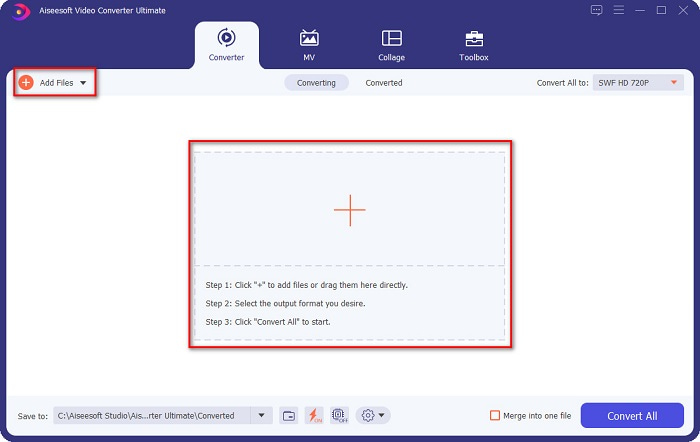
Step 2. After opening the converter, click the Add Files button or the + sign button to upload your SWF file in the software’s first interface.
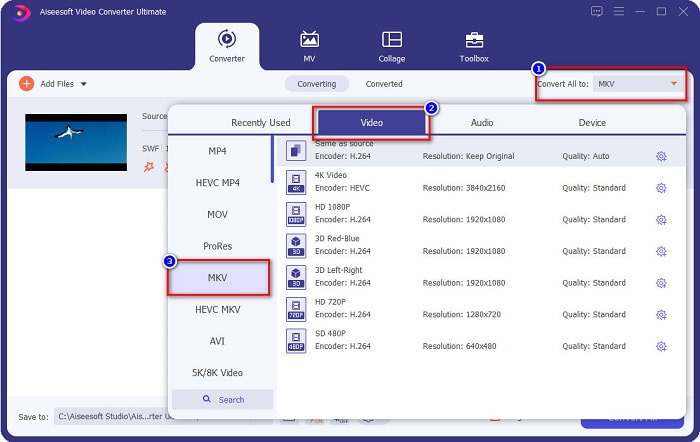
Step 3. Next is, click the Convert All to button. After clicking the Convert All to button, a list of file formats will appear. Then select the MKV file format.
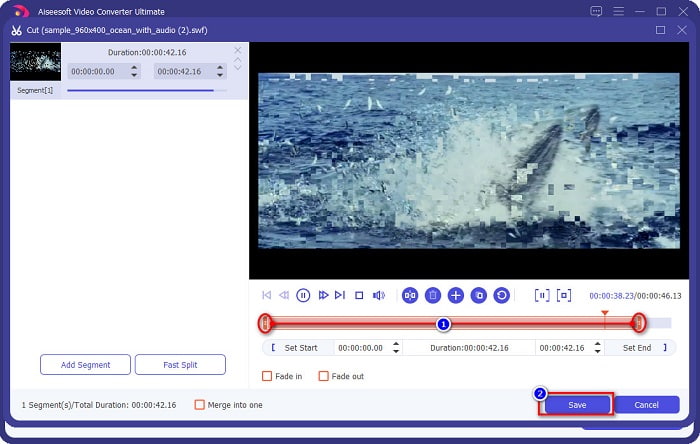
Optional. If you want to cut the length of your file, click the scissor button. You can trim the length by adjusting the play heads to your desired length. Then click the Save button, to save the changes.
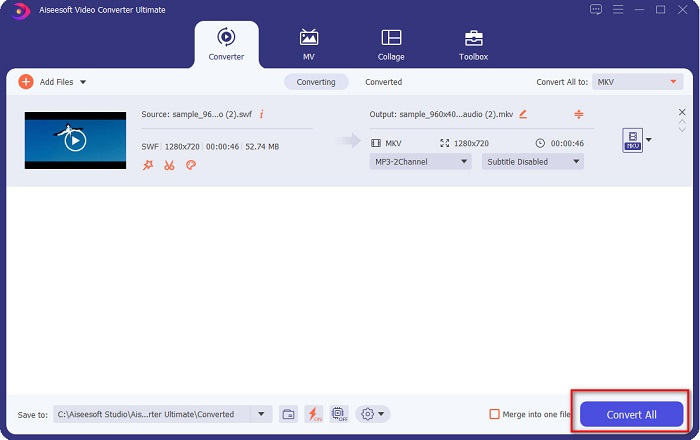
Step 4. And lastly, click the Convert All button to convert your SWF file to an MKV file. And that is it! After a few seconds, your file will be ready.
Parte 2. Convierta SWF a MKV en línea usando convertidores en línea gratuitos
No se puede negar que convertir archivos usando una herramienta en línea es más conveniente porque no necesitará descargar nada. Por lo tanto, proporcionamos herramientas en línea gratuitas que son una de las mejores en la actualidad.
Convertidor de video en línea gratuito FVC
Steps on how to convert using FVC Free Online Video Converter:
Step 1. To use this converter, search FVC Free Online Video Converter, or click this link, and you will be directed to their website.
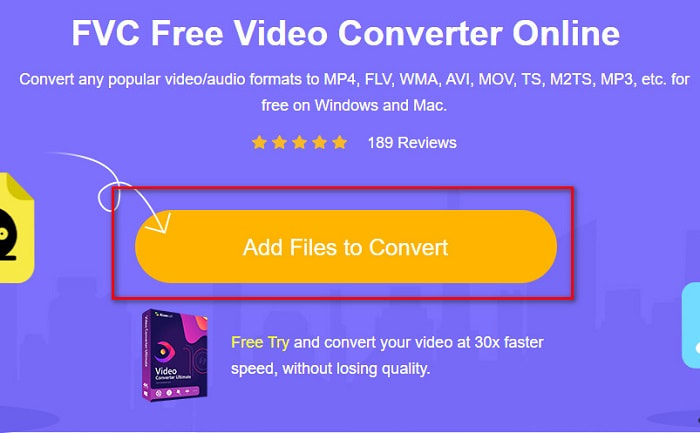
Step 2. After going to the website, click Add Files to Convert. Then launch the converter, and then select your SWF file when your computer files appear.
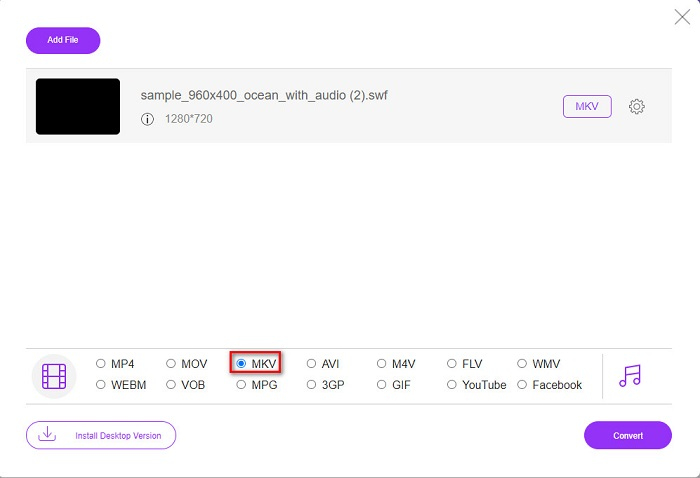
Step 3. The available file formats are listed below the software's second interface. Click the MKV file, then proceed to the next step.
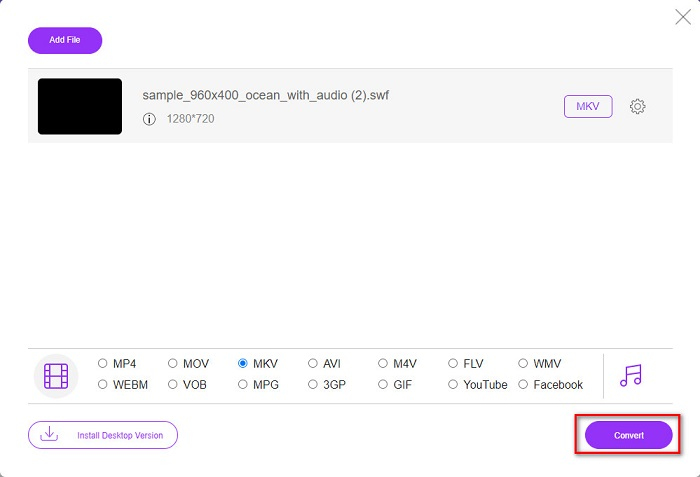
Step 4. To finish, click the Convert button to start your conversion. Then wait for your conversion to finish.
Aconvert.com
Another free online converter that you must try is Aconvert.com. This tool can convert various files across the net. It is also easy-to-use and allows you to convert quickly depending on your internet speed. Since this converter is an online tool, you may experience having a slow conversion and have ads that might be disturbing. Still, this converter allows you to convert SWF to MKV with ease.
Step 1. On your browser, search Aconvert.com. Then click the Video panel on the left side of the software’s interface.

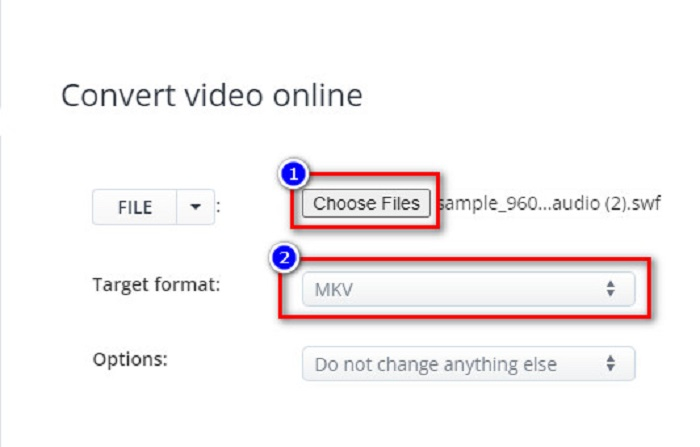
Step 2. After, click the Choose Files button, and select your SWF file. Then on the Target Format, click the MKV file.
Step 3. For the last step, click the Convert Now! button, to begin your SWF file to MKV conversion.

FreeConvert.com
FreeConvert.com is an online converter to convert your SWF file to MKV file format. It is easy to use; however, it contains many disturbing ads. Nevertheless, this converter supports various file formats available on the web.
Step 1. Search FreeConvert.com on your browser to be led to their website. And then, click the Choose Files button. Your computer files will appear, then select your SWF file.

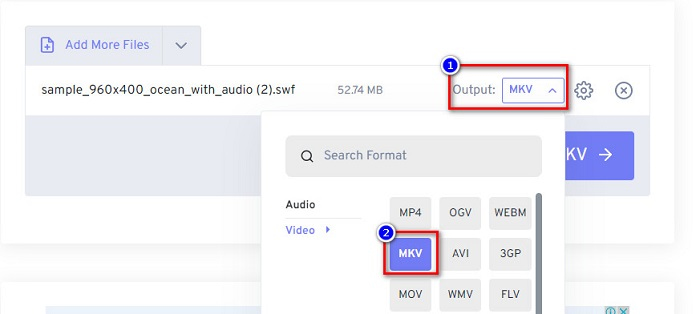
Step 2. Click the drop-down button beside the Output word to select your conversion output. Click MKV as your file output format.
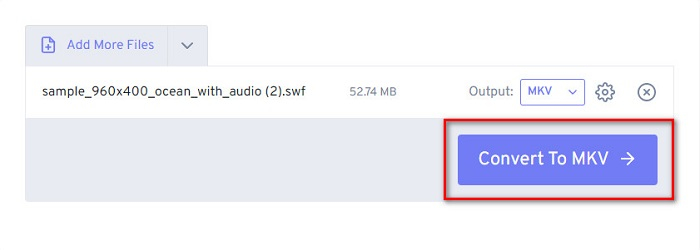
Step 3. Then click the Convert to MKV button to start converting your file.
Parte 3. Conocimiento ampliado de SWF y MKV
SWF o Shock Wave File es un formato de archivo de Adobe Flash. Macromedia lo desarrolló, pero más tarde, propiedad de Adobe. Este formato de archivo generalmente se usa en la red, pero puede abrirlo habilitando Adobe Flash en su navegador. Los archivos SWF no solo contienen videos, sino también animaciones basadas en vectores. Además, este tipo de formato de archivo tiene audio, video y animaciones comprimidos, por lo que puede estar disponible en la web.
En comparación, el archivo MKV o Matroska es un formato de archivo compatible con varios códecs de audio y video. Por lo general, se usa para almacenar clips de video cortos y películas. Aunque el tamaño de archivo de MKV es mayor, el archivo MKV es un archivo preparado para el futuro, y esto significa que este tipo de archivo fue diseñado para no estar desactualizado.
Parte 4. Preguntas frecuentes sobre la conversión de SWF a MKV
¿Puedes convertir SWF a MKV sin pérdidas?
Sí. Puede convertir sus archivos SWF a archivos MKV sin perder la calidad. Algunos convertidores pueden cambiar SWF a MKV sin pérdidas, como FVC Video Converter Ultimate. Este convertidor puede convertir archivos sin que la calidad se vea afectada.
¿Se puede reproducir SWF en Windows?
Sí tu puedes. Sin embargo, aún necesita descargar un reproductor flash oculto para adobe porque adobe flash se está eliminando gradualmente.
¿El Reproductor de Windows Media admite archivos SWF?
No. Windows Media Player does not support SWF files. Nonetheless, you must have a .swf codec to play it on Windows Media Player. Or the easiest choice is to convert your SWF file to a file like MP4, which various media players widely support. To have more information about converting SWF to MP4, read this article SWF to MP4: Free Convert SWF to MP4 Online and PC.
Conclusión
This article shows you how to convert SWF to MKV by using the offline and online converters presented above. And there is no denying that online tools are more convenient to use; however, you can experience slow conversion in using them. In addition, the FVC Video Converter Ultimate has more features that are beneficial for your file and in your conversion—still having doubts about it? Download it now and experience the unique features that this converter can offer!
-
 [Gratis y fácil] Herramientas excepcionales para usar en la conversión de SWF a MOV
 ¿Has intentado convertir SWF a MOV porque no puedes editar videos? ¿Quién tiene la culpa de la incompatibilidad de tu editor de vídeo'? Continúe leyendo para su solución.
-
 4 convertidores ocultos utilizados para convertir SWF a FLV en línea y fuera de línea de forma gratuita
 ¿Quiere saber más sobre los convertidores ocultos que puede usar para convertir un archivo .swf a .flv? Si ese es el caso, debe leer este artículo para tener una idea de cómo hacerlo.
-
 Herramientas más útiles para convertir SWF a WMV (en línea y sin conexión)
 ¿Tiene dificultades para encontrar un reproductor para sus archivos SWF? No necesita preocuparse porque simplemente puede convertirlo a formato WMV para una mejor experiencia de consumo de video. Lea este artículo para saber más sobre este proceso de conversión.
