


 Video Converter Ultimate
 Grabador de pantalla
 Reparación de vídeo
 Descarga segura
3 métodos sin esfuerzo para convertir TRP a MKV
¿Estás teniendo dificultades con tu archivo TRP porque no puedes reproducirlo en tu reproductor multimedia u otros programas? Si eres uno de esos usuarios que se encuentran con este tipo de problema, entonces es muy recomendable que leas este artículo. Puedes convertir tu archivo TRP a MKV, ya que la mayoría de programas son compatibles con el formato MKV. Este artículo te mostrará métodos sencillos para convertir TRP a MKV usando Windows, Mac y herramientas en línea. ¿A qué estás esperando? ¡No pierdas el tiempo y empieza a leer este artículo!

Parte 1: Definición de TRP y MKV
¿Qué es TRP?
TRP es un archivo de vídeo en alta definición codificado en el formato de transporte MPEG-2 parte 1. Se utiliza a menudo en la difusión de vídeo digital. Además, se usa para flujos de audio, sincronizar la salida y la multiplexación digital de vídeo, e incluye excelentes funciones para corregir errores. TRP también contiene datos de audio AC3 y vídeo H.264. Se puede reproducir con varios programas de reproducción de vídeo.
¿Qué es MKV?
MKV, o Matroska, es un contenedor multimedia que gestiona varios archivos de audio, subtítulos y vídeo en un único formato de archivo. MKV también es diferente de otros estándares multimedia como MP4 y AVI porque es de código abierto y puede personalizarse mediante implementaciones de software de código abierto. Por último, el formato de archivo MKV se utiliza con mayor frecuencia para vídeos en alta definición y para la reproducción de vídeo en streaming en línea.
Parte 2: Formas más fáciles de convertir TRP a MKV sin conexión
Uso de Video Converter Ultimate
Debe descargar y usar Video Converter Ultimate para convertir TRP a MKV sin pérdidas. Con esta aplicación, puede convertir cualquier formato de archivo de video que desee, incluidos TRP y MKV. Puede convertir varios archivos de video en un solo proceso porque esta herramienta tiene una función de conversión por lotes. Además, tiene un proceso de conversión 30 veces más rápido, por lo que no tiene que consumir más tiempo para convertir diferentes archivos. Esta aplicación admite varios formatos además de TRP y MKV, como video 5K/8K, ProRes, DV, ASF, M4V, MXF, MP4, MOV y más. La mejor parte es que puede utilizar esta aplicación con Windows y Mac, lo cual es una buena noticia para todos los usuarios. Además, si desea cambiar la velocidad de sus videos, puede usar la función Controlador de velocidad de video. Puede ralentizar su video desde 0.125x y acelerarlo hasta 8x más rápido que la velocidad original. Además, si desea recortar su video, puede hacerlo. Esta herramienta también ofrece una función de recorte de video,
Para saber más acerca de este gran software, debe descargarlo y probarlo usted mismo.
Funciones:
◆ Convierte numerosos formatos de archivo.
◆ Puede hacer un collage creativo.
◆ Ofrece Music Video Creator.
◆ Proporciona Toolbox para mejorar videos.
Pros
- 30 veces más rápido que otros convertidores de software.
- Tiene una interfaz de usuario amigable, que es adecuada para usuarios no profesionales.
- Tiene diferentes características además de la conversión.
- Disponible tanto en Windows como en Mac.
- Convierta varios formatos de archivo, como FLV, MP4, MOV, WBM, GIF, AMV, etc.
- Puede cambiar los detalles de la fecha individualmente o en lotes.
Contras
- Compre la suscripción para usar funciones más avanzadas.
Si está ansioso por convertir TRP a MKV, siga estos sencillos pasos a continuación.
Paso 1: En tu Windows o Mac, descarga Video Converter Ultimate haciendo clic en el botón Descargar de abajo. Abre la aplicación después de descargarla e instalarla.
Descarga gratuitaPara Windows 7 o posteriorDescarga segura
Descarga gratuitaPara macOS 10.7 o posteriorDescarga segura
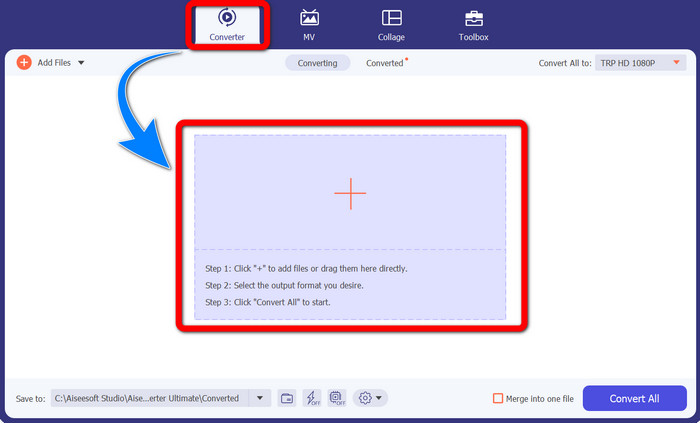
Paso 2: Cuando ya hayas iniciado Video Converter Ultimate, selecciona el panel Convertidor. Luego, haz clic en el signo + para importar tu vídeo en formato TRP.
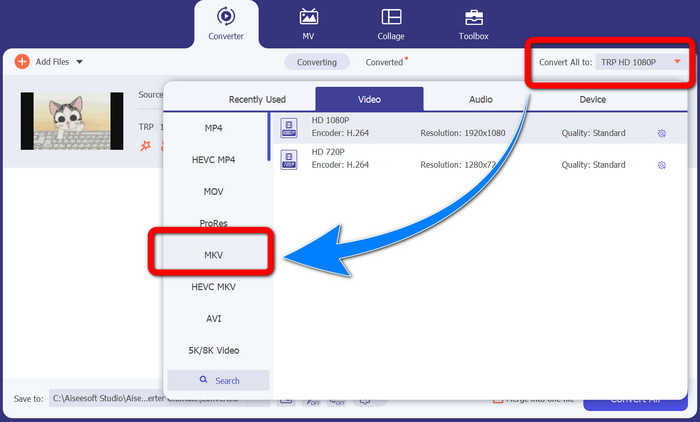
Paso 3: Después de importar tu vídeo, haz clic en el icono Convertir todo a. Busca el formato MKV entre las opciones de formato y haz clic en él.
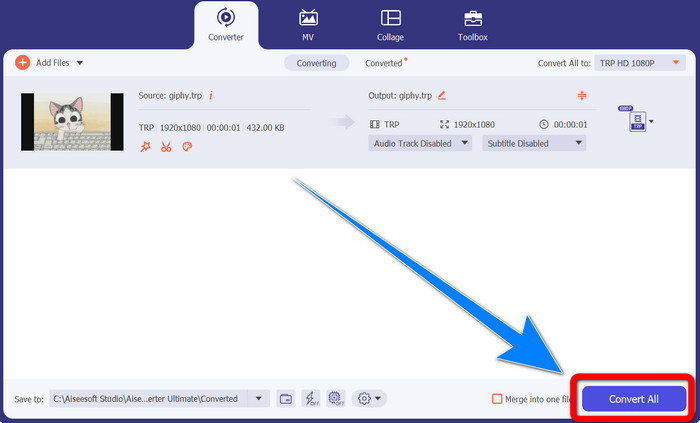
Paso 4: A continuación, haz clic en el botón Convertir todo para convertir tu TRP al formato MKV.
Uso del convertidor de video Prism
Prism es otra aplicación que puedes descargar en tu Windows y Mac. Esta aplicación puede ayudarte a convertir TRP a MKV fácilmente. Además, es compatible con distintos formatos de archivo, como AMV, MP4, DVD, VOB, MOV, DIVX, AVI, 3GP y más. Sin embargo, esta aplicación es muy lenta cuando se instala en Windows o Mac. Además, el proceso de conversión lleva tiempo. Y tiene una interfaz complicada, lo que confundirá a los principiantes, por lo que tendrás que buscar algunos tutoriales o pedir ayuda a usuarios avanzados. Si quieres descargar y usar esta aplicación, sigue los sencillos pasos de abajo.
Paso 1: Descarga Prism Video Converter en tu Mac o Windows.
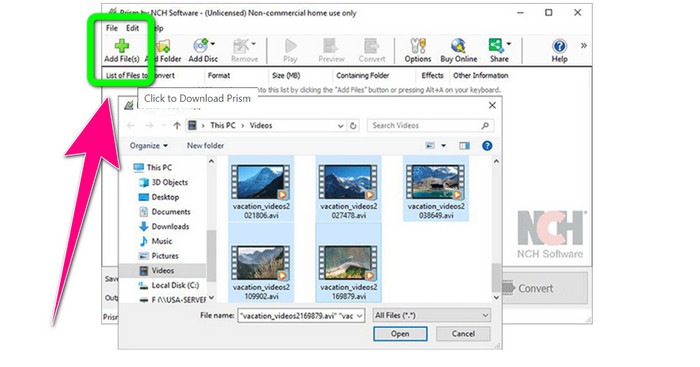
Paso 2: Haz clic en el botón verde Añadir archivos e inserta tu archivo TRP.
Paso 3: Configura el formato de salida. Haz clic en el archivo MKV en las opciones de formato.
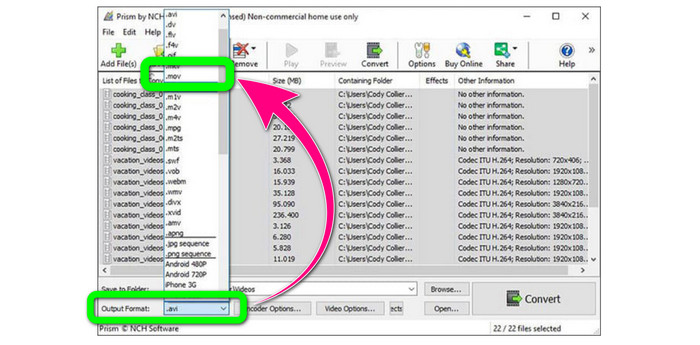
Paso 4: Por último, selecciona el botón Convertir para convertir tu archivo TRP a formato MKV.
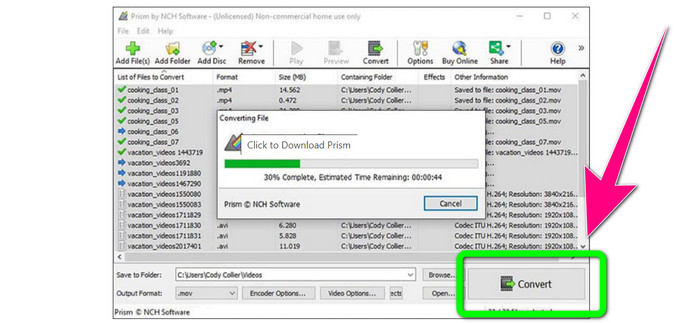
Parte 3: Aplicaciones en línea para convertir TRP a MKV
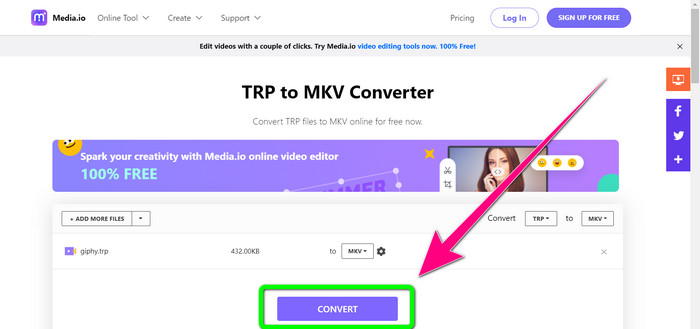
¿Te interesa convertir TRP a MKV en línea? Entonces puedes usar Media.io. Con la ayuda de esta aplicación, puedes convertir TRP a MKV. Además, admite más formatos, como MP4, AVI, WMV, MOV, FLV, DIVX, XVID, 3GP, etc. También es un conversor de audio e imágenes.
Además, también es capaz de editar videos. Puede recortar, recortar, fusionar, reproducir videos en bucle y más. Sin embargo, cuando se trata del proceso de conversión, es lento. Tienes que esperar un poco más para completar el proceso. También tiene anuncios inquietantes que aparecen en la pantalla. Además, necesita una conexión rápida a Internet para funcionar bien. Si desea convertir TRP a MKV usando Media.io, siga los pasos a continuación.
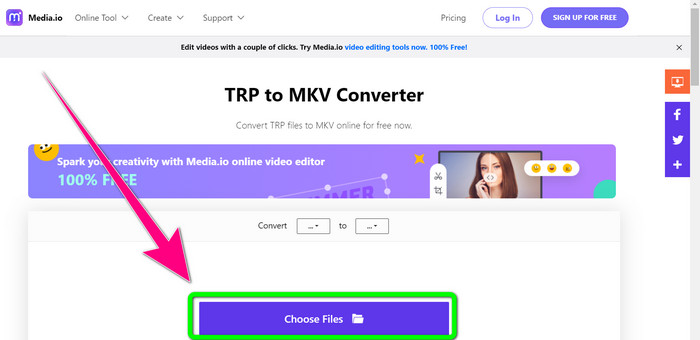
Paso 1: Ve al sitio web de Media.io. Luego, haz clic en el botón Elegir archivos para añadir tu vídeo con formato de archivo TRP.
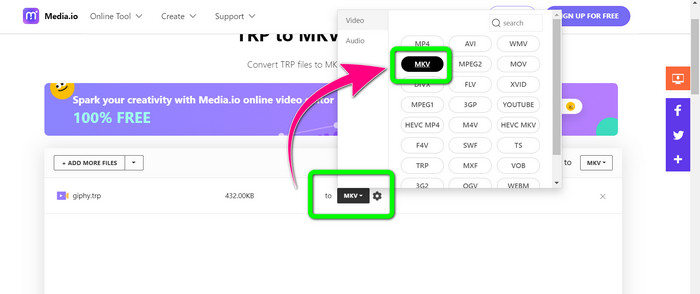
Paso 2: Después de añadir tu vídeo, ve a las opciones de formato, busca el archivo MKV y selecciónalo.
Paso 3: Para el paso final, haz clic en el botón Convertir. Espera a que termine el proceso de conversión y guarda tu vídeo en formato de archivo MKV.
Lecturas recomendadas
Los mejores procedimientos sobre cómo convertir AMV a MKV gratis
Convierte fácilmente MTV a MKV usando estos conversores definitivos
Parte 4: Preguntas frecuentes sobre la conversión de TRP a MKV
¿Por qué el archivo MKV no es compatible con mi TV?
Un archivo MKV es solo un contenedor de video que se puede codificar con muchos códecs, como HEVC, MPEG-4, VP9, etc. La TV tiene poca compatibilidad con estos códecs, por eso no puede reproducir MKV en su TV.
¿El archivo MKV es de buena calidad?
El formato de archivo MKV es popular en videos de alta calidad. También tiene un tamaño de archivo más grande. Significa que MKV es un contenedor y no tiene ningún efecto sobre la calidad.
¿Hay un convertidor rápido que pueda usar en mi computadora?
¡Definitivamente, sí! Si está buscando un convertidor de software rápido, Video Converter Ultimate es la mejor aplicación. Puede convertir sus archivos muchas veces más rápido y más fácil.
Conclusión
Con todas las aplicaciones y métodos de convertir TRP a MKV mencionados arriba, te recomendamos encarecidamente usar Video Converter Ultimate. Puede convertir numerosos archivos al instante con una velocidad de conversión ultrarrápida. Entonces, ¿a qué esperas? Pruébalo tú mismo para descubrir más.
-
 2 del software más impresionante disponible para convertir TRP a MOV
 ¿No se pudieron convertir archivos TRP a MOV? A continuación, siga la guía proporcionada en este artículo. A medida que seleccionamos las mejores herramientas que puede usar para convertir sus archivos TRP.
- 2 del software más impresionante disponible para convertir TRP a MOV
¿No se pudieron convertir archivos TRP a MOV? A continuación, siga la guía proporcionada en este artículo. A medida que seleccionamos las mejores herramientas que puede usar para convertir sus archivos TRP
-
 2 convertidores profesionales para convertir TRP a formato WMV [Guía]
 ¿Eres de los usuarios que lo está pasando mal con el archivo TRP? Si es así, sigamos leyendo este artículo para saber cómo convertir TRP a WMV y saber más
