


 Video Converter Ultimate
 Grabador de pantalla
 Reparación de vídeo
 Descarga segura
Guías destacadas para convertir VOB a DIVX completamente
Los archivos que se encuentran con más frecuencia en los DVD se llaman archivos VOB y pueden contener prácticamente todos los datos, incluida la navegación, los menús, los subtítulos, el vídeo y el audio. Pero ocupan demasiado espacio en un dispositivo. Así que, si quieres que el tamaño de tu archivo sea más pequeño, debes convertir tu archivo VOB a otros formatos de archivo como el formato DIVX. Afortunadamente, este artículo ofrece los mejores métodos que puedes probar para convertir distintos archivos. Para convertir VOB a DIVX, debes leer este artículo y conocer las herramientas que puedes utilizar tanto en línea como sin conexión.

Parte 1: Excelente convertidor de VOB a DIVX sin perder calidad
¿Quieres convertir un archivo VOB a DIVX sin perder calidad? Entonces este artículo es la mejor respuesta para ti. El conversor más excelente y útil que puedes utilizar es Video Converter Ultimate. Puede ayudarte a convertir numerosos archivos, como VOB, MT2S, DV, ASF, OGV, DIVX, MTV, MP4, M4V, AVI, AMV, GIF y muchos más. También permite la conversión por lotes para convertir múltiples archivos con un solo clic. Además, esta herramienta sin conexión puede convertir archivos a una gran velocidad, hasta 30 veces más rápida que otros conversores. Asimismo, puedes descargarla tanto en Mac como en Windows, de modo que cualquier usuario puede utilizar esta herramienta.
Además, Video Converter Ultimate tiene muchas funciones, como el creador de videos musicales, el creador de collages y más. Con la ayuda de esta herramienta fuera de línea, puedes hacer lo que quieras en tu video. Lea más detalles sobre este convertidor fuera de línea a continuación.
Funciones
◆ Convierta numerosos formatos de video, como VOB, DIVX, MP4, AVI, MTS y más.
◆ Ofrece proceso de conversión por lotes.
◆ Crear un gran y hermoso Collage.
◆ Ofrece varias herramientas de edición, como compresor de video, potenciador, controlador de velocidad de video, recortador, etc.
Pros
- Puede utilizar eficientemente Mac y Windows.
- Accesible para principiantes y usuarios avanzados.
- Puede convertir hasta 30 veces más rápido.
Contras
- Las funciones avanzadas se pueden utilizar utilizando la versión de pago.
Ofrece varias herramientas de edición, como compresor de video, potenciador, controlador de velocidad de video, recortador, etc.
Paso 1: Descarga Video Converter Ultimate en tu Mac o Windows haciendo clic en el botón Download que aparece a continuación. Instálalo y ejecuta la aplicación.
Descarga gratuitaPara Windows 7 o posteriorDescarga segura
Descarga gratuitaPara macOS 10.7 o posteriorDescarga segura
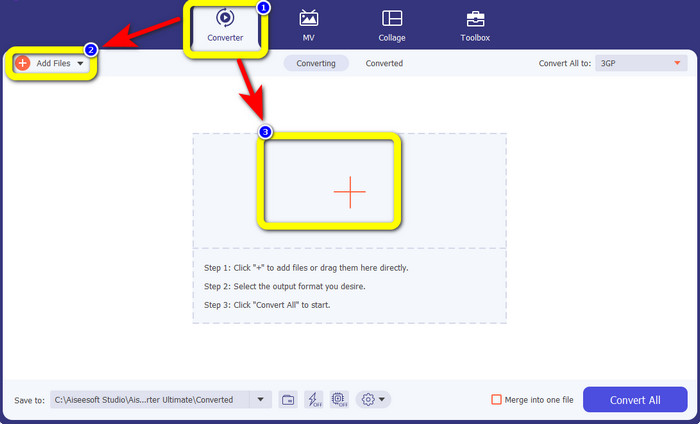
Paso 2: Selecciona la pestaña Converter. Luego, haz clic en el botón Add Files para subir tu archivo VOB. También puedes hacer clic en el botón con el signo Plus para cargar el archivo.
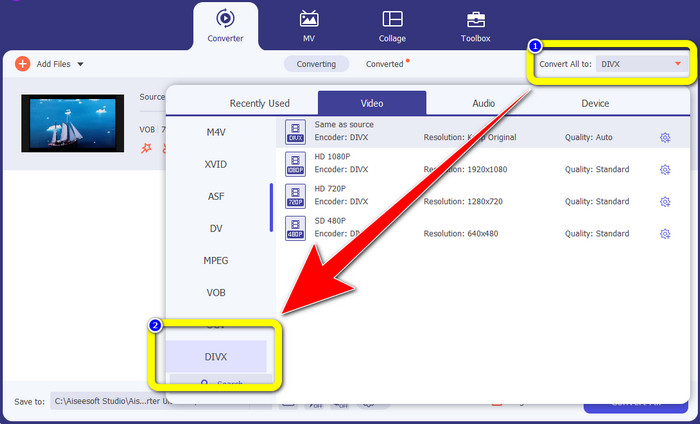
Paso 3: Después de subir el archivo, ve al botón Convert All to. Aparecerán las opciones de formato; a continuación, selecciona el formato de archivo DIVX.
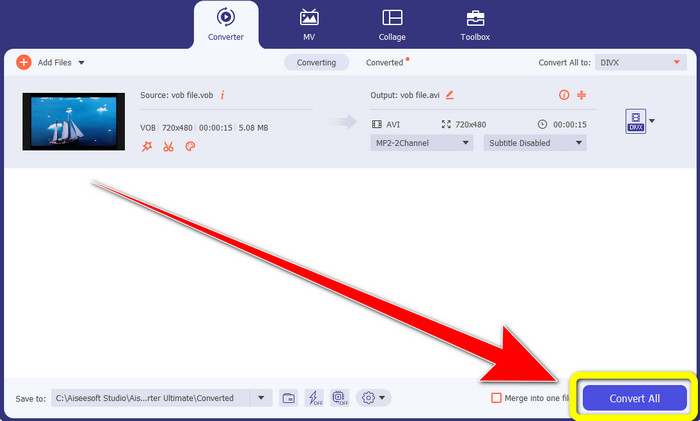
Paso 4: Haz clic en Convert All para convertir y guardar tu resultado final.
Parte 2: Herramientas gratuitas en línea para convertir VOB a DIVX
Media.io
Si te preguntas qué conversor puedes usar sin instalarlo en tu Windows o Mac, puedes usar Media.io. Esta herramienta gratuita en línea es capaz de convertir VOB a DIVX. Es muy sencilla de utilizar porque solo requiere tres pasos fáciles para convertir varios archivos. Además, este conversor en línea admite distintos formatos de vídeo y audio, como MOV, AVI, XVID, DIVX, FLV, MP4, M4V, MP3, WAV, WMA y muchos más. Por otra parte, esta herramienta en línea no es solo un conversor. Puedes hacer muchas cosas con ella, como editar tus vídeos usando diversas herramientas, como editor de vídeo, combinador, recortador, cortador, etc. Sin embargo, Media.io es una aplicación basada en la web, por lo que siempre dependes del acceso a Internet. Sin conexión a Internet, no puedes utilizar este conversor. Además, solo ofrece un proceso de conversión normal, por lo que convertir más archivos lleva algo de tiempo. Para convertir el archivo VOB al formato DIVX, sigue los sencillos pasos que se indican a continuación.
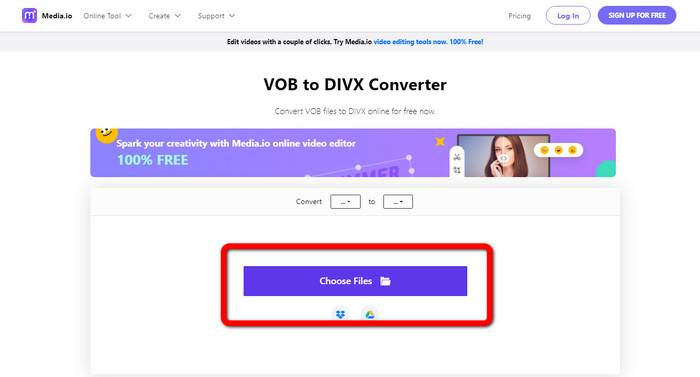
Paso 1: Ve al sitio web de Media.io. Haz clic en el botón Choose Files. Aparecerán tus archivos en la pantalla. Selecciona el archivo VOB que quieras convertir.
Paso 2: Cuando hayas terminado de subir el archivo VOB, selecciona el formato de archivo DIVX entre las opciones de formato.
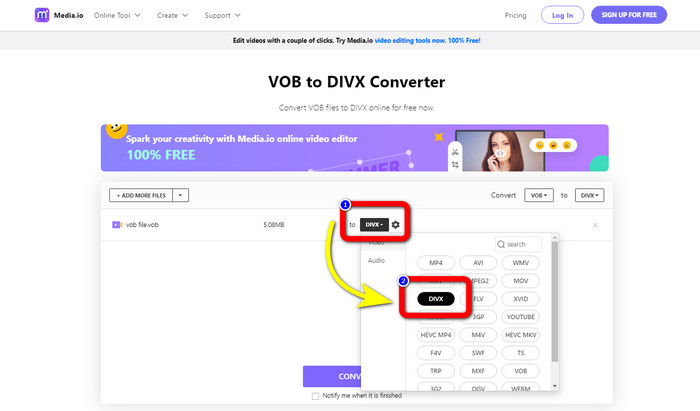
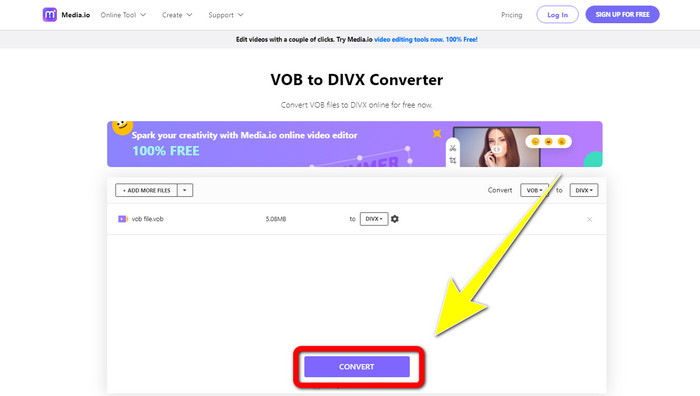
Paso 3: Para el último paso, haz clic en el botón Convert. Luego guárdalo en tu ordenador.
Convertio
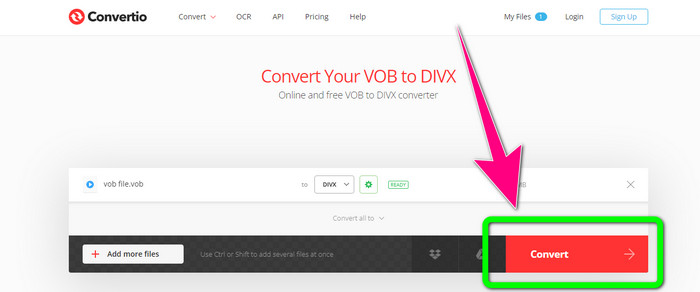
Otro software en línea que puede usar para convertir VOB a DIVX es Convertio. Esta herramienta en línea admite diferentes formatos de archivo, como FLV, MP4, DIVX, VOB, MOV, MTS, WMV y más. Además, este software es fácil de usar y perfecto para todos los usuarios. Además de eso, también puede convertir varios formatos de audio, imágenes, presentaciones, documentos, libros electrónicos, etc. Desafortunadamente, usar este convertidor en línea tiene una desventaja. Solo puede soltar archivos con un máximo de 100 Mb usando la versión gratuita. La única forma de aumentar el tamaño máximo de archivo es comprar una suscripción. De esta manera, puede disfrutar de la conversión de numerosos archivos sin preocuparse por el límite de tamaño del archivo. Siga los pasos a continuación para convertir un archivo VOB a DIVX usando Convertio.
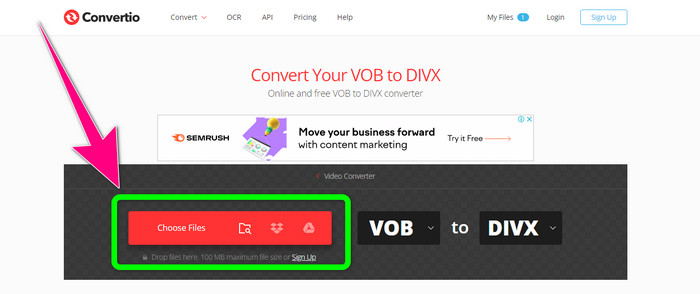
Paso 1: Visita el sitio web de Convertio. Haz clic en el botón Choose Files y suelta el archivo VOB.
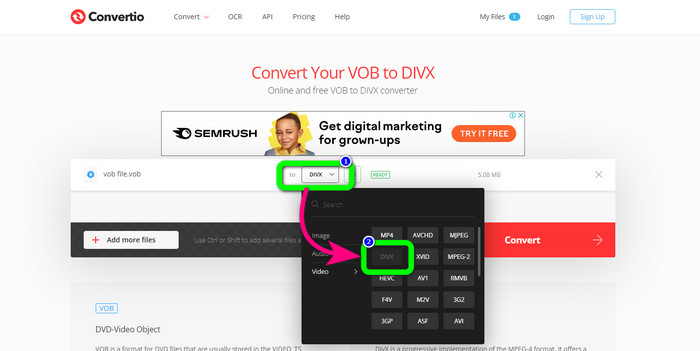
Paso 2: Para el segundo paso, elige el formato DIVX entre las opciones de formato.
Paso 3: En el último paso, haz clic en el botón Convert. Espera al proceso de conversión y guarda tu archivo DIVX. Si necesitas convertir VOB a 3GP, también puedes usar esta herramienta.
Parte 3: VOB frente a DIVX
| VOB | DIVX | |
| Extensión de archivo | El formato de contenedor de video digital VOB (Objeto de video) se ve típicamente en material de video DVD. VOB multiplexa información de video, audio, menú y texto de DVD como subtítulos. Los códecs de audio AAC y de vídeo MPEG-1 o MPEG-2 Parte 2 se utilizan con frecuencia. A pesar de ser gratuito, algunas versiones específicas de este formato pueden estar encriptadas. | El códec de video DivX, creado por DivX, LLC, es principalmente compatible con el software de Windows, pero también puede integrarse con consolas de juegos, despertadores, estéreos de vehículos y otros dispositivos. Actualmente, hay tres códecs DivX principales: códec de video de alta definición H.264/MPEG-4 AVC DivX Plus, HEVC Ultra HD y MPEG-4 Parte 2 (DivX Plus). |
| Programas Asociados | Reproductor KM Reproductor multimedia VLC Reproductor multimedia Reproductor GOM clásico | Reproductores de DVD/Blu-ray Auto Estéreo XBox 360 Despertadores |
| Desarrollado por | Foro de DVD | DIVX Networks Inc. |
| Tipo de Mimica | Vídeo/MPEG, VÍDEO/DVD | DIVX/VÍDEO |
Parte 4: Preguntas frecuentes sobre la conversión de VOB a DIVX
1. ¿Para qué sirve DIVX?
La empresa DivX produce productos bajo la marca DivX. La palabra a veces se usa para referirse al conocido códec DivX, que comprime videos largos para reducir el tamaño de los archivos mientras mantiene un nivel razonable de calidad de video.
2. ¿Cómo convierto el formato MP4 a DIVX?
Puede convertir MP4 a formato DIVX usando Video Converter Ultimate. De esta manera, puede cambiar fácilmente el formato de su video.
3. ¿DIVX es lo mismo que AVI?
Aunque el formato de archivo DivX también puede incluir funciones como subtítulos y capítulos XSUB, también se basa en el contenedor AVI. Todos los dispositivos con certificación DivX, incluidos los televisores y los dispositivos para automóviles, admitirán la reproducción de videos AVI y DIVX.
Conclusión
Estos son los mejores métodos para convertir VOB a DIVX sin perder calidad utilizando herramientas tanto sin conexión como en línea. Pero, como puedes ver, las herramientas en línea tienen desventajas. Por ello, la mejor solución es descargar un conversor excelente en tu Windows o Mac, como Video Converter Ultimate.
-
 Cómo convertir archivos VOB a WMV en Windows y Mac [rápidamente]
 ¿Es usted una de las personas que desea convertir su archivo VOB al formato de archivo WMV? Probamos convertidores fuera de línea y en línea y elegimos los mejores convertidores de VOB a WMV.
-
 3 formas de convertir VOB a MKV en Windows, Mac y en línea
 ¿Quieres convertir DVD VOB a MKV? Este artículo le brinda las tres mejores formas de convertir su archivo VOB a MKV sin tener dificultades para convertir archivos.
-
 Cómo convertir DIVX a 3GP en Windows, Mac y en línea
 ¿Cómo convertir DIVX a 3GP? Si buscas una respuesta, lee este artículo. Le mostraremos excelentes procedimientos con la ayuda de diferentes convertidores.
